
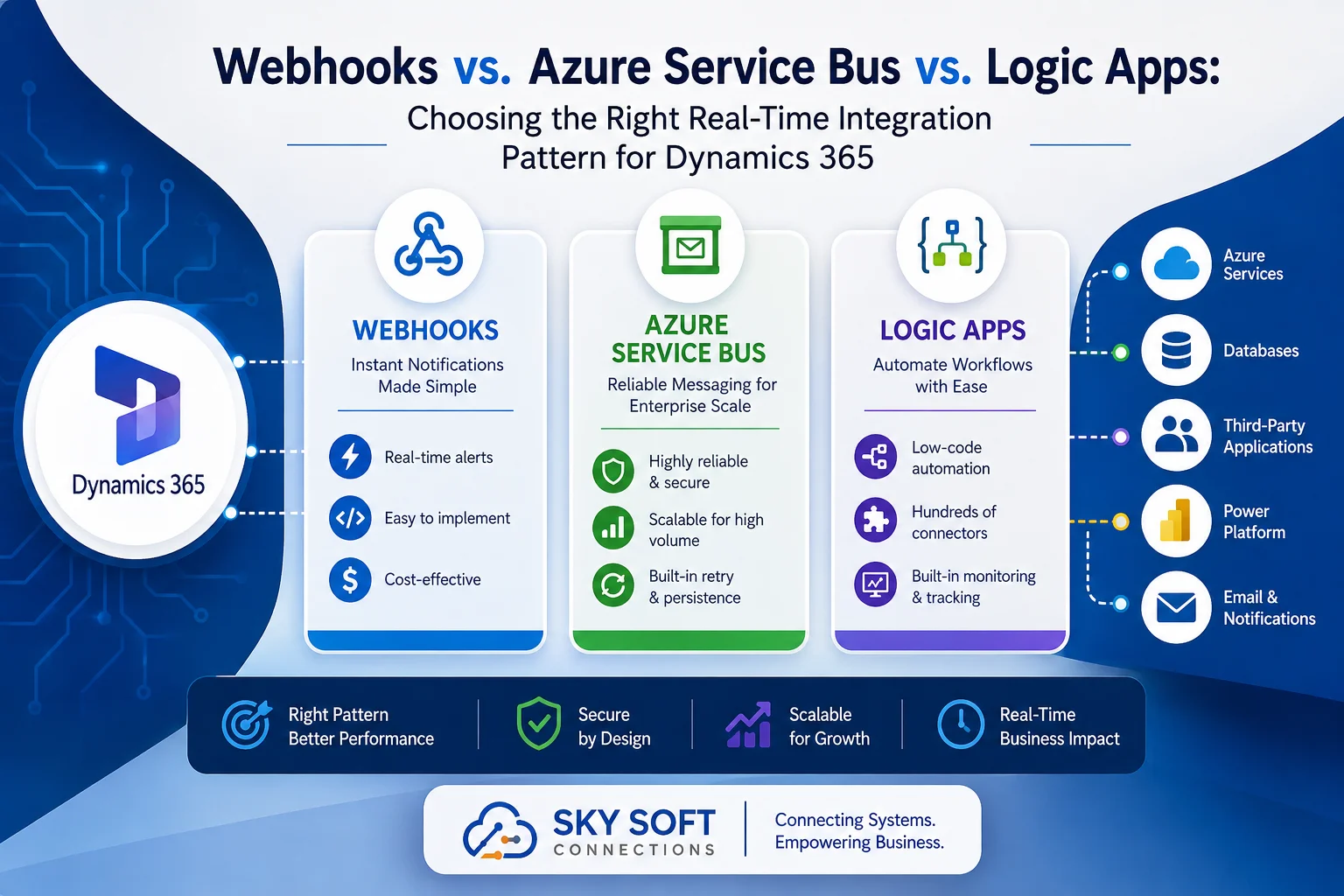
Modern businesses expect data to move instantly between applications. Whether you need to synchronize customer records, automate approvals, connect ERP systems, or trigger AI workflows, selecting the right integration pattern is critical.
However, many organizations implementing Microsoft Dynamics 365 struggle with one important question:
Should I use Webhooks, Azure Service Bus, or Azure Logic Apps?
The answer depends on your business requirements, scalability expectations, security needs, and integration complexity.
In this guide, we’ll compare all three integration methods in detail. You’ll learn when to use each approach, their advantages and disadvantages, architecture considerations, performance comparisons, and real-world business scenarios.
If you’re planning a Dynamics 365 implementation or modernization project, this article will help you choose the best real-time integration strategy.
Why Real-Time Integrations Matter in Dynamics 365
Today’s organizations no longer operate a single software system.
Instead, Dynamics 365 often needs to communicate with:
- ERP systems
- Accounting software
- HR applications
- Power BI
- Azure Functions
- AI services
- Third-party CRMs
- Customer portals
- Mobile applications
- Warehouse Management Systems
- IoT platforms
Without proper integration, businesses face:
- Duplicate data
- Delayed updates
- Manual work
- Higher operational costs
- Inconsistent reporting
- Poor customer experience
Therefore, selecting the appropriate integration architecture directly impacts business efficiency.
Understanding Dynamics 365 Integration Options
Microsoft offers multiple integration mechanisms. Nevertheless, the three most commonly used real-time approaches include:
| Integration Pattern | Best For | Complexity | Scalability |
|---|---|---|---|
| Webhooks | Simple real-time notifications | Low | Medium |
| Azure Service Bus | Enterprise messaging | Medium-High | Very High |
| Azure Logic Apps | Workflow automation | Low-Medium | High |
Each option serves different business objectives.
Let’s examine them individually.
What Are Dynamics 365 Webhooks?
Webhooks allow Dynamics 365 to send an HTTP POST request whenever a specified event occurs.
For example:
- New Lead Created
- Opportunity Updated
- Case Closed
- Contact Deleted
- Invoice Generated
Instead of continuously checking Dynamics for changes, external applications receive instant notifications.
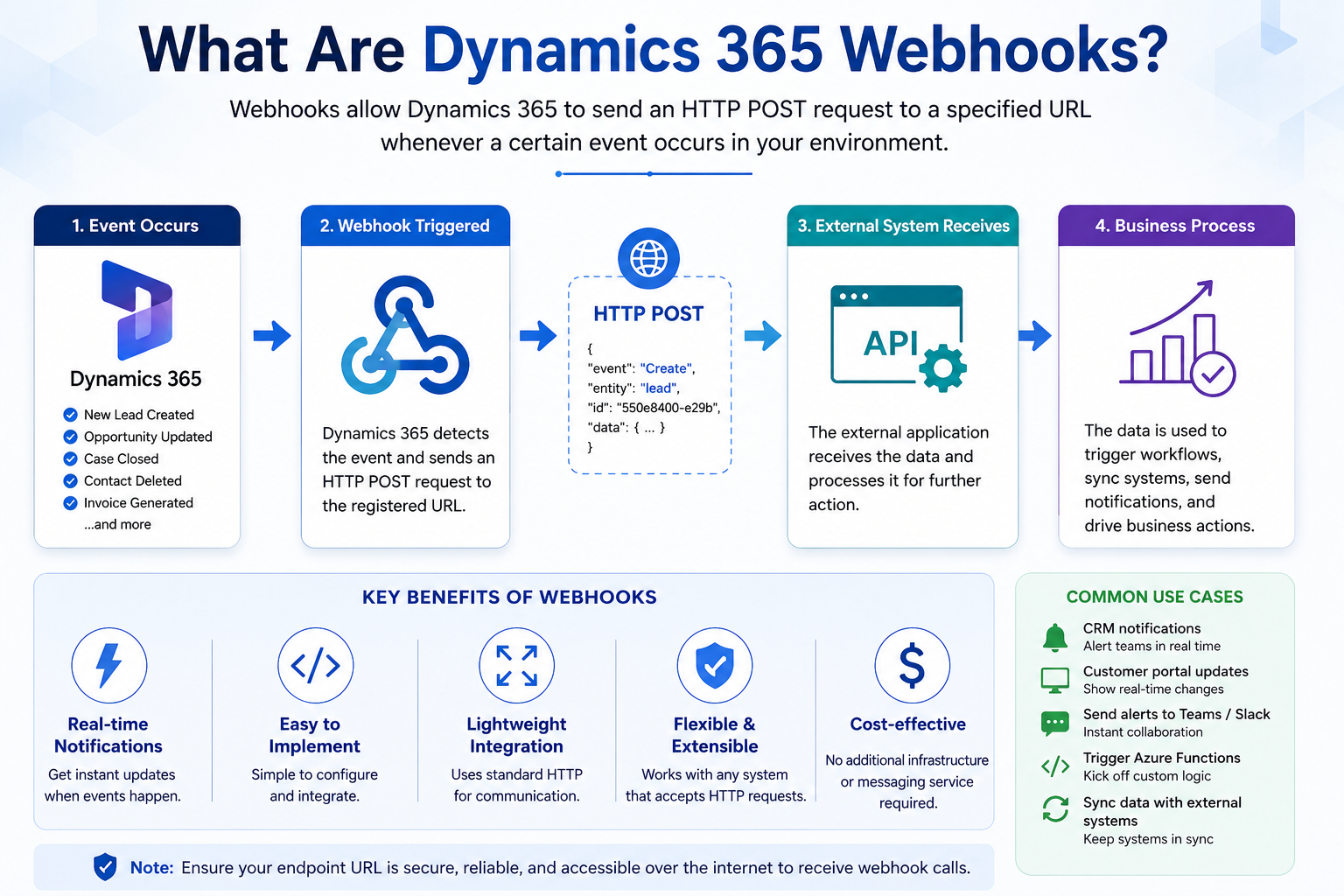
How Webhooks Work
Dynamics 365
      │
      ▼
Webhook Trigger
      │
      ▼
External API
      │
      ▼
Business Process
Advantages of Webhooks
- Near real-time communication
- Easy implementation
- Low infrastructure requirements
- Ideal for REST APIs
- Cost-effective
Limitations of Webhooks
- No built-in message retry
- Limited error handling
- Point-to-point architecture
- Not suitable for high-volume enterprise messaging
- Requires publicly accessible endpoints
Best Use Cases
Webhooks are ideal for:
- CRM notifications
- Customer portal updates
- Slack or Teams alerts
- Lightweight integrations
- Triggering Azure Functions
What Is Azure Service Bus?
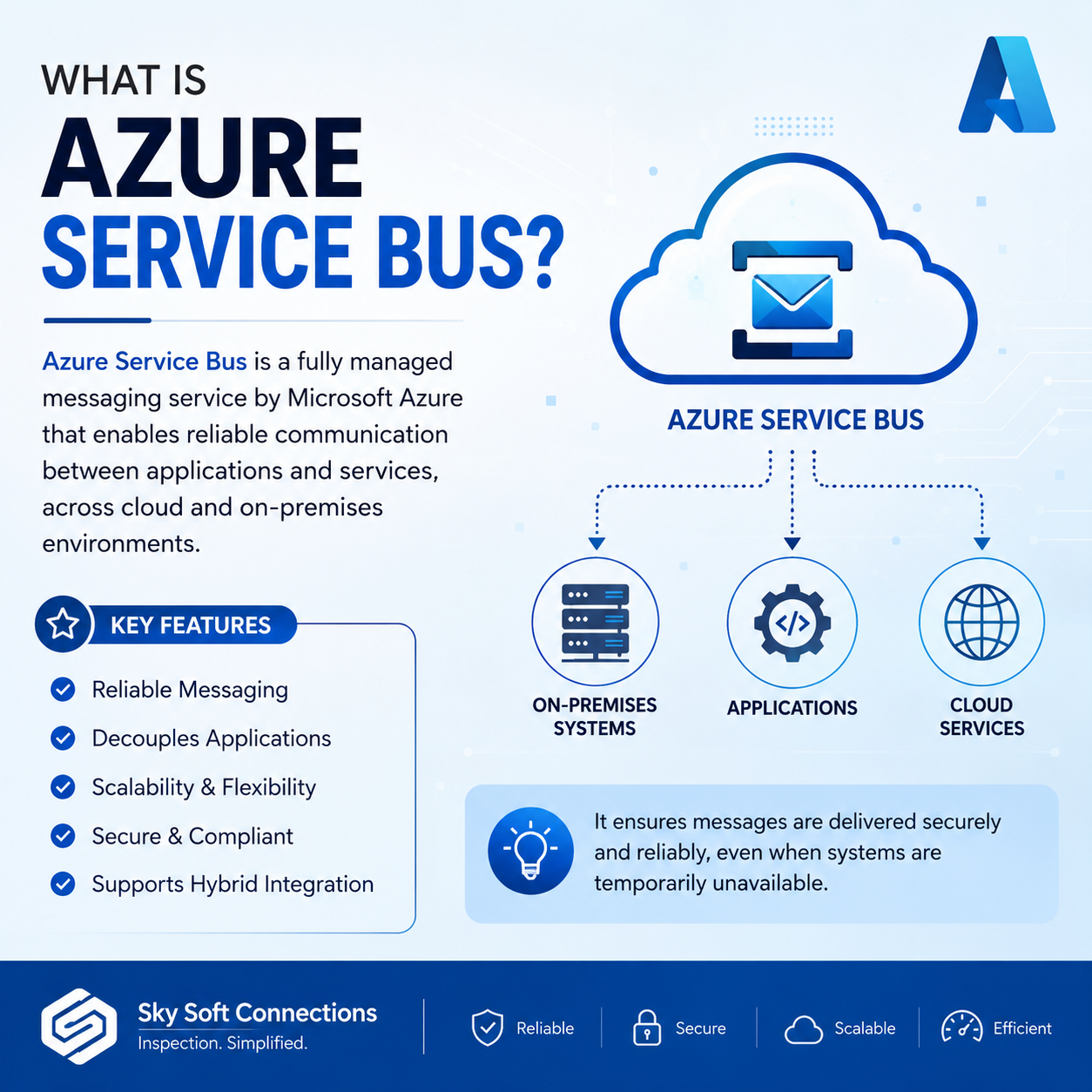
Azure Service Bus is Microsoft’s enterprise-grade messaging platform.
Instead of sending data directly to another application, Dynamics 365 publishes messages into a queue or topic.
Other systems consume these messages whenever they are available.
This creates a highly reliable and scalable architecture.
How Azure Service Bus Works
Dynamics 365
      │
      ▼
Azure Service Bus
      │
 ┌────┴────┐
 ▼         ▼
ERP      Mobile App
 ▼         ▼
Analytics AI Services
Benefits of Azure Service Bus
High Reliability
Messages remain safe even if receiving systems become unavailable.
Automatic Retry
Failed deliveries are retried automatically.
Decoupled Architecture
Applications operate independently.
Enterprise Scalability
Millions of messages can be processed daily.
Security
Supports Azure Active Directory authentication and advanced access controls.
Limitations
- Higher implementation complexity
- Requires Azure infrastructure
- Additional monitoring
- Increased development effort
Best Business Scenarios
Azure Service Bus is ideal for:
- Enterprise integrations
- Financial systems
- ERP synchronization
- Manufacturing
- Supply chain applications
- Multi-system architecture
- High-volume CRM environments
What Is Azure Logic Apps?
Azure Logic Apps is Microsoft’s low-code integration and workflow platform.
Rather than writing custom code, organizations build workflows visually.
Logic Apps offers hundreds of built-in connectors.
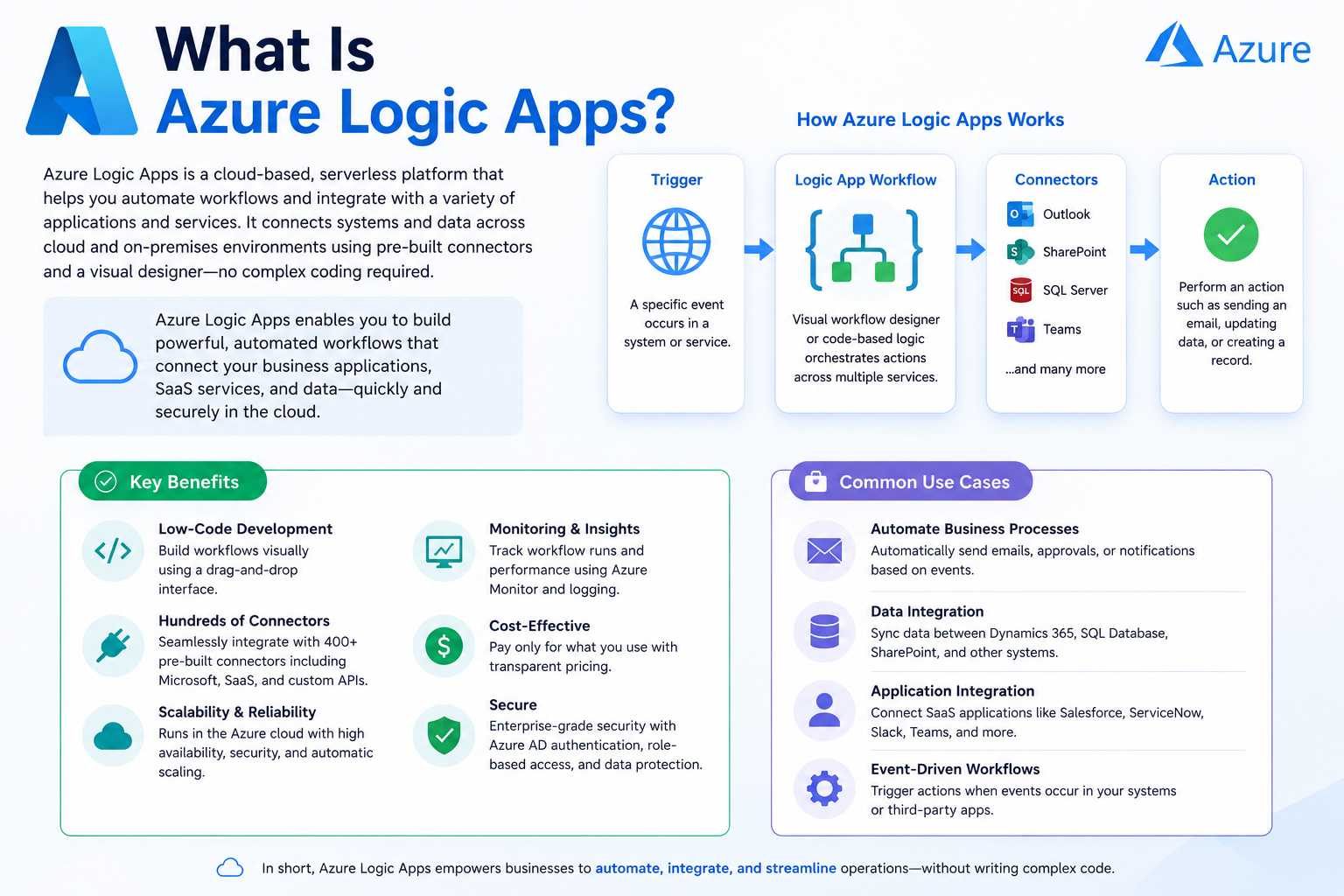
These include:
- Dynamics 365
- SharePoint
- SQL Server
- SAP
- Salesforce
- Outlook
- Teams
- Azure Storage
- Office 365
- Power Platform
How Logic Apps Work
Dynamics 365 Event
        │
        ▼
Logic Apps Workflow
        │
 ┌──────┼─────────┐
 ▼      ▼         ▼
Email  Teams   SQL Database
Advantages
- Low-code development
- Hundreds of connectors
- Visual workflow designer
- Built-in monitoring
- Easy maintenance
- Rapid deployment
Limitations
- Less flexibility for highly customized logic
- Connector costs may increase
- Performance depends on workflow complexity
Best Use Cases
Logic Apps are excellent for:
- Approval workflows
- Document processing
- Customer onboarding
- Email automation
- Data synchronization
- Multi-step business workflows
Webhooks vs. Azure Service Bus vs. Logic Apps Comparison
| Feature | Webhooks | Azure Service Bus | Logic Apps |
|---|---|---|---|
| Real-Time | Excellent | Excellent | Very Good |
| Scalability | Medium | Excellent | High |
| Development Effort | Low | Medium-High | Low |
| Reliability | Medium | Excellent | High |
| Retry Mechanism | No | Yes | Yes |
| Monitoring | Basic | Advanced | Built-In |
| Enterprise Ready | Limited | Yes | Yes |
| Low-Code | No | No | Yes |
| Cost | Low | Medium | Medium |
Which Integration Pattern Should You Choose?
Choose Webhooks If
- You need immediate notifications.
- The integration is simple.
- You’re connecting one application.
- You already have REST APIs.
- Development speed matters.
Choose Azure Service Bus If
- High availability is essential.
- You manage enterprise applications.
- Multiple systems consume the same data.
- Reliability is a priority.
- Large-scale messaging is expected.
Choose Logic Apps If
- Business users need visibility.
- Automation spans multiple systems.
- You prefer low-code solutions.
- Microsoft connectors meet your requirements.
- Approval workflows are involved.
Real-World Dynamics 365 Integration Examples
Scenario 1: Sales Notifications
Requirement
Notify the sales manager when an opportunity exceeds $100,000.
Recommended Pattern
Webhooks
Scenario 2: ERP Synchronization
Requirement
Sync orders with multiple downstream systems.
Recommended Pattern
Azure Service Bus
Scenario 3: Customer Onboarding
Requirement
Create users, send emails, notify Teams, update SharePoint, and generate documents.
Recommended Pattern
Azure Logic Apps
Architecture Decision Matrix
| Business Requirement | Recommended Solution |
|---|---|
| Simple API Trigger | Webhooks |
| Enterprise Messaging | Azure Service Bus |
| Visual Automation | Logic Apps |
| Multi-System Integration | Service Bus |
| Approval Workflows | Logic Apps |
| CRM Alerts | Webhooks |
| High Transaction Volume | Service Bus |
| Low-Code Automation | Logic Apps |
Performance Considerations
Before selecting an integration pattern, evaluate the following:
Message Volume
High-volume systems benefit from Azure Service Bus.
Business Criticality
Mission-critical integrations require retry mechanisms and message durability.
Security
Sensitive industries often prefer Azure-native services with enterprise-grade authentication.
Future Growth
Scalable architectures reduce future redevelopment costs.
Maintenance
Low-code platforms simplify ongoing support and reduce development overhead.
Common Mistakes to Avoid
Many organizations make avoidable integration mistakes, including:
- Choosing Webhooks for enterprise messaging
- Overengineering simple integrations with Service Bus
- Ignoring retry and error handling
- Not planning for scalability
- Skipping monitoring and logging
- Using Logic Apps for highly complex custom processing when code-first solutions are more appropriate
Avoiding these pitfalls will improve reliability and lower long-term maintenance costs.
Best Practices for Dynamics 365 Real-Time Integrations
To build secure and scalable integrations:
- Define clear integration requirements before development.
- Use asynchronous processing where appropriate.
- Implement robust error handling and retries.
- Secure endpoints with Azure Active Directory or managed identities.
- Monitor workflows using Azure Monitor and Application Insights.
- Design for scalability from the beginning.
- Document integration architecture and dependencies.
- Test integrations under realistic workloads before production deployment.
How Sky Soft Connections Helps Businesses Build Dynamics 365 Integrations
At Sky Soft Connections, we help organizations design, implement, and optimize Microsoft Dynamics 365 integrations that are secure, scalable, and future-ready.
Our Microsoft technology expertise includes:
- Dynamics 365 CRM implementation
- Azure Service Bus architecture
- Azure Logic Apps development
- Custom Webhook integrations
- Power Platform solutions
- Azure Functions
- Power Automate workflows
- API development and management
- System integration with ERP, HRMS, and third-party applications
- Microsoft Azure cloud solutions
- Managed support and performance optimization
Whether you need a lightweight webhook integration or a large-scale enterprise messaging architecture, our consultants deliver solutions tailored to your business goals.
Read more : Multi-Language and Multi-Currency Dynamics 365 Rollouts
FAQ’s
For simple notifications, Webhooks can provide immediate HTTP callbacks. However, Azure Service Bus offers greater reliability, message persistence, and scalability for enterprise environments.
For many standard business processes, yes. Logic Apps can automate workflows using built-in connectors. Nevertheless, highly specialized scenarios may still require custom development.
Azure Service Bus is generally the preferred choice for high-volume, mission-critical integrations that require resilience and message durability.
Absolutely. Many modern architectures use Webhooks to trigger Azure Functions, Azure Service Bus for reliable messaging, and Logic Apps to orchestrate downstream workflows.
Azure Service Bus provides enterprise-grade security features, including Azure Active Directory integration, role-based access control, and encrypted messaging. Webhooks can also be secured, but they require additional implementation measures.
Final Thoughts
There is no one-size-fits-all answer when choosing between Webhooks, Azure Service Bus, and Azure Logic Apps for Dynamics 365 integrations.
If you need simple real-time notifications, Webhooks are an excellent choice. If your organization requires reliable, enterprise-scale messaging, Azure Service Bus is the better fit. Meanwhile, if your goal is to automate business workflows with minimal coding, Azure Logic Apps offers unmatched flexibility and speed.
By aligning your integration strategy with your business objectives, scalability requirements, and operational needs, you can build a Dynamics 365 ecosystem that is resilient, efficient, and ready for future growth.