Table of Content
Overview
This guide walks through the implementation of an AI-powered Follow-Up & Nurturing Agent for Microsoft Dynamics 365. The solution uses Power Automate as the automation engine, Dataverse for data logging, and Outlook for email drafting with mandatory human approval at every step.
Solution Components:
- Microsoft Dynamics 365 : CRM data source (Leads, Opportunities, Activities)
- Microsoft Power Automate : Scheduled flow, conditions, and approvals
- Microsoft Dataverse : Custom KPI log table (FollowUpAILog)
- Microsoft Outlook : Email draft creation and sending after approval
- Microsoft Teams : Approval notifications and manager escalation alerts
Status: Implemented & Tested Successfully
Step 1 : Create KPI Log Table in Dataverse
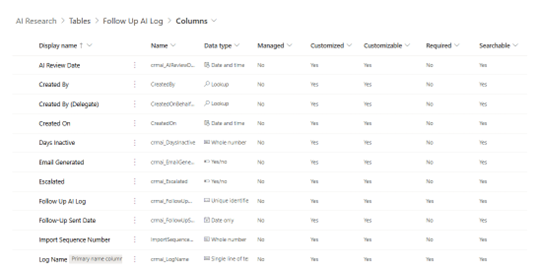
Create a custom Dataverse table called FollowUpAILog to track every AI-triggered follow-up event. This enables KPI reporting and audit visibility.
Table setup:
- Navigate to Power Apps → Tables → New Table
- Table Name: FollowUpAILog | Primary Column: Log Name (Text)
Add the following custom columns:
- Opportunity : Lookup to Opportunity table
- Risk Level : Choice: Low / Medium / High
- Days Inactive : Whole Number
- Email Generated : Yes/No
- Escalated : Yes/No
- Follow-Up Sent Date Only
- AI Review Date : Date & Time
Step 2 : Build the Scheduled Cloud Flow
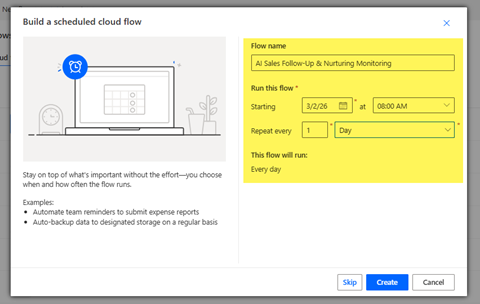
Create a Scheduled Cloud Flow in Power Automate that runs daily to monitor all active opportunities.
- Go to Power Automate → Create → Scheduled Cloud Flow
- Flow Name: AI Sales Follow-Up & Nurturing Monitoring
- Trigger: Recurrence Every 1 Day, starting at 8:00 AM
- Inside the flow, add an Initialize Variable action: Name = RiskLevel, Type = String, Value = Low
Step 3 : Retrieve Active Opportunities
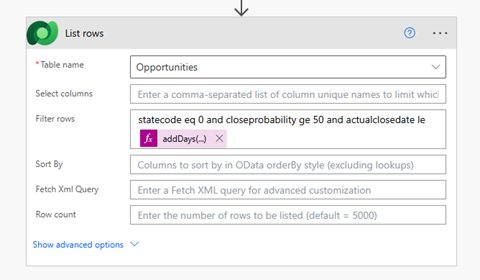
Add a Dataverse List Rows action to query open opportunities that need follow-up.
- Action: Dataverse → List Rows → Table: Opportunities
- Add this OData filter: statecode eq 0 and closeprobability ge 50 and estimatedclosedate le addDays(utcNow(),10)
- This returns active deals with ≥50% probability closing within 10 days
- Add an Apply to Each loop using the Value array from the List Rows output
Step 4 : Calculate Inactivity & Classify Risk
Inside the loop, add a Compose action to calculate days since the opportunity was last modified:
div(sub(ticks(utcNow()),ticks(items(‘Apply_to_each’)?[‘modifiedon’])),864000000000)
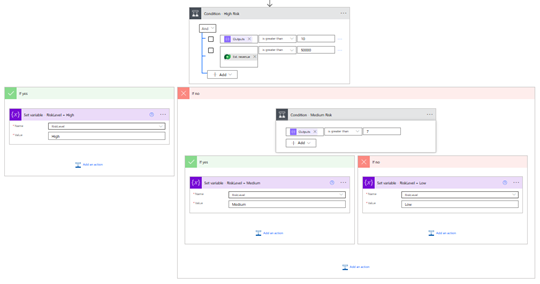
Then add nested Condition blocks to assign risk level:
- High Risk: Days Inactive > 10 AND Revenue > 50,000 → Escalation + Approval + Email
- Medium Risk: Days Inactive 7–10 OR Close Date within 5 days → Approval + Email Draft
- Low Risk: Days Inactive 5–7 → No email, no escalation
Step 5 : Generate Email Draft & Require Approval
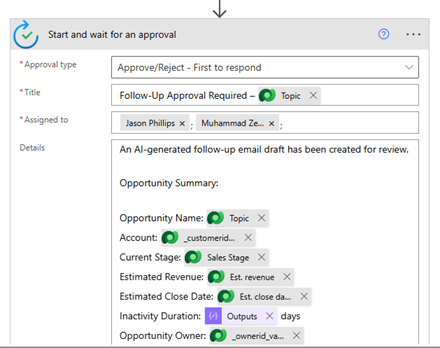
For Medium and High risk deals, create an Outlook email draft (not sent automatically), then route it for mandatory seller approval before any email reaches the customer.
Email Draft Setup:
- Action: Outlook → Create Draft
- To: Opportunity Owner email (dynamic)
- Subject: Follow-Up Required: [Opportunity Name]
- Body: Use dynamic content owner name, stage, revenue, days inactive, close date
Approval Step:
- Action: Start and Wait for Approval (Approve/Reject First to respond)
- Assigned To: Opportunity Owner email (dynamic)
- If Approved → Send Email action triggered
- If Rejected → Update record status to ‘Pending Manual Review’
Step 6 : Log KPI Entry & Test the Flow
After all email and escalation logic, add a Dataverse Add Row action to log every AI intervention to FollowUpAILog. This creates a permanent audit trail for KPI reporting.
Fields to map:
- Log Name: AI Review [Opportunity Name]
- Opportunity: GUID from the loop
- Risk Level: RiskLevel variable
- Days Inactive: Output from Days Inactive Compose step
- Email Generated: Yes (in Medium/High branches)
- Escalated: Yes if High Risk, otherwise No
- AI Review Date: utcNow()
Testing:
- Go to Power Automate → select the flow → click Test → Manually → Run Flow
- Monitor the run history to confirm all steps show green checkmarks
- Verify a new row appears in the FollowUpAILog table in Dataverse
- Confirm approval notification was received and email draft was created in Outlook
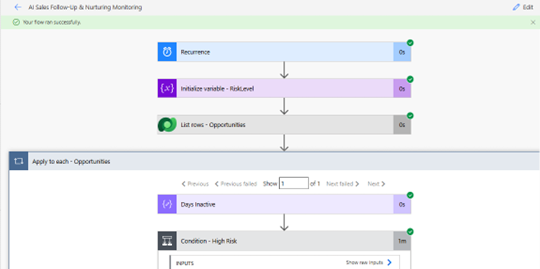
Implementation Complete — All steps tested and validated successfully.
 is a software solution company that was established in 2016. Our quality services begin with experience and end with dedication. Our directors have more than 15 years of IT experience to handle various projects successfully. Our dedicated teams are available to help our clients streamline their business processes, enhance their customer support, automate their day-to-day tasks, and provide software solutions tailored to their specific needs. We are experts in Dynamics 365 and Power Platform services, whether you need Dynamics 365 implementation, customization, integration, data migration, training, or ongoing support.