Table of Content
1. Problem Statement
Manual booking processes often suffer from high drop-off rates and data inaccuracies. Businesses using enterprise CRMs like Dynamics 365 frequently struggle with:
- Identity Spoofing: Fake or mistyped emails creating “ghost” appointments.
- High Friction: Users having to navigate away from a chat to check calendars or verify emails.
- Manual Scheduling: The overhead of manually creating Teams links and updating CRM records after a chat concludes.
2. The Solution
We built a secure, end-to-end conversational agent that acts as a bridge between the customer and the enterprise backend. The solution features:
- Secure Identity Verification: A mandatory OTP (One-Time Password) gate to validate users.
- Real-Time Data Sync: Direct integration with Dataverse for live slot retrieval.
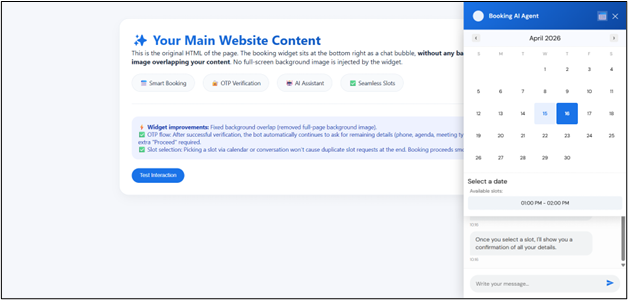
- Interactive UI: A custom calendar component that overlays the chat for a “heads-up” booking experience.
- Full Automation: Instant CRM record creation and Microsoft Teams meeting generation.
3. Technical Stack
| Layer | Technology | Purpose |
| Frontend | JavaScript (ES6+), HTML5, CSS3 | Embedded widget with dynamic UI states for chat and calendar. |
| Orchestration | ASP.NET Core Web API | Core logic, OTP management, and secure communication. |
| AI Engine | OpenAI API | Natural Language Processing (NLP) to extract intent and entities. |
| Backend/CRM | Dataverse (Dynamics 365) | Management of appointments, contacts, and availability. |
| Auth/Security | OTP via SMTP/Mail API | Email verification prior to booking. |
| Collaboration | Microsoft Graph API | Automated Teams meeting creation and calendar invites. |
4. System Workflow & Use Cases
Step 1: Intent Extraction (OpenAI)
The user starts a natural conversation (e.g., “I’d like to book a dental cleaning for 17th April at 2:00pm”). OpenAI parses this to identify the service type and preferred timeframe.
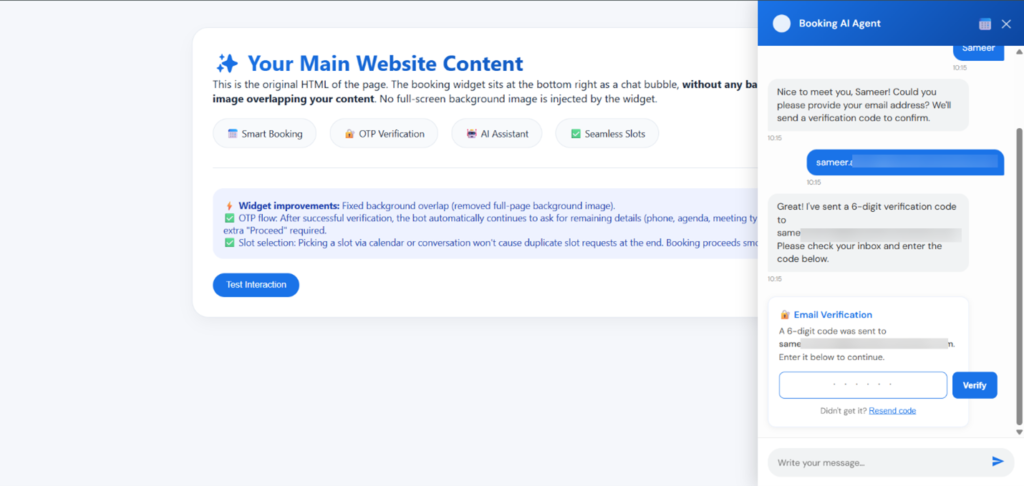
Step 2: Secure OTP Verification
Before accessing the business’s private schedule, the bot requests the user’s email.
- The NET Core API sends a 6-digit code.
- The user must enter the code in the chat.
- Result: Only verified leads can block time in the CRM, significantly reducing spam.
Step 3: Visual Slot Selection
Once verified, the API queries Dataverse for real-time availability. A Calendar UI appears above the chat bar, allowing the user to tap a specific slot without typing.
Step 4: Finalization & Integration
Upon selection:
- Dataverse: An appointment record is created/updated.
- Teams: If “Online” is selected, a Teams meeting link is generated via Graph API.
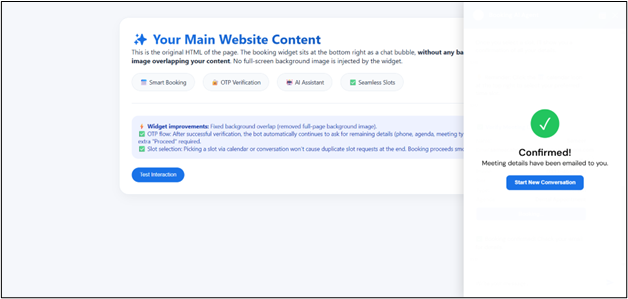
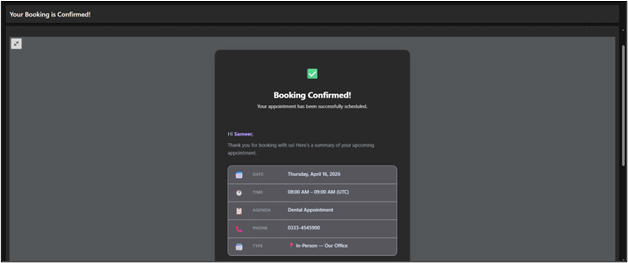
- Confirmation: A final email is sent containing the appointment summary and the meeting link.
5. Visual Walkthrough
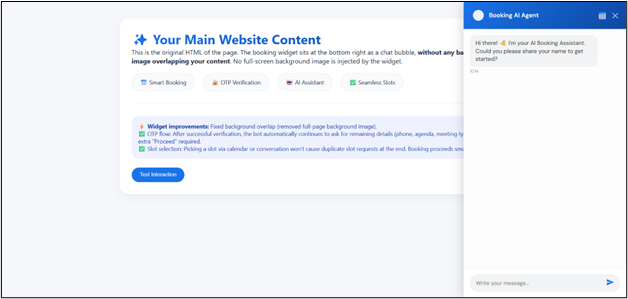
Screen 1: The AI Conversation
Screen 2: OTP Gate
Screen 3: The Calendar Overlay
Screen 4: Success State
Screen 5: Booking Confirmation
6. Key Achievements
- Reduced Friction: Users complete a complex CRM entry in under 60 seconds.
- Enhanced Security: The OTP layer ensures 100% valid email leads in Dynamics 365.
- Enterprise Ready: Scalable architecture using ASP.NET Core and Microsoft’s Power Platform ecosystem.
 is a software solution company that was established in 2016. Our quality services begin with experience and end with dedication. Our directors have more than 15 years of IT experience to handle various projects successfully. Our dedicated teams are available to help our clients streamline their business processes, enhance their customer support, automate their day-to-day tasks, and provide software solutions tailored to their specific needs. We are experts in Dynamics 365 and Power Platform services, whether you need Dynamics 365 implementation, customization, integration, data migration, training, or ongoing support.