

A workflow can look straightforward in a process document and still frustrate the people who use it every day. Requests may sit in approval queues, customers may wait for updates, and employees may re-enter the same information in several systems. If you automate before understanding these problems, you can end up making a weak process run faster without making it better.
Power Automate process mining helps you see how work actually moves through your business. It uses process data to show common routes, delays, repeated steps, and other patterns. With that evidence, you can decide whether to simplify a workflow, automate part of it, or keep a person involved.
Table of contents
What Is Process Mining in Power Automate?
Process mining is a way to examine the digital records created as work moves through business systems. These records often called event data show activities and when they happened. Power Automate uses them to build a visual map of the process.
For example, an invoice process might include these activities:
- Invoice received
- Invoice checked
- Approval requested
- Approval completed
- Payment processed
The map can show whether invoices follow that route every time or take different paths. It can also reveal where cases spend time waiting or return to an earlier step.
In practical terms, process mining gives you an evidence-based view of how a process runs—not just how people think it runs. It can help teams spot delays, rework, unusual routes, and possible automation opportunities.
Process mining vs. task mining
Process mining looks at the broader workflow across systems. Task mining looks more closely at the actions people take on their desktops to complete specific tasks.
For instance, process mining might show that customer requests take a long time to reach the right team. Task mining can then help examine the manual steps involved in sorting and assigning those requests.
Why Find Bottlenecks Before Automating?
Automation follows the rules and information you give it. Therefore, if a process has unnecessary approvals, unclear responsibilities, or incomplete data, an automation may simply reproduce those problems.
Imagine that invoice approvals often stall. The delay might come from a slow approval notification. However, it could also happen because invoices arrive without purchase order details, so employees have to send them back for correction. Those problems need different solutions.
Process mining helps your team distinguish between them. As a result, you can focus on the step that causes the delay instead of automating the entire workflow by guesswork.
It can help you:
- Find waiting time: See where cases pause between activities.
- Identify repeated work: Spot cases that return to earlier steps for corrections.
- Compare process routes: Understand why some cases take longer than others.
- Prioritize improvements: Start with problems that happen often or affect important outcomes.
- Measure change: Compare performance before and after an improvement.
How to Use Power Automate Process Mining
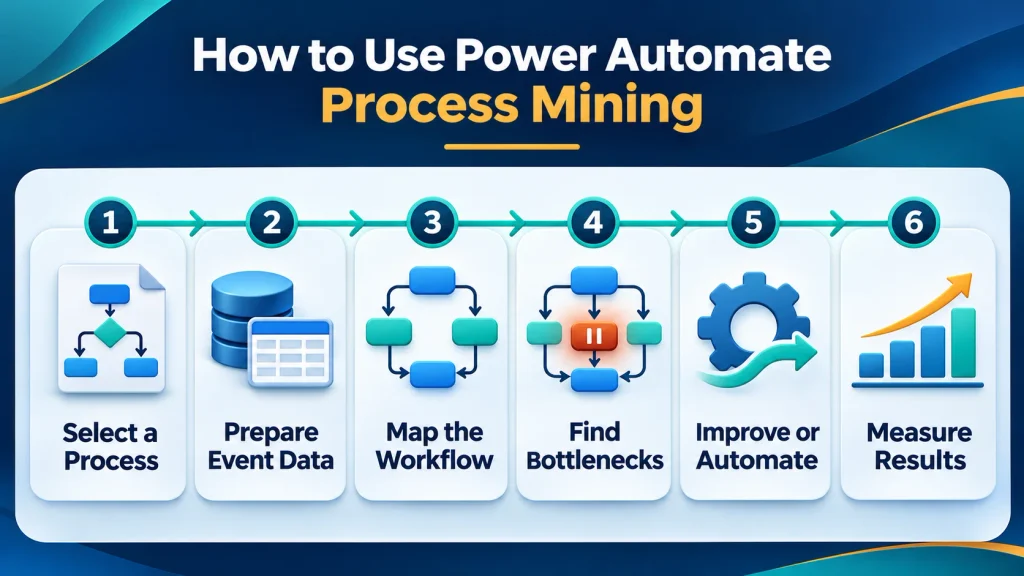
1. Choose a process with a clear problem
Start with one workflow, such as invoice approval, order processing, or customer service requests. Then write down the question you want to answer.
For example:
- Where do approval requests wait the longest?
- Why do some orders need extra review?
- Which service requests return to the same team?
- How often do employees repeat the same data entry?
A focused question keeps the analysis useful. By contrast, trying to study every department at once can create a complicated map without a clear action.
2. Check whether your data tells the story
Process mining needs data that connects each case to its activities and timestamps. Depending on the workflow, it may also help to include fields such as team, request type, region, or approval status.
Before analyzing the data, check that each case has a consistent identifier and that activities use clear, consistent names. Also confirm that timestamps are complete and accurate. Otherwise, the map may show data problems rather than process problems.
Finally, review who can access the data. Business records may contain customer or employee information, so access should follow your organization’s privacy and security requirements.
3. Study both the common route and the exceptions
The most frequent route shows how work usually moves. However, less common routes can explain why certain cases take longer or need extra attention.
Look for steps that repeat, cases that move backwards, and handoffs that occur more often than expected. Then compare those cases with the ones that finish smoothly.
For example, if only a particular type of request returns for correction, the issue may be the information collected at intake. If all requests wait at the same approval step, the delay may relate to routing, workload, or approval rules.
4. Confirm what the map shows with the people doing the work
A process map reveals patterns, but it does not always explain the reason behind them. Therefore, review the findings with employees and managers who handle the workflow.
Ask whether a step provides a necessary control, whether the system records activities accurately, and what usually causes a case to wait or return. This discussion helps separate avoidable delays from valid exceptions.
5. Choose the right improvement
Once you understand the cause, decide whether to simplify the process, improve the data, or automate a step. The table below shows how the same finding can lead to different actions.
| What the process map shows | Possible cause | Practical next step |
|---|---|---|
| Requests repeatedly return for missing details | The intake form does not collect required information | Improve the form or add a clear checklist |
| Routine approvals sit in a queue | Requests may not reach the right approver promptly | Review routing rules and consider automated reminders |
| Employees enter the same data in multiple systems | Systems do not share the required information | Assess whether data synchronization could help |
| A small number of cases take a different route | Those cases may require special judgment or controls | Keep a human review for exceptions |
| Activity names or timestamps appear inconsistent | The source data may be incomplete or unclear | Improve data quality before automating |
6. Test the change and measure the result
Start with a limited pilot before expanding the change across the organization. Then compare the pilot with your original baseline.
Useful measures include:
- Total time to complete a case
- Time spent waiting between steps
- Number of handoffs
- Rework or correction frequency
- Percentage of cases completed without manual intervention
- Automation failures and exceptions
However, speed is only one part of the result. An automation may shorten one step but create extra work for another team. Therefore, review the complete process and check whether the change improves the outcome for everyone involved.
Common Mistakes to Avoid in Power Automate Process Mining
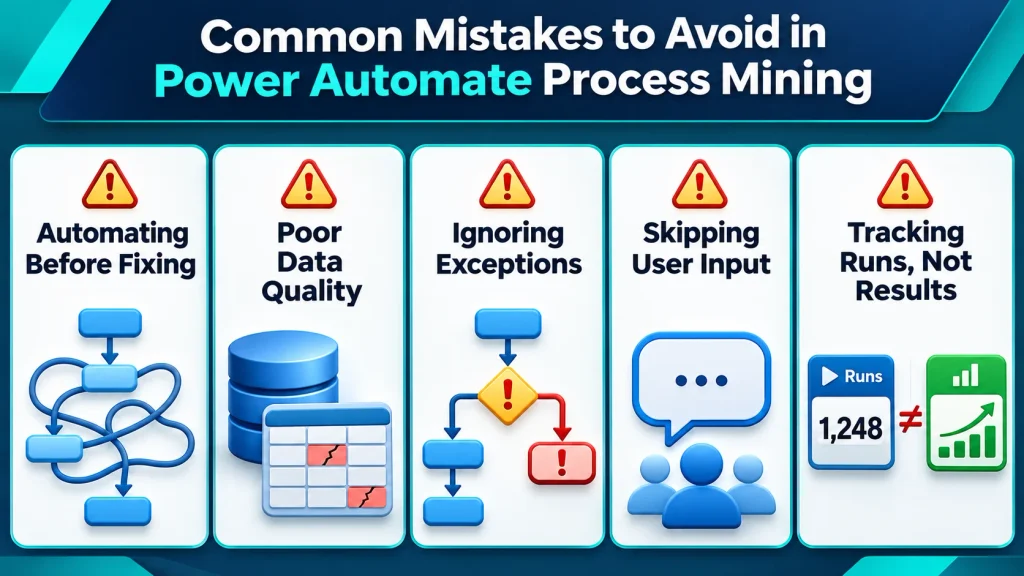
Automating every step in the current workflow can preserve unnecessary work. First look for steps you can remove or simplify.
Treating every unusual route as a mistake can remove important reviews. Instead, ask process owners why those exceptions exist.
Ignoring data quality can lead to poor decisions. Check case identifiers, activity labels, and timestamps before drawing conclusions.
Measuring only the number of flows created does not show whether the process improved. Track business outcomes such as cycle time, rework, and successful completion as well.
How Sky Soft Connections Can Help
Sky Soft Connections works with businesses on Power Platform solutions, including Power Automate workflow automation, multi-stage approvals, notifications, data synchronization, and scheduled business jobs. The team also works with Power Apps, Power BI, Dataverse, and custom connectors as part of connected business applications and automation.
For a process improvement project, a practical first step is to select one workflow, confirm what data is available, and agree on the result the business wants to improve. From there, Sky Soft Connections can help assess the process and plan a suitable Power Platform solution. Its wider services include Dynamics 365 implementation, integration, data migration, and ongoing support.
Frequently Asked Questions
It helps teams examine process data, see how work moves between steps, identify delays and repeated work, and decide where process improvements or automation may help.
A useful process dataset connects each case to the activities completed and the times those activities occurred. Additional details, such as request type or team, can help explain why some cases follow different routes.
Process mining analyzes the broader workflow across systems. Task mining examines desktop actions people take while completing particular tasks.
No. Some bottlenecks need a clearer form, a simpler rule, or better data. Other cases require human judgment. First identify the cause, then decide whether automation is the right response.
Start With Evidence, Then Automate
Power Automate process mining helps your team replace assumptions with a clearer picture of how work gets done. Choose one process, investigate where cases slow down, and confirm the causes with the people involved. Then simplify or automate the steps that make sense and measure whether the change improves the complete workflow.
Read more : Why Your CRM Is Not Delivering Results