
Businesses are constantly looking for ways to build applications faster, improve employee productivity, and reduce the time spent on repetitive development tasks. However, traditional application development often requires considerable effort in designing user interfaces, connecting data sources, configuring business logic, and testing functionality.
This is where Power Apps Generative Pages can make a difference.
Microsoft is bringing generative AI deeper into the Power Platform, allowing developers and business makers to describe their requirements in natural language and generate functional application pages with AI assistance. Instead of manually designing every component, makers can explain what they need and let AI help create the initial structure, layout, and functionality.
Moreover, these AI-assisted capabilities work alongside Microsoft Dataverse and existing model-driven applications, helping businesses create more tailored digital experiences.
In this guide, we will explore what Power Apps Generative Pages are, how they work, how to build them, and how businesses can use them to develop smarter applications.
Table of contents
- What Are Power Apps Generative Pages?
- How Do Power Apps Generative Pages Work?
- How to Build AI-Assisted Business Apps Using Generative Pages
- Real-World Business Use Cases for Power Apps Generative Pages
- Power Apps Generative Pages vs Traditional App Development
- Benefits of Using Generative Pages for Business Applications
- Important Considerations and Limitations
- Best Practices for Building Reliable AI-Assisted Power Apps
- How Sky Soft Connections Helps Businesses Build Smarter Power Apps Solutions
- Conclusion
- Frequently Asked Questions (FAQs)
What Are Power Apps Generative Pages?
Power Apps Generative Pages are AI-powered application pages that allow makers to create and customize user experiences using natural language instructions.
Instead of manually arranging every component, developers can describe the page they want to build. The AI agent then interprets the instructions and generates the corresponding page using React code, including its user interface and supporting business logic.
These pages are designed for Microsoft Power Apps model-driven applications and can connect to business information stored in Microsoft Dataverse.
For example, a business might request:
“Create an employee management dashboard showing employee details, department information, leave requests, and pending approvals. Include filters and a summary of outstanding requests.”
Based on the instructions, the AI can generate a page containing relevant layouts, data displays, and interactive components.
Furthermore, makers can refine the generated page through additional instructions rather than rebuilding the entire interface.
Key Features of Generative Pages
Some important capabilities include:
- Natural language development: Describe application requirements instead of manually creating every component.
- AI-generated interfaces: Generate layouts, dashboards, forms, and data-driven experiences.
- Dataverse integration: Connect pages with existing business tables and records.
- Code generation: Generate React and TypeScript code for the page.
- Iterative customization: Improve the generated experience by providing additional instructions.
- Solution integration: Include generative pages in solutions for application lifecycle management.
Therefore, generative pages can help businesses accelerate application development while maintaining flexibility for further customization.
How Do Power Apps Generative Pages Work?
Generative Pages use AI to interpret development instructions and transform them into functional application experiences.
The process starts when a maker describes the required page. The AI then analyses the request, identifies relevant data sources, and generates the page structure and functionality.
Here is a simplified explanation of the process.
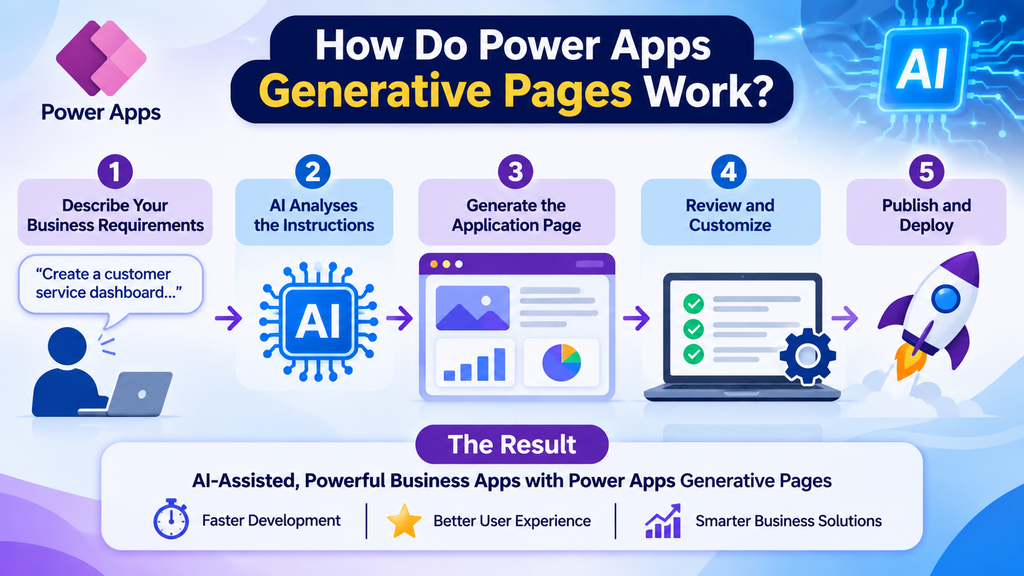
1. Describe Your Business Requirements
First, identify the business problem you want the application page to solve.
For example, a sales department might need a dashboard displaying:
- Total customer accounts
- Monthly sales performance
- Pending customer enquiries
- Sales representatives’ activities
- Follow-up reminders
Instead of manually planning every visual component, the maker can describe these requirements in a natural language prompt.
2. AI Analyses the Instructions
Next, the AI agent interprets the request and identifies the components required to build the page.
Depending on the requirements, it can determine:
- Which Dataverse tables are needed
- What information should appear on the page
- Which interface components are appropriate
- How users should interact with the information
- What supporting business logic is required
For more complex requirements, the AI-assisted workflow can also propose a development plan before generating the application components.
3. Generate the Application Page
After analysing the requirements, the system generates the page.
This includes the user interface, data connections, and supporting functionality. With the code-first development approach, the generated pages use React and TypeScript.
Additionally, developers can review the generated code and make further changes when necessary.
4. Review and Customize the Page
AI-generated content should always be reviewed before being used in a business environment.
Makers can test the page, adjust its layout, refine functionality, and provide additional instructions to improve the experience.
For example, they might request:
“Add a priority filter, display overdue tasks in a separate section, and show the assigned employee beside each task.”
This iterative approach makes it easier to improve the application without starting from scratch.
5. Publish and Deploy the Page
Finally, once the page has been reviewed and tested, it can be published within the model-driven application.
Generative pages are also solution-aware, which helps organizations manage application components across development, testing, and production environments.
How to Build AI-Assisted Business Apps Using Generative Pages
Building a useful AI-assisted business application requires more than writing a single prompt. You need to understand your business process, organize your data, and define how employees will use the application.
Here is a practical development approach.
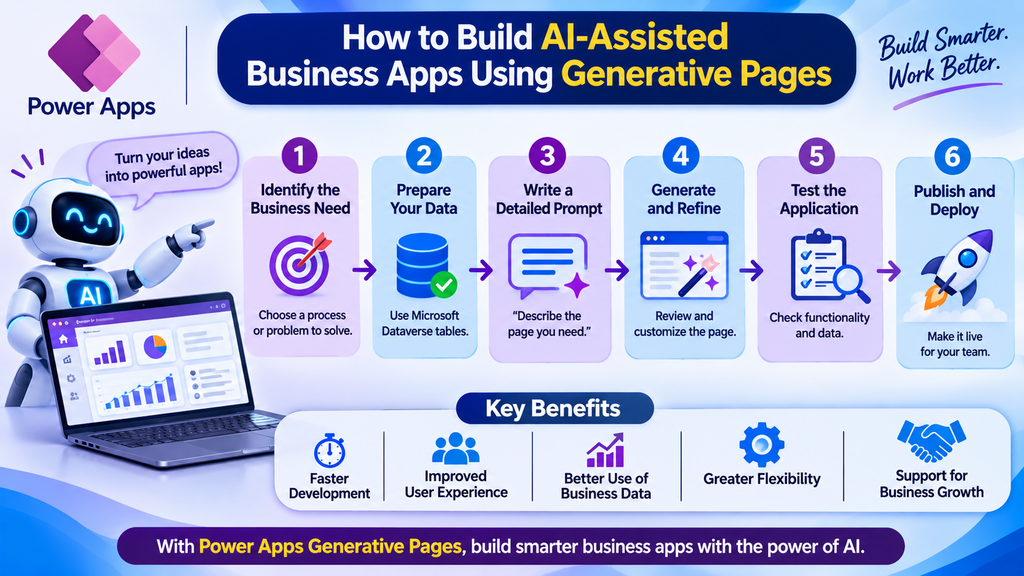
Step 1: Identify the Business Process
Start by selecting a process that needs improvement.
For example, consider a company that manages customer service requests through spreadsheets and emails.
Employees might struggle to track enquiries, assign responsibilities, monitor response times, and identify unresolved cases.
A generative page could provide a centralized dashboard for managing these activities.
Before development, identify:
- The intended application users
- The information they need
- Existing data sources
- Required actions and workflows
- Reporting and monitoring requirements
This provides a clear foundation for AI-assisted development.
Step 2: Prepare Your Dataverse Tables
Microsoft Dataverse provides the structured data foundation for many model-driven applications.
Before generating the page, identify the tables and relationships required by the business process.
For a customer service application, these might include:
| Dataverse Table | Information Stored |
|---|---|
| Customers | Customer names, contact details, and account information |
| Service Requests | Enquiries, descriptions, and request status |
| Employees | Assigned representatives and department details |
| Activities | Follow-ups, calls, and communication history |
| Priorities | Request priority and escalation information |
Organizing data properly helps ensure that the generated page displays meaningful business information.
Moreover, existing Dataverse tables can be reused instead of creating unnecessary duplicate structures.
Step 3: Write a Detailed AI Prompt
The quality of the generated page depends heavily on how clearly you communicate your requirements.
A vague prompt may produce a basic layout that requires considerable refinement. However, a detailed prompt gives the AI more context about the required functionality and user experience.
Example prompt for a customer service dashboard:
“Create a customer service management page for a model-driven Power App using the existing Customer and Service Request Dataverse tables. Display total enquiries, open requests, overdue cases, and completed requests. Include a searchable request list, priority filters, customer information, assigned employees, and request status. Add a clear layout with separate sections for pending and completed requests.”
A good prompt should specify:
- The purpose of the application page.
- The intended users.
- The required Dataverse tables.
- The information to display.
- The filters and interactive elements.
- The expected layout and design.
- Any additional business logic.
Step 4: Generate and Refine the Page
Once the prompt is ready, use the supported generative page authoring workflow.
Microsoft provides two approaches:
- In-browser authoring: Create pages through the conversational experience in Power Apps.
- AI code generation tools: Use tools such as GitHub Copilot CLI to generate and edit pages from a local development environment.
The code-first approach is Microsoft’s recommended path and offers additional flexibility for developers working with React and TypeScript.
After generation, review the output and refine the page based on actual business requirements.
Step 5: Test Data Connections and Functionality
A visually attractive application is not necessarily a reliable business application.
Therefore, test the generated page carefully.
Check whether:
- Dataverse records load correctly.
- Search and filtering work as expected.
- Users can access only authorized information.
- Buttons and interactive components perform the correct actions.
- Related records display accurately.
- The application performs well with realistic data volumes.
Additionally, test the application with different user roles to identify access or permission issues.
Step 6: Publish and Manage Through Solutions
Once testing is complete, publish the page and manage it through your Power Platform solution.
For larger organizations, it is important to maintain separate development, testing, and production environments.
This approach makes future updates easier to manage while reducing the risks associated with directly changing live business applications.
Real-World Business Use Cases for Power Apps Generative Pages
Generative pages can support different business scenarios where employees need customized, data-driven application experiences.
Here are some practical examples.
1. Customer Relationship Management Dashboards
Sales teams often work with large amounts of customer information.
A generative page can provide a consolidated dashboard showing:
- Customer account information
- Sales opportunities
- Upcoming meetings
- Pending follow-ups
- Sales performance indicators
Consequently, sales representatives can access important information from a single interface.
2. Employee Management Applications
HR departments can use AI-assisted page generation to create employee management experiences.
For example, an HR dashboard could display employee profiles, department details, leave requests, and approval statuses.
Furthermore, integrating Power Automate can help automate leave approval notifications and related processes.
3. Inventory and Operations Management
Businesses managing inventory across multiple departments need accurate and accessible operational information.
A customized application page can display stock levels, product information, warehouse records, and pending purchase requests.
As a result, employees can identify inventory issues more quickly and make better operational decisions.
4. Project Management and Task Tracking
Project managers need visibility into tasks, deadlines, responsibilities, and project progress.
Generative pages can help create dashboards that display:
- Active projects
- Pending tasks
- Overdue activities
- Assigned team members
- Project completion status
Moreover, connecting these experiences with automated notifications can improve accountability across project teams.
5. Customer Service and Support Management
Customer service teams can benefit from centralized request management.
A dedicated page can display customer enquiries, complaint categories, assigned representatives, response deadlines, and unresolved cases.
Therefore, managers can monitor service performance and identify requests requiring immediate attention.
Power Apps Generative Pages vs Traditional App Development
Generative pages introduce a different approach to designing application interfaces. However, they do not replace every traditional Power Apps development method.
The right choice depends on the application’s complexity, data requirements, and customization needs.
| Feature | Traditional Development | Generative Pages |
|---|---|---|
| Page creation | Manually design and configure | AI-assisted page generation |
| Requirements | Translate requirements into components | Describe requirements in natural language |
| UI development | Developer-led | AI-generated with developer review |
| Customization | Manual configuration and coding | Prompt-based refinement and code editing |
| Dataverse integration | Manually configure | Specify tables and data requirements |
| Development skills | Depends on app complexity | Requires review and technical validation |
| Best suited for | Broad application development needs | AI-assisted pages in model-driven apps |
Importantly, generative pages currently support model-driven apps rather than canvas apps. They should therefore be considered an additional development capability, not a replacement for the entire Power Apps ecosystem.
Benefits of Using Generative Pages for Business Applications
AI-assisted development offers several advantages when implemented with a clear strategy.
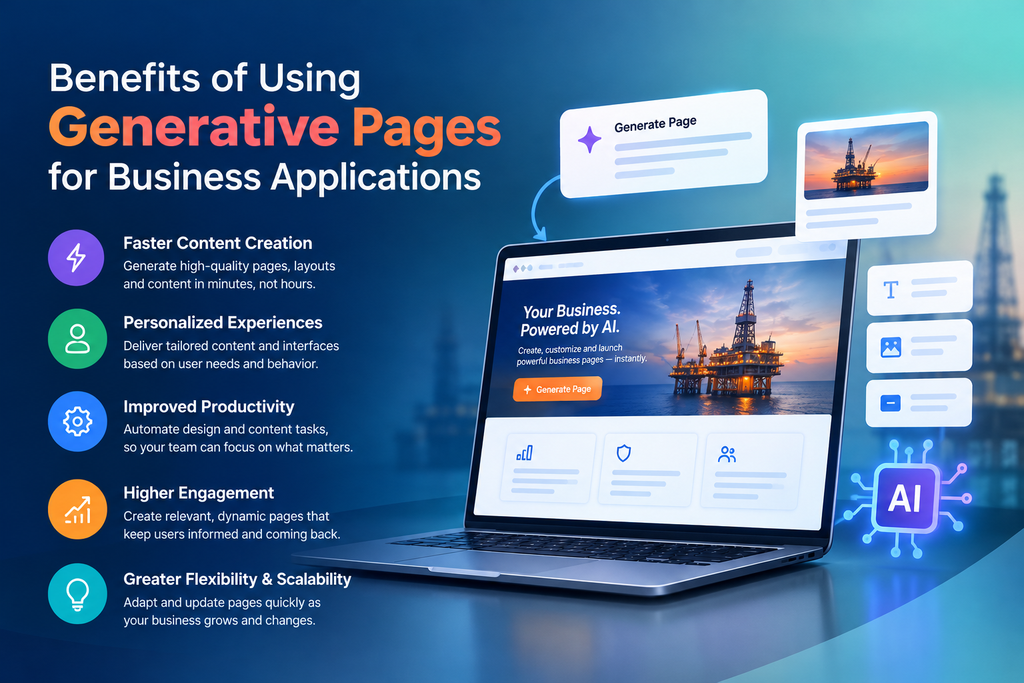
Faster Application Development
Generating an initial page through natural language can reduce the manual effort involved in designing and configuring its interface.
As a result, developers can spend more time refining functionality and solving business problems.
Improved User Experience
Generative pages can help create structured and visually engaging interfaces.
Furthermore, businesses can refine layouts based on employee feedback, making applications easier to navigate.
Better Use of Existing Business Data
By connecting with Dataverse, generative pages can use existing business records instead of relying on disconnected information sources.
Consequently, employees can access relevant information within their existing application environment.
Greater Development Flexibility
The ability to refine generated pages and review their underlying code provides flexibility for technical teams.
Developers can make adjustments when the generated experience does not fully match business requirements.
Support for Business Process Improvement
Generative pages can be combined with other Power Platform capabilities.
For example, Power Automate can manage notifications and approvals, while Power BI can provide deeper operational reporting.
Together, these technologies support more connected business applications.
Important Considerations and Limitations
Although Power Apps Generative Pages offer useful capabilities, businesses should understand their current limitations before adopting them.
| Consideration | What Businesses Should Know |
|---|---|
| App compatibility | Generative pages are designed for model-driven apps, not canvas apps. |
| Data sources | Dataverse is supported, while Power Platform connector support is currently in preview. |
| Data relationships | A single page can link up to six Dataverse tables. |
| Security | Generated pages still require proper security configuration and validation. |
| Code quality | Developers should review generated code before production deployment. |
| Testing | Generated functionality must be tested against real business requirements. |
| Availability | Authoring options and regional availability can differ. |
Additionally, AI-generated pages should not be treated as automatically production-ready.
Businesses must review security, performance, accessibility, data accuracy, and compliance requirements before deployment.
Best Practices for Building Reliable AI-Assisted Power Apps
To get meaningful results from generative pages, organizations should follow a structured development approach.
Consider these recommendations:
- Start with a clear business objective: Build pages around specific operational problems rather than adding unnecessary features.
- Use detailed prompts: Explain the required layout, data sources, user roles, and interactions.
- Maintain clean Dataverse data: Proper table structures and relationships improve the quality of application development.
- Review generated code: Validate the implementation against technical and organizational standards.
- Apply role-based security: Ensure employees can access only the information and functions they are authorized to use.
- Test continuously: Review functionality after every significant change.
- Use Power Platform solutions: Organize components properly for controlled deployment between environments.
- Collect employee feedback: Improve the interface based on how people actually use the application.
Most importantly, remember that AI should support the development process, not replace proper application architecture and governance.
How Sky Soft Connections Helps Businesses Build Smarter Power Apps Solutions
Adopting AI-assisted application development requires more than access to new technology. Businesses also need a clear understanding of their processes, data architecture, integration requirements, and long-term application strategy.
Sky Soft Connections helps organizations build, integrate, and optimize Microsoft business applications through its Microsoft Power Platform consulting and development services.
Our team supports businesses in creating solutions that connect their existing systems, automate manual processes, and improve operational visibility.
Our services include:
Custom Power Apps Development
We develop tailored canvas and model-driven applications designed around specific business requirements, including operational management, internal workflows, field inspections, and approval processes.
Microsoft Dataverse Implementation
We help businesses structure their data through Dataverse tables, relationships, security configurations, and integration architecture.
This provides a reliable foundation for scalable business applications.
Power Automate Workflow Automation
We design automated workflows for approvals, notifications, data synchronization, and repetitive business activities.
Consequently, organizations can reduce manual administration and improve process consistency.
Dynamics 365 Integration
We connect Power Apps with Dynamics 365 and other Microsoft business applications to create more connected operational environments.
Custom Connectors and API Integration
For businesses working with external platforms, we develop custom connector solutions that allow Power Platform applications to communicate with third-party and enterprise systems.
Power BI Reporting and Analytics
We also help organizations transform operational data into meaningful dashboards and reports, supporting better business decisions.
Whether your organization wants to introduce AI-assisted application development, modernize an existing Power App, or integrate multiple business systems, Sky Soft Connections can help you plan and implement the right solution.
Explore our Microsoft Power Platform Consulting and Development Services to learn more.
Conclusion
Power Apps Generative Pages represent an important development in AI-assisted application design. By allowing makers to describe their requirements in natural language, Microsoft is making it easier to generate, customize, and refine pages within model-driven applications.
However, successful implementation still depends on good data architecture, clear requirements, proper security, and thorough testing.
When combined with Microsoft Dataverse, Power Automate, Power BI, and Dynamics 365, generative pages can become part of a connected business application strategy.
For organizations looking to modernize their internal applications and improve operational efficiency, this is an opportunity to explore a more flexible approach to development.
Looking to build AI-assisted business applications with Microsoft Power Platform? Contact Sky Soft Connections to discuss your requirements and discover how our Power Platform expertise can help your business move forward.
Frequently Asked Questions (FAQs)
Power Apps Generative Pages are AI-powered pages for model-driven apps. They allow makers to describe application requirements in natural language and generate page layouts, functionality, and supporting React code.
Natural language authoring reduces the need to manually create every component. However, technical knowledge is valuable for reviewing generated code, implementing advanced functionality, and validating security and performance.
Yes. Generative pages can connect to Dataverse tables and use business information within model-driven applications. Power Platform connectors and Dataverse custom APIs also have preview support in the relevant authoring workflows.
No. Generative Pages are currently designed for model-driven Power Apps. They are not supported directly in canvas apps.
Businesses can accelerate page creation, improve application experiences, reduce repetitive design work, and make better use of existing business data. However, generated applications still require proper testing and governance.