Table of Content
The Architectural Question Nobody Asks Early Enough
Every enterprise Dynamics 365 implementation begins with the same optimism: a clean environment, a well-scoped project, and a team ready to build. What rarely gets asked in those early workshops is the question that will haunt architects three years down the line when we have five environments and four business units on the same tenant, where exactly does this logic live, and who owns it?
That question is not a technical afterthought. It is the central design decision of any multi-org Dynamics 365 deployment, and getting it wrong does not just create technical debt. It creates organisational debt tangled governance, duplicated customisations, regression-prone release cycles, and environments that have quietly drifted so far apart that no one can confidently say what the “standard” configuration even is anymore.
This post is about making that decision deliberately, early, and with a framework that scales.
Understanding the Landscape: What “Multi-Org” Actually Means in Practice
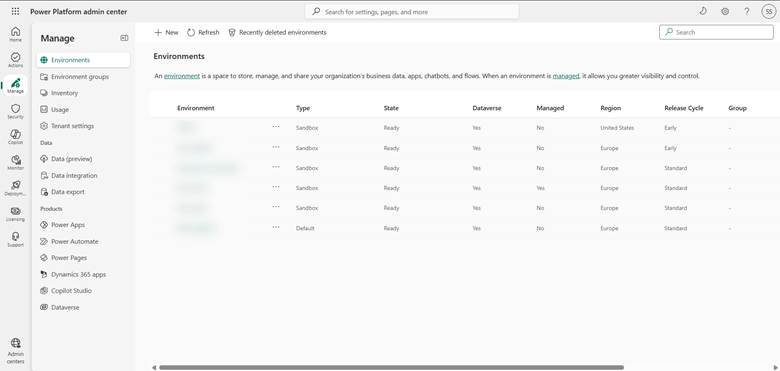
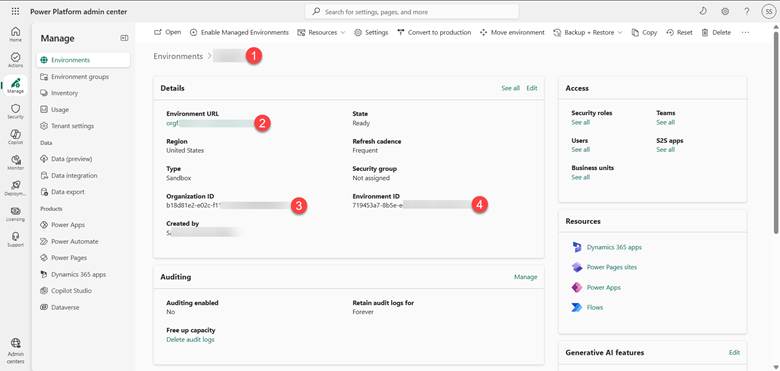
Before drawing any architectural lines, it is worth being precise about what we mean by multi-org in a Dynamics 365 context. A single Microsoft tenant can host multiple Power Platform environments, each containing its own Dataverse database, its own model-driven apps, and its own set of configurations. These environments might represent:
- Development, test, UAT, and production stages for a single solution
- Geographically distinct business units say, a European entity and a North American entity each with their own regulatory requirements
- Functionally distinct lines of business a Sales organisation and a Field Service organisation that share master data but operate under different process rules
- Acquired subsidiaries being onboarded gradually while maintaining their legacy logic
In each of these scenarios, the architectural challenge is the same at its core: some logic should be universal and governed centrally, while other logic is rightly local and should be owned by the environment it serves. The mistake is treating these two categories interchangeably, or worse, not distinguishing them at all.
The Two Failure Modes
Enterprise Dynamics 365 implementations tend to fail at multi-org scalability in one of two ways, and they are almost mirror images of each other.
Over-centralisation happens when architects, seeking consistency, push everything into shared components a single managed solution deployed everywhere, tenant-level Azure resources handling all automation, a single Power Automate cloud flow triggered by every environment. This feels clean in a diagram. In practice, it means that a business rule change required by the German subsidiary to comply with local tax law breaks something for the Canadian team. It means release windows that block everyone when one environment needs an urgent patch. It means the “shared” solution becomes a political battleground, with every team lobbying to get their requirement prioritised.
Over-fragmentation is the opposite failure. Each environment accumulates its own customisations, its own duplicate flows, its own variant of the lead qualification process with slightly different field names, its own set of business rules that were “just a quick change” three years ago and now nobody knows if they are intentional or accidental. When a genuine platform-wide requirement emerges say, a new regulatory field that must appear on every customer record across all entities the team discovers they are not maintaining one system. They are maintaining seven slightly different systems that happen to share a name.
Both failure modes are expensive. The solution is not to pick a point in the middle and hope for the best. The solution is a deliberate classification framework applied before any customisation is built.
The Classification Framework: Four Categories of Logic
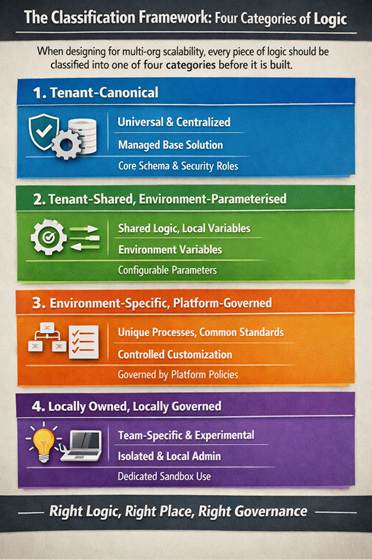
When designing for multi-org scalability, every piece of logic every flow, plugin, business rule, security role, environment variable, or configuration record should be classified into one of four categories before it is built.
Category 1: Tenant-Canonical
This is logic that is definitionally the same across every environment and every business unit. It represents the enterprise’s identity, not its operations. Examples include the core data model schema the fields that exist on Account, Contact, and custom entities that are truly universal. It includes security role definitions that reflect the enterprise’s functional taxonomy rather than any one team’s access patterns. It includes the naming conventions and solution layering standards that govern how customisations are packaged.
Tenant-canonical logic belongs in a managed base solution, deployed to every environment from a central pipeline. It should be version-controlled, peer-reviewed, and owned by a central platform team. No environment should be able to override it, and the governance model should make overriding it structurally difficult, not just procedurally discouraged.
Category 2: Tenant-Shared, Environment-Parameterised
This is logic where the structure is shared but the values are local. The canonical example in Dynamics 365 is environment variables. A cloud flow that sends a notification email uses the same logic everywhere, but the sender address, the approval threshold, or the target queue might differ by environment. The flow itself is tenant-shared. The parameters are environment-specific.
Azure App Configuration and Dataverse environment variables are the right tools for this category. The discipline required is that parameterisation must be designed in from the start not retrofitted when someone notices the hardcoded value in production. This means identifying, during the design phase, every value in a shared component that could legitimately differ by environment, and externalising it before the first deployment.
Category 3: Environment-Specific, Platform-Governed
This is where most of the interesting complexity lives. These are business processes, automation flows, and model-driven app customisations that are genuinely unique to one environment but which still need to follow platform-wide standards for how they are built, packaged, and deployed.
The sales qualification process for a pharmaceutical distributor is not the same as for a software reseller, even if both live on the same tenant. The warranty claim workflow for a manufacturing division has nothing to do with the professional services project approval workflow in another division. These processes are environment-specific and they should be. The governance requirement is not that they look the same, but that they follow the same architectural patterns: solution layering, ALM pipeline standards, plugin coding conventions, Power Automate connection reference discipline.
The mechanism for achieving this in Dynamics 365 is a combination of managed solutions for the base layer, unmanaged solutions for environment customisations that sit on top, and a CoE (Center of Excellence) toolkit implementation that enforces standards through policy and automated monitoring rather than through code.
Category 4: Locally Owned, Locally Governed
Some logic is so specific to a team, so experimental, or so temporary that it does not belong in any shared pipeline at all. Power Apps canvas apps built by citizen developers for a single team’s internal use. Power Automate flows created by a business analyst to automate a manual step in a process that is under review. These belong in dedicated development environments, governed by the environment’s local admin, with a clear sunset policy.
The failure mode here is not that these exist they are often genuinely valuable. The failure mode is when they migrate to production without anyone noticing, become depended upon, and then cannot be governed because nobody documented them.
Azure and the Tenant Layer: Where to Draw the Boundary
Dynamics 365 does not exist in isolation. Most enterprise deployments are integrated with Azure Azure Service Bus for high-volume messaging, Azure Functions for compute-intensive logic, Azure Key Vault for secrets management, Azure API Management as a central integration layer. This introduces a second question that parallels the first: which Azure resources are tenant-level, and which are environment-level?
The answer generally follows the same classification logic. Azure resources that serve as shared infrastructure an API Management gateway that routes traffic from all environments to back-end systems, an Azure Service Bus namespace that handles event-driven integration for the whole tenant are tenant-level resources. They should be provisioned once, secured with RBAC at the environment level, and treated as platform infrastructure.
Azure resources that execute environment-specific business logic a Function App that runs the pricing engine for one division’s sales environment, a Logic App that handles the warranty claim routing for one manufacturing entity are environment-specific resources. They should be provisioned per environment, even if the underlying code is drawn from a shared repository.
The practical implication for Azure DevOps or GitHub Actions pipelines is that the pipeline itself needs to know the classification of every resource it is deploying. A deployment targeting a new Dynamics 365 environment should automatically provision the environment-specific Azure resources it needs, connect them to the appropriate shared infrastructure, and apply the correct parameterisation without requiring a human to manually wire things together after the fact.
Power Platform Pipelines and ALM Across Multiple Environments
Application lifecycle management is where the classification framework becomes operational. Microsoft has invested significantly in native Power Platform Pipelines, which allow solutions to be promoted from development through test to production with approval gates. For single-environment-track implementations, this works well out of the box.
For multi-org enterprise scenarios, the native pipeline needs to be composed carefully. A few principles are worth making explicit.
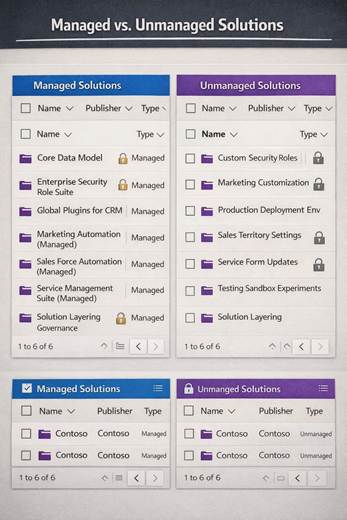
Managed solutions should always flow downstream. Any component classified as tenant-canonical or tenant-shared should be deployed as a managed solution. This prevents local customisations from being applied on top of shared components without going through the governed change process. Unmanaged solutions should exist only in development environments and should never reach production.
Solution segmentation should reflect classification boundaries, not functional boundaries. It is tempting to create solutions by feature — a “Lead Management Solution,” a “Case Routing Solution.” This feels intuitive but creates problems when some components of Lead Management are tenant-canonical and others are environment-specific. The solution structure should instead reflect whether the components inside it are shared or local. A base solution. An extension solution. A configuration solution. These layers compose predictably.
Connection references and environment variables are not optional. Every cloud flow that crosses an environment boundary — meaning every flow that goes to production — must use connection references and environment variables. No hardcoded connection IDs. No hardcoded URLs. This is not a best practice; it is a prerequisite for any multi-org pipeline to function without manual intervention at every deployment.
Governance: The Layer That Makes the Architecture Work
No technical architecture survives contact with a large organisation without a governance model to enforce it. In a Dynamics 365 multi-org context, governance has three components.
Environment topology policy defines which environments exist, what they are for, and who can create new ones. Without this, the tenant accumulates environments the way a shared server accumulates folders purposelessly and without accountability. The Power Platform CoE Starter Kit provides a governance toolkit that includes environment request flows, approval processes, and automated inventory. This is the right starting point.
Solution ownership policy defines who owns each classified piece of logic, who can approve changes to it, and through what change process changes flow. Tenant-canonical logic should require central platform team approval. Environment-specific logic should require local environment owner approval, subject to platform team audit rights. This is not bureaucracy for its own sake; it is the mechanism by which drift is caught before it becomes a migration project.
Monitoring and drift detection is the enforcement layer. The CoE toolkit’s inventory and compliance components can surface environments that have unmanaged customisations in production, flows that are not using connection references, or security roles that deviate from the tenant-canonical baseline. Without this, the governance policy is aspirational rather than operational.
A Practical Heuristic for the Field
When working with a client who is about to make a customisation decision in a multi-org environment, a useful prompt is this: if we needed to deploy this to a new environment next month for an acquired subsidiary, what would have to change, and how long would it take?
If the answer is “nothing, because everything configurable is in environment variables and the pipeline handles the rest,” the design is correct. If the answer is “we would need to go through the code and update the hardcoded values, and probably spend a few days re-wiring the connections,” the design is not yet multi-org-ready, regardless of how well it works in the current single-environment context.
That heuristic does not make every decision there are genuinely environment-specific processes that should not be portable and do not need to be. But it surfaces the hidden assumptions that tend to become migration projects later.
Conclusion: Scalability Is a Design Constraint, Not a Feature
The organisations that build Dynamics 365 platforms that scale gracefully to five, ten, or twenty environments on a single tenant are not organisations with more budget or more developers. They are organisations that treated multi-org scalability as a constraint from day one not a feature to be added later when the platform was “more mature.”
The classification framework described here tenant-canonical, tenant-shared-parameterised, environment-specific-platform-governed, locally-owned is not complex. It takes a whiteboard session and a governance conversation to establish. What makes it difficult is not the framework itself, but the discipline to apply it consistently when a project is under deadline pressure and the quickest path to done is to hardcode the value, duplicate the flow, and document it later.
Later, in a multi-org Dynamics 365 enterprise, has a cost that compounds. The architecture that prevents that cost is the one that asks, early and often, the question nobody wants to delay a sprint for: where does this logic actually belong?
Read more : dynamics 365 evolution records to actions
FAQ’s
Tenant-wide logic is shared and consistent across all environments, while environment-specific logic is tailored to a single business unit, region, or use case.
Because poor separation leads to duplication, broken deployments, and environments drifting apart making scaling difficult.
Use a simple test: if you create a new environment tomorrow, what needs to change? If too much breaks, your design isn’t scalable.
 is a software solution company that was established in 2016. Our quality services begin with experience and end with dedication. Our directors have more than 15 years of IT experience to handle various projects successfully. Our dedicated teams are available to help our clients streamline their business processes, enhance their customer support, automate their day-to-day tasks, and provide software solutions tailored to their specific needs. We are experts in Dynamics 365 and Power Platform services, whether you need Dynamics 365 implementation, customization, integration, data migration, training, or ongoing support.