
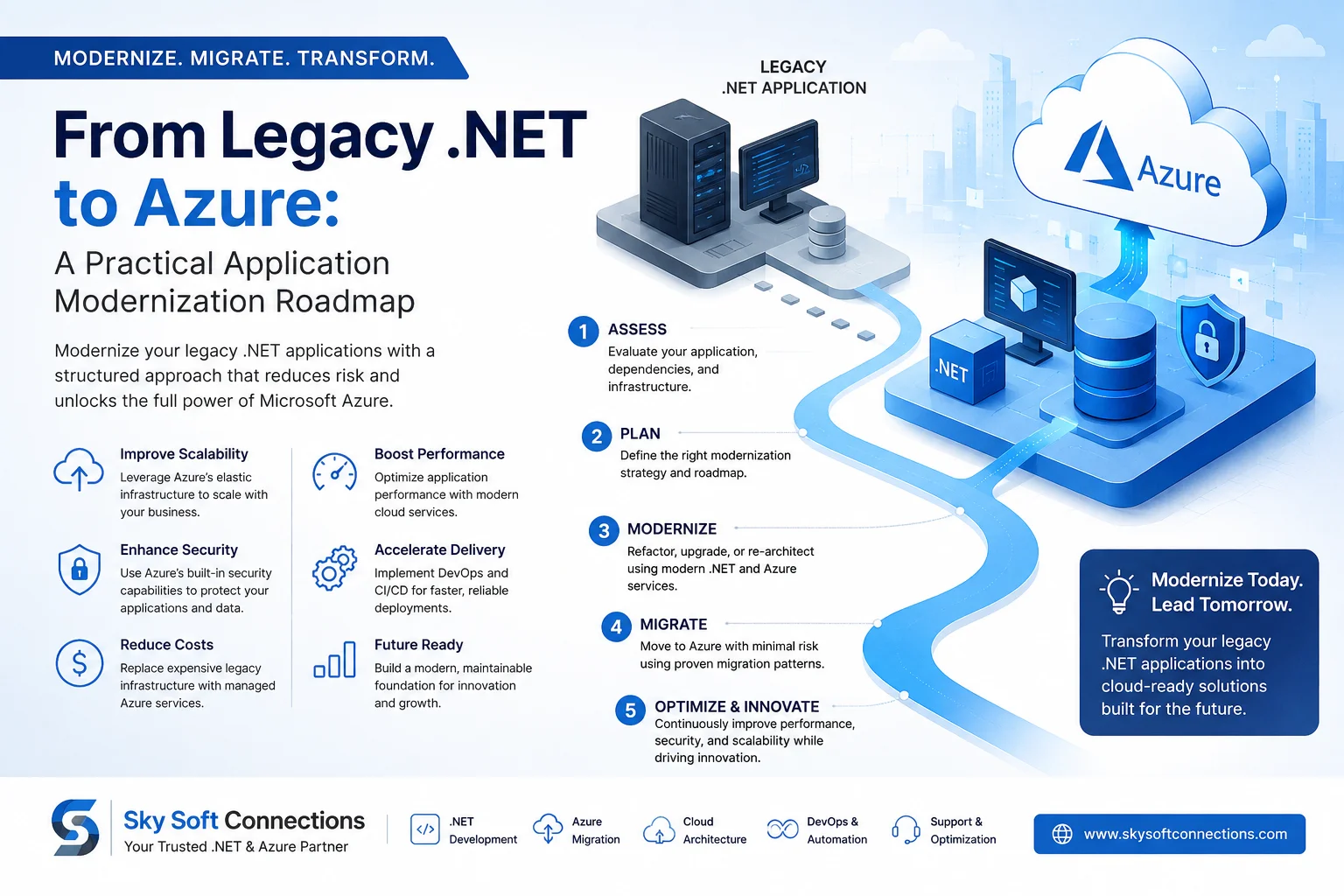
Many businesses still rely on legacy .NET applications that power critical operations. However, as these applications age, maintaining them can become increasingly difficult. Outdated frameworks, limited scalability, security concerns, and expensive infrastructure can slow business growth.
That is where .NET application modernization on Azure can make a significant difference.
Instead of replacing an entire application overnight, organizations can follow a structured modernization roadmap. This approach helps reduce risk while improving application performance, scalability, security, and long-term maintainability.
In this guide, we’ll explain how to modernize legacy .NET applications for Microsoft Azure, which modernization strategy to choose, what challenges to expect, and how to build a practical migration plan.
What Is .NET Application Modernization?
.NET application modernization is the process of updating an existing .NET application so it can take advantage of modern technologies, cloud infrastructure, and development practices.
However, modernization does not always mean rewriting everything.
Depending on the application’s architecture and business requirements, you may:
- Move the existing application to Azure with minimal changes.
- Upgrade the application to a newer version of .NET.
- Refactor selected components for better cloud performance.
- Break a large application into smaller services.
- Replace outdated components with modern Azure services.
- Rebuild specific business-critical features.
Therefore, the right strategy depends on your application’s current architecture, business value, technical debt, and future requirements.
Why Modernize Legacy .NET Applications?
Legacy applications can continue to deliver business value for years. However, keeping them unchanged can create technical and operational challenges.
Common problems include:
| Legacy Challenge | Modernization Opportunity |
|---|---|
| Outdated .NET framework | Upgrade to modern .NET |
| On-premises infrastructure | Azure cloud infrastructure |
| Limited scalability | Elastic cloud scaling |
| Manual deployments | CI/CD automation |
| Aging databases | Modern database options |
| Security limitations | Azure security capabilities |
| Monolithic architecture | Modular or service-based architecture |
| High maintenance costs | Managed cloud services |
| Limited monitoring | Centralized cloud monitoring |
More importantly, modernization can help organizations respond faster to changing customer expectations.
For example, an application that struggles during peak demand can use Azure’s scalable infrastructure to handle changing workloads more efficiently.
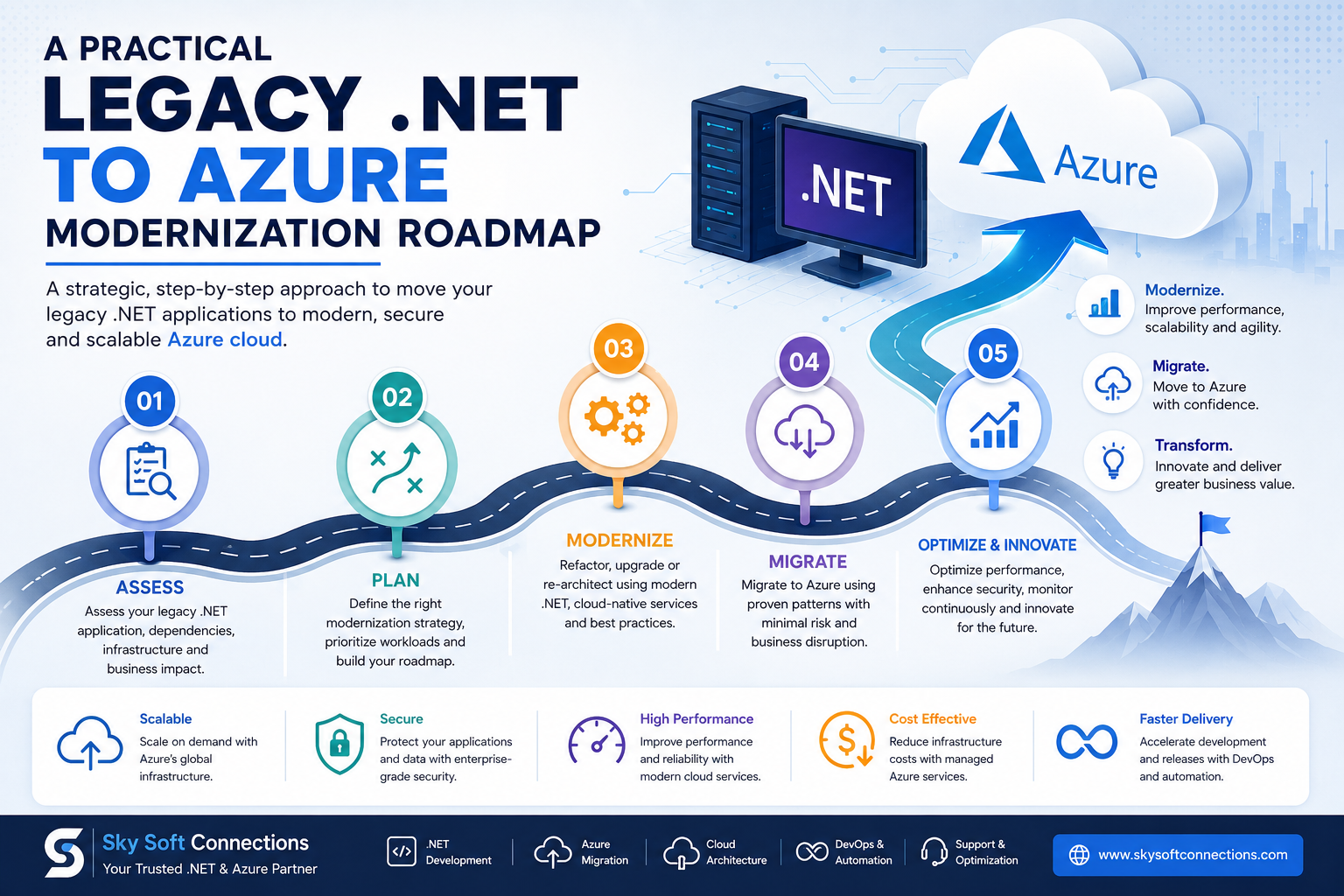
A Practical Legacy .NET to Azure Modernization Roadmap
Successful modernization should be treated as a business and technology transformation, rather than simply a cloud migration project.
Here is a practical roadmap.
1. Assess Your Existing .NET Application
Before changing anything, understand what you already have.
Start with a detailed application assessment covering:
- .NET Framework version
- Application architecture
- Programming languages and dependencies
- Database architecture
- Third-party libraries
- APIs and integrations
- Authentication mechanisms
- Infrastructure dependencies
- Security vulnerabilities
- Application performance
- Deployment processes
- Technical debt
This assessment creates a baseline for the modernization strategy.
What Should a .NET Assessment Identify?
A useful assessment should answer questions such as:
Which components should be migrated?
Which components need refactoring?
What can be retired?
Which dependencies could cause migration problems?
Which workloads should remain unchanged?
Without this analysis, organizations can easily spend money modernizing components that do not provide meaningful business value.
2. Choose the Right Azure Modernization Strategy
There is no single approach that works for every legacy .NET application.
Microsoft’s commonly used cloud migration approaches can be adapted to application modernization.
Rehost
Also known as lift and shift, rehosting moves the existing application to Azure with minimal code changes.
It is useful when:
- You need a faster migration.
- The application is stable.
- A complete redesign is not currently justified.
- You want to reduce dependency on on-premises infrastructure.
However, rehosting alone may not unlock the full benefits of cloud-native architecture.
Replatform
Replatforming introduces selected improvements without fundamentally changing the application.
For example, an application could move to Azure while adopting managed databases, improved monitoring, or modern hosting services.
This is often a practical middle ground.
Refactor
Refactoring involves modifying application components to improve scalability, performance, maintainability, or cloud compatibility.
For example, teams might:
- Modernize APIs.
- Improve database access.
- Introduce caching.
- Separate application components.
- Adopt cloud-native services.
Rearchitect
Rearchitecting involves making significant architectural changes.
A legacy monolithic .NET application might gradually evolve toward a modular architecture or microservices where appropriate.
This approach can deliver substantial long-term benefits, but it requires more planning and development effort.
Rebuild or Replace
In some cases, rebuilding a specific application or replacing an outdated solution makes more sense than migrating it.
This is particularly relevant when the existing application has severe technical limitations or no longer aligns with business requirements.
3. Upgrade the .NET Application
If your application is running on an older version of .NET Framework, modernization may involve upgrading it to a supported version of modern .NET.
However, this process should be carefully planned.
First, identify incompatible APIs, third-party dependencies, Windows-specific components, and other legacy technologies.
Then, create a staged upgrade plan.
A typical process includes:
- Inventory dependencies.
- Review application architecture.
- Identify compatibility issues.
- Upgrade libraries and frameworks.
- Refactor unsupported components.
- Run automated tests.
- Conduct performance testing.
- Deploy gradually.
Importantly, avoid combining too many major changes into a single deployment. A phased approach makes troubleshooting easier.
4. Modernize the Application Architecture
Moving an old application to Azure does not automatically make it cloud-native.
Therefore, architecture should be evaluated separately.
For example, a legacy .NET application may have:
- A tightly coupled codebase
- Shared database dependencies
- Manual deployments
- Server-specific configurations
- Background jobs running on the same server
- Limited API separation
These areas can gradually be modernized.
Modern Architecture Options
Depending on requirements, organizations can consider:
- ASP.NET Core
- REST APIs
- Azure App Service
- Azure Functions
- Azure SQL
- Azure Storage
- Azure Service Bus
- Azure Key Vault
- Azure Application Insights
- Azure Kubernetes Service
The objective is not to use every Azure service available. Instead, choose services that solve specific business and technical problems.
5. Modernize the Database
The database is often one of the most important parts of a legacy application.
Before migrating it, assess:
- Database version
- Size and growth rate
- Stored procedures
- SQL dependencies
- Performance bottlenecks
- Integration dependencies
- Backup requirements
- Compliance requirements
For SQL Server workloads, Azure SQL can provide a managed cloud database environment while reducing infrastructure management responsibilities.
However, database modernization should be carefully tested because application performance and business processes often depend heavily on database behavior.
6. Strengthen Security During Modernization
Application modernization is also an opportunity to improve security.
Instead of simply copying existing security practices to the cloud, review them from the ground up.
Consider:
- Identity and access management
- Role-based access control
- Secrets management
- Encryption
- Network security
- API security
- Logging
- Vulnerability management
- Backup and disaster recovery
- Compliance requirements
For example, sensitive application secrets should not be hard-coded into configuration files. Services such as Azure Key Vault can help organizations manage secrets more securely.
Similarly, centralized monitoring can make suspicious activity and application problems easier to identify.
7. Introduce DevOps and CI/CD
Legacy applications often rely on manual deployments. This can make releases slower and more error-prone.
As part of modernization, introduce automated development and deployment workflows.
A modern .NET DevOps pipeline can include:
Code → Build → Automated Tests → Security Checks → Deployment → Monitoring
This approach provides faster feedback and reduces deployment risks.
Additionally, infrastructure and application configuration can be managed more consistently through automation.
8. Test Before You Migrate Completely
Testing should happen throughout the modernization journey—not just at the end.
Your testing strategy should cover:
- Functional testing
- Integration testing
- API testing
- Database testing
- Security testing
- Performance testing
- Load testing
- User acceptance testing
For business-critical applications, consider running old and modernized versions in parallel during the transition.
This can help identify unexpected differences before the new environment becomes the primary production system.
9. Migrate in Phases
A big-bang migration may appear faster. However, it can also introduce significant business risk.
Instead, divide the application into logical workloads.
For example:
Phase 1 : Foundation
Set up:
- Azure environment
- Identity
- Networking
- Security
- Monitoring
- DevOps pipeline
Phase 2 : Application Migration
Move low-risk components first.
Phase 3 : Modernization
Refactor selected application services and upgrade dependencies.
Phase 4 : Optimization
Improve:
- Performance
- Scalability
- Cost efficiency
- Monitoring
- Security
Phase 5 : Continuous Improvement
Continue modernizing based on business priorities and application performance.
Legacy .NET to Azure: Choosing the Right Approach
| Strategy | Effort | Risk | Best For |
|---|---|---|---|
| Rehost | Low | Low–Medium | Fast cloud migration |
| Replatform | Medium | Medium | Cloud benefits with limited changes |
| Refactor | Medium–High | Medium | Improving selected components |
| Rearchitect | High | High | Major architecture modernization |
| Rebuild | Very High | High | Applications requiring major redesign |
The best approach is often hybrid.
For example, an organization may rehost one stable workload, refactor another, and rebuild a business-critical module.
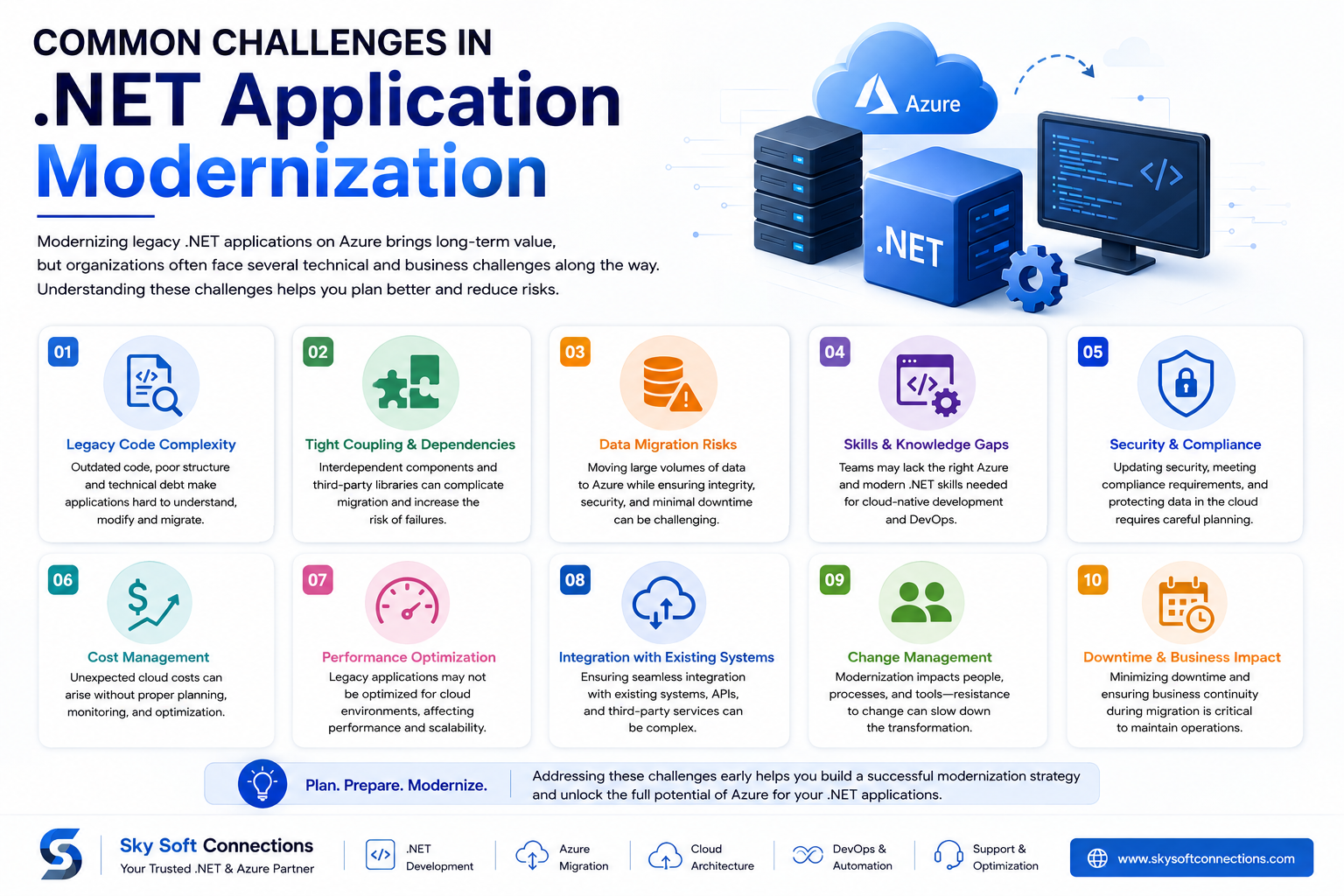
Common Challenges in .NET Application Modernization
Modernizing legacy software is not without challenges.
Technical Debt
Older applications often contain years of accumulated technical debt.
Therefore, teams should prioritize the components that create the greatest business or technical risk.
Legacy Dependencies
Third-party libraries and Windows-specific components can complicate migration.
A dependency assessment should happen before development begins.
Data Migration
Moving large databases can create downtime and data integrity concerns.
Consequently, migration should include a tested data strategy and rollback plan.
Skills Gaps
Cloud modernization requires expertise across .NET, Azure, security, DevOps, databases, and architecture.
Organizations may therefore need external expertise alongside their internal teams.
Cost Management
Azure provides flexible infrastructure, but cloud resources still need to be managed carefully.
Monitor resource usage and establish cost controls from the beginning.
How Sky Soft Connections Helps Modernize .NET Applications
Sky Soft Connections helps businesses modernize applications and build scalable solutions using Microsoft’s technology ecosystem.
Our services include custom .NET development, Azure cloud solutions, data migration, Microsoft Power Platform, Dynamics 365, SSRS, and custom business portals.
For organizations moving from legacy .NET applications to Azure, our approach can cover:
- Legacy application assessment
- .NET application modernization
- Custom .NET development
- Azure migration and integration
- Database and data migration
- API development
- Cloud architecture
- Application modernization
- Microsoft Power Platform integration
- Business process automation
- Reporting and analytics
- Ongoing application support
Rather than recommending a complete rewrite by default, the goal is to identify the most practical modernization path based on business requirements, application complexity, budget, and future growth.
How Long Does .NET Application Modernization Take?
There is no universal timeline.
A small application with limited dependencies may be modernized relatively quickly. On the other hand, a large enterprise application with complex integrations, databases, and compliance requirements can take significantly longer.
The timeline usually depends on:
- Application size
- Number of dependencies
- Code quality
- Database complexity
- Integration requirements
- Testing requirements
- Security requirements
- Selected modernization strategy
- Team size and expertise
Therefore, a technical assessment should come before committing to a fixed timeline.
Benefits of Moving Legacy .NET Applications to Azure
A successful modernization strategy can provide several benefits:
Better Scalability
Azure resources can be scaled according to application demand.
Improved Reliability
Cloud services can provide modern infrastructure and availability options.
Stronger Security
Modern identity, monitoring, encryption, and secrets-management capabilities can improve security.
Faster Development
Modern .NET and DevOps practices can help development teams release updates more efficiently.
Reduced Infrastructure Management
Managed Azure services can reduce the operational burden associated with maintaining physical infrastructure.
Better Business Agility
Most importantly, modern applications can make it easier to introduce new features, integrations, and digital services.
Frequently Asked Questions
There is no single best approach. Rehosting is suitable for fast migration, while refactoring or rearchitecting can provide greater long-term benefits. The right strategy depends on the application’s architecture, dependencies, business value, and modernization goals.
Yes. Depending on the application type, legacy .NET Framework applications can be hosted on Azure services such as Azure Virtual Machines or Azure App Service for supported scenarios. However, modernization to modern .NET may provide better long-term flexibility.
Not necessarily. A complete rewrite can introduce significant cost and risk. In many cases, incremental modernization allows businesses to preserve valuable existing functionality while gradually improving the application.
Azure can provide scalable infrastructure, managed databases, cloud security capabilities, monitoring, automation, integration services, and other tools that can improve the application’s operational and development capabilities.
Final Thoughts
Moving from a legacy .NET application to Azure is not simply an infrastructure migration. It is an opportunity to modernize how an application is built, deployed, secured, monitored, and scaled.
The most effective strategy is usually gradual.
Start with an application assessment. Then choose the right modernization approach, upgrade critical components, modernize the architecture where it makes sense, strengthen security, automate deployments, and migrate in manageable phases.
Ultimately, the goal is not to make an application “more cloud.” The goal is to create a more scalable, secure, maintainable, and business-ready application.
If your organization is evaluating a legacy .NET to Azure migration, Sky Soft Connections can help you assess your existing application and define a practical modernization roadmap based on your technical and business requirements.