
For many mid-market and enterprise organizations, choosing a CRM or business management platform is a major investment. The question is no longer simply, “What does Dynamics 365 cost?” The more important question is:
“Will Microsoft Dynamics 365 generate enough business value to justify the investment?”
The answer depends on how effectively the platform addresses your existing operational challenges.
Microsoft Dynamics 365 can bring sales, customer service, finance, operations, marketing, and business data into a connected ecosystem. However, the return on investment (ROI) comes from more than purchasing licenses. It depends on implementation, adoption, process automation, data quality, integrations, and how well the system supports business goals.
This guide provides a practical Dynamics 365 ROI framework for business leaders evaluating whether the platform is worth the investment.
What Is the ROI of Dynamics 365?
The ROI of Dynamics 365 measures the financial and operational value generated by the platform compared with its total cost of ownership.
A simple formula is:
Dynamics 365 ROI = (Business Benefits − Total Investment) ÷ Total Investment × 100
However, calculating the real ROI requires looking beyond direct revenue.
For example, Dynamics 365 may create value through:
- Increased sales productivity
- Reduced administrative work
- Faster customer response times
- Improved lead conversion
- Lower operational costs
- Better customer retention
- Automated business processes
- More accurate forecasting
- Reduced duplicate data entry
- Better management visibility
- Improved reporting and decision-making
Therefore, an effective ROI analysis should consider both financial and operational outcomes.
Why Mid-Market and Enterprise Leaders Consider Dynamics 365
As organizations grow, disconnected systems often become increasingly expensive.
Sales teams may use one platform, finance another, customer service may maintain separate records, while management relies on spreadsheets to bring everything together.
Consequently, business leaders often start looking for a platform that can connect these processes.
Dynamics 365 is particularly relevant when an organization needs:
- A scalable CRM platform
- Centralized customer data
- Sales pipeline management
- Customer service automation
- Marketing automation
- Business intelligence
- ERP and financial management
- Workflow automation
- Integration with Microsoft technologies
- Enterprise-level security and governance
The goal is not simply to replace existing software.
The goal is to create a more connected way of running the business.
Dynamics 365 ROI Framework: 6 Areas to Measure
A strong business case should evaluate Dynamics 365 across several measurable areas rather than relying on software features alone.
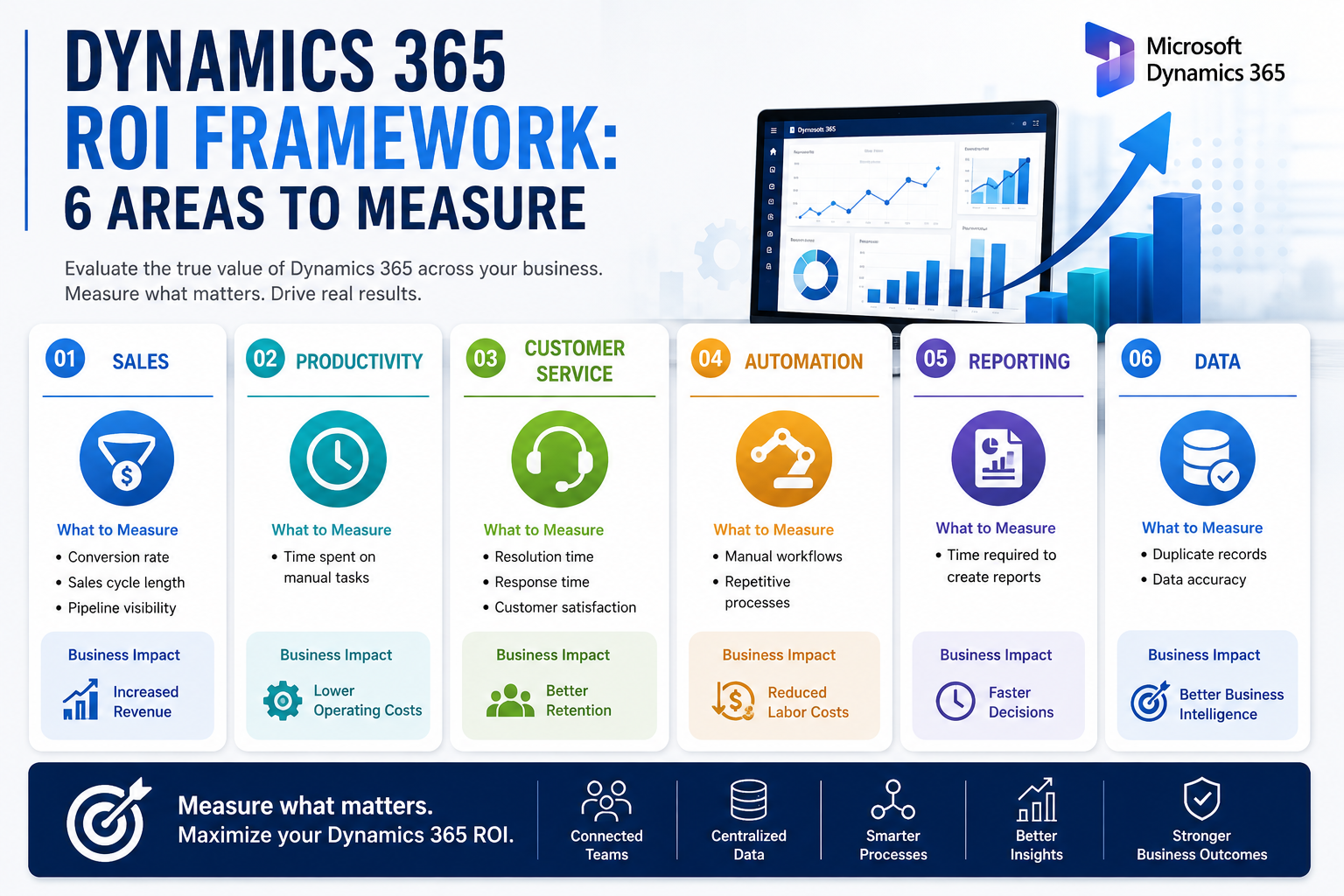
| ROI Area | What to Measure | Potential Business Impact |
|---|---|---|
| Sales | Conversion rate, sales cycle, pipeline visibility | Increased revenue |
| Productivity | Time spent on manual tasks | Lower operating costs |
| Customer Service | Resolution time, response time, satisfaction | Better retention |
| Automation | Manual workflows and repetitive processes | Reduced labor costs |
| Reporting | Time required to create reports | Faster decisions |
| Data | Duplicate records, data accuracy | Better business intelligence |
Let’s look at each area in more detail.
1. Measure Sales Productivity
Sales productivity is one of the most visible areas where a CRM can generate measurable ROI.
Without a centralized CRM, sales representatives may spend significant time searching for customer information, updating spreadsheets, preparing reports, or manually tracking follow-ups.
Dynamics 365 can centralize customer interactions, opportunities, activities, and pipeline information.
As a result, sales teams can spend more time selling and less time managing administrative tasks.
Key sales ROI metrics
Track metrics such as:
- Lead-to-opportunity conversion rate
- Opportunity-to-customer conversion rate
- Average sales cycle
- Revenue per salesperson
- Pipeline value
- Follow-up response time
- Win rate
- Customer acquisition cost
For example, if automation saves each salesperson several hours every week, the annual productivity gain can become significant across a 50-, 100-, or 500-person sales organization.
2. Calculate the Value of Business Automation
Manual processes are often hidden costs.
Consider a process where employees repeatedly:
- Receive customer information.
- Enter it into a spreadsheet.
- Copy it into a CRM.
- Send an internal email.
- Update another system.
- Create a report manually.
Each individual task may appear insignificant. However, when repeated thousands of times, the cost becomes substantial.
Dynamics 365 can be combined with Microsoft Power Automate to automate many repetitive workflows.
For example, organizations can automate:
- Lead assignment
- Customer notifications
- Approval workflows
- Follow-up reminders
- Data synchronization
- Case escalation
- Internal alerts
- Record updates
- Document workflows
A simple automation ROI calculation
Suppose:
- 20 employees perform a task.
- Each employee spends 30 minutes per day on it.
- The average fully loaded employee cost is $30 per hour.
That represents approximately:
20 × 0.5 × $30 = $300 per working day
Over approximately 250 working days, that becomes:
$75,000 per year
If automation eliminates most of that manual effort, the business can potentially recover a substantial portion of that cost.
3. Measure Customer Service ROI
Customer experience has a direct connection with retention, loyalty, and revenue.
When customer information is scattered across systems, service representatives may struggle to understand the customer’s history.
Consequently, customers may need to repeat information, while employees spend additional time searching for records.
Dynamics 365 Customer Service can provide a centralized view of customer interactions, cases, knowledge, and service activity.
Important customer service KPIs
Businesses evaluating Dynamics 365 should consider:
- Average response time
- Average resolution time
- First-contact resolution
- Customer satisfaction
- Case backlog
- Cost per service case
- Customer retention
- Customer lifetime value
Even relatively small improvements can have a meaningful financial impact in organizations with thousands of customers.
4. Evaluate Reporting and Decision-Making
Another important part of Dynamics 365 ROI is management visibility.
Executives need reliable answers to questions such as:
- Which sales opportunities are most likely to close?
- Which customers are at risk?
- Which products generate the most revenue?
- Where are service bottlenecks occurring?
- Which sales representatives are performing best?
- What does the current pipeline look like?
When employees manually consolidate information from multiple systems, reporting becomes slower and less reliable.
Dynamics 365 can work with Microsoft Power BI to turn business data into dashboards, reports, and actionable insights.
Therefore, the ROI is not simply the time saved creating reports.
It also includes the potential value of making better decisions faster.
5. Consider Data Quality and Data Management
Poor data quality can quietly increase operational costs.
Duplicate customer records, outdated contact information, incomplete fields, and inconsistent sales data can affect everything from forecasting to customer communication.
A centralized CRM strategy can help organizations establish:
- Standardized customer records
- Consistent data structures
- Data validation
- Duplicate management
- Role-based access
- Data governance
- Better reporting
This becomes increasingly important as organizations expand into new markets, acquire companies, or add new business units.
6. Calculate the Cost of Not Modernizing
One of the most overlooked parts of a Dynamics 365 ROI analysis is the cost of staying with the current system.
Ask what your organization currently loses because of inefficient processes.
For example:
| Current Problem | Potential Hidden Cost |
|---|---|
| Manual reporting | Employee time |
| Poor lead follow-up | Lost opportunities |
| Duplicate customer records | Data cleanup |
| Disconnected systems | Integration overhead |
| Slow customer service | Customer churn |
| Spreadsheet dependency | Errors and rework |
| Limited visibility | Delayed decisions |
| Manual approvals | Operational delays |
Sometimes the strongest Dynamics 365 business case comes from calculating how much the current environment is already costing.
What Does Dynamics 365 Cost?
There is no single Dynamics 365 cost because pricing depends on the applications, users, licenses, implementation requirements, integrations, customization, and support model involved.
Therefore, leaders should avoid evaluating the platform based solely on subscription pricing.
A realistic Dynamics 365 total cost of ownership (TCO) analysis should include:
- Software licensing
- Implementation
- Data migration
- Customization
- Integration
- Training
- User adoption
- Support and maintenance
- Security and governance
- Future upgrades or enhancements
This distinction is important.
License cost is only one part of the investment.
Dynamics 365 vs. the Cost of Doing Nothing
A useful executive comparison looks like this:
| Option | Short-Term Cost | Long-Term Impact |
|---|---|---|
| Keep legacy systems | Lower | Increasing inefficiency |
| Add multiple point solutions | Medium | More complexity |
| Build a custom CRM | Potentially high | Greater maintenance burden |
| Implement Dynamics 365 | Medium–High | Scalable connected platform |
The cheapest option today is not necessarily the least expensive option over five years.
For this reason, enterprise leaders should calculate five-year TCO and business value, rather than focusing only on the initial implementation budget.
When Is Dynamics 365 Worth the Investment?
Dynamics 365 is more likely to deliver strong ROI when an organization has complex processes, multiple departments, significant customer data, or a need for scalable automation.
It can be particularly valuable when:
- Your business has outgrown spreadsheets.
- Multiple systems contain overlapping customer data.
- Sales and service teams lack a unified customer view.
- Reporting requires significant manual work.
- Employees spend too much time on repetitive processes.
- Management lacks real-time visibility.
- Your organization already uses Microsoft technologies.
- You need a scalable CRM and business platform.
- Multiple business units need standardized processes.
In contrast, a small business with very simple requirements may not need the full capabilities of Dynamics 365.
The right question is not whether Dynamics 365 is expensive. It is whether the business problems it solves are expensive.
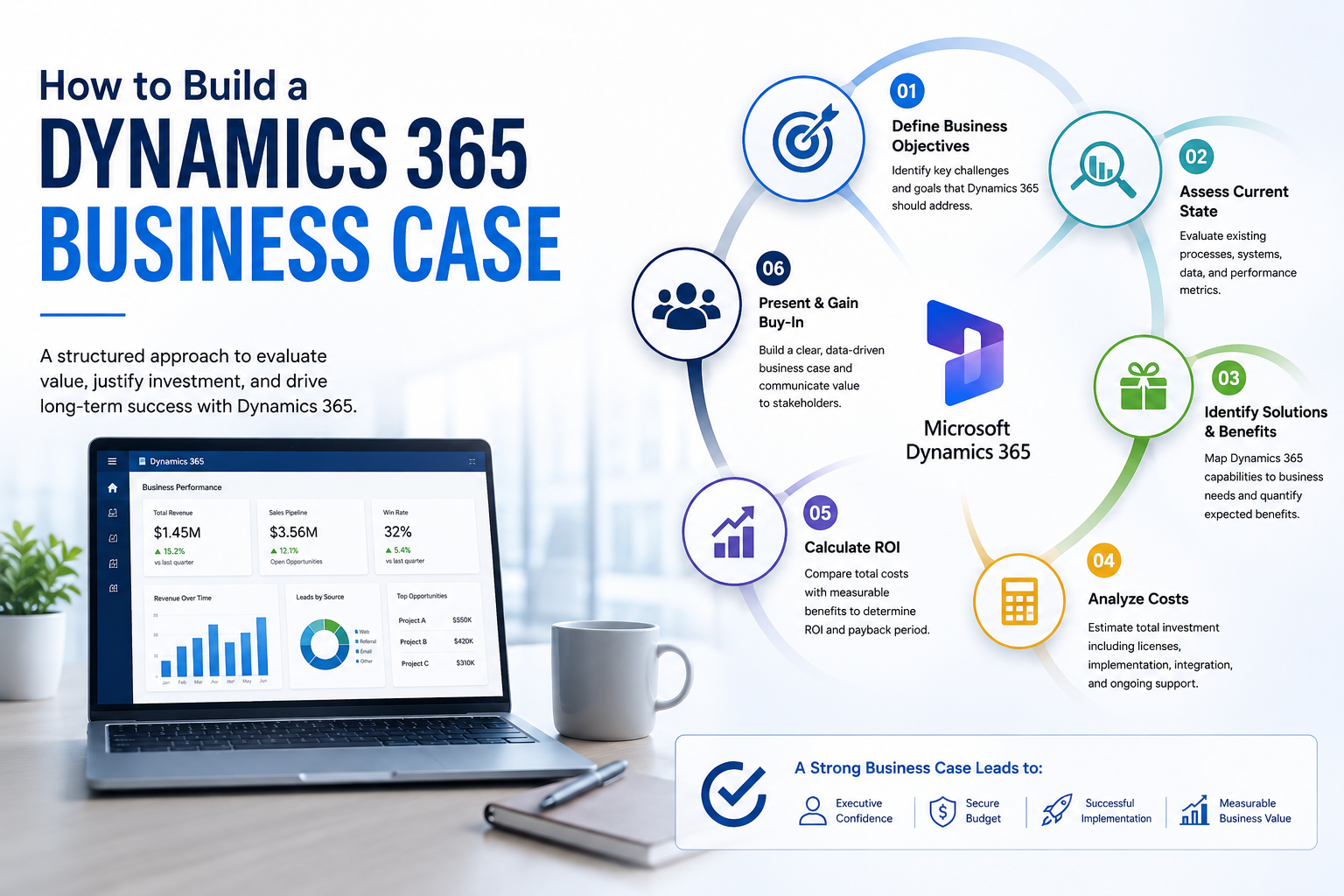
How to Build a Dynamics 365 Business Case
Before approving a Dynamics 365 project, leadership should create a business case based on measurable outcomes.
Step 1: Establish the baseline
Document current:
- Revenue
- Conversion rates
- Sales cycle
- Employee productivity
- Customer service metrics
- Reporting time
- Manual processes
- Technology costs
Step 2: Identify improvement opportunities
Estimate realistic improvements rather than assuming maximum results.
For example:
- 10% reduction in administrative work
- 15% faster lead response
- 10% reduction in sales cycle
- 20% faster reporting
- 15% reduction in manual data entry
Step 3: Assign financial values
Convert those improvements into financial estimates.
For example:
Hours saved × employee cost = productivity savings
And:
Additional sales × average contribution margin = incremental business value
Step 4: Calculate total investment
Include implementation, licenses, integrations, migration, training, and ongoing support.
Step 5: Calculate payback period
A useful executive metric is:
Payback Period = Total Investment ÷ Annual Financial Benefit
A shorter payback period generally makes the business case easier to justify.
How Sky Soft Connections Can Help With Dynamics 365
Implementing Dynamics 365 successfully requires more than installing a CRM.
Sky Soft Connections helps businesses design, implement, customize, integrate, and optimize Microsoft business solutions around their actual operational requirements.
Its services include:
- Microsoft Dynamics 365 CRM
- Microsoft Power Apps
- Power Automate
- Power BI
- Power Pages
- Power Virtual Agents
- SSRS reporting
- Data migration
- Custom .NET portals
- Azure solutions
This approach allows organizations to connect CRM, automation, reporting, portals, and cloud technologies instead of treating each system as a separate investment.
For mid-market and enterprise organizations, the objective should be straightforward:
Build a Dynamics 365 environment that improves measurable business outcomes not simply a system with more features.
Common Dynamics 365 ROI Mistakes
Even a powerful platform can produce disappointing ROI when implementation is poorly planned.
Avoid these common mistakes:
Focusing only on license costs
Software pricing does not represent the complete investment.
Measuring only implementation completion
A project being delivered on time does not automatically mean it generated business value.
Ignoring user adoption
If employees continue using spreadsheets and disconnected tools, expected ROI will decline.
Over-customizing the platform
Excessive customization can increase complexity, maintenance requirements, and long-term costs.
Failing to establish KPIs
Without baseline metrics, it becomes difficult to prove whether the implementation delivered value.
Treating data migration as an afterthought
Poor-quality data can undermine CRM adoption and reporting from day one.
Read more : The License Audit Nobody Runs: How Companies Overpay for Dynamics 365 and Power Platform
Frequently Asked Questions About Dynamics 365 ROI
Yes, it can be worth the investment when the business has complex sales, service, reporting, automation, or integration requirements. The decision should be based on expected business value rather than license price alone.
Calculate the total financial and operational benefits generated by Dynamics 365, subtract the total investment, and divide the result by the investment. Include licensing, implementation, migration, training, support, productivity gains, revenue improvements, and cost reductions.
The timeframe varies considerably. Some organizations see benefits shortly after automating manual processes, while broader CRM transformation may take longer as adoption, data quality, and process improvements mature.
The biggest factors typically include user adoption, implementation quality, process automation, data quality, integration, customization, and how clearly the project is aligned with business objectives.
Not necessarily for every organization. Dynamics 365 becomes particularly compelling when a business needs broader CRM capabilities, automation, analytics, integrations, scalability, and a connected Microsoft technology ecosystem.
Final Verdict: Is Dynamics 365 Worth It?
For many mid-market and enterprise organizations, Dynamics 365 can be a strong investment but only when ROI is measured against real business outcomes.
The platform itself does not create ROI automatically.
Instead, value comes from reducing manual work, improving sales productivity, strengthening customer relationships, connecting business data, automating processes, and giving leaders better information for decision-making.
Therefore, before investing, build a clear business case around:
Current costs → Business problems → Expected improvements → Financial value → Total investment → Payback period
That framework gives leadership a much more useful answer than simply asking, “How much does Dynamics 365 cost?”
The better question is:
“How much is our current way of working costing us—and how much of that cost can Dynamics 365 realistically eliminate?”