Table of Content
Your sales team wants better follow-ups. Meanwhile, finance needs accurate invoices, and operations wants reliable stock information. Should you solve these problems with one Microsoft application or two?
Choose Dynamics 365 Sales when your main challenge is managing leads, relationships and your sales pipeline. Choose Business Central when you need connected finance, purchasing, inventory and order processing. Consider both when complex selling and operational handovers need to work together.
However, the right decision depends on where work breaks down. This Dynamics 365 Sales vs Business Central comparison explains how to choose using practical business scenarios.
What Is the Difference Between Dynamics 365 Sales and Business Central?
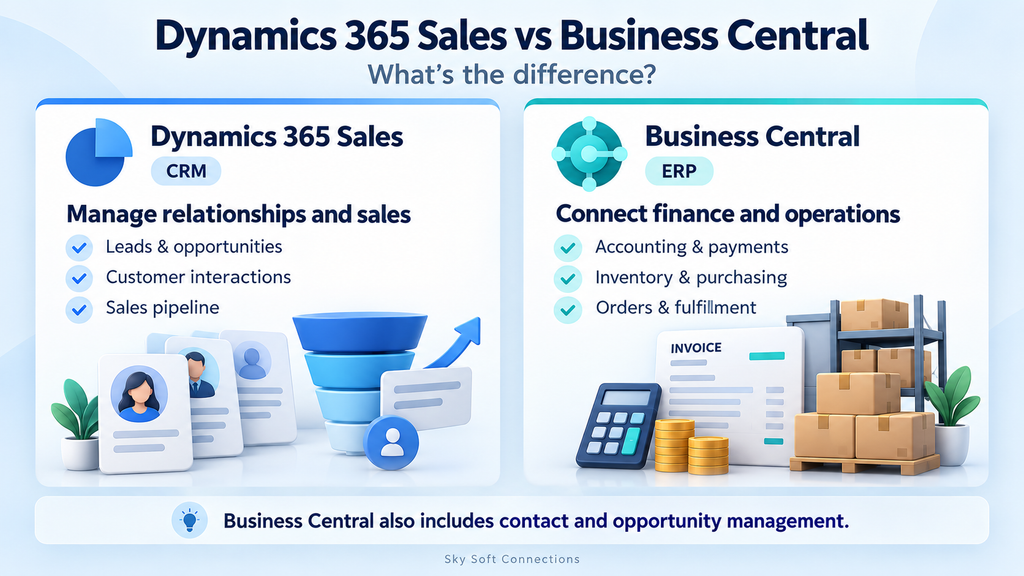
Dynamics 365 Sales is a customer relationship management (CRM) application focused on selling. It helps teams manage accounts, contacts, leads and opportunities. Depending on the edition, it also provides forecasting and more advanced sales capabilities.
Business Central is an enterprise resource planning (ERP) application. It connects financial management with processes such as purchasing, inventory, sales orders and project management.
However, Business Central also includes relationship management, interactions and sales opportunities. Therefore, the choice is not simply “CRM features versus no CRM features”; it is about the depth of sales functionality your team needs.
| Business requirement | Dynamics 365 Sales | Business Central |
|---|---|---|
| Customer relationship management | Dedicated environment for sales teams | Built-in relationship management alongside operations |
| Leads and opportunities | Core sales pipeline functionality | Opportunity tracking within relationship management |
| Sales forecasting | Capabilities depend on the Sales edition | Assess available opportunity and reporting tools against your needs |
| Quotes and orders | Supports sales documents within the selling process | Connects documents with fulfilment and financial processing |
| Accounting and payments | Does not replace an accounting system | Core financial management functionality |
| Purchasing and inventory | Requires another system for these operations | Core operational functionality |
| Best starting point | Missed follow-ups and poor pipeline visibility | Disconnected finance, stock and order processing |
When Is Dynamics 365 Sales the Better Starting Point?
Start with Dynamics 365 Sales when winning and managing opportunities is the main problem, while your existing accounting or ERP system still meets your needs.
For example, imagine a consultancy where enquiries arrive through referrals, website forms and email. Salespeople keep separate spreadsheets, so managers struggle to identify stalled proposals.
In this situation, prioritise a consistent sales process:
- Assign an owner to every qualified enquiry.
- Record the customer’s requirements and key contacts.
- Define opportunity stages and clear qualification criteria.
- Give each active deal a next action and follow-up date.
- Review pipeline progress in a shared sales workspace.
However, software alone will not fix unclear responsibilities. Agree on what makes a lead qualified before configuring the system.
Practical test: Can your sales manager identify the owner, next action and expected closing date for each important opportunity? If not, investigate your CRM process first.
When Can Business Central Be Enough?
Business Central may be enough when sales are relatively straightforward and operational control is the bigger challenge.
For instance, a distributor may receive repeat orders from established customers. Its biggest problems might involve stock discrepancies, purchasing delays and invoices that require manual correction.
Here, a separate sales CRM may add less value than a well-configured ERP. Business Central can bring the commercial transaction and its financial consequences into a connected process.
Moreover, its relationship management features may cover the team’s contact and opportunity tracking needs.
Before adding Dynamics 365 Sales, demonstrate a real workflow in Business Central: record an opportunity, prepare a quote, process an order and invoice the customer. Then ask users to identify specific gaps.
Practical test: If the team can manage its sales work comfortably and the remaining problems concern fulfilment or accounting, focus on Business Central first.
When Do You Need Both Dynamics 365 Sales and Business Central?
Consider both when you need dedicated sales management and a connected operational system, especially when staff repeatedly re-enter information between them.
For example, imagine an equipment supplier with lengthy negotiations, several buyer contacts and complex delivery requirements. Sales needs visibility into relationships and deal progress. Meanwhile, operations needs accurate orders, stock and financial records.
A proposed division of responsibilities could look like this:
| Process | Proposed primary system |
|---|---|
| Enquiries, qualification and opportunity ownership | Dynamics 365 Sales |
| Customer conversations and sales follow-ups | Dynamics 365 Sales |
| Item records and operational pricing rules | Business Central |
| Order fulfilment, purchasing and inventory | Business Central |
| Posted invoices and payments | Business Central |
This is a starting design, not a universal integration mapping. In particular, decide where quotations originate and who approves commercial changes.
Microsoft supports integration between the applications, including shared customer information and configured sales-document processes. However, the connection requires setup, record matching and agreed synchronisation rules.
How Do You Avoid Common CRM and ERP Integration Problems?
Connecting the applications is only part of the work. Before rollout, resolve these practical questions.
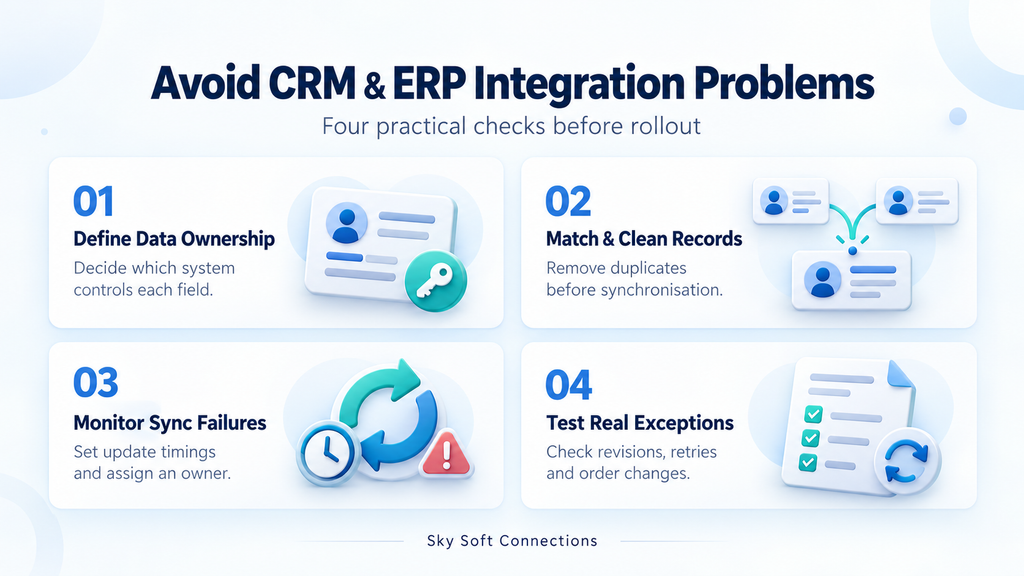
1. Which System Owns Each Field?
For example, finance may control payment terms while sales maintains prospect details. Document ownership at field level so that one team’s update does not overwrite another team’s approved information.
Also, define when a prospect should become an ERP customer. Otherwise, you may fill the customer list with enquiries that never progress.
2. How Will You Match Existing Records?
A customer might appear under an abbreviated name in CRM and a legal name in ERP. Therefore, agree on matching rules and remove duplicates before the first synchronisation.
Do not rely on company names alone when more reliable identifiers are available.
3. What Happens When Synchronisation Fails?
Scheduled synchronisation does not mean every change appears instantly. Microsoft documents recurring integration jobs, so confirm the timing your workflow needs.
Additionally, assign someone to monitor failures and resolve missing products, mismatched units or incomplete customer details.
4. Have You Tested Exceptions?
Test more than one successful order. For example, include a revised quote, changed delivery address, discount and retry after a failed transfer.
Then verify that the process creates the intended records without duplicate orders or conflicting updates.
How Should You Compare Implementation Costs?
Compare the cost of the working process, not just the subscription.
Alongside licences, assess data cleanup, configuration, integrations, training and ongoing support. Moreover, confirm which users need which capabilities before selecting editions.
For a practical comparison, ask providers to demonstrate the same three workflows:
- A new enquiry progressing to an accepted order.
- An existing customer placing a repeat order.
- A customer changing an order after the initial handover.
Then compare manual steps, missing information and implementation effort. This reveals more than a feature checklist alone.
How Can Sky Soft Connections Help?
Sky Soft Connections offers Dynamics CRM and Power Platform services, alongside CRM and ERP integration and data migration.
For this decision, bring the team a real example of where your current process fails. For instance, show how an accepted proposal becomes an order and where employees copy information manually.
Then discuss requirements, data ownership and integration scope before committing to a solution.
Contact Sky Soft Connections to discuss whether Dynamics 365 Sales, Business Central or a connected setup fits your business workflow.
Read more : Dataverse vs SharePoint Lists: Which Should You Use for Power Apps?
Frequently Asked Questions
Business Central is primarily an ERP, but it includes relationship management and opportunity tracking. Therefore, some businesses can meet their sales requirements without adding a separate CRM.
No. Although it supports sales documents, Dynamics 365 Sales does not replace the financial management functions of an accounting or ERP system.
No. Integration requires configuration and supported mappings. Consequently, validate the fields, document flows and update timing your business needs before rollout.
Conclusion: Choose Around Your Biggest Process Gap
Choose Dynamics 365 Sales when sales visibility and follow-up need attention. Choose Business Central when finance and operations need a stronger foundation. If both problems exist, assess a connected implementation.
Before deciding, trace one customer journey from enquiry to payment. The points where people lose information, repeat work or wait for answers will help you identify the right starting point.
 is a software solution company that was established in 2016. Our quality services begin with experience and end with dedication. Our directors have more than 15 years of IT experience to handle various projects successfully. Our dedicated teams are available to help our clients streamline their business processes, enhance their customer support, automate their day-to-day tasks, and provide software solutions tailored to their specific needs. We are experts in Dynamics 365 and Power Platform services, whether you need Dynamics 365 implementation, customization, integration, data migration, training, or ongoing support.