
Overview
Data migration from Microsoft Dynamics 365 CRM to Odoo is a common requirement when organizations adopt Odoo for ERP or customer management needs. This article explains two practical approaches for migrating data—using a paid connector and a free/custom solution—both implemented with SQL Server Integration Services (SSIS).
The focus of this migration is on Contact data, but the same approach can be extended to other entities.
1. Data Import Using SSIS
SSIS is a powerful Microsoft ETL (Extract, Transform, Load) tool that enables data movement, transformation, validation, and error handling. In this implementation:
- Source System: Dynamics 365 CRM
- Destination System: Odoo
- Initial Dataset: Contacts
Two different methods were used to achieve the migration.
Method 1: Using the CData Odoo Connector (Paid Connector)
Description
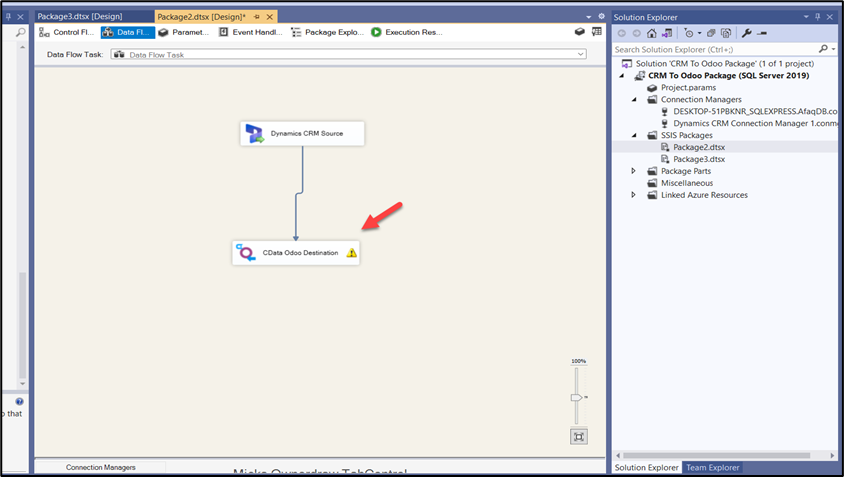
This approach uses the CData Odoo Connector with SSIS to enable bulk data import from Dynamics 365 CRM to Odoo.
- Dynamics 365 CRM is configured as the source.
- Odoo is configured as the destination.
- The CData connector provides built-in connectivity between SSIS and Odoo.
Key Features
- Minimal custom coding
- Easy field mapping through SSIS
- Built-in data transformation and validation
- Reliable error handling
- Faster implementation
Implementation Notes
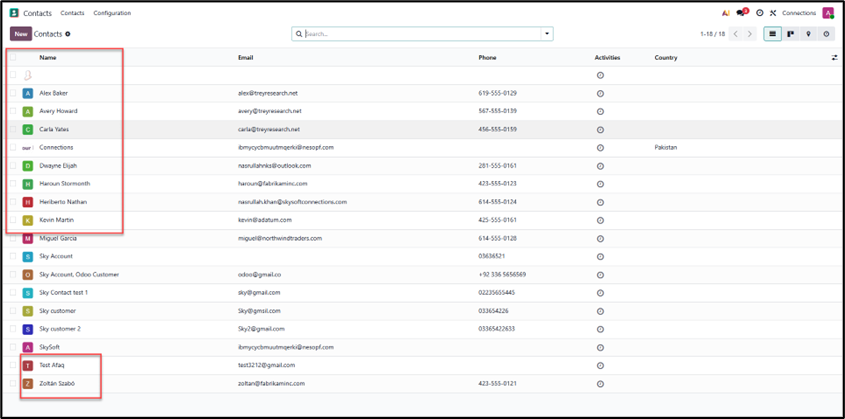
The migration was tested using the CData Odoo Connector. Using SSIS, contact records were successfully extracted from CRM, transformed as required, and loaded into Odoo.
This method is ideal for production environments where stability, support, and reduced development effort are priorities.
Important Note
The CData Odoo Connector is a licensed component. After the trial period expires, a paid subscription is required to continue using this connector.
Method 2: Using SSIS Script Component (Free / Custom Solution)
Description
As an alternative to paid connectors, a custom SSIS Script Component was implemented for proof-of-concept purposes.
This method uses:
- SSIS built-in components
- Custom C# scripting
- Direct Odoo API integration
C# Scripting:
using System;
using System.Net.Http;
using System.Text;
using System.Windows.Forms;
using Microsoft.SqlServer.Dts.Pipeline.Wrapper;
using Microsoft.SqlServer.Dts.Runtime.Wrapper;
[Microsoft.SqlServer.Dts.Pipeline.SSISScriptComponentEntryPointAttribute]
public class ScriptMain : UserComponent
{
private static readonly HttpClient client = new HttpClient();
private string odooUrl = “{baseurl}/jsonrpc”;
public override void Input0_ProcessInputRow(Input0Buffer Row)
{
// Construct the JSON payload
// Using string interpolation for simplicity
string jsonPayload = @”
{
“”jsonrpc””: “”2.0″”,
“”method””: “”call””,
“”params””: {
“”service””: “”object””,
“”method””: “”execute_kw””,
“”args””: [
“”{database}””,
2,
“”{APIKEY}””,
“”res.partner””,
“”create””,
[
{
“”name””: “”” + Row.fullname + @”””,
“”email””: “”” + Row.emailaddress1 + @”””,
“”phone””: “”” + Row.mobilephone + @”””
}
]
]
},
“”id””: 1
}”;
try
{
var content = new StringContent(jsonPayload, Encoding.UTF8, “application/json”);
var response = client.PostAsync(odooUrl, content).Result;
if (!response.IsSuccessStatusCode)
{
// Log error if needed
bool cancel = false;
ComponentMetaData.FireError(0, “Odoo API”, “Failed to create record: ” + response.ReasonPhrase, “”, 0, out cancel);
}
}
catch (Exception ex)
{
bool cancel = false;
ComponentMetaData.FireError(0, “Odoo API”, ex.Message, “”, 0, out cancel);
}
}
}
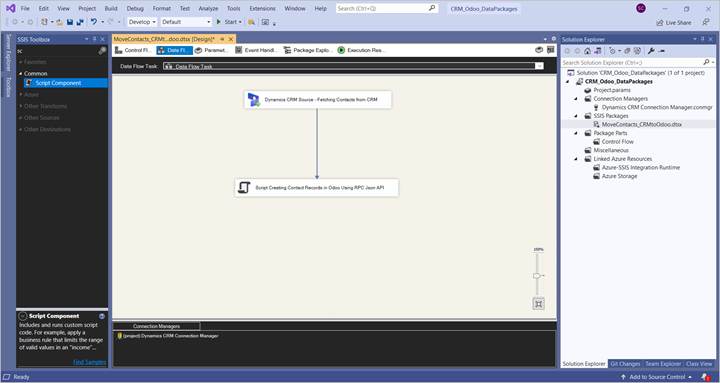
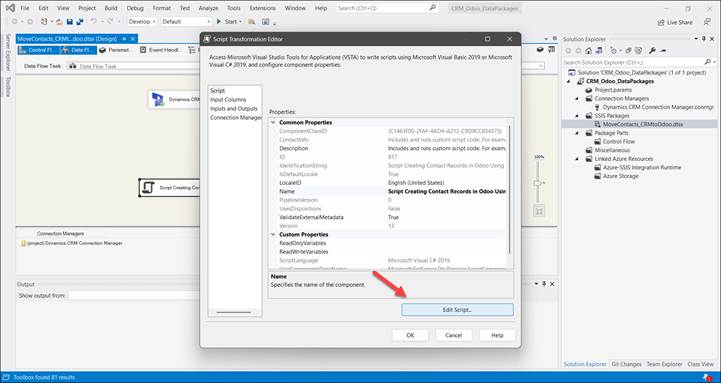
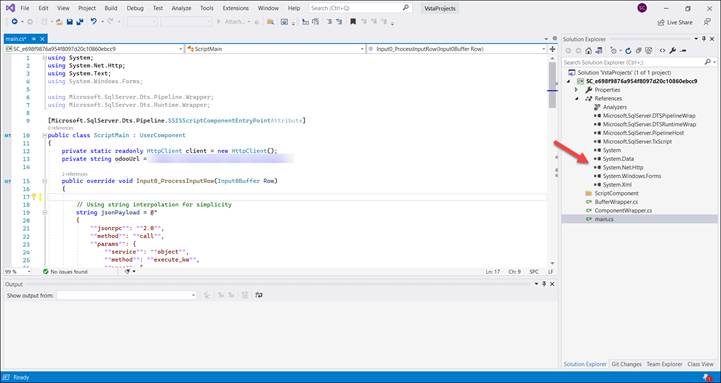
Note: In the scripting, we need to add a reference to System.Net.Http, as the scripting does not support NuGet package references.
Key Features
- No third-party licensing cost
- Full control over data flow logic
- Custom field mapping
- Flexible transformation rules
- Batch processing support
- Robust error handling
Considerations
While this approach avoids licensing costs, it requires:
- Manual API integration
- Custom C# development
- Ongoing maintenance
- More development and testing effort
This method is best suited for organizations with strong technical resources or for environments where licensing cost is a concern.
Comparison Summary
| Aspect | CData Connector (Paid) | Script Component (Free) |
| Cost | Paid (Trial available) | Free |
| Setup Time | Fast | Longer |
| Coding Required | Minimal | High |
| Maintenance | Low | Medium to High |
| Scalability | High | High (with effort) |
| Best For | Production use | Custom or budget-driven solutions |
Conclusion
Both approaches successfully migrated contact data from Dynamics 365 CRM to Odoo using SSIS:
- The CData Connector provides a fast, reliable, and low-maintenance solution suitable for production environments.
- The Script Component approach offers a cost-effective alternative with greater flexibility but requires more development effort.
The final choice depends on budget, technical expertise, and long-term maintenance considerations. Book a Free Consultation with Skysoft connections
Read more : dataverse mcp vs custom connectors api call savings
FAQ’s
Yes, SSIS can be used with either a paid connector or a custom API-based solution.
No. It simplifies the process but requires a license after the trial period.
It can be, but it needs strong technical expertise and ongoing maintenance.
Yes, the same method can be extended to leads, accounts, and other CRM entities.