Table of Content
- What Is CRM Downtime?
- Why CRM Downtime Is More Expensive Than It Looks
- How to Calculate the Business Cost of CRM Downtime
- The Hidden Costs Leadership Teams Often Miss
- CRM Business Continuity Checklist for Leadership
- How Microsoft Business Solutions Can Improve CRM Resilience
- How Sky Soft Connections Can Help
- Questions Leadership Should Ask Before the Next CRM Outage
- FAQ’s
- Final Takeaway: Treat CRM Availability as a Business Priority
CRM systems have become the operational backbone of modern businesses. Sales teams use them to manage opportunities, customer service teams track cases, marketing teams manage campaigns, and leadership relies on CRM data to make informed decisions.
However, what happens when your CRM goes down?
The immediate problem may appear to be a technical outage. In reality, CRM downtime can quickly become a business continuity problem. Lost productivity, delayed customer responses, missed sales opportunities, data access issues, and operational disruption can continue long after the system comes back online.
For leadership teams, therefore, the key question is not simply “How quickly can IT restore the CRM?” It is:
“How much business risk are we exposed to while the CRM is unavailable?”
This guide explains the real cost of CRM downtime and provides a practical CRM business continuity checklist that leadership teams can use to improve resilience.
What Is CRM Downtime?
CRM downtime occurs when users cannot access critical customer relationship management systems or when important CRM functions become unavailable.
Downtime can result from:
- Cloud service outages
- Network or connectivity failures
- Cybersecurity incidents
- Failed integrations
- Software updates or configuration errors
- Database problems
- Authentication issues
- Third-party service disruptions
- Human error
Importantly, downtime does not always mean the entire CRM is offline. A critical integration, workflow, reporting function, or customer portal can fail while the core platform remains accessible.
That is why organizations should evaluate business impact, rather than measuring downtime only by the number of minutes a system is unavailable.
Why CRM Downtime Is More Expensive Than It Looks
The obvious cost of downtime is lost employee productivity. However, that is only one part of the equation.
Consider a sales representative who cannot access customer records for two hours. They may lose more than two hours of productivity because a scheduled follow-up could be missed, an opportunity could go cold, or a customer may receive a delayed response.
Similarly, a customer service team without access to case history may struggle to resolve urgent issues.
The real cost can include:
| Cost Area | Potential Business Impact |
|---|---|
| Employee productivity | Teams cannot access customer records or workflows |
| Lost sales | Opportunities and follow-ups may be delayed |
| Customer experience | Responses and issue resolution become slower |
| Operational disruption | Manual processes replace automated workflows |
| Data risk | Temporary records may create duplication or inconsistencies |
| Reputation | Customers may lose confidence in service reliability |
| Compliance | Missing or delayed records can create governance risks |
| Recovery costs | IT teams may spend significant time restoring operations |
Therefore, leadership should view CRM availability as a business continuity requirement, not simply an IT performance metric.
How to Calculate the Business Cost of CRM Downtime
There is no universal cost for one hour of CRM downtime. The impact depends on company size, revenue, number of users, business processes, integrations, and customer dependency on the platform.
A simple starting formula is:
Estimated Downtime Cost = Lost Productivity + Lost Revenue + Recovery Costs + Customer Impact
For example, consider an organization with 100 CRM users.
If the average fully loaded employee cost is $40 per hour and all users are affected:
100 × $40 = $4,000 per hour in direct productivity cost
However, the actual business impact could be considerably higher once missed sales opportunities, customer delays, manual recovery work, and operational disruption are included.
For leadership, this calculation provides an important starting point: What is one hour of CRM downtime actually worth to our organization?
The Hidden Costs Leadership Teams Often Miss
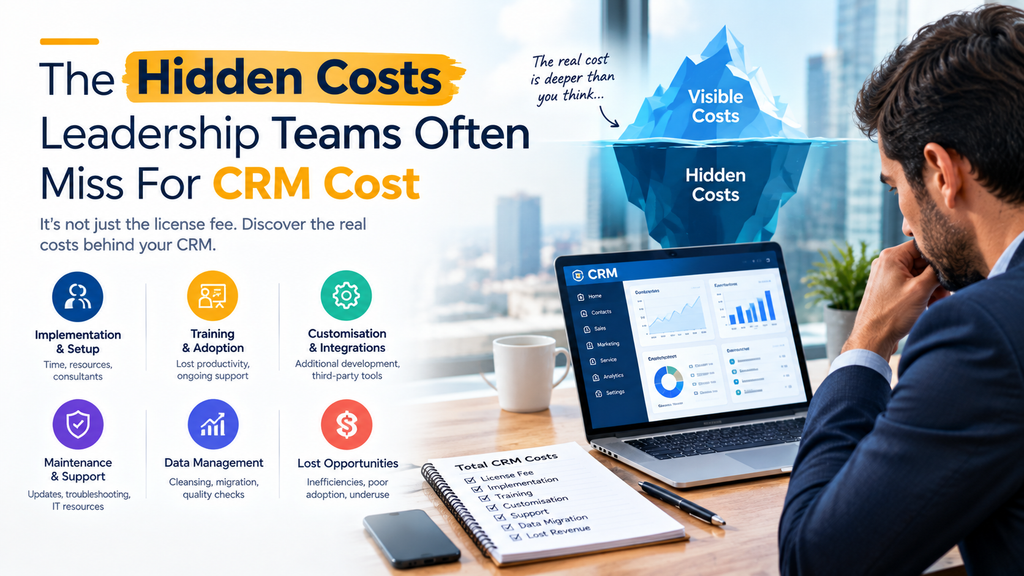
Some downtime costs are difficult to measure because they appear after the system has been restored.
1. Lost Sales Opportunities
Sales teams depend on accurate customer information, opportunity stages, tasks, quotations, and follow-up reminders.
During an outage, representatives may postpone activities. As a result, prospects can experience delays at precisely the wrong moment in the buying journey.
2. Manual Workarounds
When CRM automation stops, employees often move to spreadsheets, emails, documents, or notes.
Although these workarounds keep operations moving temporarily, they can create:
- Duplicate customer records
- Missing information
- Data-entry errors
- Untracked activities
- Version-control problems
Consequently, restoring the CRM does not automatically restore data consistency.
3. Customer Experience Problems
Customers do not care whether the problem is caused by a database, API, authentication service, or integration.
They simply expect the business to have their information available.
If support agents cannot access customer history, previous cases, contracts, or account information, service quality can decline quickly.
4. Management Decision Delays
Leadership teams increasingly rely on CRM dashboards and business intelligence for forecasting and operational decisions.
If CRM data becomes unavailable or unreliable, management may have to make decisions using outdated information.
CRM Business Continuity Checklist for Leadership
A strong CRM continuity strategy should answer five basic questions:
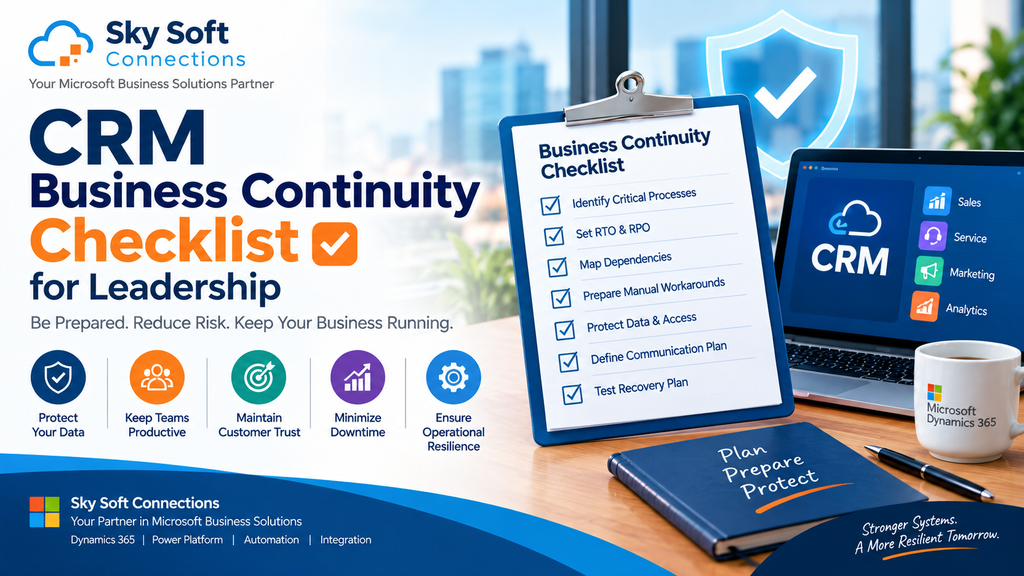
What can fail? What will be affected? How quickly must we recover? What happens during the outage? And who is responsible?
Use the following checklist as a starting point.
1. Identify Critical CRM Processes
Start by documenting the business processes that depend on your CRM.
For example:
- Lead capture and qualification
- Opportunity management
- Sales forecasting
- Customer service
- Case management
- Marketing automation
- Customer communications
- Contract management
- Reporting and dashboards
- Workflow automation
Next, classify each process according to its business importance.
2. Define Your RTO and RPO
Two important business continuity metrics are Recovery Time Objective (RTO) and Recovery Point Objective (RPO).
RTO: How quickly must the system or process be restored?
RPO: How much data loss can the business tolerate?
For example:
| Business Requirement | Example Target |
|---|---|
| Critical customer service | RTO: 1 hour |
| Sales operations | RTO: 2 hours |
| Management reporting | RTO: 8 hours |
| Acceptable data loss | RPO: 15–60 minutes |
The correct targets depend on the organization. However, defining them forces leadership to connect technical recovery with business priorities.
3. Map CRM Dependencies
Modern CRM platforms rarely operate alone.
Your CRM may connect with:
- ERP systems
- Marketing platforms
- Email services
- Telephony systems
- Payment platforms
- Customer portals
- Data warehouses
- Power Platform applications
- APIs and third-party applications
- Identity and authentication services
Therefore, document what happens if each dependency becomes unavailable.
A CRM may remain online while a critical integration silently stops processing data.
4. Establish Manual Continuity Procedures
Ask each department:
“What would you do if the CRM became unavailable for four hours?”
Create documented procedures for critical activities.
For example, sales teams may need temporary lead and follow-up tracking, while customer service teams may require access to essential customer information through an approved backup process.
The objective is not to recreate the entire CRM manually. Instead, focus on keeping the most critical operations running until normal service is restored.
5. Protect Data and Access
Business continuity also depends on data protection.
Leadership should confirm:
- Backup and recovery procedures are documented
- Access permissions are reviewed regularly
- Critical data can be recovered
- Authentication dependencies are understood
- Recovery procedures are tested
- Security incidents have an escalation process
Furthermore, backup strategies should be tested rather than simply assumed to work.
6. Define Communication Responsibilities
During a major outage, communication can become chaotic.
Assign responsibility for:
- Internal employee updates
- Customer communication
- IT escalation
- Executive reporting
- Vendor communication
- Incident documentation
A clear communication structure prevents multiple teams from providing conflicting information.
7. Test the Recovery Plan
A business continuity plan that has never been tested is only a document.
Run controlled exercises that simulate scenarios such as:
- CRM unavailable for several hours
- Integration failure
- Cybersecurity incident
- Authentication outage
- Data corruption
- Third-party API failure
After every exercise, document what worked, what failed, and what needs improvement.
How Microsoft Business Solutions Can Improve CRM Resilience
For organizations using Microsoft Dynamics 365, business continuity can extend beyond the CRM platform itself.
Connected technologies such as Microsoft Power Platform, Power Automate, Dataverse, Azure, Microsoft 365, and Power BI can support automation, integrations, reporting, and operational workflows.
However, the more connected systems an organization uses, the more important dependency mapping and governance become.
This is where the right technology architecture matters.
How Sky Soft Connections Can Help
Sky Soft Connections helps organizations design and implement Microsoft-based business solutions that connect CRM, automation, data, and business processes.
Its services can support organizations looking to improve CRM operations and digital resilience through:
- Microsoft Dynamics 365 implementation and customization
- Power Platform solutions
- Power Automate workflow automation
- Dataverse-based business applications
- Microsoft Power BI reporting and dashboards
- AI-powered business automation
- Custom CRM integrations and APIs
- Business process automation
- CRM optimization and support
Rather than treating CRM as an isolated application, businesses can build a connected technology environment where critical processes, integrations, data, and automation are designed around business requirements.
For leadership teams,
Questions Leadership Should Ask Before the Next CRM Outage
Before approving a CRM continuity plan, leadership should ask:
- Which business processes stop if our CRM becomes unavailable?
- How much revenue could be affected by one hour of downtime?
- What is our acceptable RTO and RPO?
- Which CRM integrations are business-critical?
- Can employees continue critical operations manually?
- How will customer-facing teams respond?
- How quickly will leadership be informed?
- When was our recovery process last tested?
- Can we recover critical data reliably?
- Who owns the business continuity plan?
If these questions do not have clear answers, your organization may have a CRM availability problem that is larger than the IT team alone can solve.
Read more : Controlling Entity Visibility in Dynamics 365 Using Sitemap Privileges (Part 1)
FAQ’s
The biggest cost depends on the organization. Lost productivity, missed sales, customer service disruption, manual recovery work, and reputational damage can all contribute to the total cost.
Businesses can reduce the impact of downtime by identifying critical processes, defining RTO and RPO targets, mapping dependencies, protecting data, documenting manual workarounds, establishing communication procedures, and regularly testing recovery plans.
RTO, or Recovery Time Objective, defines the maximum acceptable time required to restore a critical system or business process after disruption.
RPO, or Recovery Point Objective, defines the amount of data loss an organization can tolerate, usually expressed as a period of time.
Final Takeaway: Treat CRM Availability as a Business Priority
CRM downtime is not simply a technical inconvenience.
It can affect revenue, employee productivity, customer relationships, operational continuity, reporting, and management decisions. Moreover, the consequences can continue even after the CRM is restored.
The best time to build a CRM business continuity strategy is before the next outage.
By identifying critical processes, calculating downtime exposure, defining RTO and RPO, mapping dependencies, preparing fallback procedures, protecting data, and testing recovery plans, leadership can significantly reduce operational risk.
And with the right Microsoft technology strategy, businesses can go further by improving automation, integration, visibility, and resilience.
Sky Soft Connections can help organizations evaluate and modernize their Dynamics 365, Power Platform, automation, integration, and business application environment to create more resilient digital operations.
 is a software solution company that was established in 2016. Our quality services begin with experience and end with dedication. Our directors have more than 15 years of IT experience to handle various projects successfully. Our dedicated teams are available to help our clients streamline their business processes, enhance their customer support, automate their day-to-day tasks, and provide software solutions tailored to their specific needs. We are experts in Dynamics 365 and Power Platform services, whether you need Dynamics 365 implementation, customization, integration, data migration, training, or ongoing support.