
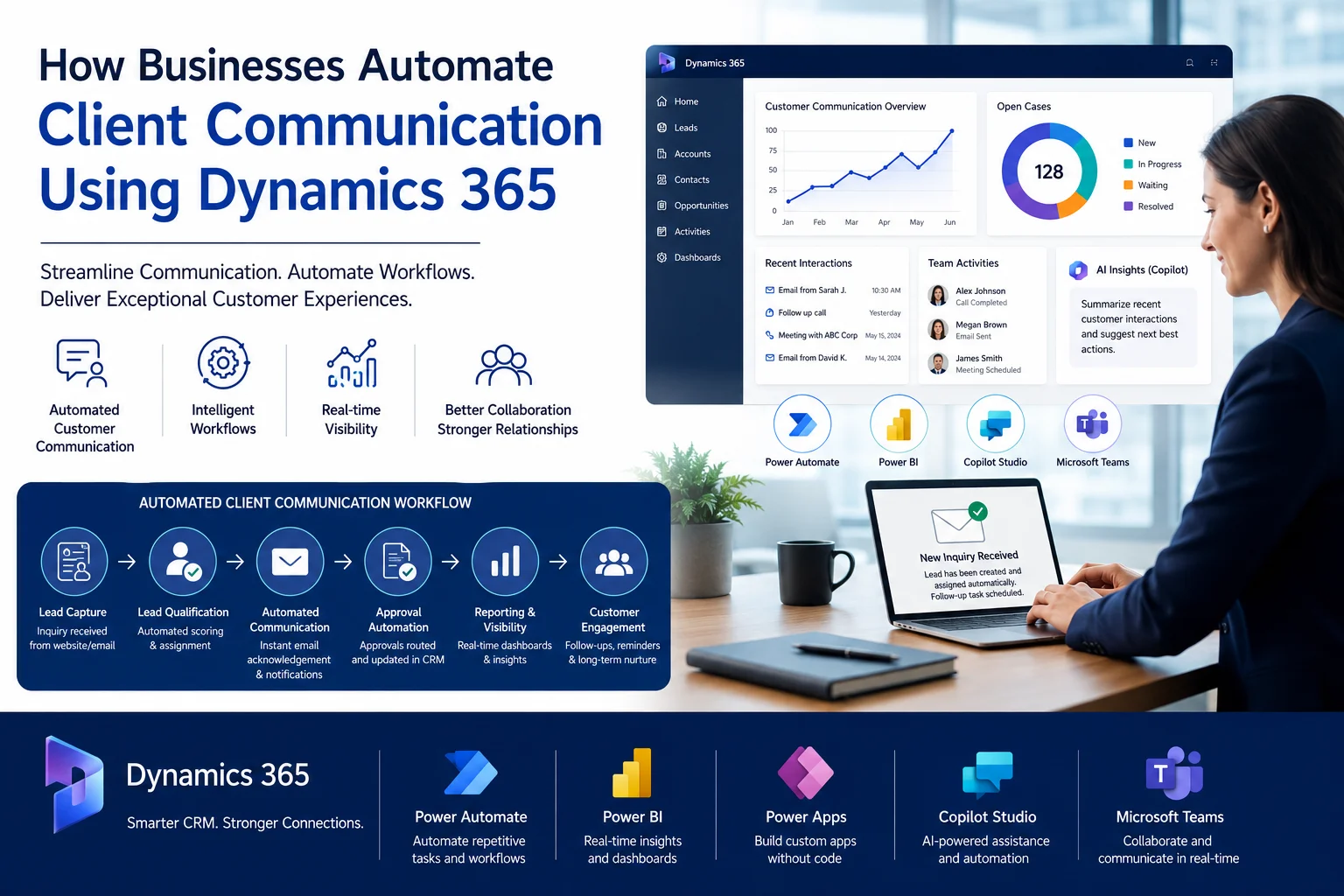
Modern businesses rarely struggle because of a lack of customers. Most operational issues happen because communication processes remain fragmented across emails, spreadsheets, disconnected systems, and manual follow-ups.
Sales teams miss lead responses. Customer service teams lose visibility. Managers struggle to track approvals. Meanwhile, customers expect faster communication, personalized engagement, and real-time updates.
This is exactly why organizations are increasingly investing in CRM automation platforms like Sky Soft Connections powered by Microsoft Dynamics 365 and the Microsoft Power Platform. These platforms help businesses automate customer interactions, approvals, reporting, notifications, and operational workflows while improving visibility across departments.
Understanding the Core Business Problem
Many organizations still depend on manual communication processes even after implementing CRM systems. As a result, teams waste time switching between tools instead of focusing on customers.
Common operational problems include:
- Sales inquiries sitting unanswered for hours
- Customer data duplicated across systems
- Approval requests delayed in email chains
- Lack of visibility into customer interactions
- Manual follow-up reminders
- Reporting delays caused by spreadsheet dependency
- Customer service teams working with outdated information
For example, a sales manager may receive leads through a website form, while customer service teams manage requests through Outlook emails and operations teams track approvals in Excel files. Consequently, nobody has a centralized view of the customer journey.
Over time, these disconnected processes create operational bottlenecks that directly impact customer experience and revenue growth.
Common Challenges Businesses Face
Businesses typically encounter the following CRM communication issues:
- Inconsistent customer data across departments
- Manual lead assignment processes
- Slow response times for customer inquiries
- Disconnected sales and service workflows
- Limited reporting visibility
- Repetitive administrative tasks
- Delayed internal approvals
- Lack of automated notifications
- Poor collaboration between departments
- Difficulty tracking customer interactions
- Limited scalability as operations grow
- Excessive spreadsheet dependency
Additionally, many businesses cannot measure communication performance accurately because reporting remains scattered across multiple systems.
Operational Impact of Manual CRM Processes
| Operational Problem | Business Impact |
|---|---|
| Delayed approvals | Slower sales cycles |
| Spreadsheet dependency | Higher error rates |
| Disconnected systems | Data inconsistency |
| Manual customer follow-ups | Missed opportunities |
| Poor reporting visibility | Weak decision-making |
| Slow lead response | Lower conversion rates |
| Duplicate data entry | Reduced productivity |
| Lack of automation | Increased operational costs |
As organizations scale, these inefficiencies become significantly more expensive.
How CRM Automation Solves These Problems
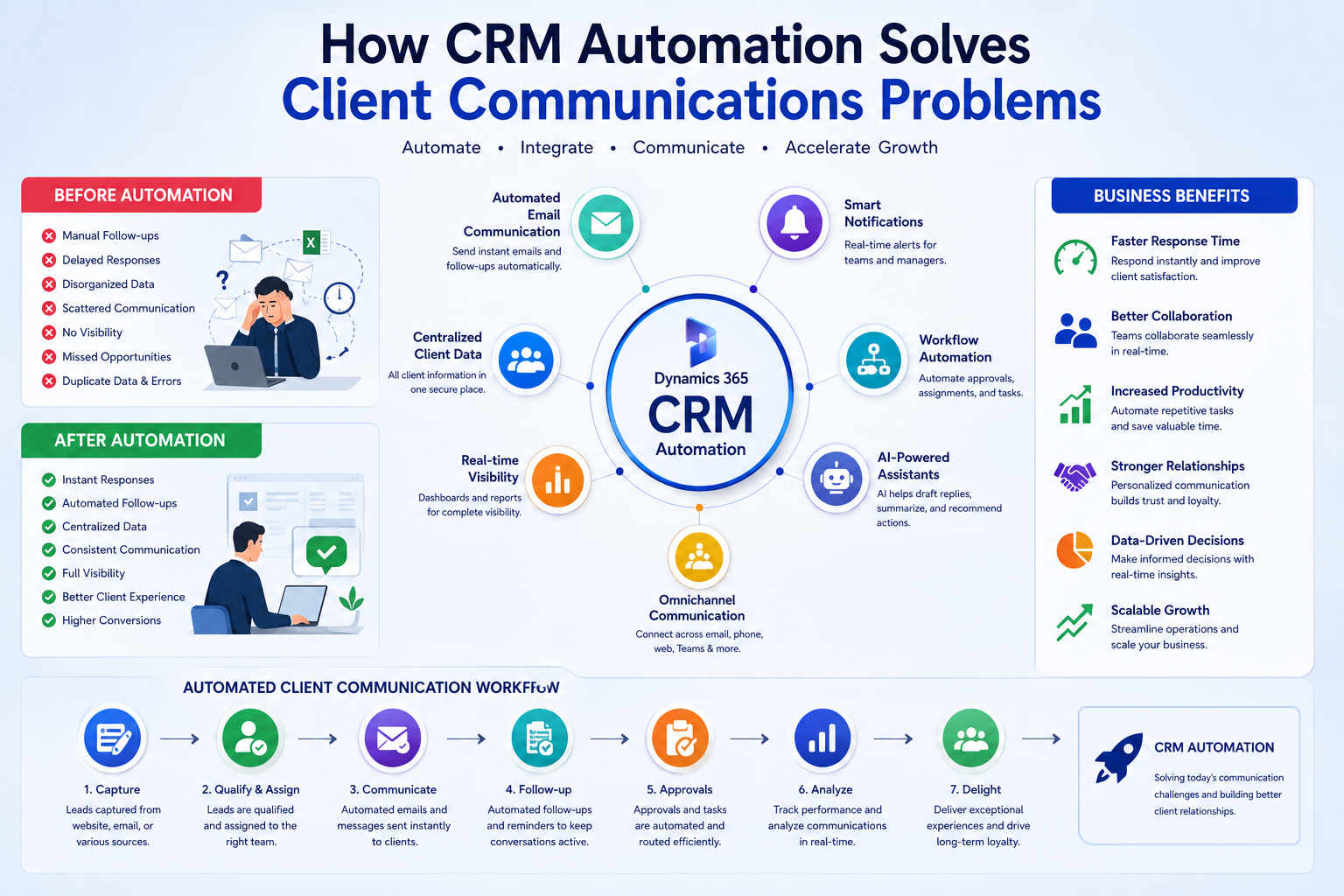
Businesses now use Microsoft Dynamics 365 together with tools from the Microsoft Power Platform to automate customer communication workflows from end to end.
At Sky Soft Connections, businesses implement automation solutions that centralize communication, improve operational visibility, and reduce manual workload.
Key Automation Capabilities
Dynamics 365 CRM
Businesses use Dynamics 365 to:
- Centralize customer data
- Track customer interactions
- Manage leads and opportunities
- Automate communication history
- Monitor sales activities
- Improve customer visibility
Because all departments access the same CRM data, communication becomes more consistent and transparent.
Power Automate Workflows
Microsoft Power Automate enables businesses to automate repetitive operational tasks.
Examples include:
- Automatic lead assignment
- Email notifications
- Approval routing
- Task creation
- Customer follow-up reminders
- Escalation workflows
- Document approvals
- CRM record synchronization
For instance, when a customer submits a website inquiry, Power Automate can:
- Create a lead in Dynamics 365
- Assign the lead to the correct sales representative
- Send an automated acknowledgment email
- Notify management in Microsoft Teams
- Schedule a follow-up task automatically
As a result, businesses reduce response delays significantly.
AI Powered CRM Automation
Organizations increasingly integrate Microsoft Copilot Studio into CRM operations to improve communication efficiency.
AI powered workflows can:
- Generate email responses
- Summarize customer conversations
- Recommend next actions
- Analyze customer sentiment
- Predict sales opportunities
- Automate knowledge retrieval
- Assist customer service teams
Consequently, businesses improve both response speed and customer experience.
Power BI Reporting
Microsoft Power BI helps organizations gain visibility into communication performance.
Businesses can monitor:
- Lead response times
- Customer engagement metrics
- Sales pipeline movement
- Team productivity
- Service resolution trends
- Approval bottlenecks
Therefore, management teams make faster and more informed decisions.
Microsoft Teams Integration
CRM automation becomes even more powerful when integrated with Microsoft Teams.
Businesses can:
- Receive real-time CRM notifications
- Conduct automated meeting scheduling
- Collaborate directly on customer records
- Share approval requests instantly
- Improve internal communication
This eliminates delays caused by disconnected communication channels.
Real Workflow Example
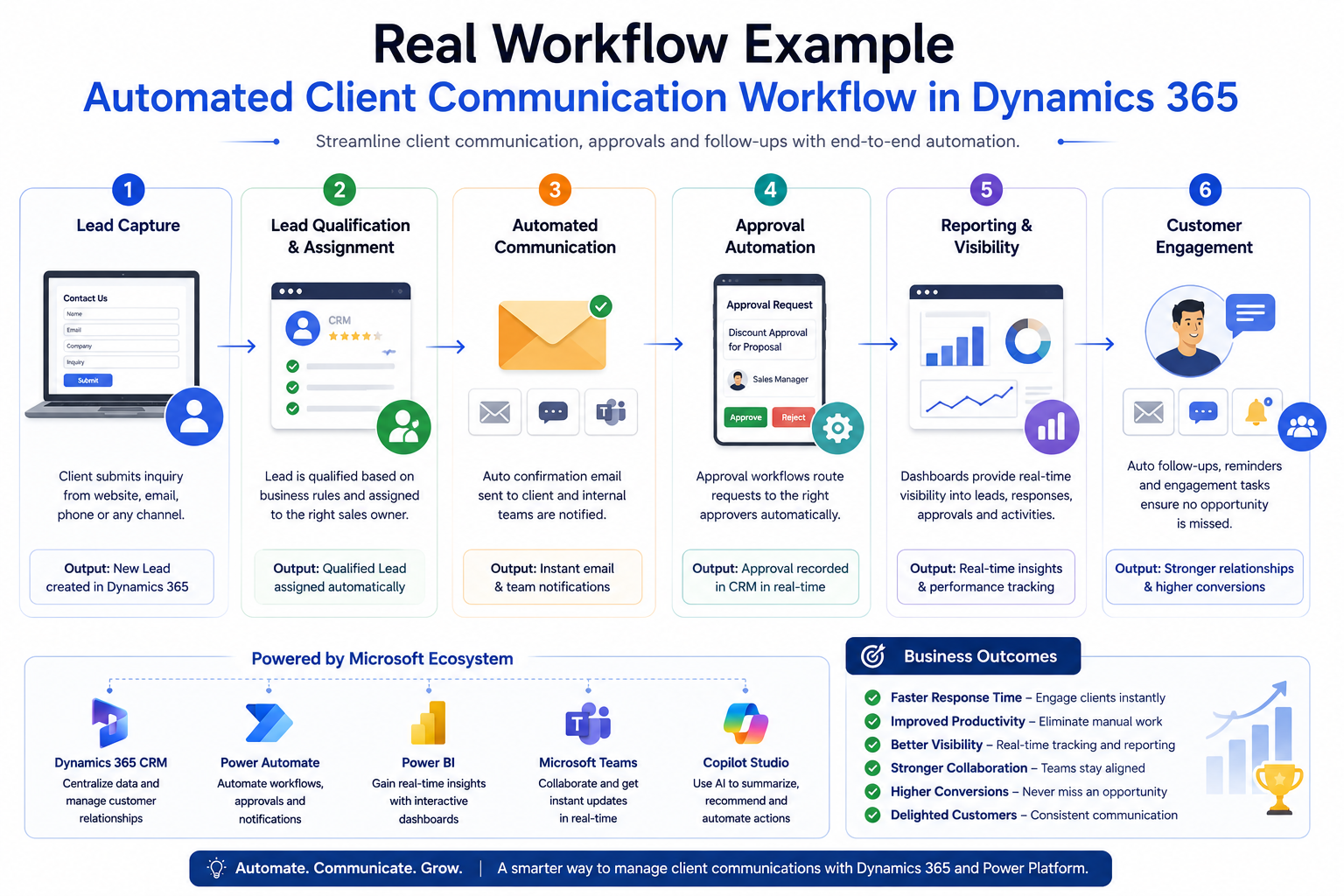
Automated Client Communication Workflow
Step 1: Lead Capture
A customer submits a website inquiry form.
The system automatically creates a lead inside Dynamics 365 CRM.
Step 2: Lead Qualification
Business rules analyze:
- Customer location
- Industry
- Service interest
- Priority level
The CRM automatically assigns the lead to the correct sales representative.
Step 3: Automated Communication
The customer immediately receives:
- A confirmation email
- Estimated response timelines
- Relevant company information
Meanwhile, sales teams receive instant notifications in Microsoft Teams.
Step 4: Approval Automation
If discounts or approvals are required:
- Power Automate routes approvals automatically
- Managers receive approval requests instantly
- Decisions sync directly back into Dynamics 365
Therefore, teams avoid long email approval chains.
Step 5: Reporting & Visibility
Management dashboards track:
- Lead status
- Response times
- Communication history
- Pipeline progression
- Team performance
As a result, leadership gains full operational visibility.
Step 6: Customer Engagement
The CRM continues automated engagement through:
- Follow-up reminders
- Scheduled emails
- Service notifications
- Customer satisfaction tracking
This creates a more consistent customer experience.
Best Practices for Successful CRM Automation
Businesses achieve better results when they follow structured implementation practices.
Recommended Best Practices
- Standardize customer data before automation
- Eliminate duplicate CRM records
- Define clear workflow ownership
- Automate repetitive processes first
- Use role-based security permissions
- Build centralized dashboards
- Integrate communication channels
- Use approval automation carefully
- Monitor workflow performance continuously
- Train users properly
- Start with scalable automation architecture
- Use AI capabilities strategically
Additionally, businesses should avoid overcomplicating workflows during the initial implementation phase.
Why AI Powered CRM Operations Are Becoming Important
AI powered CRM operations are transforming how businesses communicate with customers.
Modern organizations no longer want teams spending hours on repetitive administrative tasks. Instead, they expect intelligent systems that automate communication while improving operational visibility.
Businesses now use AI for:
- Intelligent lead scoring
- Automated customer communication
- Predictive sales insights
- Workflow recommendations
- Sentiment analysis
- AI generated summaries
- Conversational copilots
- Smart task prioritization
With platforms like Microsoft Copilot Studio, organizations can build intelligent assistants that support sales, operations, and customer service teams directly inside the Microsoft ecosystem.
Consequently, businesses improve productivity without increasing operational complexity.
Why Businesses Are Moving Toward Centralized CRM Platforms
Centralized CRM platforms provide far more than contact management.
Organizations now require:
- Scalable automation
- Cross-department visibility
- Centralized customer records
- Integrated communication
- Compliance support
- Advanced reporting
- Workflow standardization
- AI powered decision support
Because of this, businesses increasingly adopt integrated solutions built around Microsoft Dynamics 365 and the Microsoft Power Platform ecosystem.
Centralized systems help organizations improve:
- Customer experience
- Operational efficiency
- Communication consistency
- Reporting accuracy
- Business scalability
Furthermore, integrated CRM platforms reduce dependency on disconnected third-party tools.
Final Thoughts
Businesses no longer compete solely on products or pricing. Increasingly, they compete on operational speed, communication quality, and customer experience.
Manual CRM processes create delays, reduce visibility, and slow growth. However, organizations that implement intelligent automation workflows gain a major operational advantage.
With solutions powered by Microsoft Dynamics 365, Microsoft Power Automate, Microsoft Power BI, and Microsoft Copilot Studio, businesses can automate communication, improve customer engagement, and build scalable operations.
Sky Soft Connections helps organizations implement practical CRM automation strategies designed around real operational workflows, not generic software deployments.
Whether the goal is improving lead management, automating approvals, enhancing reporting visibility, or building AI powered customer engagement systems, the right CRM automation strategy can significantly improve business performance.
Read more : hr support assistant using microsoft copilot
FAQ’s
Dynamics 365 automates customer communication through workflows, email automation, notifications, approval routing, and AI powered engagement tools.
Power Automate reduces manual work by automating approvals, notifications, follow-ups, and repetitive CRM tasks.
Yes. Businesses can integrate Microsoft Teams with Dynamics 365 for real-time collaboration, notifications, and workflow communication.
AI improves CRM automation through predictive insights, intelligent workflows, automated communication, and faster decision-making.