

Imagine a customer contacts your business for the third time. Instead of explaining their requirements again, they expect your team to understand their previous conversations, preferences, and unresolved issues.
However, many businesses still struggle with this basic expectation. Customer information is scattered across emails, calls, support tickets, and CRM records. As a result, employees often repeat questions, miss important details, and deliver inconsistent experiences.
This is where AI memory in CRM becomes valuable.
By combining artificial intelligence with customer interaction history, businesses can build CRM systems that remember important details, understand customer preferences, and improve future interactions. Consequently, every conversation becomes an opportunity to strengthen the customer relationship.
Table of contents
- What Is AI Memory in CRM?
- How Does AI Memory Improve Customer Relationships?
- Traditional CRM vs AI-Powered CRM With Memory
- How to Implement AI Memory in Microsoft Dynamics 365 CRM
- Practical Example: How AI Memory Works in a Sales Workflow
- How Sky Soft Connections Helps Businesses Build AI-Powered CRM Solutions
- What Is the Future of AI Memory in CRM?
- Final Thoughts
- FAQ’s
What Is AI Memory in CRM?
AI memory in CRM refers to the ability of an AI-powered customer relationship management system to retain, retrieve, and use relevant information from previous customer interactions.
Traditional CRM systems store customer records, activities, emails, and notes. However, AI memory takes this information further by identifying meaningful context and making it useful during future interactions.
For example, an AI-powered CRM can remember:
- A customer’s previous purchases and service requests.
- Their preferred communication channels.
- Previous complaints and unresolved issues.
- Budget expectations and product interests.
- Important commitments made by sales representatives.
- Communication preferences and business requirements.
As a result, employees do not need to search through multiple records before every conversation. Instead, the CRM can provide relevant customer context when it matters.
How Does AI Memory Improve Customer Relationships?
AI memory creates value when it connects previous interactions with future business decisions. Here are five practical ways it improves customer relationships.
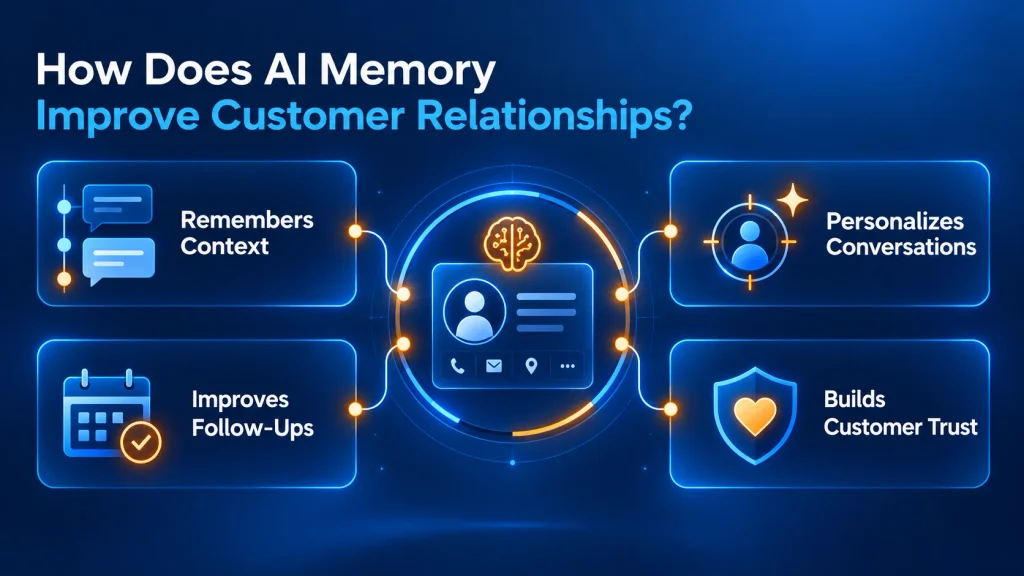
1. Every Conversation Starts With Context
Customers do not want to repeat the same information every time they contact a business.
With AI memory, CRM systems can summarize previous conversations and highlight important customer details before an employee responds.
For instance, if a customer previously discussed pricing with a sales representative, the system can retrieve that discussion during the next interaction.
Therefore, the employee can continue the conversation naturally instead of starting from zero.
2. Personalized Customer Communication
Generic messages rarely create meaningful customer relationships. Instead, customers respond better when businesses understand their individual needs.
AI-powered CRM systems can analyze customer preferences, purchase history, communication patterns, and previous interactions to support more relevant communication.
For example:
- A returning customer receives recommendations based on previous purchases.
- A sales prospect receives information related to their business requirements.
- An existing client receives follow-ups based on an earlier discussion.
- A customer with an unresolved issue receives communication that acknowledges the problem.
Consequently, businesses can deliver more relevant experiences without manually reviewing every customer record.
3. Smarter Sales Follow-Ups
Sales opportunities are often lost because follow-ups happen at the wrong time or lack relevant information.
However, AI memory can help sales teams understand where each customer stands in the buying journey.
It can identify previous objections, requested information, buying preferences, and outstanding commitments.
For example, if a prospect requested a proposal but wanted to review it after an internal meeting, the CRM can retain that context and help the sales representative prepare an appropriate follow-up.
As a result, sales communication becomes more consistent and meaningful.
4. Better Customer Support Experiences
Customer support teams frequently deal with repeated questions, ongoing complaints, and multiple service requests.
Without proper context, employees may provide inconsistent answers or ask customers to explain previous issues again.
AI memory helps by connecting support history with the customer’s broader CRM profile.
For example, when a customer reports a recurring technical issue, the system can highlight previous tickets, troubleshooting steps, and resolutions.
Therefore, support employees can investigate the problem faster and provide more informed assistance.
5. Customer Relationships That Improve Over Time
The biggest advantage of AI memory is its ability to make future interactions more useful based on previous experiences.
As customers interact with a business, the CRM can build a richer understanding of their requirements, preferences, and business history.
Over time, this information can help organizations:
- Identify changing customer needs.
- Recognize potential upselling opportunities.
- Predict customer dissatisfaction.
- Improve customer retention strategies.
- Deliver more relevant recommendations.
In other words, the CRM becomes more than a database. It becomes an intelligent system that helps employees make better customer-related decisions.
Traditional CRM vs AI-Powered CRM With Memory
Although traditional CRM systems provide valuable customer information, AI memory introduces a more intelligent way to use that information.
| Capability | Traditional CRM | AI-Powered CRM With Memory |
|---|---|---|
| Customer history | Stores activities and records | Retrieves relevant interaction context |
| Communication | Mostly manual personalization | Context-based communication suggestions |
| Sales follow-ups | Depends on employee tracking | Uses previous discussions and commitments |
| Customer support | Employees review ticket history | AI summarizes relevant support context |
| Customer insights | Relies on reports and manual analysis | Identifies patterns and emerging requirements |
| Recommendations | Based on predefined rules | Uses customer context and interaction patterns |
However, AI memory does not replace traditional CRM functionality. Instead, it enhances existing customer data and makes it more useful.
How to Implement AI Memory in Microsoft Dynamics 365 CRM
Businesses using Microsoft Dynamics 365 can combine existing CRM capabilities with AI, automation, and data integration to create more intelligent customer experiences.
A practical implementation can include the following components:
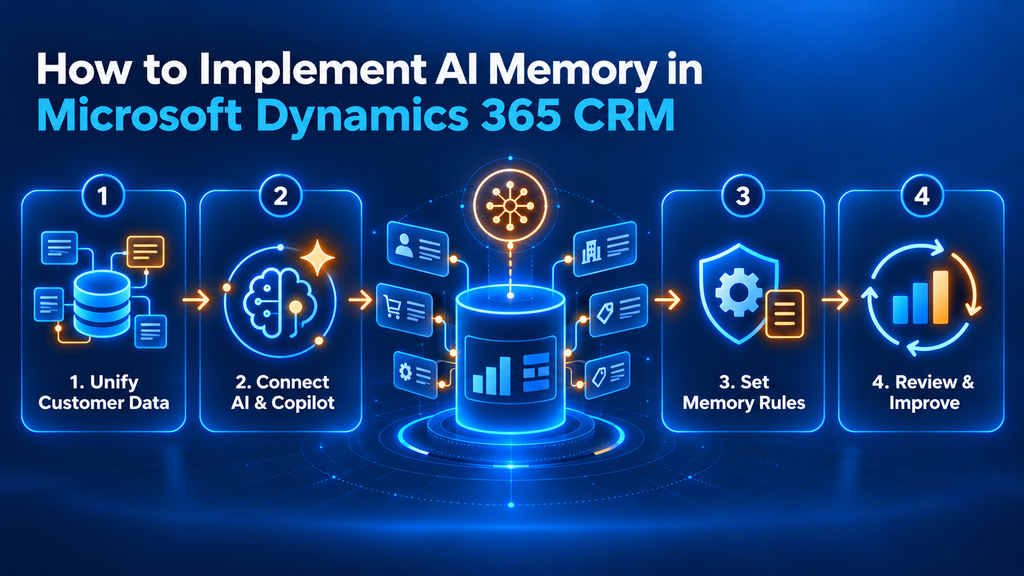
1. Centralize Customer Information
First, bring relevant customer information into a connected CRM environment.
This may include:
- Contacts and account records.
- Sales opportunities and activities.
- Emails and communication history.
- Customer service cases.
- Previous purchases and business requirements.
A connected data foundation helps AI retrieve information from the right sources.
2. Build an AI Customer Context Layer
Next, use AI to identify important information from customer interactions.
For example, an AI service can convert lengthy email conversations into structured summaries containing customer requirements, preferences, previous concerns, and pending actions.
Additionally, businesses can use relevant historical information to create customer profiles that evolve as new interactions occur.
3. Connect AI With CRM Workflows
AI memory becomes more useful when it is connected to everyday business processes.
Using Microsoft Power Automate and custom integrations, businesses can automate tasks such as:
- Generating customer interaction summaries.
- Updating relevant CRM fields.
- Creating follow-up activities.
- Notifying sales representatives about important changes.
- Highlighting unresolved customer concerns.
4. Apply Data Security and Memory Controls
Not every conversation should become permanent customer memory.
Therefore, businesses should establish clear rules for what information AI can retain, retrieve, and use.
Important considerations include:
- Customer data permissions and access controls.
- Data retention policies.
- Secure storage and processing.
- Customer consent where required.
- Human approval for important business decisions.
- Regular review of outdated or incorrect information.
This ensures that AI memory remains useful, accurate, and aligned with business requirements.
Practical Example: How AI Memory Works in a Sales Workflow
Consider a software company that receives enquiries from a potential customer.
During the first conversation, the prospect explains their requirements, budget, and expected implementation timeline.
A few days later, they request additional information. Then, after another discussion, they raise concerns about integration costs.
With AI memory in CRM, the workflow can look like this:
| Interaction | What AI Remembers | Business Benefit |
|---|---|---|
| First enquiry | Requirements, budget, timeline | Builds initial customer context |
| Second conversation | Requested information and interests | Enables relevant follow-up |
| Pricing discussion | Integration cost concerns | Helps sales address objections |
| Follow-up meeting | Previous commitments and next steps | Maintains conversation continuity |
| Future engagement | Updated needs and buying signals | Supports better recommendations |
As a result, the sales representative can understand the complete customer journey without manually reviewing every conversation.
How Sky Soft Connections Helps Businesses Build AI-Powered CRM Solutions
Building an AI-powered CRM requires more than connecting an AI model to customer records. Businesses need the right data architecture, automation workflows, integrations, and security controls.
Sky Soft Connections helps organizations transform their CRM environments through Microsoft technologies and custom software development.
Our services include:
- Microsoft Dynamics 365 CRM: Implementation, customization, and optimization to create a connected customer management environment.
- AI and Microsoft Copilot Integration: Developing intelligent CRM experiences that help teams access customer context and generate useful insights.
- Power Automate: Automating customer follow-ups, notifications, record updates, and repetitive business processes.
- Power Apps: Building custom applications that connect business workflows with CRM data.
- Data Migration and Integration: Connecting customer information from different systems to establish a more consistent data foundation.
- Custom AI Solutions: Developing AI-powered workflows for lead qualification, email processing, customer insights, and business automation.
Whether you want to improve an existing Dynamics 365 environment or develop a more intelligent CRM solution, Sky Soft Connections can help you identify the right approach.
Explore our Microsoft Dynamics 365 CRM services to discover how connected CRM and AI solutions can improve business operations.
What Is the Future of AI Memory in CRM?
AI memory is moving CRM technology beyond simple record management.
In the future, businesses will increasingly use AI agents that can understand customer history, coordinate information across departments, identify changing requirements, and recommend appropriate actions.
However, successful adoption will depend on data quality, reliable integrations, transparency, and human oversight.
The goal is not simply to make CRM systems remember more information. Instead, it is to help businesses remember the right information and use it at the right time.
Final Thoughts
Customer relationships should become stronger with every interaction, not restart with every conversation.
AI memory in CRM makes this possible by connecting customer history, preferences, previous discussions, and business context. Consequently, sales teams can communicate more effectively, support teams can resolve issues with better context, and managers can make more informed decisions.
For businesses looking to improve customer experience and operational efficiency, combining AI with Microsoft Dynamics 365 CRM is a practical step toward more intelligent customer relationship management.
Ready to make your CRM smarter? Contact Sky Soft Connections to explore AI-powered Dynamics 365 CRM solutions designed around your business needs.
Read more : CRM Records to Business Reasoning: How AI Connects Customer Data With Business Decisions
FAQ’s
AI memory in CRM allows systems to retain and retrieve relevant customer information from previous interactions, helping businesses deliver more personalized communication and consistent customer experiences.
It helps businesses understand customer preferences, remember previous conversations, improve sales follow-ups, and provide faster, more relevant customer support.
Yes. AI capabilities can be integrated with Dynamics 365 CRM using Microsoft Copilot, Power Automate, AI services, and custom integrations to improve customer insights and workflow automation.
Yes, when implemented with appropriate security controls, data permissions, encryption, retention policies, and access management. Businesses should also ensure AI only accesses information it is authorized to use.