

Most businesses already have valuable customer data in their CRM systems. They can see sales history, customer interactions, open opportunities, support cases, and previous purchases. However, having this information does not automatically lead to better business decisions.
The real challenge is understanding what the data means and deciding what to do next.
This is where AI-powered CRM analytics and business reasoning can make a difference. By connecting customer data with business goals, artificial intelligence can help organizations identify risks, recognize opportunities, and recommend practical next steps.
Instead of simply reporting what happened, an intelligent CRM system can help explain why it happened, what might happen next, and which actions deserve attention.
Table of contents
- What Does It Mean to Connect CRM Data With Business Decisions?
- How AI Turns Customer Data Into Actionable Business Insights
- A Practical Example: Turning CRM Records Into a Sales Decision
- How Microsoft Dynamics 365 and Power Platform Support AI-Driven Decisions
- How Sky Soft Connections Helps Businesses Connect CRM Data With Decisions
- Best Practices for Implementing AI-Powered Business Reasoning
- Frequently Asked Questions
- Conclusion
What Does It Mean to Connect CRM Data With Business Decisions?
Connecting CRM data with business decisions means using customer information, business rules, and AI-driven analysis to guide real business actions.
Traditional CRM systems primarily organize information. They help teams manage contacts, track opportunities, record customer interactions, and monitor sales performance. AI adds another layer by interpreting these records in the context of business objectives.
For example, a CRM system might show that a sales opportunity has remained open for 45 days. AI can analyze additional information, including unanswered emails, delayed follow-ups, changes in deal value, and previous sales patterns, to identify a potential risk.
As a result, the sales manager receives more than a status update. They gain useful context for deciding whether to contact the customer, involve a senior salesperson, or revise the sales forecast.
CRM Data vs. AI-Powered Business Reasoning
| Traditional CRM | AI-Powered Business Reasoning |
|---|---|
| Records customer interactions | Interprets interaction patterns |
| Displays sales pipeline reports | Identifies potential deal risks |
| Stores customer complaints | Detects recurring service problems |
| Tracks sales activities | Recommends relevant next steps |
| Reports historical performance | Helps evaluate possible future outcomes |
| Requires manual analysis | Automates selected analysis and recommendations |
However, AI recommendations are only as reliable as the data, rules, and context behind them. Therefore, businesses need a structured approach rather than relying on AI-generated answers alone.
How AI Turns Customer Data Into Actionable Business Insights
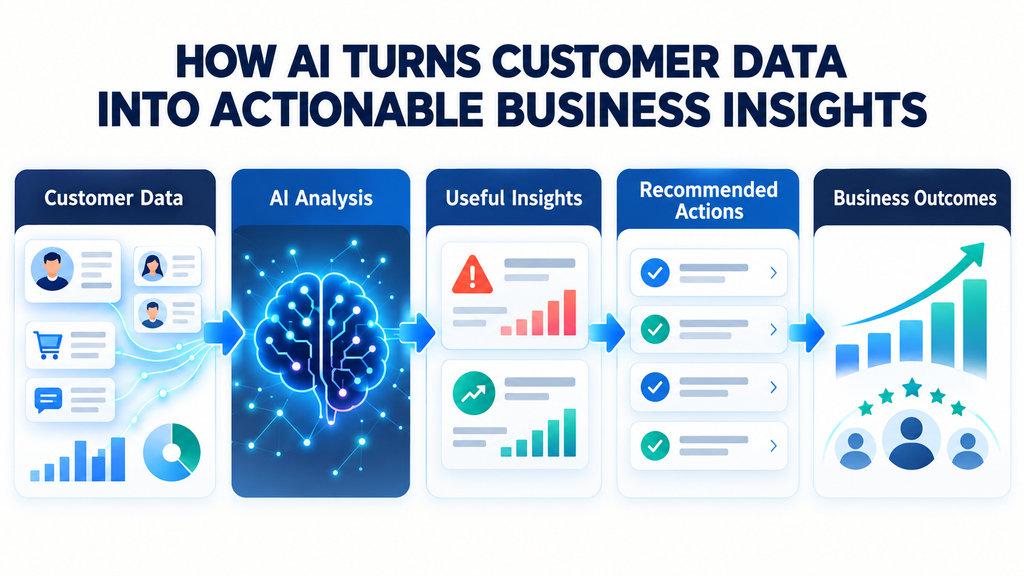
AI creates business value when it connects information from different sources and uses that context to support specific decisions.
Here are five practical ways this process works.
1. Connect Customer Data Across Business Systems
Customer information is often spread across multiple platforms, including CRM software, ERP systems, email, customer service tools, and marketing applications.
When these systems operate separately, employees may struggle to understand the complete customer journey.
AI can help analyze information across connected systems, provided the business has appropriate integrations, data permissions, and reliable records.
For example, a CRM may show that a customer has placed several large orders. Meanwhile, the ERP system may reveal delayed payments, and the support platform may contain unresolved complaints.
When these signals are considered together, the business can identify a potential account risk that would be difficult to recognize from CRM records alone.
2. Identify Patterns That Traditional Reports Miss
Standard reports are useful for tracking measurable results. Nevertheless, they may not explain the relationships between different business activities.
AI can analyze historical records, customer behavior, and operational patterns to identify trends that deserve further investigation.
Consider a company experiencing a decline in sales conversions. Instead of reviewing every opportunity manually, an AI-powered system could identify patterns such as:
- Opportunities with no customer interaction for two weeks.
- Deals that frequently stall after a product demonstration.
- Customer segments with declining engagement.
- Sales representatives who need support with a particular stage of the pipeline.
These findings help managers investigate the underlying problems and take targeted action.
Importantly, a detected pattern is not always proof of causation. Business teams should validate important findings before making significant changes.
3. Predict Business Risks and Opportunities
AI can use historical data and current business signals to estimate the likelihood of certain outcomes.
For example, predictive models can help organizations identify opportunities that may be at risk of being lost or customers who may need additional attention.
An AI-powered CRM workflow could evaluate factors such as:
- Recent customer engagement.
- Opportunity age and sales stage.
- Historical conversion rates.
- Outstanding service issues.
- Changes in purchasing behavior.
The system can then flag opportunities for review or recommend suitable follow-up actions.
However, predictions should support human judgment rather than replace it. Sales managers must still consider customer relationships, market conditions, and information that may not be available in the CRM.
4. Recommend the Next Best Business Action
One of the most useful applications of AI is turning analysis into a clear recommendation.
For instance, a CRM system may identify a high-value opportunity with declining engagement. Instead of simply marking the opportunity as risky, an AI assistant could recommend reviewing the latest customer conversation and scheduling a follow-up.
Similarly, a customer service team could receive recommendations to escalate a recurring complaint or review an account with several unresolved cases.
Effective recommendations should explain:
- What happened: The relevant customer or business signal.
- Why it matters: The potential impact on business performance.
- What to do next: A practical action based on approved business rules.
- Who should act: The employee or team responsible.
- How to measure the result: The expected outcome or success indicator.
This structure makes AI insights more useful because employees can connect recommendations to actual business priorities.
5. Automate Decisions Within Defined Business Rules
Not every business decision requires manual approval. Some routine actions can be automated when the conditions are clear and the risks are manageable.
For example, an organization could configure an AI-enabled CRM workflow to classify incoming customer emails, identify potential sales enquiries, and create draft responses for review.
Similarly, a sales workflow might notify a manager when an opportunity meets predefined risk criteria.
Using Microsoft Power Automate, Dynamics 365, and suitable AI services, businesses can connect insights with operational workflows.
Nevertheless, organizations should define approval requirements, access permissions, audit logs, and escalation rules. High-impact decisions involving financial commitments, sensitive customer information, or contractual obligations may require human approval.
A Practical Example: Turning CRM Records Into a Sales Decision
Imagine a B2B software company managing hundreds of active sales opportunities in Microsoft Dynamics 365.
The sales team has access to customer records, but managers still spend hours reviewing reports and contacting representatives to understand which deals need attention.
An AI-powered workflow could improve this process.
| Business Signal | AI Analysis | Recommended Action |
|---|---|---|
| No customer response for 14 days | Identifies declining engagement | Ask the account owner to review the opportunity |
| Multiple unresolved support cases | Flags a potential customer concern | Coordinate with the support team |
| Opportunity close date repeatedly changes | Identifies possible forecasting risk | Request an updated sales assessment |
| Strong engagement with a new product | Identifies a possible cross-selling opportunity | Review product fit with the customer |
| Repeated delays in the approval process | Highlights a workflow bottleneck | Investigate the approval steps |
The result is a more focused sales process. Rather than treating every opportunity equally, managers can prioritize deals that need attention.
The workflow should also capture what happens after a recommendation. Over time, this information can help the organization assess whether its AI alerts are useful and where the underlying rules or models need improvement.
How Microsoft Dynamics 365 and Power Platform Support AI-Driven Decisions
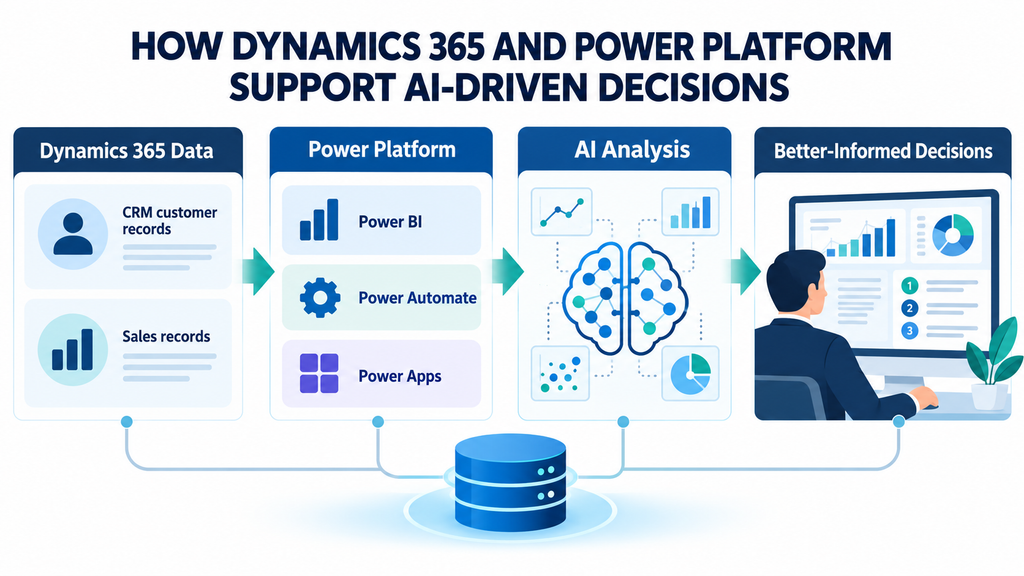
For organizations already using Microsoft’s business ecosystem, Dynamics 365 and Power Platform provide a foundation for connecting customer information with business workflows.
Microsoft Dynamics 365 CRM
Dynamics 365 can centralize information about customers, leads, opportunities, and service interactions. With appropriate configuration and integrations, this data can support AI-assisted analysis, sales forecasting, customer prioritization, and workflow automation.
Microsoft Power Automate
Power Automate connects business applications and triggers workflows based on defined conditions. It can help move information between systems, notify employees, initiate approvals, and execute actions after an AI-generated insight has been reviewed.
Microsoft Copilot and AI Services
Microsoft Copilot capabilities and other suitable AI services can help employees summarize customer interactions, retrieve relevant information, analyze business context, and prepare recommendations.
The available capabilities depend on the specific Microsoft product, licensing, configuration, and data sources involved.
Microsoft Power BI
Power BI helps organizations monitor key performance indicators and understand business trends. When combined with reliable CRM data and AI-generated insights, it can give decision-makers a clearer view of performance and potential areas for improvement.
Together, these technologies can help businesses move from disconnected records to a more coordinated decision-making process.
How Sky Soft Connections Helps Businesses Connect CRM Data With Decisions
Implementing AI successfully requires more than adding an AI assistant to an existing CRM. Businesses must also ensure that their data is reliable, their systems communicate effectively, and their workflows reflect real operational requirements.
Sky Soft Connections helps organizations build and improve Microsoft-based business solutions that connect customer information, business processes, and reporting.
Its services include:
- Microsoft Dynamics 365 CRM: Implementation, customization, workflow improvements, and CRM optimization to help businesses manage customer relationships more effectively.
- Power Platform development: Power Apps and Power Automate solutions that connect business processes, reduce repetitive work, and support controlled automation.
- Microsoft Copilot and AI integration: AI-enabled workflows that help employees access information, process customer enquiries, and support business activities.
- Data migration and system integration: Connecting business applications and improving the consistency of information across systems.
- Power BI and business reporting: Developing dashboards and reporting solutions that help decision-makers understand performance and identify areas requiring attention.
- Custom software development: Building tailored applications and integrations around specific business needs.
For example, a business using Dynamics 365 may want to identify sales opportunities that need attention, automate customer enquiry processing, and give managers a clearer view of pipeline performance. Sky Soft Connections can help assess the existing environment and design an appropriate combination of CRM customization, integrations, automation, reporting, and AI capabilities.
The objective is not to introduce AI for its own sake. Instead, it is to make existing business data more useful and help employees take informed action.
To explore suitable solutions, visit the Sky Soft Connections website.
Best Practices for Implementing AI-Powered Business Reasoning
Before introducing AI-driven decision support, businesses should establish a reliable foundation.
Start With a Specific Business Problem
Identify a measurable challenge, such as slow lead response times, poor sales forecasting, recurring service issues, or time-consuming account reviews.
A focused use case makes it easier to evaluate whether AI delivers meaningful results.
Improve Data Quality Before Adding AI
Duplicate contacts, outdated records, missing fields, and inconsistent sales stages can weaken AI recommendations.
Therefore, review data quality and establish clear ownership of important customer information before implementing advanced analytics.
Define Rules for Human Oversight
Determine which actions AI can perform automatically and which require employee approval.
For example, an AI assistant might classify an enquiry automatically but require a salesperson to approve a quotation or a manager to approve a significant commercial decision.
Measure Business Outcomes
Track performance before and after implementation. Useful metrics may include:
- Lead response time.
- Sales conversion rate.
- Forecast accuracy.
- Customer retention rate.
- Time spent on manual reporting.
- Percentage of AI recommendations accepted by employees.
- Frequency of incorrect or irrelevant recommendations.
These measures help determine whether the solution is improving business performance rather than simply increasing automation.
Protect Customer Data
AI systems should follow appropriate security, privacy, and access-control requirements. Organizations should also ensure that employees can review the information behind important recommendations and understand the system’s limitations.
Frequently Asked Questions
What is AI-powered business reasoning in CRM?
AI-powered business reasoning uses customer data, business rules, and analytical models to help organizations interpret business situations and evaluate possible actions. It extends traditional CRM reporting by providing context, identifying potential risks, and supporting decision-making.
How does AI turn CRM data into actionable insights?
AI can analyze customer interactions, sales history, service records, and other connected information to identify patterns and estimate possible outcomes. It can then generate recommendations or trigger workflows, depending on the system’s configuration and the level of human oversight required.
Can Microsoft Dynamics 365 use AI to support business decisions?
Yes. Microsoft Dynamics 365 can support AI-assisted customer insights, sales activities, and business workflows through available product capabilities and integrations. The exact functionality depends on the Dynamics 365 application, licensing, configuration, and connected services.
What is the difference between CRM analytics and AI-driven decision-making?
CRM analytics primarily helps businesses understand performance through reports, metrics, and trends. AI-driven decision-making adds capabilities such as pattern recognition, predictions, contextual recommendations, and workflow automation. However, important decisions may still require human review.
Does a business need clean data before implementing AI in CRM?
Yes. Reliable data improves the quality of analysis and recommendations. Although AI can help identify some inconsistencies, it cannot reliably compensate for every missing, inaccurate, or contradictory record.
Read more : What Happens When Two AI Agents Disagree? Managing Conflicting Decisions Across CRM Workflows
Conclusion
Moving from CRM records to business reasoning means changing how organizations use customer information. Instead of relying solely on reports and manual analysis, businesses can use AI to connect customer signals, identify potential risks, and recommend practical next steps.
However, the greatest value comes from combining reliable data, well-designed workflows, appropriate AI capabilities, and human judgment.
With Microsoft Dynamics 365, Power Platform, Power BI, and suitable AI integrations, businesses can build a more connected approach to decision-making.
The goal is simple: turn customer data into clearer insights, and turn those insights into better business actions.