
1. Executive Summary
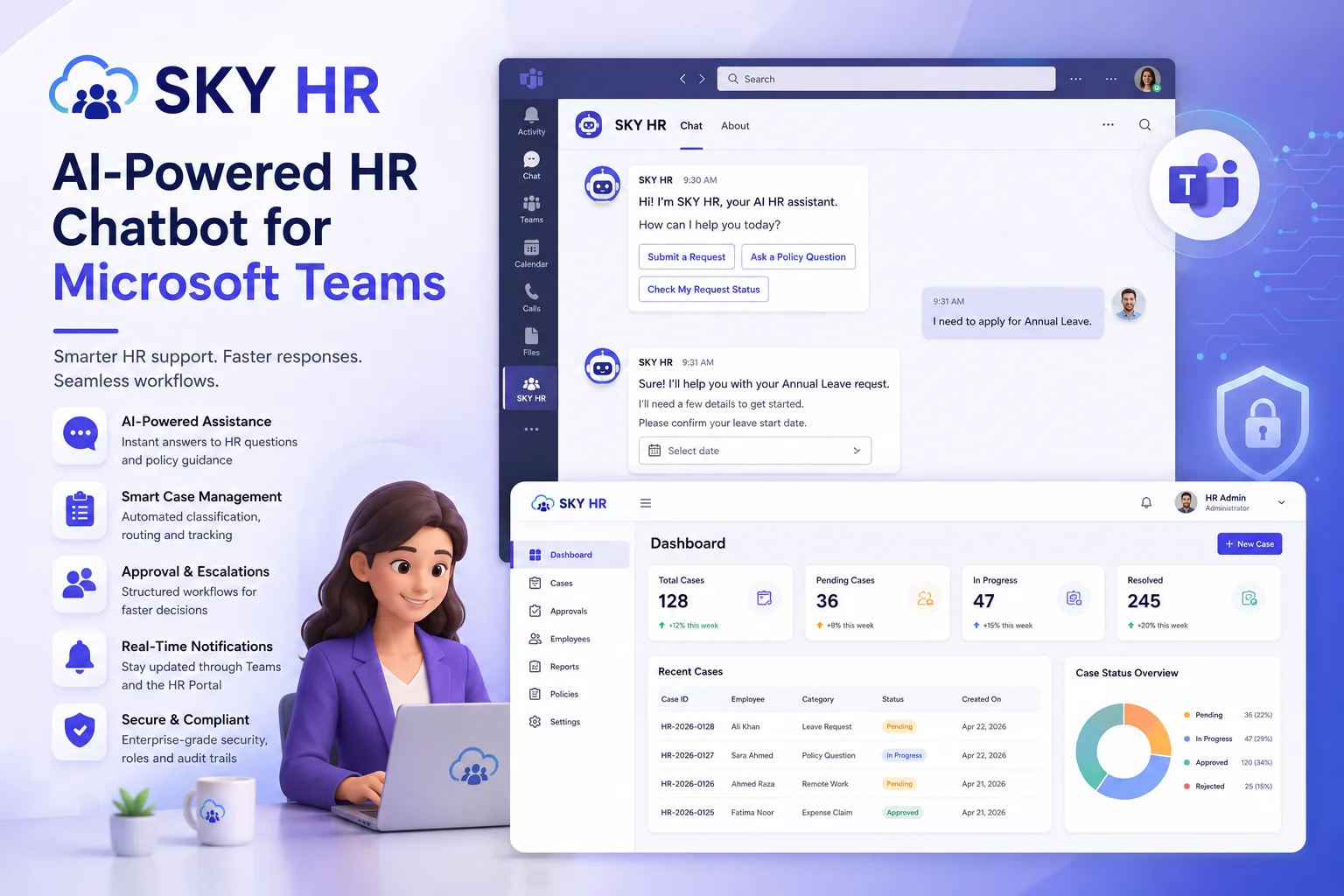
SKY HR is an AI-powered HR case management and workflow automation platform integrated with Microsoft Teams and a web-based HR portal. The solution enables employees to submit HR requests, ask policy-related questions, and receive support directly through Teams while allowing HR to manage cases, approvals, escalations, and employee communication through a centralized portal. The platform uses OpenAI-powered intelligence to classify requests, collect required information, generate summaries, and automate HR workflows. SKY HR improves response times, reduces manual HR effort, and provides a structured and auditable process for handling employee requests.
| Key Outcomes |
| Reduces manual HR request handling and triage effort. |
| Enables centralized case management and approval workflows. |
| Provides AI-powered employee self-service through Microsoft Teams. |
| Improves communication transparency between employees and HR. |
| Maintains complete audit trails for HR activities. |
2. Problem Statement
2.1 Background
Organizations often manage employee requests through emails, chats, phone calls, and manual spreadsheets. This fragmented process creates delays, inconsistent responses, limited visibility into request status, and difficulty tracking approvals and resolutions
2.2 Core Problem
Employees lack a centralized and efficient mechanism to submit HR requests and obtain policy guidance, while HR teams lack a structured workflow for managing requests, approvals, escalations, and employee communications. This leads to delays, inconsistent processing, and limited visibility into request progress.
2.3 Affected Stakeholders
| Stakeholder | Role | Impact | Key Concerns |
| Employees | Submit HR Requests | High | Quick Responses, visibility |
| HR Team | Case Processing | High | Efficiency, workload |
| Managers | Approvals, Escalations | Medium | Timely decisions |
| Leadership | Strategic oversight | Medium | Cost, ROI, delivery |
2.4 Pain Points
- HR requests are scattered across emails and chats.
- Employees repeatedly ask the same policy-related questions.
- Manual request categorization increases workload.
- Limited visibility into approval and escalation status.
- Delays caused by unavailable HR personnel.
3. Solution Overview
3.1 Proposed Solution
SKY HR provides a centralized HR support platform combining Microsoft Teams, artificial intelligence, and workflow automation. Employees interact with an AI-powered Teams bot to ask questions, submit requests, and receive updates. The AI classifies requests, gathers required information, generates request summaries, and creates cases automatically. HR manage cases, approvals, escalations, and employee communications through a dedicated web portal.
3.2 Out of Scope
- Payroll processing.
- Recruitment and applicant tracking.
- Performance management.
- Employee compensation planning.
4. Screenshots & Workflow
This section illustrates the end-to-end user journey through the system. Each step maps to a key interaction point. Replace the placeholders below with actual screenshots from the application.
4.1 Workflow Overview
| Step | Screen / Action | Description | UI Location |
| 1 | User Authentication | User logs in via SSO or credentials | Login page |
| 2 | Dashboard / Home | User lands on personalized dashboard | Main dashboard |
| 3 | Initiate Action | User submits form, uploads data, or triggers job | Input form / Upload |
| 4 | Processing | System processes request, model runs inference | Progress indicator |
| 5 | Results & Review | Output rendered; user reviews and acts | Results view |
| 6 | Export / Handoff | User exports results or triggers downstream action | Export panel |
4.2 Screen-by-Screen Walkthrough
Step 1 Authentication
Users authenticate using Microsoft Teams or the SKY HR web portal. Portal users authenticate using their registered email address and password.
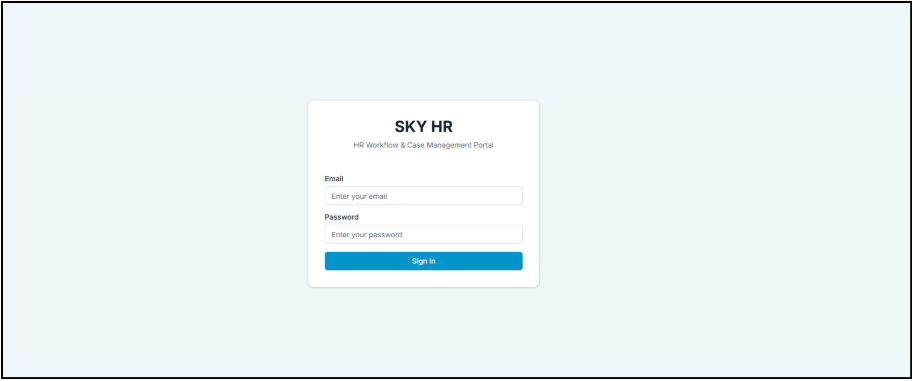
Figure 1 Authentication screen
Step 2 : Dashboard
After authentication, users with HR role are presented with a dashboard.
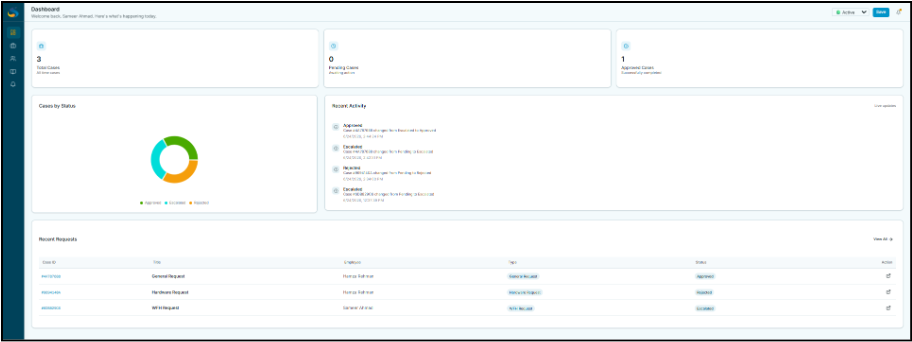
Figure 2 . Dashboard with key metrics and navigation
Step 3 : Input & Submission
Employees interact with the SKY HR Microsoft Teams bot to submit HR requests or ask policy-related questions. User can also submit a case by asking for a specific form. Once all required information has been gathered, the system creates an HR case.
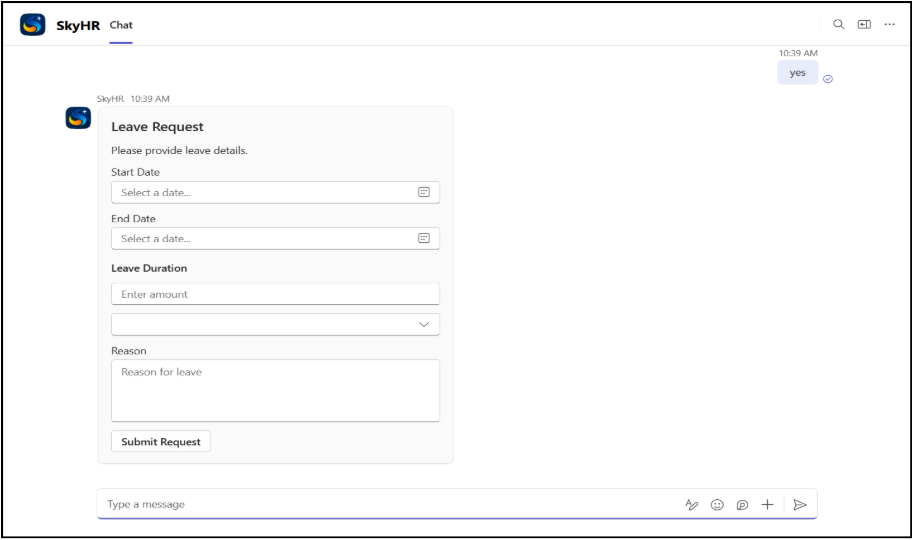
Figure 3 Case Form
Step 4 : Processing
Upon submission, the system builds the case and displays a success message.
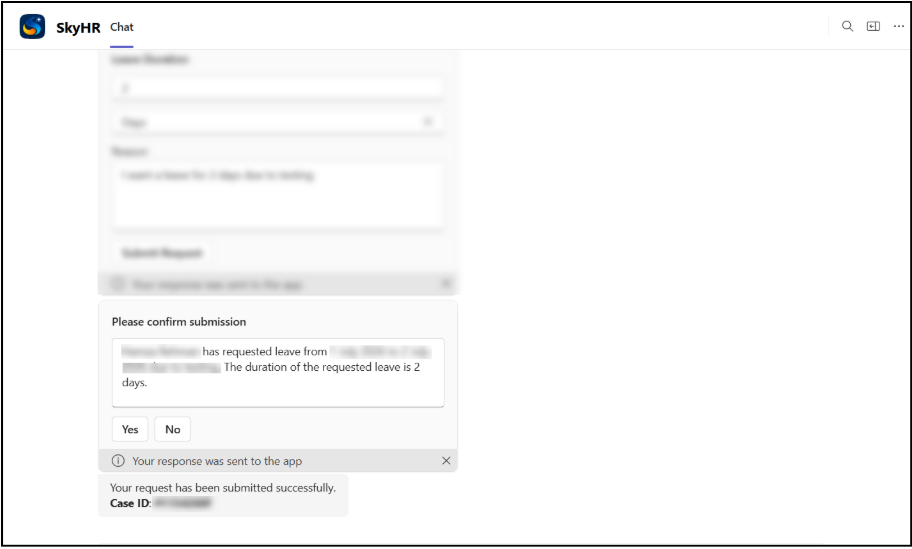
Figure 4 Case processing and AI response generation
Step 5 : Results
Created cases are available through the SKY HR web portal, where HR users can review request details, communicate with employees, escalate cases, approve or reject requests, and monitor case progress.
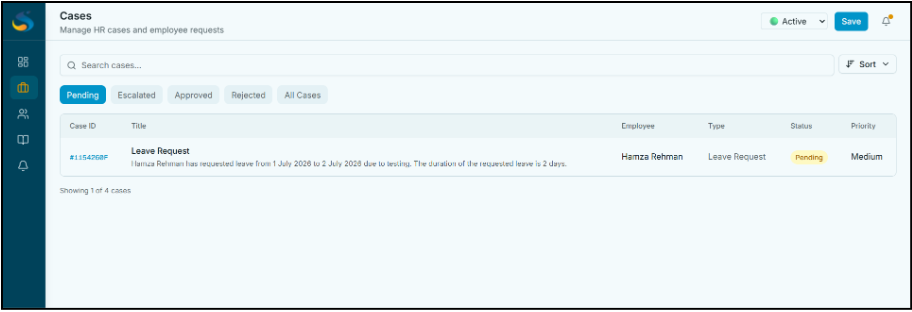
Figure 5 Cases Screen showing pending cases by default
Step 6 : Resolution & Notifications
Once a final decision has been made, the system updates the case status, records the decision in the audit trail, and automatically notifies the employee and relevant participants through both the web portal and Microsoft Teams.
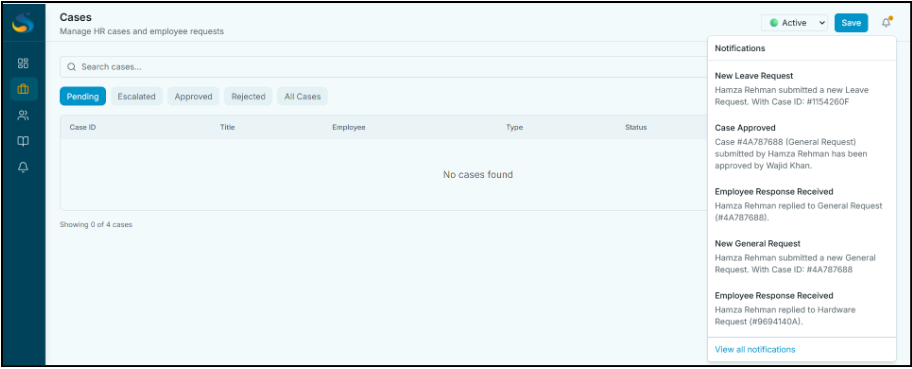
Figure 6 . Final case resolution
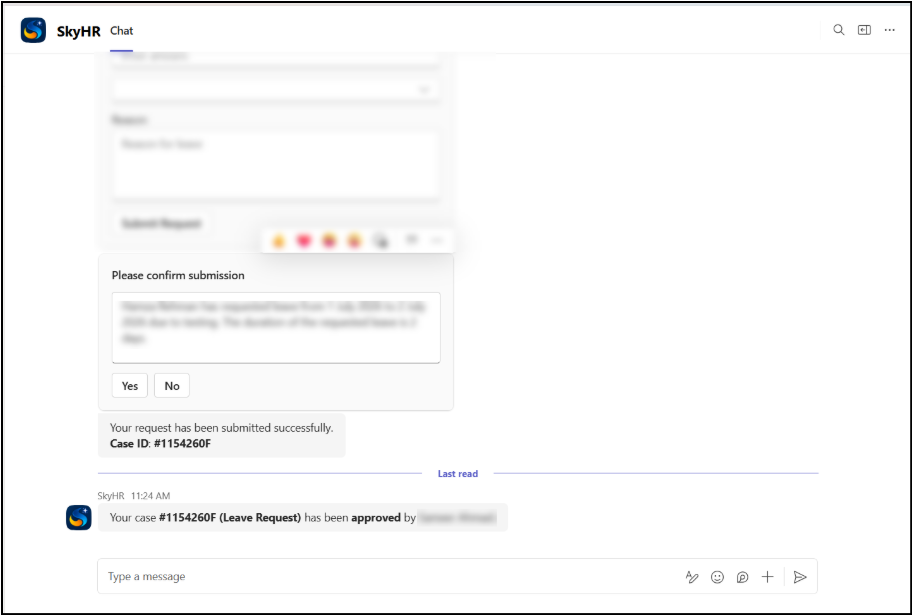
Figure 6 . Final Notification Delivery
5. High-Level Architecture
The architecture prioritizes scalability, maintainability, security, and user accessibility.
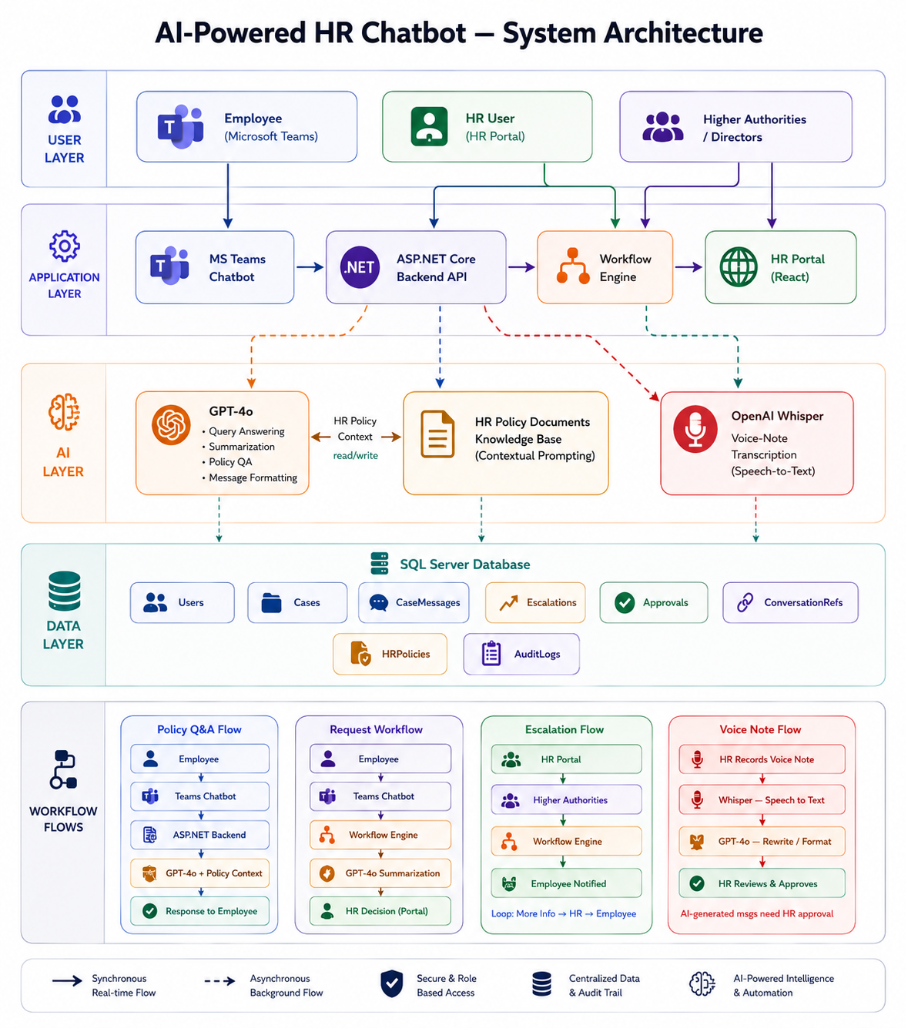
Figure 7 High-level system architecture (replace with actual diagram)
5.1 Architectural Layers
| Layer | Technology | Responsibility |
| Client Layer | Microsoft Teams | Employee interaction |
| Web Portal | Next.js, React, TypeScript | HR management interface |
| API Layer | ASP.NET Core Web API | Business logic |
| AI Layer | OpenAI GPT Models, Whisper | Classification and summaries |
| Database Layer | SQL Server | Data storage |
| Real-Time Layer | SignalR | Live updates |
| Identity Layer | Microsoft Entra ID, JWT | Authentication |
| Notification Layer | Bot Framework | Teams notifications |
5.2 Data Flow
The table below traces a request from user input through to final output, identifying the component responsible at each step.
| # | From | To | Description | |
| 1 | Employee | → | Teams Bot | User submits request |
| 2 | Teams Bot | → | API | Request sent to backend |
| 3 | API | → | OpenAI | Classification and analysis |
| 4 | OpenAI | → | API | Prepared payload dispatched for inference |
| 5 | API | → | Database | Case saved |
| 6 | Database | → | Portal | HR retrieves cases |
| 7 | Portal | → | Employee | Updates sent through Teams |
5.3 Model Choice & Rationale
| Attribute | Value |
| Selected Model | GPT-4o-mini |
| Model Type | Conversational AI / Classification |
| Provider | OpenAI |
| Context Window | Large-context support |
| Fine-Tuned | No |
Why this model?
- Strong HR request classification capability.
- Natural conversational responses.
- Fast response times.
- Cost-effective compared to larger models.
- Easy integration through OpenAI APIs.
5.4 Integrations
The system integrates with the following external systems. Each integration is described by protocol, authentication method, and purpose.
| System | Protocol | Auth Method | Purpose |
| Microsoft Teams | Bot Framework | Entra ID | Employee communication |
| OpenAI | REST API | API Key | AI processing |
| SQL Server | ADO.NET | Connection String | Data storage |
| SignalR | WebSocket | JWT | Real-time updates |
| Microsoft Entra ID | OAuth 2.0 | JWT | Identity management |
5.5 Security Considerations
| Security Posture Summary |
| HTTPS enforced for all communication. |
| JWT authentication for portal users. |
| Microsoft Entra ID authentication for Teams users. |
| Role-based access control implemented. |
| Internal and employee conversations separated. |
| Audit history maintained for all case activities. |
Authentication & Authorization
- Microsoft Entra ID for Teams authentication.
- JWT tokens for portal access.
- Role-based permissions:
- Employee
- HR
- Manager
- Team Lead
- Admin
Data Protection
- Sensitive data stored in SQL Server.
- API access secured through authorization middleware.
- Case history and approval actions logged.
Infrastructure Security
- Secure API endpoints.
- Role-based access restrictions.
- Input validation and request sanitization.
6. Deployment & Infrastructure
6.1 Environments
| Environment | Platform | Purpose | Access |
| Local Development | Visual Studio, SQL Server, Microsoft Teams Toolkit | Feature development, debugging, and testing | Developers only |
| Frontend Production | Vercel | Hosts the HR Web Portal for end users | Employees, HR, Managers, Team Leads, Admins |
| Backend Production | Microsoft Azure App Service | Hosts the ASP.NET Core Web API, Teams Bot, SignalR Hub, and business logic | Authorized application users |
| Database | Microsoft SQL Server | Stores users, cases, approvals, workflows, policies, notifications, and chat history | Backend services and database administrators |
6.2 CI/CD Pipeline
- Developers implement and test new features locally using Visual Studio and SQL Server.
- The frontend application is built and deployed to Vercel, making the latest user interface available to end users.
- The backend API is published from Visual Studio to Microsoft Azure App Service, deploying all REST APIs, SignalR services, AI integrations, and Microsoft Teams bot functionality.
- Azure App Service configuration (connection strings, JWT settings, Microsoft Bot credentials, and environment variables such as API keys) is updated through the Azure Portal without modifying application code.
- The Microsoft Teams application package is updated and uploaded to the Microsoft Teams Admin Center, allowing users to access the latest bot functionality.
- After deployment, functionality is verified by testing:
- HR Portal authentication
- Case creation and management
- Microsoft Teams bot conversations
- Workflow processing
- Notifications and approvals
- Database connectivity
7. Open Issues & Risks
| Risk | Severity | Likelihood | Mitigation |
| AI misclassification | Medium | Medium | Human review workflows |
| OpenAI service availability | Medium | Medium | Retry mechanisms |
| Teams API limitations | Low | Medium | Monitoring and fallbacks |
| Data quality issues | Medium | Medium | Validation checks |
| User adoption challenges | Medium | Medium | Training and onboarding |
8. Appendix
A. Glossary
| Term | Definition |
| Case | An HR request submitted by an employee. |
| Adaptive Card | Interactive Teams card used for notifications and responses. |
| Entra ID | Microsoft’s identity and access management platform. |
| RBAC | Role-Based Access Control. |
| SignalR | Real-time communication framework. |
FAQ’s
An AI HR chatbot for Microsoft Teams helps employees submit HR requests, get instant policy answers, and track case progress without leaving Teams.
SKY HR uses AI to classify requests, collect required information, create HR cases, and automate approvals, notifications, and escalations.
Yes. Employees receive real-time updates and notifications through Microsoft Teams and can monitor the progress of their HR requests.
Yes. SKY HR uses Microsoft Entra ID authentication, role-based access control, encrypted communication, and audit trails to protect sensitive HR information.