
1. Executive Summary
The Hiring Copilot Agent is an AI-powered recruitment automation solution built on Microsoft Copilot Studio, designed for staffing and recruitment agencies that manage large volumes of hiring requests on behalf of client companies.
The agent monitors incoming Outlook emails for job hiring requests, extracts and interprets job descriptions using OpenAI (Claude Sonnet 4.6), and automatically matches requirements against a SharePoint-hosted candidate repository. It then shortlists the most suitable candidates, responds to the client’s email with a curated shortlist and attached CVs, and optionally schedules Microsoft Teams interviews with a single automated workflow.
Built entirely on the Microsoft 365 ecosystem and orchestrated through MCP (Model Context Protocol) connectors, the agent eliminates manual email triage and CV screening, reducing recruiter effort from hours to seconds per hiring request.
| Key Outcome | Impact |
| Automated email monitoring and job description extraction | Eliminates manual inbox triage |
| AI-driven candidate matching against SharePoint repository | Reduces CV screening time by 85%+ |
| Automated reply with shortlisted profiles and attached CVs | Faster, more consistent client responses |
| Automated Teams interview scheduling for clients and candidates | Removes back-and-forth scheduling overhead |
2. Problem Statement
2.1 Background
Recruitment agencies act as intermediaries between companies seeking talent and a pool of registered candidates. Traditionally, a recruiter manually reads each inbound job request email, interprets the requirements, searches through spreadsheets or resume folders, shortlists candidates, and sends replies, a process repeated dozens of times per day.
2.2 Core Problem
There is no automated system to connect inbound hiring requests with the most relevant candidate profiles. Every step, reading emails, interpreting JDs, searching CVs, drafting replies, and scheduling interviews, is done manually, leading to bottlenecks, inconsistency, and slow turnaround times.
2.3 Affected Stakeholders
| Stakeholder | Role | Impact | Key Concerns |
| Recruitment Consultants | Process hiring requests daily | High | Speed, accuracy, workload reduction |
| Client Companies | Submit job requirements | High | Quality of shortlist, response time |
| Candidates | Receive interview invitations | Medium | Timely communication, fair evaluation |
2.4 Pain Points
- Recruiters spend 4–6 hours/day manually reading and routing hiring request emails
- CV matching is subjective and inconsistent across recruiters
- Candidate shortlists are often delayed, resulting in poor client experience
- Interview scheduling involves multiple back-and-forth email exchanges
3. Solution Overview
3.1 Proposed Solution
The Hiring Copilot Agent automates the end-to-end recruitment response pipeline. When a hiring email arrives in a designated Outlook inbox, the agent triggers via Power Automate, reads the email content through the Outlook MCP connector, and passes the job description to OpenAI for structured extraction (role title, required skills, experience level, location, etc.).
The agent then queries the SharePoint candidate repository via the available SharePoint knowledge source, retrieving candidate profiles. Claude Sonnet 4.6 evaluates each candidate against the extracted job requirements using the following criteria:
skill and experience alignment, depth and relevance of professional history, real contributions vs. generic responsibilities, technical fit and transferable skills, and overall career trajectory.
The top-matched candidates are shortlisted, their CVs are fetched from SharePoint, and a structured reply email is composed and sent via the Outlook MCP connector. Optionally, the agent generates Microsoft Teams meeting links and sends calendar invitations to both the client and the shortlisted candidates.
3.2 Goals & Success Metrics
| Goal | Success Metric | How Measured | Timeline |
| Email-to-shortlist speed | Under 2 minutes per request | Agent execution log timestamps | Month 1 |
| Matching accuracy | 90%+ recruiter approval rate on shortlists | Recruiter feedback loop | Month 1 |
| Client response rate | 100% of hiring emails receive automated reply | Outlook delivery reports | Month 1 |
| Interview scheduling | Teams invites sent within 5 mins of shortlist approval | Calendar audit log | Month 1 |
| Recruiter time savings | 4+ hours/day reclaimed per consultant | Time-tracking comparison | Month 1 |
4. Workflow Overview
4.1 End-to-End Workflow
| Step | Action | Description | System |
| 1 | Email Trigger | New hiring request email arrives in Outlook inbox; Power Automate detects it | Outlook + Power Automate |
| 2 | Email Reading | Agent reads email subject and body via Outlook MCP connector | Outlook MCP |
| 3 | JD Extraction | OpenAI extracts structured job requirements (role, skills, experience, location) | Claude Sonnet 4.6 |
| 4 | Candidate Retrieval | Agent fetches candidate profiles from SharePoint repository via SharePoint Knowledge | SharePoint Knowledge Source |
| 5 | AI Matching | Claude Sonnet 4.6 scores and ranks candidates against extracted JD criteria | Claude Sonnet 4.6 |
| 6 | CV Fetching | Top-matched candidates’ CVs are retrieved from SharePoint document library | SharePoint MCP |
| 7 | Reply Composition | Agent drafts and sends a structured email with shortlisted profiles and attached CVs | Outlook MCP |
| 8 | Interview Scheduling | Teams meeting links generated; calendar invites sent to client and candidates | Calendar MCP |
5. High-Level Architecture
5.1 Architectural Layers
| Layer | Technology | Responsibility |
| Orchestration Layer | Microsoft Copilot Studio + Power Automate | Agent logic, workflow triggers, MCP tool invocation |
| AI / Intelligence Layer | Claude Sonnet 4.6 | JD extraction, candidate evaluation, reply drafting |
| Email Integration | Outlook / Exchange via MCP Connector | Read incoming emails, send shortlist replies |
| Candidate Data Layer | SharePoint Online via MCP Connector | retrieve candidate profiles and CVs |
| Scheduling Layer | Microsoft Teams via MCP Connector | Generate meeting links, send calendar invitations |
| Automation Layer | Power Automate | Event-driven triggers on new email arrival |
5.2 Data Flow
| # | From | To | Description |
| 1 | Outlook Inbox | Power Automate | New email event trigger fired on arrival of hiring request |
| 2 | Power Automate | Copilot Studio Agent | Email metadata and body passed to agent for processing |
| 3 | Agent | Outlook MCP | Full email content retrieved for analysis |
| 4 | Agent | Claude | Raw email body sent for job description extraction |
| 5 | Claude | Agent | Structured JD object returned (skills, role, seniority, location) |
| 6 | Agent | SharePoint MCP / Knowledge | Query candidate profiles matching extracted criteria |
| 7 | SharePoint MCP | Agent | Candidate profile list returned with metadata |
| 8 | Agent | Claude | Profiles + JD sent for comparative scoring and ranking |
| 9 | Claude | Agent | Ranked shortlist with evaluation rationale returned |
| 10 | Agent | SharePoint MCP | CV documents for top candidates fetched |
| 11 | Agent | Outlook MCP | Reply email with shortlist and CVs composed and dispatched |
| 12 | Agent | Calendar MCP | Meeting links generated; invitations sent to client and candidates |
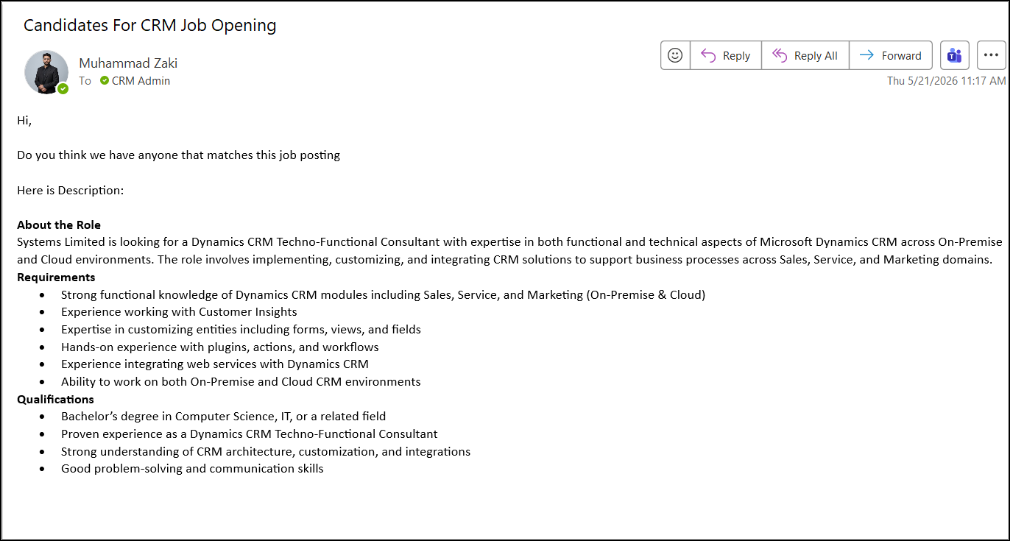
Candidates Requirement Email:
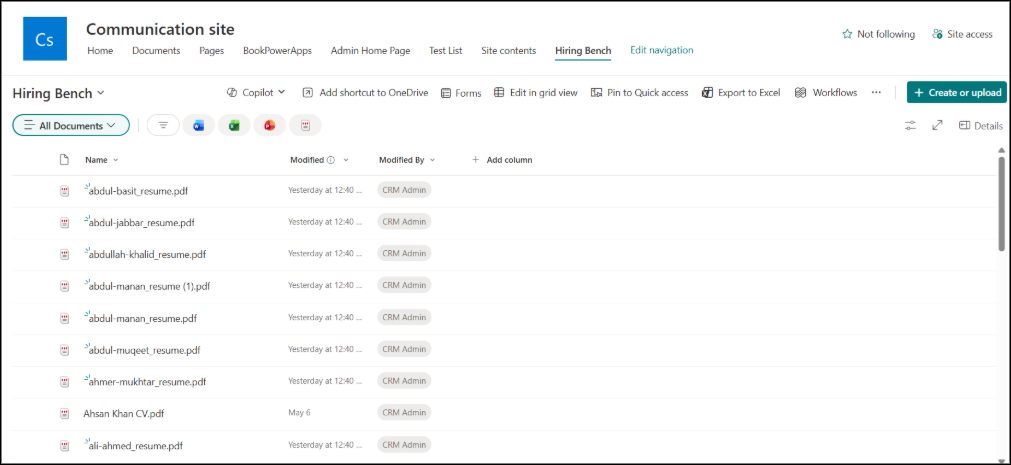
SharePoint Location from where the Agent will pick the Resumes:
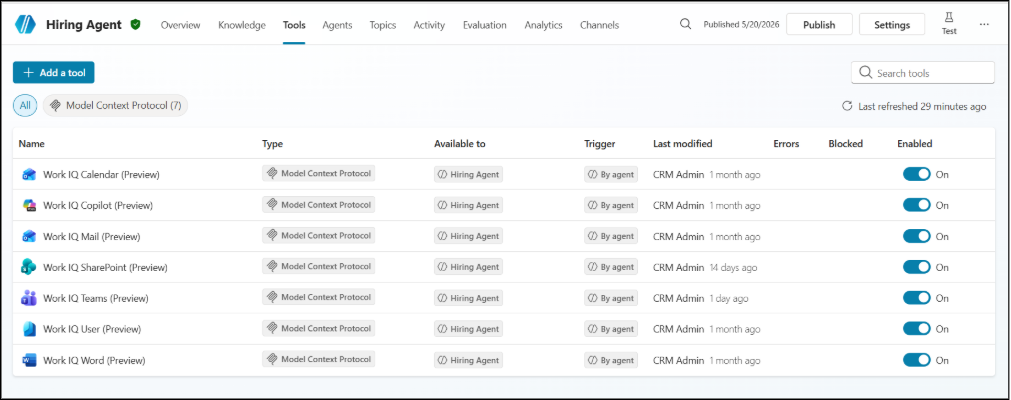
MCP’s Used in the Agent:
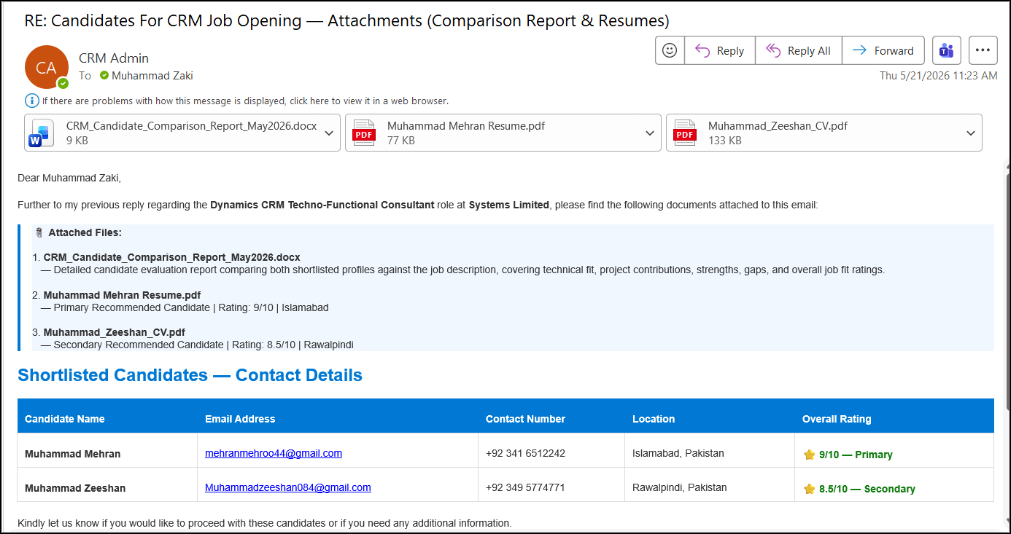
Response from the agent including detailed candidate comparison word document as well as the Resumes of the Candidates:
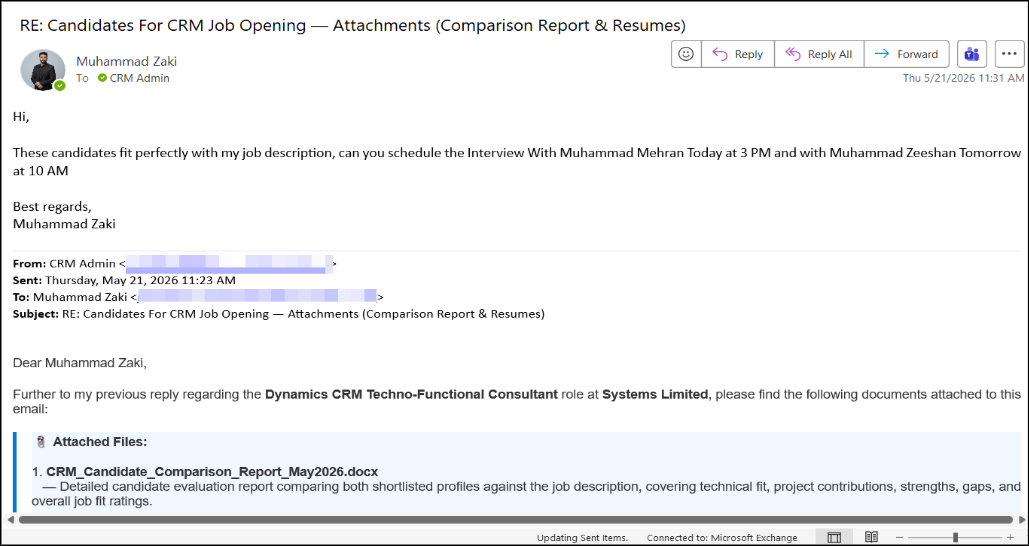
Requesting to arrange the interviews with the candidates:
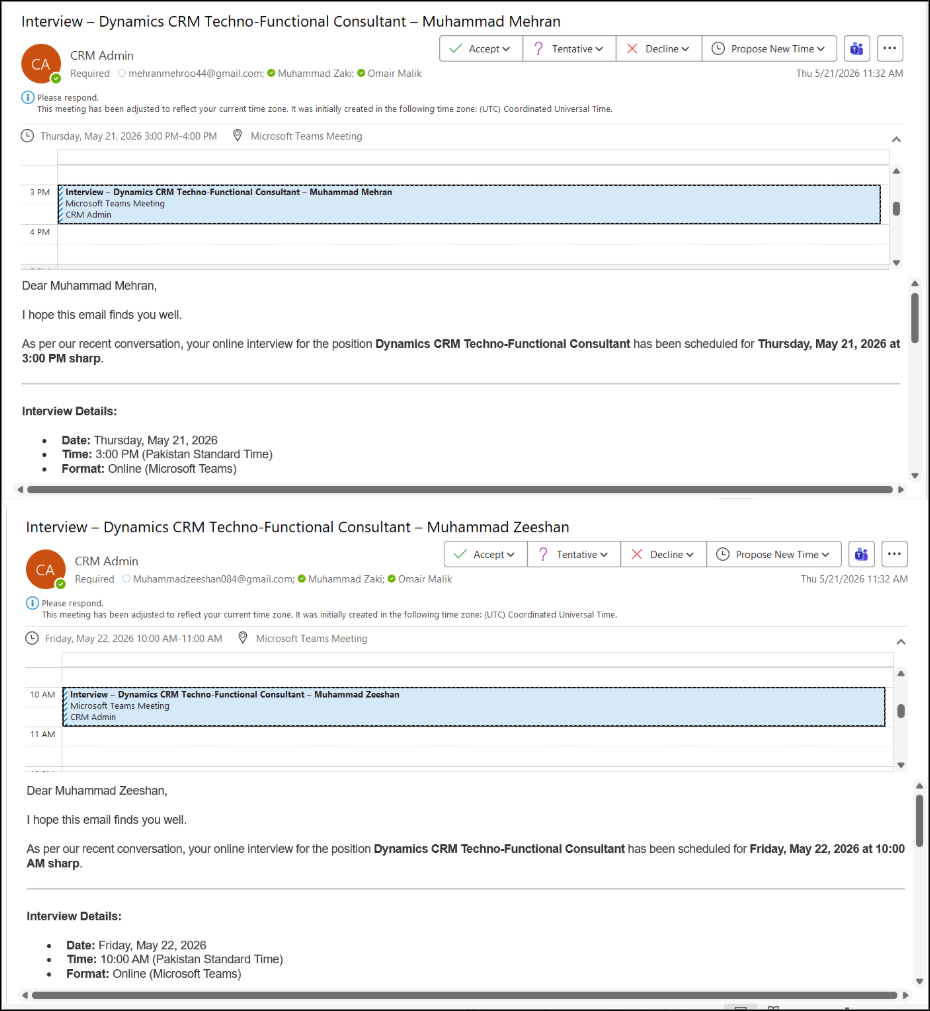
Agent schedules interviews with the candidates by extracting their emails from the resumes:
5.3 Model Choice & Rationale
| Attribute | Value | Notes |
| Selected Model | Claude Sonnet 4.6 | Primary intelligence engine for extraction and matching |
| Model Type | Large Language Model Generation + Reasoning | Handles both structured extraction and nuanced evaluation |
| Key Capability | Function calling / structured outputs | Ensures reliable JSON extraction from unstructured emails |
5.4 MCP Integrations
| MCP Connector | Auth Method | Data Exchanged |
| Outlook MCP | OAuth 2.0 / Azure AD | Read emails, send replies with attachments |
| SharePoint MCP | OAuth 2.0 / Azure AD | Query lists, fetch documents and CVs |
| Microsoft Calendar MCP | OAuth 2.0 / Azure AD | Create online meetings, send calendar invites |
6. Deployment & Infrastructure
6.1 Environments
| Environment | Platform | Purpose |
| Development | Copilot Studio Dev Environment | Feature building and unit testing |
| Staging | Copilot Studio Test Environment | Integration testing with real M365 connectors |
| Production | Copilot Studio Production Environment | Live recruitment automation |
7. Open Issues & Risks
| Risk | Severity | Likelihood |
| Low candidate match quality if profiles not regularly updated | High | Medium |
| Email parsing failures on non-standard JD formats | Medium | Medium |
| Claude Sonnet 4.6 producing biased candidate rankings | High | Low |
8. Appendix
A. Glossary
| Term | Definition |
| MCP | Model Context Protocol a standard for connecting AI agents to external tools and data sources |
| Copilot Studio | Microsoft’s low-code platform for building AI-powered copilot agents |
| Claude Sonnet 4.6 | OpenAI’s multimodal frontier model |
| Power Automate | Microsoft’s workflow automation platform used to trigger and orchestrate agent actions |
| JD | Job Description the structured requirements document extracted from hiring emails |
Read more : Power Automate Solutions for Growing Businesses
FAQ’s
The agent uses AI to analyze job requirements from incoming emails and compares them against candidate profiles stored in SharePoint to identify the best matches
Yes, the solution can generate Microsoft Teams meeting links and automatically send interview invitations to clients and shortlisted candidates.
The system reduces manual recruitment work, improves candidate matching accuracy, speeds up client responses, and automates interview coordination.