
Artificial intelligence is changing how businesses manage customer relationships, sales activities, and service operations. Today, companies can use multiple AI agents to analyze customer data, recommend next steps, automate follow-ups, and support business decisions.
However, as organizations introduce more AI agents into their Customer Relationship Management (CRM) systems, a new challenge emerges: What happens when two AI agents recommend conflicting actions?
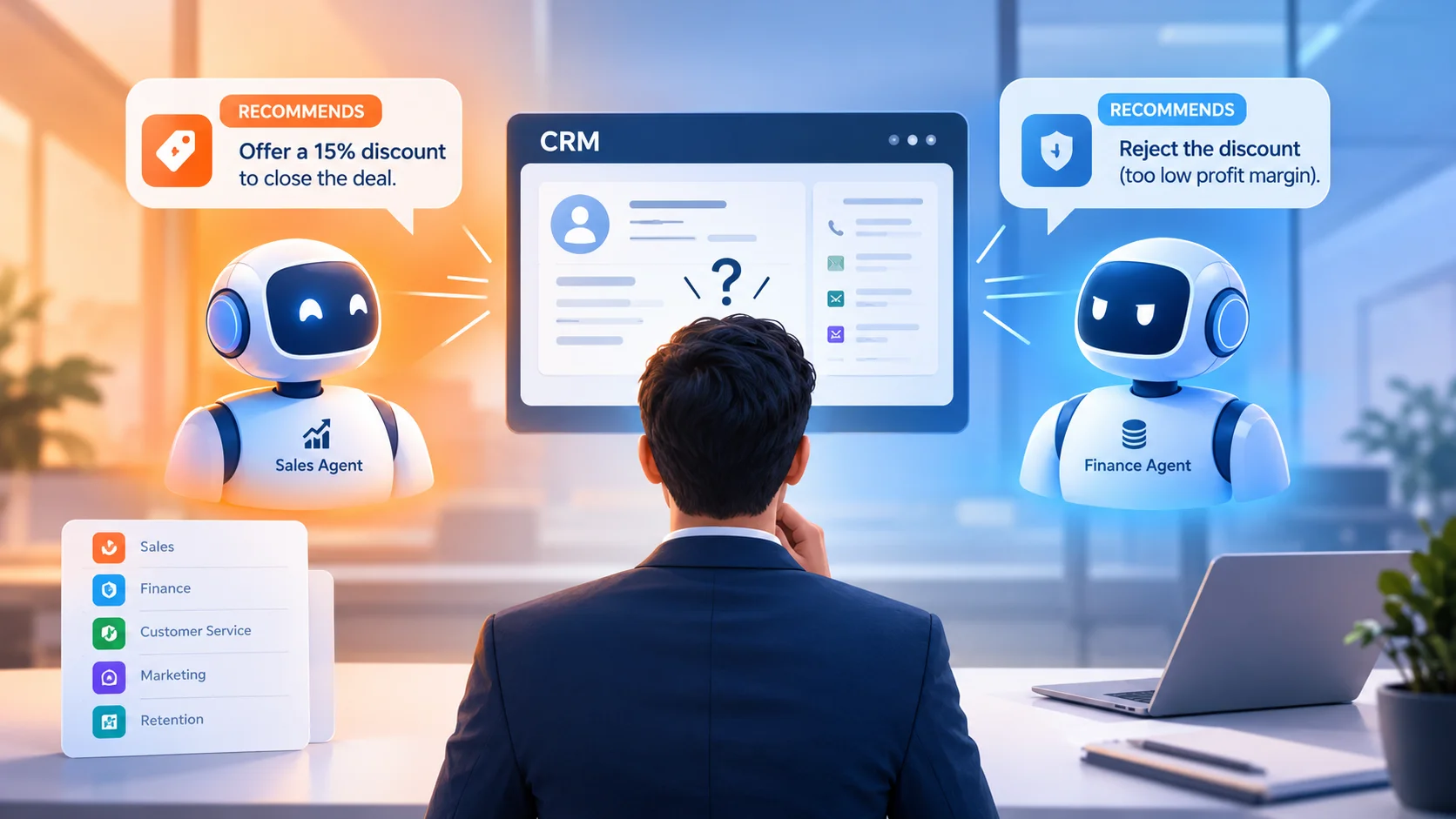
For example, a sales AI agent might recommend offering a discount to close a deal, while a pricing agent rejects the discount because the profit margin is too low. Similarly, a customer service agent might recommend issuing a refund while a policy agent determines that the request does not meet the company’s refund criteria.
Without clear coordination rules, these disagreements can lead to inconsistent customer experiences, incorrect CRM updates, and unnecessary operational delays.
This guide explains why AI agents disagree, how businesses can manage conflicting AI decisions, and how solutions such as Microsoft Dynamics 365, Microsoft Power Platform, and custom AI integrations can support more reliable CRM workflows.
What Is an AI Agent Conflict in CRM?
An AI agent conflict occurs when two or more AI agents produce incompatible recommendations, attempt conflicting actions, or interpret the same business situation differently.
In a CRM environment, different agents may handle sales, customer service, marketing, pricing, and customer retention. Although each agent has a specific responsibility, their decisions can affect the same customer record or business process.
For instance, consider a business using three AI agents:
- Sales agent: Recommends a discount to accelerate deal closure.
- Finance agent: Rejects the discount because it exceeds the approved margin threshold.
- Customer relationship agent: Recommends maintaining the existing price to protect long-term account value.
Each agent may be following its assigned objectives. However, the business still needs a consistent way to determine which recommendation should guide the final action.
Therefore, managing AI agent conflicts requires more than improving individual AI models. It requires clear business rules, shared context, decision-making authority, and controlled execution.
Why Do AI Agents Disagree in CRM Workflows?
AI agents can disagree for several reasons. Understanding these causes helps businesses design more reliable AI-powered CRM systems.
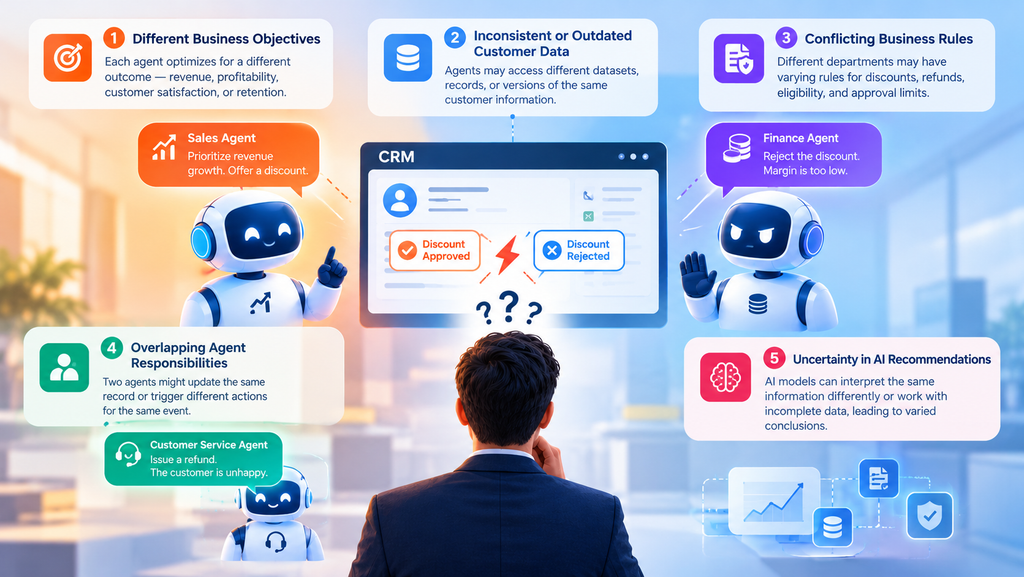
1. Different Business Objectives
Each AI agent may optimize for a different outcome.
For example, a sales agent might prioritize revenue growth, while a finance agent focuses on profitability. Consequently, both agents can analyze the same opportunity and recommend different actions.
Businesses should define how these objectives are prioritized before allowing AI agents to make decisions independently.
2. Inconsistent or Outdated Customer Data
AI agents may access different datasets, records, or versions of customer information.
For example, a sales agent might use an opportunity’s previous value, while another agent reads a recently updated forecast. As a result, their recommendations may no longer align.
A centralized and well-governed data environment helps reduce these inconsistencies.
3. Conflicting Business Rules
An organization may have different rules for discounts, customer eligibility, refunds, and approval limits across departments.
If AI agents interpret these rules differently, they may recommend incompatible actions.
Therefore, critical business policies should be defined clearly and enforced through reliable system-level controls rather than relying entirely on AI-generated interpretations.
4. Overlapping Agent Responsibilities
Two AI agents might attempt to update the same CRM record or trigger different actions for the same event.
For example, one agent may schedule a follow-up email while another pauses communication because the customer has raised a complaint.
Without coordination, the customer could receive an inappropriate message.
5. Uncertainty in AI Recommendations
AI models can produce different conclusions because they interpret context differently or operate with incomplete information.
Even when agents receive similar inputs, their recommendations may vary. For this reason, businesses should not assume that an AI-generated answer is automatically correct or authoritative.
Common AI Agent Conflicts in CRM: Examples and Solutions
The following table illustrates common situations and practical ways to manage them.
| CRM Scenario | Agent A Recommendation | Agent B Recommendation | Recommended Resolution |
|---|---|---|---|
| Sales discount | Offer a 15% discount | Reject discounts above 10% | Apply the approved discount policy and escalate exceptions |
| Customer refund | Approve the refund | Reject the request under refund rules | Verify eligibility and require authorized approval when necessary |
| Customer communication | Send a promotional email | Pause marketing after a complaint | Check communication preferences and applicable suppression rules |
| Lead assignment | Assign the lead to Sales Team A | Assign it to Sales Team B | Apply predefined ownership and routing rules |
| Customer retention | Offer a special incentive | Recommend standard pricing | Evaluate approved incentives and account-specific policies |
The key principle is simple: AI agents can provide recommendations, but the business must define how conflicting recommendations are evaluated and resolved.
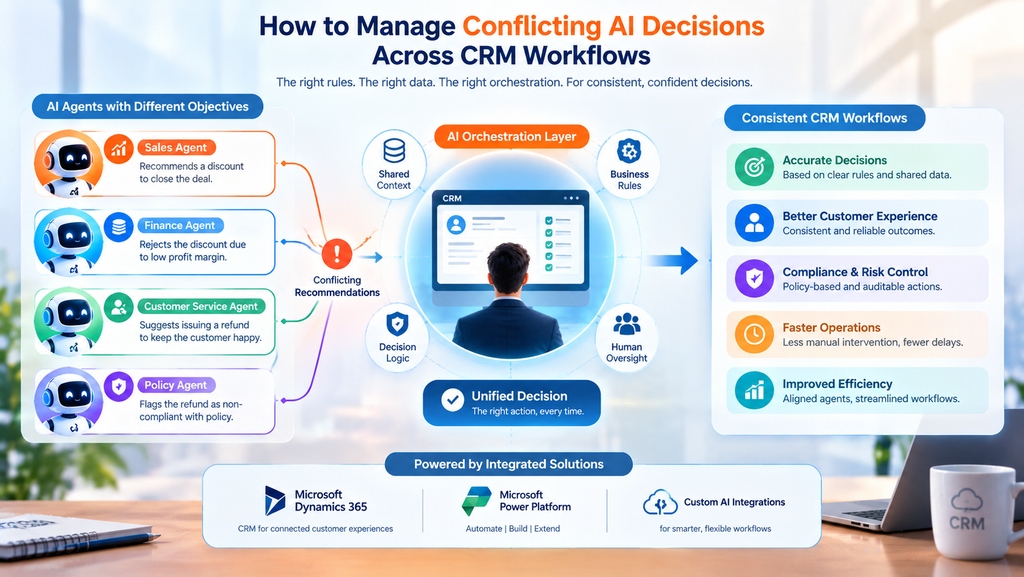
How to Manage Conflicting AI Decisions Across CRM Workflows
Businesses can reduce AI agent conflicts by implementing a structured decision-management process.
1. Establish a Clear Decision Hierarchy
Not every AI agent should have equal authority over every business decision.
For example, a sales agent may recommend a discount, but a pricing policy or authorized manager should determine whether that discount can be approved.
Define which decisions AI agents can make independently, which require validation, and which must be escalated to a human.
A practical hierarchy might look like this:
- Mandatory business rules: Legal requirements, security restrictions, and approved company policies take priority.
- System validation: CRM rules verify permissions, record status, eligibility, and required conditions.
- AI recommendations: Agents propose actions within their permitted responsibilities.
- Human approval: Authorized employees review high-risk or unresolved conflicts.
This approach helps prevent an AI agent from overriding an important business restriction simply because its recommendation appears more effective.
2. Give Every AI Agent a Defined Role
Clearly defined responsibilities reduce overlap between agents.
For example, a sales agent might identify opportunities and recommend next steps, while a pricing agent validates discount eligibility. A customer service agent could handle routine enquiries, while a policy-checking process verifies whether a requested action is permitted.
Moreover, each agent should have clearly defined limits on the records it can access and the actions it can perform.
This makes the overall CRM workflow easier to monitor, maintain, and improve.
3. Create a Conflict-Resolution Layer
A conflict-resolution layer evaluates recommendations before they trigger important business actions.
Rather than allowing multiple agents to update a CRM record independently, businesses can route their recommendations through a central workflow.
This layer can:
- Compare proposed actions and identify contradictions.
- Check recommendations against approved business rules.
- Validate current CRM data and record status.
- Apply priority rules to determine the next step.
- Request human approval when the conflict cannot be resolved safely.
- Record the decision and its outcome for future review.
For instance, Microsoft Power Automate can orchestrate workflow steps, while Dynamics 365 and Dataverse can provide business records and enforce relevant permissions and validation rules. Custom services may be needed when more advanced coordination or conflict-resolution logic is required.
Importantly, an AI-generated resolution should not automatically override deterministic business controls.
4. Use Shared, Up-to-Date Business Context
AI agents need consistent information to make compatible recommendations.
Where appropriate, agents should use the same authoritative CRM records, customer history, approved policies, and current transaction status.
Additionally, workflows should validate important information immediately before executing an action.
For example, an agent might recommend approving a quotation. However, before approval, the system should verify that the quotation is still valid, the amount has not changed, and the required authorization is available.
This extra validation helps prevent decisions based on outdated information.
5. Introduce Human Approval for High-Risk Decisions
Some conflicts should not be resolved automatically.
Decisions involving significant discounts, financial commitments, sensitive customer information, or exceptions to company policy may require an authorized employee.
A useful approach is to classify actions by risk:
| Risk Level | Example | Recommended Control |
|---|---|---|
| Low | Categorizing a routine customer enquiry | Automated execution with monitoring |
| Medium | Changing lead ownership or modifying a follow-up schedule | Rule-based validation and activity logging |
| High | Approving an exceptional discount or financial adjustment | Mandatory authorization or human review |
The appropriate thresholds depend on the organization’s policies, industry, and risk tolerance.
6. Maintain an Audit Trail of AI Decisions
When an AI agent conflict occurs, businesses should be able to determine what happened and why.
A useful decision record includes:
- The original request or business event.
- The agents involved and their recommendations.
- The relevant data and policy checks.
- The conflict-resolution rule applied.
- Any human approval or rejection.
- The final action and its outcome.
Consequently, teams can investigate errors, identify recurring disagreements, and improve their workflows over time.
How Microsoft Dynamics 365 and Power Platform Can Help
Microsoft business applications provide several components that organizations can use to coordinate AI-assisted CRM processes.
However, the exact architecture depends on the workflow, connected systems, security requirements, and level of autonomy required.
Microsoft Dynamics 365 CRM
Dynamics 365 can provide the central business context for sales, customer service, and customer relationship activities.
Its records and business processes can help AI-assisted workflows access relevant customer and transaction information. In addition, configured security roles, validation rules, and approval processes can help enforce business restrictions.
Microsoft Power Automate
Power Automate can coordinate workflow steps, evaluate conditions, route exceptions, and request approvals.
For example, if two agents propose different actions for a sales opportunity, a flow can compare their recommendations against predefined business rules before allowing the next step.
Microsoft Dataverse
Dataverse can store structured business information and support controlled access to CRM data.
When multiple agents interact with the same records, the implementation should also account for record changes, concurrency, and data validation to reduce conflicting updates.
Microsoft Copilot Studio and Custom AI Integrations
Copilot Studio can support the development of AI agents for defined business scenarios. Custom AI integrations can also connect models, external services, and CRM workflows when standard capabilities do not meet specific requirements.
Nevertheless, using multiple agents does not automatically provide conflict resolution. Developers must deliberately design the orchestration, permissions, validation, escalation, and monitoring mechanisms.
Best Practices for Reliable Multi-Agent CRM Systems
Before deploying multiple AI agents in a production CRM environment, businesses should follow these practical guidelines:
- Define ownership: Assign each agent a specific responsibility and clear operating boundaries.
- Centralize critical rules: Maintain consistent business policies for approvals, eligibility, pricing, and access.
- Validate before execution: Check record status and permissions before making important changes.
- Prevent duplicate actions: Use idempotency controls and suitable transaction or concurrency handling where needed.
- Set escalation conditions: Route unresolved conflicts and high-risk decisions to authorized employees.
- Monitor outcomes: Track incorrect actions, failed workflows, repeated disagreements, and manual interventions.
- Test realistic scenarios: Simulate conflicting recommendations, outdated data, unavailable services, and simultaneous record updates before launch.
Together, these practices help organizations build CRM workflows that are more predictable, accountable, and resilient.
How SkySoft Connections Can Help Businesses Build Reliable AI-Powered CRM Workflows
Implementing multiple AI agents requires more than connecting AI models to a CRM. Businesses also need a reliable architecture that aligns automation with operational processes, data quality, security, and approval requirements.
SkySoft Connections helps businesses implement and customize Microsoft business solutions to support connected, efficient operations.
Its services include:
- Microsoft Dynamics 365 CRM implementation and customization: Align CRM functionality with business processes, customer data, and operational requirements.
- Power Automate workflow development: Automate approvals, notifications, exception handling, and multi-step business processes.
- Microsoft Power Platform solutions: Build applications and workflows that connect business users, data, and operational systems.
- AI integration and automation: Connect AI capabilities with business applications while incorporating appropriate validation and human oversight.
- Data migration and system integration: Improve the consistency and availability of information across connected platforms.
- Custom software development: Develop additional services and integration components when standard platform functionality is insufficient.
For organizations exploring multi-agent CRM automation, SkySoft Connections can help assess existing workflows, identify potential conflicts, and design an implementation approach suited to their business requirements.
Explore the company’s Microsoft technology and software services to learn more.
Frequently Asked Questions
Yes. Multiple agents can work with the same CRM record when the system is designed to support their responsibilities. However, businesses should implement appropriate permissions, validation, concurrency controls, and workflow coordination to prevent conflicting updates.
Businesses can use a combination of predefined business rules, centralized orchestration, data validation, risk-based approval processes, and human review. The appropriate method depends on the type and impact of the decision.
Power Automate can coordinate workflow steps, evaluate conditions, route exceptions, and request approvals. However, conflict detection and resolution logic must be designed as part of the workflow. Complex scenarios may require custom services or additional orchestration components.
Not always. Low-risk actions may be automated when suitable controls are in place. However, decisions involving financial commitments, sensitive data, policy exceptions, or significant customer impact may require additional validation or human authorization.
Useful metrics include conflict frequency, incorrect actions prevented, escalation rates, resolution time, duplicate updates, human intervention rates, and the accuracy of final decisions. Tracking these measures helps organizations identify weaknesses and improve their AI-powered CRM workflows.
Conclusion
As businesses introduce more AI agents into CRM systems, conflicting recommendations become an important workflow design challenge. Different objectives, inconsistent data, overlapping responsibilities, and unclear business rules can all lead to incompatible decisions.
However, these conflicts can be managed through clear agent responsibilities, shared business context, centralized orchestration, deterministic validation, and appropriate human oversight.
Microsoft Dynamics 365, Power Automate, Dataverse, Copilot Studio, and custom integrations can support these processes when configured for the organization’s specific requirements.
The goal is not simply to deploy more AI agents. It is to ensure they work together within a controlled business process.
With the right architecture and implementation strategy, businesses can make their AI-powered CRM workflows more consistent, reliable, and accountable.
Read more : How to Test a Copilot Studio Agent Before Launch: A Practical Checklist