Table of Content
In today’s fast-moving digital landscape, businesses rely on accurate, real-time data to make informed decisions. However, when systems operate in silos, data inconsistencies and delays can disrupt operations. That’s why real-time data sync between Dynamics 365 and external systems using Power Automate has become essential for modern enterprises.
In this guide, you’ll learn how real-time synchronization works, why it matters, and how Skysoft Connections helps businesses build reliable, scalable integrations.
Why Real-Time Data Sync Matters for Dynamics 365
Data synchronization ensures that information across systems remains consistent, accurate, and up to date. Without it, businesses may face:
- Duplicate or inconsistent customer records
- Delayed reporting and decision-making
- Inefficient workflows across departments
- Poor customer experience
With Power Automate, organizations can connect Dynamics 365 with external platforms such as ERP systems, payment gateways, marketing tools, and custom applications—ensuring seamless data flow in real time.
How Power Automate Enables Real-Time Integration
Power Automate acts as a bridge between Dynamics 365 and external systems. It uses triggers and actions to move data instantly when a change occurs.
Key Components of Real-Time Sync
| Component | Description |
|---|---|
| Trigger | Detects events like record creation or updates in Dynamics 365 |
| Connector | Links Power Automate to external systems (APIs, databases, SaaS tools) |
| Action | Performs operations such as create, update, or delete data |
| Flow Logic | Defines conditions, filters, and transformation rules |
Because of this structure, businesses can automate complex workflows without writing heavy code.
Common Use Cases of Dynamics 365 Data Synchronization
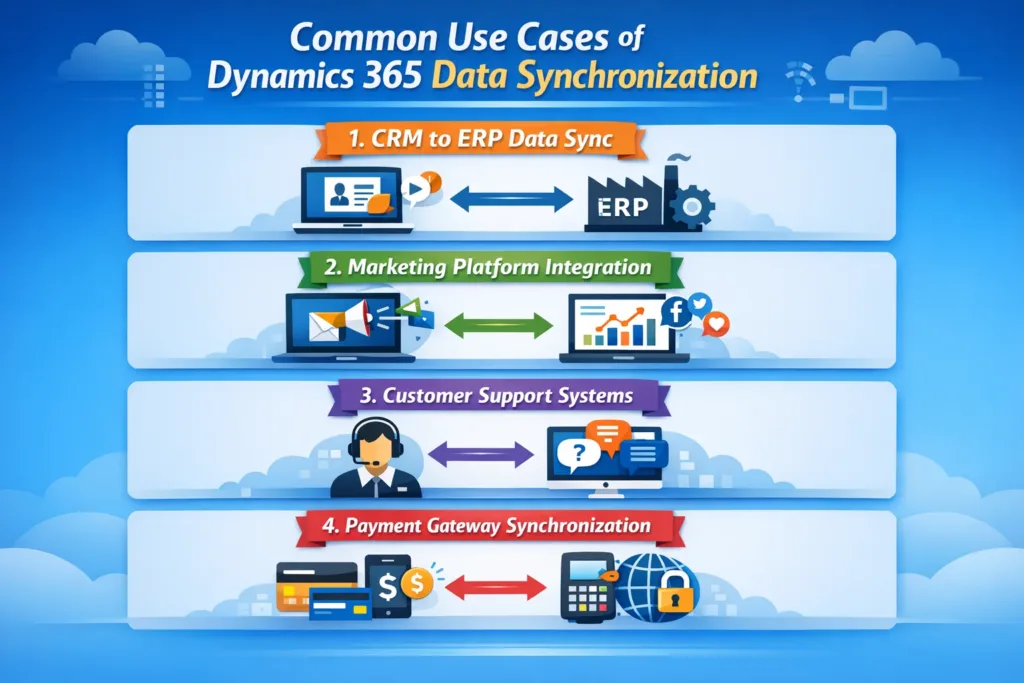
1. CRM to ERP Data Sync
When a new order is created in Dynamics 365, it can automatically sync with ERP systems for invoicing and inventory updates.
2. Marketing Platform Integration
Leads captured in external marketing tools can instantly sync to Dynamics 365, ensuring the sales team acts quickly.
3. Customer Support Systems
Support tickets created in third-party helpdesk platforms can be pushed into Dynamics 365 for unified tracking.
4. Payment Gateway Synchronization
Payment confirmations from external systems can update records in Dynamics 365 in real time.
Step-by-Step: Setting Up Real-Time Sync with Power Automate
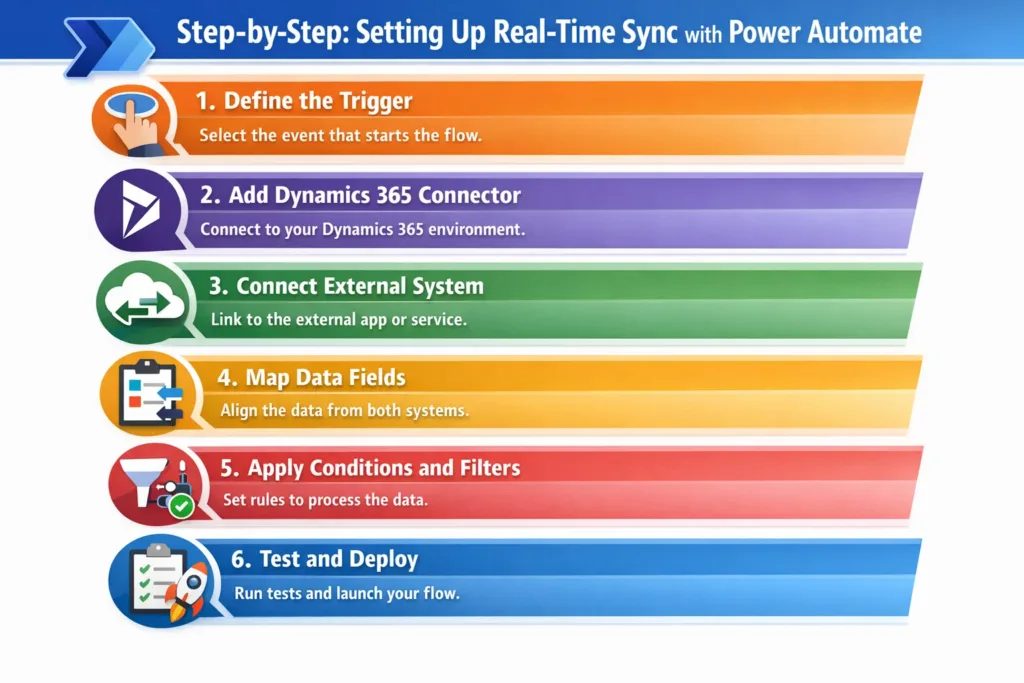
Step 1: Define the Trigger
Choose an event such as:
- When a record is created
- When a record is modified
Step 2: Add Dynamics 365 Connector
Use built-in connectors to connect your Dynamics environment securely.
Step 3: Connect External System
Integrate via:
- REST APIs
- SQL databases
- Third-party SaaS connectors
Step 4: Map Data Fields
Ensure fields match between both systems to avoid data mismatch.
Step 5: Apply Conditions and Filters
Use logic to sync only relevant data.
Step 6: Test and Deploy
Run multiple test scenarios before going live to ensure smooth execution.
Best Practices for Real-Time Data Sync
To achieve reliable integration, follow these best practices:
- Use error handling and retry policies
- Implement data validation rules
- Monitor flows using Power Automate analytics
- Avoid unnecessary triggers to reduce API calls
- Ensure compliance with data security standards
Additionally, businesses should always document integration logic for future scalability.
Benefits of Using Power Automate for Dynamics 365 Integration
By implementing real-time sync, companies can:
- Improve operational efficiency
- Reduce manual data entry
- Eliminate duplicate records
- Enhance reporting accuracy
- Deliver better customer experiences
Furthermore, real-time insights allow leadership teams to make proactive business decisions.
How Skysoft Connections Helps You
At Skysoft Connections, we specialize in Microsoft Dynamics 365 and Power Platform solutions tailored to your business needs. Our team ensures your systems are connected, optimized, and scalable.
Our Integration Services Include:
- Dynamics 365 and ERP integration
- CRM and marketing platform sync
- Custom API and middleware development
- Power Automate workflow automation
- Data migration and transformation
- Real-time reporting dashboards
Because we have delivered over 40,000+ hours of successful projects, our solutions are both reliable and future-ready.
Real-World Example: Data Sync Architecture
Here’s how a typical real-time integration works:
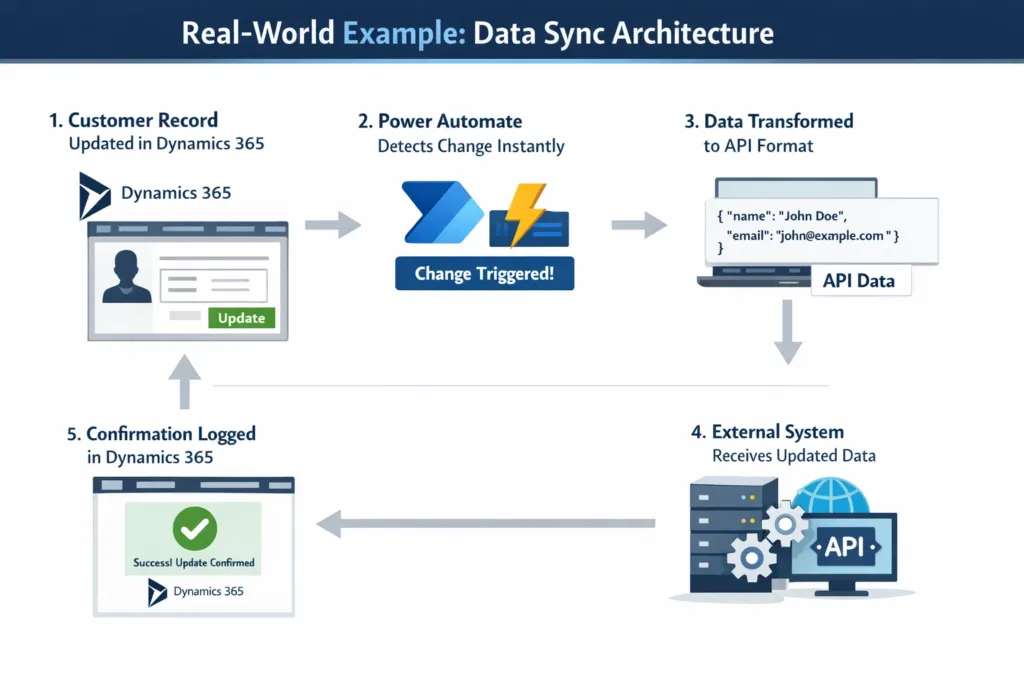
- A customer record is updated in Dynamics 365
- Power Automate detects the change instantly
- Data is transformed into API format
- The external system receives updated data
- A confirmation response is logged back in Dynamics
As a result, both systems remain synchronized without manual intervention.
Challenges and How to Overcome Them
Although real-time integration is powerful, it comes with challenges:
Common Issues
- API rate limits
- Data mismatch errors
- Network latency
- Security concerns
Solutions
- Use batching and throttling controls
- Implement logging and alerts
- Use Azure services for secure data exchange
- Apply validation rules before syncing
Therefore, choosing the right implementation partner is crucial.
Future of Real-Time Data Integration
With the growth of AI, IoT, and predictive analytics, real-time data sync will become even more critical. Businesses that adopt automated integrations today will gain a competitive advantage tomorrow.
Power Automate combined with Dynamics 365 creates a scalable ecosystem where data flows freely, securely, and intelligently.
Conclusion
Real-time data sync between Dynamics 365 and external systems using Power Automate is no longer optional—it’s essential for modern business success. By eliminating silos and automating workflows, companies can improve efficiency, accuracy, and customer satisfaction.
If you’re planning to integrate your systems, Skysoft Connections is here to help you build secure, scalable, and intelligent solutions tailored to your business.
Read more : migrating legacy systems to dynamics 365
FAQ’s
It is the process of instantly updating data between Dynamics 365 and external systems when changes occur.
Yes, with proper design and connectors, Power Automate can support enterprise-level integrations.
Not necessarily. Most integrations are low-code, but advanced scenarios may require API customization.
Power Automate supports enterprise-grade security, including authentication, encryption, and compliance controls.
 is a software solution company that was established in 2016. Our quality services begin with experience and end with dedication. Our directors have more than 15 years of IT experience to handle various projects successfully. Our dedicated teams are available to help our clients streamline their business processes, enhance their customer support, automate their day-to-day tasks, and provide software solutions tailored to their specific needs. We are experts in Dynamics 365 and Power Platform services, whether you need Dynamics 365 implementation, customization, integration, data migration, training, or ongoing support.