
Technical Architecture & Solution Document
1. Executive Summary
This Project is an automated intelligence pipeline that scrapes executive level job postings from multiple job boards, enriches each record with CEO and leadership data sourced from official company websites, and publishes a clean, deduplicated dataset to Google Sheets for recruiting and market monitoring purposes.
The system serves recruiting firms, executive search researchers, and business-intelligence teams who need a reliable, continuously updated watchlist of senior vacancies without manually browsing dozens of job platforms. By combining Apify actors, Make (Integromat) automation scenarios, and optional LLM based extraction, the pipeline delivers structured recruiting intelligence with minimal human intervention.
An AI powered Copilot Agent is layered on top of the enriched dataset, allowing end users to query job listings, filter by sector or seniority, and get instant answers about active executive openings all through a conversational interface.
| Key Outcome | Description |
| Automated Executive Monitoring | Scrapes senior job postings 24/7 across multiple boards with no manual effort |
| CEO & Leadership Enrichment | Automatically resolves CEO names from official company pages per listing |
| Deduplicated Clean Output | Filtering in MAKE + dedup logic ensures Google Sheet stays clean and actionable |
| Conversational Copilot Agent | End users query job data in natural language via an AI chat interface |
| Scalable & Repeatable | Apify + Make architecture supports adding new boards or enrichment sources easily |
2. Problem Statement
2.1 Background
Senior executive job postings are scattered across LinkedIn, Indeed, specialist board sites, and company career pages. Recruiting researchers and intelligence teams currently resort to daily manual browsing to track new C-suite and VP-level vacancies a time-intensive process prone to missed postings and inconsistent data quality.
Prior approaches involved ad-hoc spreadsheet updates maintained by junior analysts, with no systematic enrichment of company leadership data. This created gaps in intelligence and limited the team’s ability to act quickly on new opportunities.
2.2 Core Problem
There is no automated, repeatable system that (a) aggregates executive job postings across multiple platforms, (b) enriches each posting with verified CEO/leadership information, and (c) delivers a clean, queryable dataset without manual data-entry overhead.
2.3 Affected Stakeholders
| Stakeholder | Role | Impact | Key Concerns |
| Recruiting Researchers | Primary pipeline consumers | High | Data freshness, deduplication accuracy |
| Executive Search Clients | End beneficiaries of intelligence | High | Coverage breadth, CEO name accuracy |
| Operations / Automation Team | Pipeline maintenance | High | Reliability, error handling, cost |
| Leadership / Management | Strategic oversight | Medium | ROI, platform cost, compliance |
2.4 Pain Points
- Manual browsing across 10+ job boards consumes 3–5 hours per researcher per day
- No consistent enrichment of CEO / leadership data looked up ad hoc per listing
- Duplicate listings across platforms inflate apparent vacancy counts
- No queryable interface researchers must scroll spreadsheets to find relevant postings
- No alerting when new senior roles matching criteria are posted
3. Solution Overview
3.1 Proposed Solution
The solution is a multi-stage automated pipeline built on Apify (web scraping actors), Make (orchestration & scenario automation), and Google Sheets (output layer), with an optional LLM extraction step for CEO name resolution and a conversational Copilot Agent for end-user querying.
The pipeline ingests job postings by board type, applies filtering to isolate executive roles, deduplicates across sources, enriches each record with CEO/leadership information scraped from official company websites, and publishes a structured sheet. On top of this, an AI Copilot Agent built that allows end users to query the enriched dataset conversationally.
3.2 Goals & Success Metrics
| Goal | Success Metric | How Measured | Timeline |
| Board Coverage | 5+ job boards scraped per cycle | Apify run logs | Month 1 |
| CEO Enrichment Rate | >85% of listings enriched with CEO name | Sheet completion % | Month 2 |
| Deduplication Accuracy | <2% duplicate records in output sheet | Manual spot-check + script | Ongoing |
| Pipeline Reliability | 99% successful Make scenario runs | Make execution history | Month 2 |
| Copilot Query Accuracy | Relevant results in >90% of queries | User feedback / QA review | Month 3 |
| Time Savings | Reduce manual research from 4 hrs to <30 min/day | Researcher time log | Month 2 |
4. Screenshots & Workflow
The section below traces the end-to-end pipeline flow from job-board sourcing through to the end-user Copilot Agent interaction. Each step corresponds to a Make scenario stage, Apify actor execution, or user-facing UI touchpoint.
4.1 Workflow Overview
| Step | Stage / Action | Description | Tool / Location |
| 1 | Source Bucketing | Classify target job boards by type (general, exec-specialist, company career pages) | Make: Board Config Module |
| 2 | Apify Actor Execution | Run scraping actors per board; collect raw job listing JSON | Apify Platform |
| 3 | Make Scenario Orchestration | Receive Apify webhook, parse payload, route to enrichment steps | Make Scenario |
| 4 | Filtering | Apply title/seniority filters to isolate C-suite, VP, Director-level roles | Make :Filter Module |
| 5 | Deduplication Logic | Hash-based dedup across board sources to remove cross-platform duplicates | Make : Dedup Module |
| 6 | Google Sheet Output | Write enriched, deduplicated records to master sheet with timestamps | Google Sheets |
| 7 | Copilot Agent Query | End user queries enriched job data via conversational AI interface | Claude Copilot Agent |
4.2 Screen-by-Screen Walkthrough
Step 1–2 Source Bucketing & Apify Actor Execution
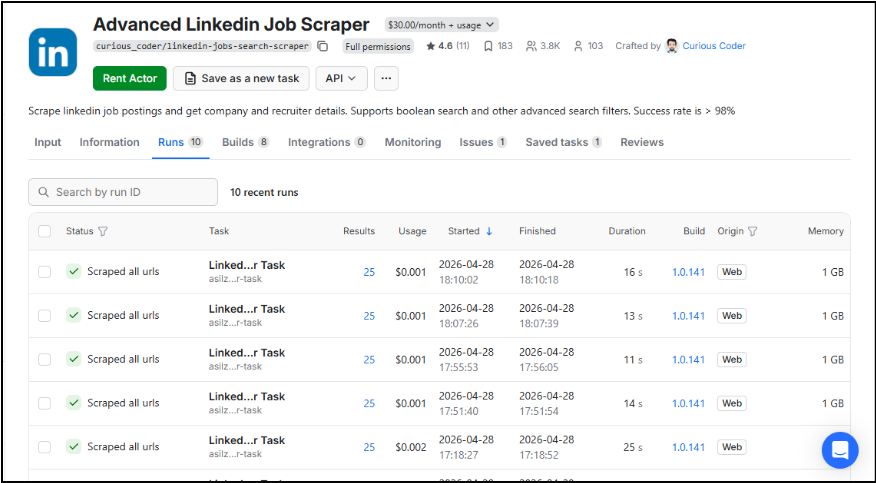
The pipeline begins in Make with a board configuration module that defines which job boards to scrape per run cycle. Each board type maps to a dedicated Apify actor. Actors are triggered via Make HTTP modules or Apify’s scheduler, and raw JSON payloads are returned via webhook to the Make scenario.
Screenshot: Apify Actor Dashboard
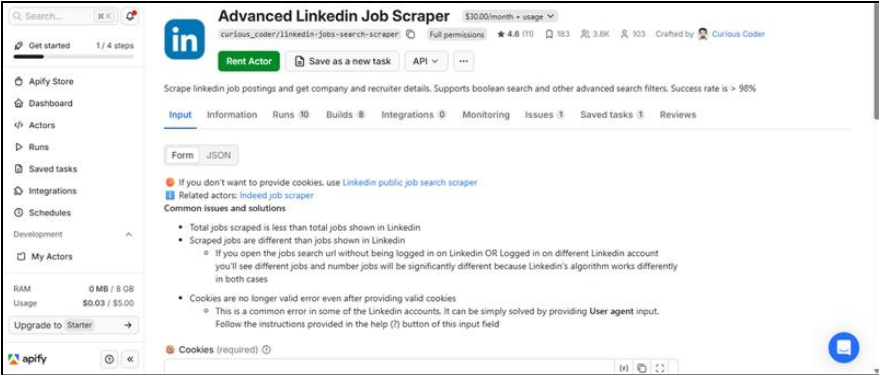
Figure : Apify actor run list showing board-specific scrapers and execution status
Step 3–5 : Make Scenario: Filter, Dedup & Route
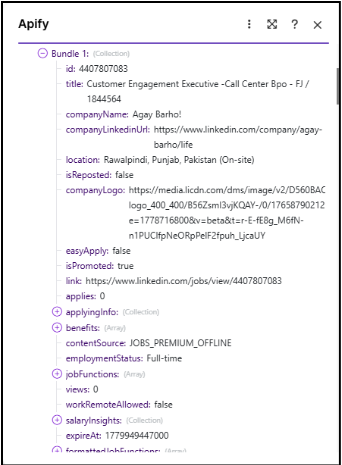
The core Make scenario receives the Apify webhook, parses the job listing array, and routes each item through a filter module. Matched executive listings pass to the deduplication module, which checks a running hash store. Only net-new listings proceed to enrichment.
Screenshot: Make Scenario Canvas
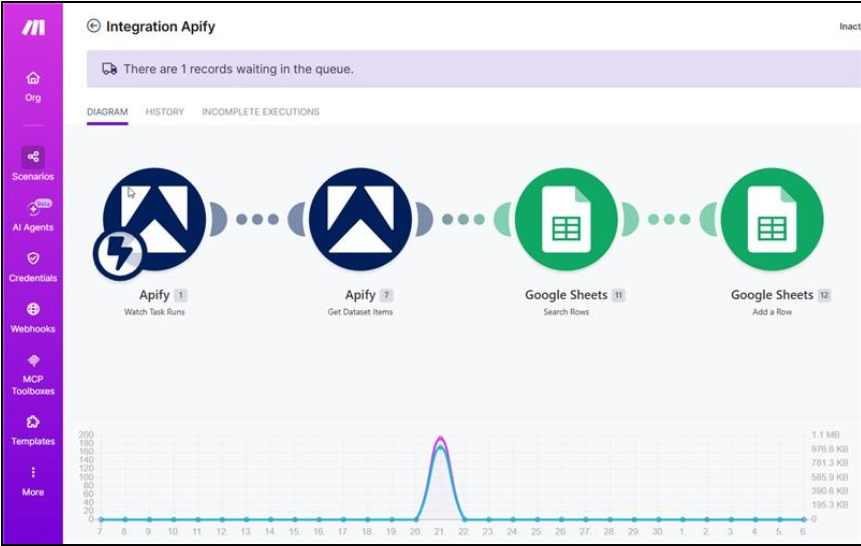
Figure : Make scenario showing filter, dedup, and routing modules
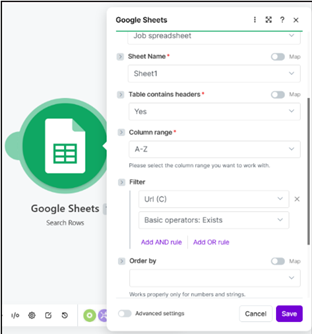
Step 6 : Google Sheet Output
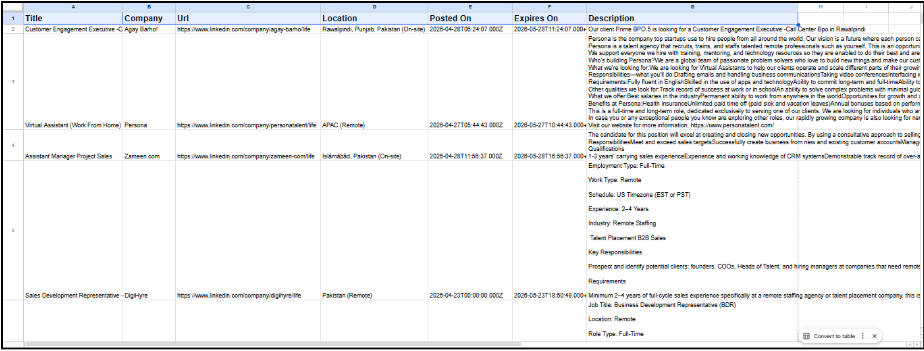
Enriched records are appended to the master Google Sheet via Make’s Google Sheets module. Each row includes: job title, company, board source, posting date, CEO name, enrichment confidence, and a dedup hash.
Screenshot: Google Sheet Output
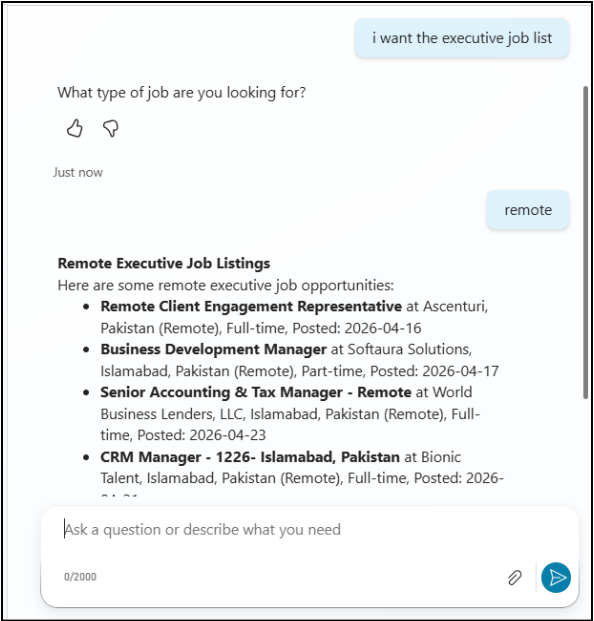
Step 7 : Copilot Agent End User Query Interface
The AI Copilot Agent serves as the primary interface through which end users interact with the enriched job dataset. A centralized Google Sheet containing cleaned and enriched job records is maintained in a shared location and is automatically updated on an hourly basis using Apify and Make.
Built on Claude, the agent uses this continuously refreshed sheet (or a downstream database view) as its knowledge source, enabling real-time natural-language querying. Users can ask questions such as:
• “Show me all CFO openings posted in the last 7 days in the US”
• “Which companies have both a CEO vacancy and a COO vacancy?”
• “What is the current CEO of Acme Corp according to the enrichment data?”
• “List all executive roles at Series B fintech companies this month”
The Copilot Agent directly reads from the latest version of the shared dataset and responds in real time with structured job summaries, filtered results, or precise record lookups. It is designed to be the primary day-to-day interface for recruiting researchers, effectively eliminating the need to manually browse spreadsheets.
Screenshot: Copilot Agent Chat Interface
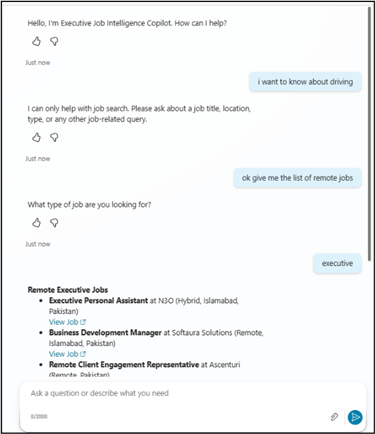
Figure : AI Copilot Agent answering a researcher’s natural-language query about executive vacancies
5. High-Level Architecture
The architecture is organized into five layers: Data Acquisition, Orchestration, Enrichment, Output, and User Interaction. The system is stateless at the scraping layer, with state maintained in Google Sheets and the deduplication hash store.
5.1 Architectural Layers
| Layer | Technology | Responsibility |
| Data Acquisition | Apify Actors | Scrape job boards and company leadership pages on schedule |
| Orchestration | Make (Integromat) | Webhook receipt, module routing, scenario execution, error handling |
| Filtering & Dedup | Make + Regex Logic | Title-based executive filtering; hash-based cross-source deduplication |
| Enrichment | Apify + Claude API (optional) | CEO/leadership name extraction from company websites; LLM fallback |
| Output / Storage | Google Sheets | Master enriched dataset; QA dashboard view; downstream exports |
| User Interaction | Claude Copilot Agent | Natural-language querying of enriched job data by end users |
5.2 Data Flow
| # | From | → | To | Description |
| 1 | Make Scheduler / Webhook | → | Apify Actor | Trigger scrape run per board; pass board config parameters |
| 2 | Apify Actor | → | Make Webhook Module | Return raw job listing JSON array via HTTP callback |
| 3 | Make Filter Module | → | Dedup Store | Check listing hash; discard duplicates; pass net-new listings |
| 4 | Make Enrichment Module | → | Apify CEO Scraper | Request CEO lookup for company domain extracted from listing |
| 5 | Apify CEO Scraper | → | Claude API (optional) | Pass raw HTML of leadership page for LLM name extraction fallback |
| 6 | Make Output Module | → | Google Sheets | Append enriched row: title, company, board, date, CEO, dedup hash |
| 7 | Google Sheets | → | Copilot Agent Context | Enriched dataset loaded as agent knowledge source |
| 8 | End User | → | Copilot Agent | Natural-language query; agent returns filtered job summaries |
Authentication & Authorization
- Make credential store used for all API keys keys are not exposed in scenario JSON exports
- Google Sheets OAuth2 service account scoped to specific spreadsheet IDs only
- Anthropic API key rotated on a regular basis; usage monitored via Anthropic console
Data Protection
- Job listing data is public information no PII beyond publicly posted contact details
- CEO names extracted from public company websites only no private data sources
- Google Sheet access controlled by sharing settings restricted to named team members
6. Deployment & Infrastructure
6.1 Environments
| Environment | Platform | Purpose | Access |
| Development | Local Make + Apify Dev | Scenario building, actor testing, prompt iteration | Developer only |
| Staging | Make (test scenarios) + Apify staging | End-to-end pipeline QA before production promotion | Team + reviewers |
| Production | Make (live) + Apify (live) + Google Sheets | Live scraping, enrichment, and Copilot Agent serving | Ops + end users |
6.2 Pipeline Schedule & CI/CD
- Apify actors scheduled via cron in Apify console default: every 6 hours per board
- Make scenarios triggered by Apify webhook on actor completion near real-time processing
- Scenario version history maintained in Make rollback to prior version on failure
- Google Sheet protected range prevents accidental manual edits to pipeline-managed columns
- Copilot Agent prompt versioned in a dedicated config sheet tab updated without code changes
- Monthly review of dedup hash store to purge stale entries and avoid false-positive matches
7. Copilot Agent Detailed Specification
The AI Copilot Agent is a Claude-powered conversational interface built on top of the enriched job dataset. It is the primary end-user touchpoint and is designed to replace manual spreadsheet browsing entirely for day-to-day research tasks.
7.1 Agent Purpose & Scope
| Capability | Description |
| Job Search & Filtering | Query listings by title, seniority level, company, sector, location, or posting date |
| CEO Lookup | Retrieve the enriched CEO name for any company in the dataset |
| Market Snapshot | Summarise active executive vacancies by sector or region on demand |
| Trend Queries | Identify companies with multiple senior vacancies or recurring hiring patterns |
| Record Lookup | Fetch a specific listing’s full details including board source and enrichment metadata |
| Out of Scope | The agent does not browse live job boards; it only queries the enriched dataset |
7.2 Technical Implementation
- Model: claude-sonnet-4-20250514 via Anthropic /v1/messages endpoint
- Context: Enriched Google Sheet exported as CSV or JSON injected into system prompt context window
- System Prompt: Defines agent persona (‘Executive Jobs Research Copilot’), data schema, and response format guidelines
- Max Tokens: 1,024 per response (sufficient for summarised job lists and record details)
- Temperature: 0.2 (low temperature for factual, consistent data retrieval responses)
- Multi-turn: Conversation history maintained in session state for follow-up query refinement
- Fallback: If the query cannot be answered from dataset context, agent responds with ‘No matching records found’ rather than hallucinating
7.3 Example Queries & Expected Responses
| User Query | Expected Agent Behaviour |
| Show me all CEO vacancies posted this week | Returns filtered list: company, title, board source, posting date |
| Who is the CEO of [Company X]? | Returns enriched CEO name and source URL from dataset |
| Which sectors have the most executive openings? | Returns ranked sector summary with vacancy counts |
| Are there any CFO roles in fintech? | Filters by title + sector tag; returns matching listings |
| Give me a market snapshot for this month | Summarises total listings, top sectors, top boards, enrichment rate |
| What boards are most active for VP-level roles? | Aggregates by source board, filtered to VP seniority tier |
8. Open Issues & Risks
| Risk | Severity | Likelihood | Mitigation |
| Job board HTML structure changes break Apify actors | High | Medium | Monitor actor error rates; maintain actor update runbook; use Apify’s change detection |
| CEO lookup page structure varies widely by company | High | High | Layered approach: structured scrape → regex → LLM fallback; flag low-confidence enrichments |
| Apify usage costs exceed budget at high scrape frequency | Medium | Medium | Tune scrape schedule; use actor caching; cap concurrent runs |
| Make scenario hitting operation limits on large payloads | Medium | Low | Batch processing in scenarios; pagination on Sheets writes |
| Copilot Agent context window exceeded for large datasets | Medium | Medium | Summarise/compress dataset before injection; use vector retrieval for scale |
| Dedup logic produces false positives (same role, different board) | Low | Medium | Review hash key composition; add human-review queue for edge cases |
| Google Sheets API quota exceeded during high-volume runs | Low | Low | Implement exponential backoff in Make; batch Sheets appends |
9. Appendix
A. Glossary
| Term | Definition |
| Apify | Cloud-based web scraping and automation platform; actors are individual scraper scripts |
| Make (Integromat) | No-code/low-code workflow automation platform used for scenario orchestration |
| Actor (Apify) | A containerised scraping script deployed and run on the Apify platform |
| CEO Enrichment | Process of resolving the name of a company’s chief executive from public web sources |
| Deduplication | Removing duplicate job listings that appear across multiple boards for the same role |
| LLM Fallback | Using a large language model (Claude) to extract data when structured scraping fails |
| Copilot Agent | An AI-powered conversational interface allowing natural-language queries of the job dataset |
| QA Dashboard | A Google Sheets view highlighting records with incomplete or low-confidence enrichment |
| System Prompt | Instructions provided to the LLM defining its persona, data context, and response rules |
| p99 Latency | 99th percentile response time — the time experienced by the slowest 1% of requests |
B. MVP Build Steps (from Project Brief)
- Step 1: Source bucketing by board type : define board list and category tags in Make config
- Step 2: Apify actor setup : configure and test one actor per target board
- Step 3: Make scenario build : webhook intake, routing, error handling skeleton
- Step 4: Dedup logic : hash store setup; duplicate detection and discard module
- Step 5: CEO lookup from official company pages : Apify CEO scraper + LLM fallback
- Step 6: Google Sheet output : schema definition, append module, QA view formatting
- Step 7: Copilot Agent : system prompt, context injection, conversation loop, UI deployment
Read more : How Digital Transformation with CRM and Automation Drives Real ROI
FAQ’s
It automatically collects executive-level job postings, enriches them with CEO data, and stores clean results in Google Sheets.
The system extracts CEO and leadership details from official company websites using automated scraping and AI-based enrichment.
Recruiting firms, executive search teams, and business intelligence teams can use it to track senior job openings faster and more accurately