
Power Automate has become one of the most widely used tools for automating business processes in Microsoft’s Power Platform. While creating flows can be simple and intuitive, ensuring they run smoothly in production environments requires careful planning, especially around error handling. Without proper handling, failed flows can lead to broken business processes, missed approvals, or incomplete data synchronization.
In this blog, we’ll cover why error handling is important, the types of errors you may encounter, and best practices to build resilient Power Automate flows.
🔹 Why Error Handling Matters
- Reliability: Ensures critical business process running without disruption.
- Transparency: Provides visibility into what went wrong.
- Recovery: Enables flows to gracefully retry or resume after a failure.
- User Trust: End users have confidence in automation when failures are managed.
🔹 Common Errors in Power Automate
- Connectivity Issues – APIs or services (like Dynamics 365, SharePoint, Outlook) may be temporarily unavailable.
- Timeouts – Flows can run into execution time limits.
- Data Validation Errors – Missing required fields, invalid formats, or duplicate records.
- Authentication Errors – Expired tokens, revoked permissions, or credential changes.
- Logic Failures – Incorrect conditions or unexpected data leading to flow termination.
🔹 Best Practices for Error Handling
-
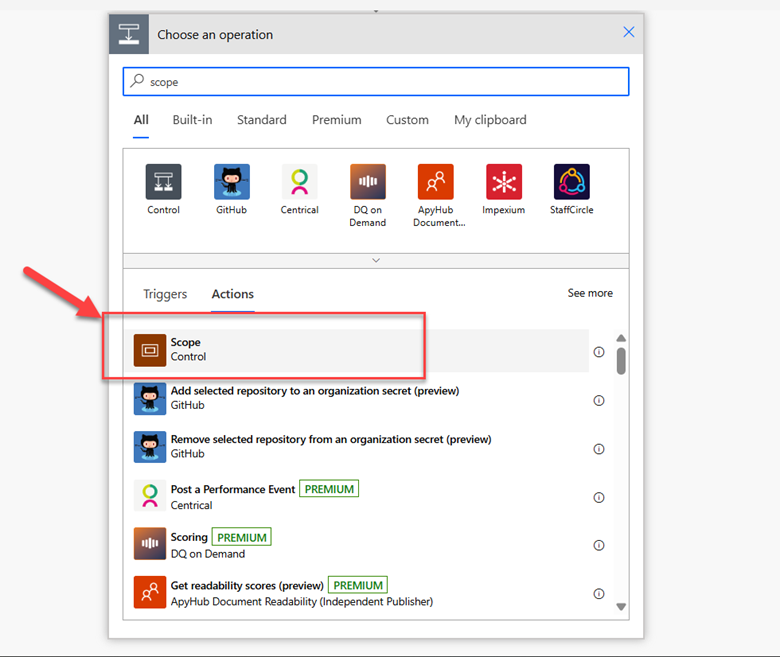
Use Scope Actions for Grouping and Monitoring
- Enclose related actions inside a Scope.
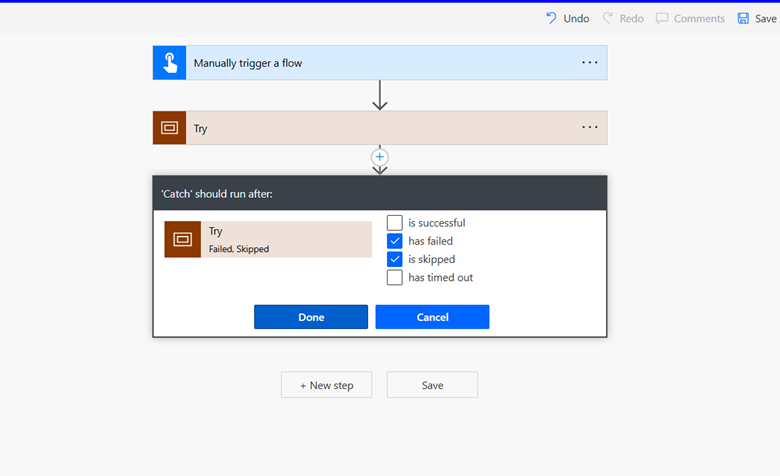
- Apply Configure Run After settings to manage success, failure, or skipped states.
- Example: If a step fails, capture the error details and alert the user instead of stopping the entire flow.
-
Configure Run After Settings
- Each action in Power Automate has a run after configuration.
- You can specify if the next action should run on success, failure, skipped, or timed out.
- This is essential for branching error handling logic.
-
Add Retry Policies
- Many connectors support retries policies.
- Set up retries using exponential backoff to handle temporary issues.
- Example: When calling Dynamics 365 API, retries can handle temporary service downtime.
-
Log Errors for Troubleshooting
- Store error details in Dataverse, or SharePoint.
- Log the error message together with the flow name, action name, and timestamp.
- This creates a history of failures for diagnostics.
-
Notify Stakeholders
- Send an email, Teams message, or create a task when a failure occurs.
- Capture key details such as flow name, record ID, and error description.
- Helps users or admins respond quickly.
-
Use Parallel Branching for Critical Flows
- Design flows with redundant steps or alternative paths.
- Example: If sending an approval via Teams fails, fall back to Outlook email.
-
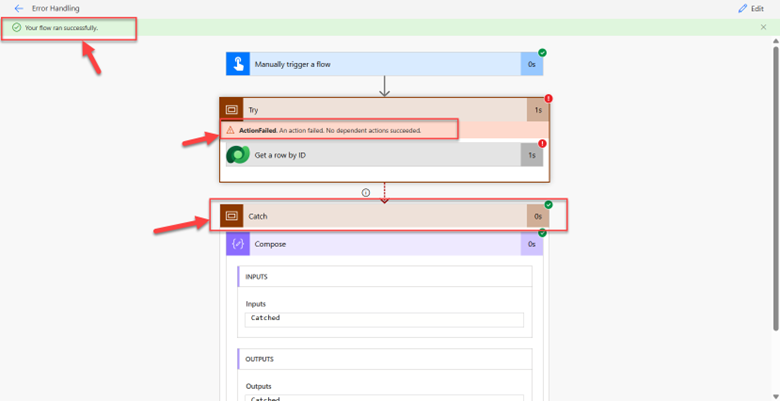
Implement Try-Catch Pattern with Scopes
- Use three Scopes: Try, Catch, and Finally.
- Place main logic inside Try.
- Place error logging and notification in Catch.
- Place cleanup actions (like releasing a lock) in Finally.
-
Leverage Child Flows for Reusability
- Move error-handling logic to a child flow.
- Reuse across multiple flows instead of duplicating error handling.
-
Test with Edge Cases
- Simulate common failure scenarios.
- Examples: API returning 500 error, empty datasets, authentication failures.
- Ensures your error-handling works as expected.
🔹 Example: Error Handling Pattern in a Flow
- Scope (Try) – Update record in Dynamics 365.
- Scope (Catch) – Runs if try fails → Log error in Dataverse + Send Teams notification.
- Scope (Finally) – Runs regardless → Cleanup or close out process.
This structure ensures your flow is resilient, self-documented, and easy to maintain.
Key Takeaways
- Always plan for failures when designing flows.
- Use Scopes, Run After, Retry Policies, and Notifications as core tools.
- Keep logs of errors for long-term diagnostics.
- Design with the end-user in mind – they should know when something fails and what action is needed.
By applying these best practices, you’ll create robust and reliable Power Automate flows that enhance business efficiency and minimize disruption.
Read more : how to track customer interactions across the lifecycle in dynamics 365
FAQ’s
Why is error handling important in Power Automate flows?
A1: It ensures reliability, transparency, and recovery, so business processes continue smoothly even when errors occur.
What are the common errors in Power Automate?
A2: Common issues include connectivity failures, timeouts, data validation errors, authentication problems, and logic failures.
How can I handle errors effectively in Power Automate flows?
A3: Use Scope actions, Configure Run After settings, Retry Policies, logging, and notifications to build resilient flows.