Table of Content
- Understanding Dynamics 365 Integration Challenges
- What is .NET Core Middleware in System Integration
- Why Use Clean Architecture for Dynamics 365 Integrations?
- Clean Architecture Layers for Dynamics 365 Middleware
- Architecture Flow: Dynamics 365 Integration Using .NET Core Middleware
- Key Components of a Clean Integration Architecture
- Example Integration Scenario
- Best Practices for Dynamics 365 Middleware Integration
- Technologies Commonly Used in This Architecture
- How SkySoft Connections Helps Businesses
- Benefits of Using Custom Middleware for Dynamics 365
- Future of Enterprise CRM Integrations
- FAQ’s
Modern enterprises rely heavily on connected systems. However, integrating CRM platforms, legacy systems, and third-party applications can quickly become complex. This is where a clean architecture approach using custom .NET Core middleware becomes highly valuable.
In this guide, we will explore how to integrate Dynamics 365 with custom .NET Core middleware using clean architecture principles. Additionally, we will explain how this approach improves scalability, maintainability, and performance. We will also discuss how SkySoft Connections helps businesses build robust integrations for modern enterprise ecosystems.
Understanding Dynamics 365 Integration Challenges
Organizations using Microsoft Dynamics 365 often need to connect it with:
- Legacy ERP systems
- Custom business applications
- Data warehouses and reporting platforms
- External APIs and services
- Mobile or web applications
However, direct integrations can create serious problems.
Common Integration Issues
- Tight coupling between systems
- Difficult maintenance and upgrades
- Poor error handling and monitoring
- Performance bottlenecks
- Limited scalability
Therefore, implementing middleware with clean architecture helps solve these issues efficiently.
What is .NET Core Middleware in System Integration
.NET Core middleware acts as an intermediate service layer that manages communication between Dynamics 365 and external systems.
Instead of connecting systems directly, middleware handles:
- Data transformation
- API orchestration
- Authentication and authorization
- Message processing
- Error handling
As a result, the architecture becomes modular, flexible, and easier to maintain.
Why Use Clean Architecture for Dynamics 365 Integrations?
Clean Architecture is a design principle that separates software into independent layers. Consequently, business logic remains independent from infrastructure and frameworks.
Key Benefits
- Improved system maintainability
- Independent testing of components
- Reduced dependency on external frameworks
- Better scalability
- Easier system upgrades
Furthermore, it ensures that business rules remain stable even when external systems change.
Clean Architecture Layers for Dynamics 365 Middleware
A well-structured middleware solution typically follows the layered architecture shown below.
| Layer | Purpose | Example Components |
|---|---|---|
| Presentation Layer | API endpoints and controllers | REST APIs, Webhooks |
| Application Layer | Business logic and workflows | Services, Commands, Queries |
| Domain Layer | Core business entities and rules | Models, Aggregates |
| Infrastructure Layer | External integrations | Dynamics 365 SDK, Databases |
| Integration Layer | Messaging and data mapping | Queue services, API adapters |
Because each layer is independent, developers can modify or extend one layer without affecting the others.
Architecture Flow: Dynamics 365 Integration Using .NET Core Middleware
The integration workflow usually follows these steps.
- External system sends request
- Middleware API receives the request
- Application services process business logic
- Data mapping converts external data format
- Middleware communicates with Dynamics 365 API
- Response returns to the requesting system
Consequently, the middleware acts as a secure and controlled gateway for all integrations.
Key Components of a Clean Integration Architecture
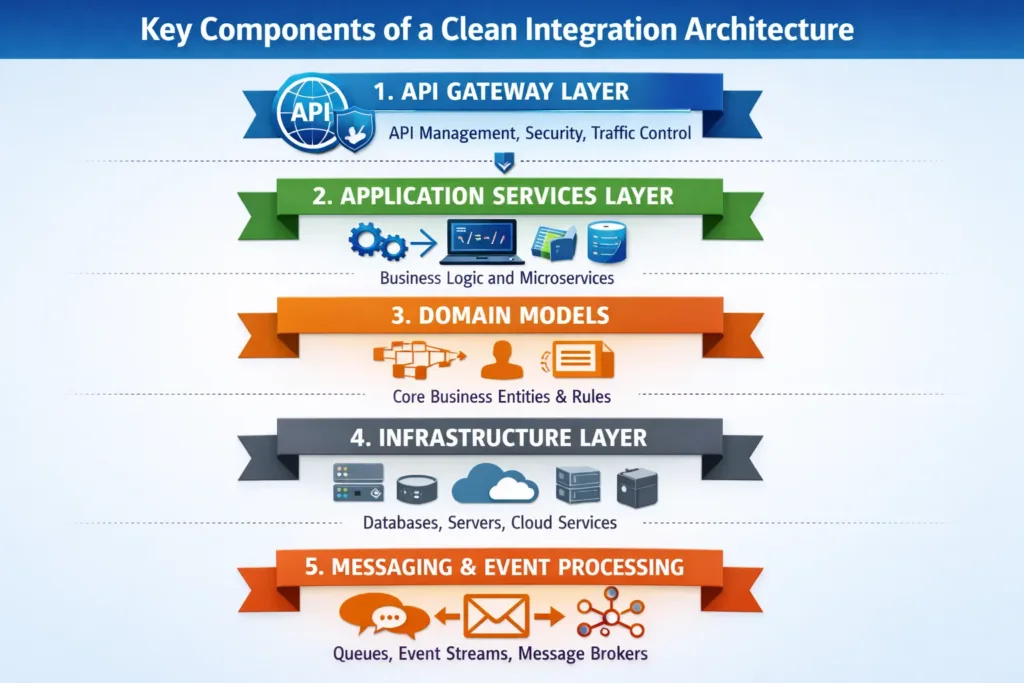
1. API Gateway Layer
The API layer exposes secure endpoints for external systems.
Key responsibilities include:
- Authentication handling
- Request validation
- Rate limiting
- Logging
2. Application Services Layer
This layer contains the core integration workflows.
For example:
- Contact synchronization
- Lead creation workflows
- Opportunity updates
- CRM data validation
Therefore, business logic remains centralized and easier to maintain.
3. Domain Models
Domain models represent core business entities.
Examples include:
- Customer
- Account
- Opportunity
- Sales Orders
Because these models are independent, they remain stable even when external systems change.
4. Infrastructure Layer
This layer manages connections with external systems.
Typical integrations include:
- Dynamics 365 Web API
- SQL databases
- Message queues
- Cloud storage services
Moreover, this separation keeps external dependencies isolated.
5. Messaging and Event Processing
In large enterprise environments, event-driven architecture improves scalability.
Popular options include:
- Azure Service Bus
- RabbitMQ
- Kafka
For instance, events like CustomerCreated or OrderUpdated can trigger automated CRM updates.
Example Integration Scenario
Below is a typical integration use case.
| System | Action | Middleware Role |
|---|---|---|
| ERP System | Creates new customer | Sends data to middleware |
| Middleware | Validates and maps data | Transforms ERP data format |
| Dynamics 365 | Creates CRM contact | Stores standardized data |
| Analytics Platform | Receives updates | Middleware publishes events |
Thus, the middleware ensures data consistency across systems.
Best Practices for Dynamics 365 Middleware Integration
When implementing integrations, several best practices should be followed.
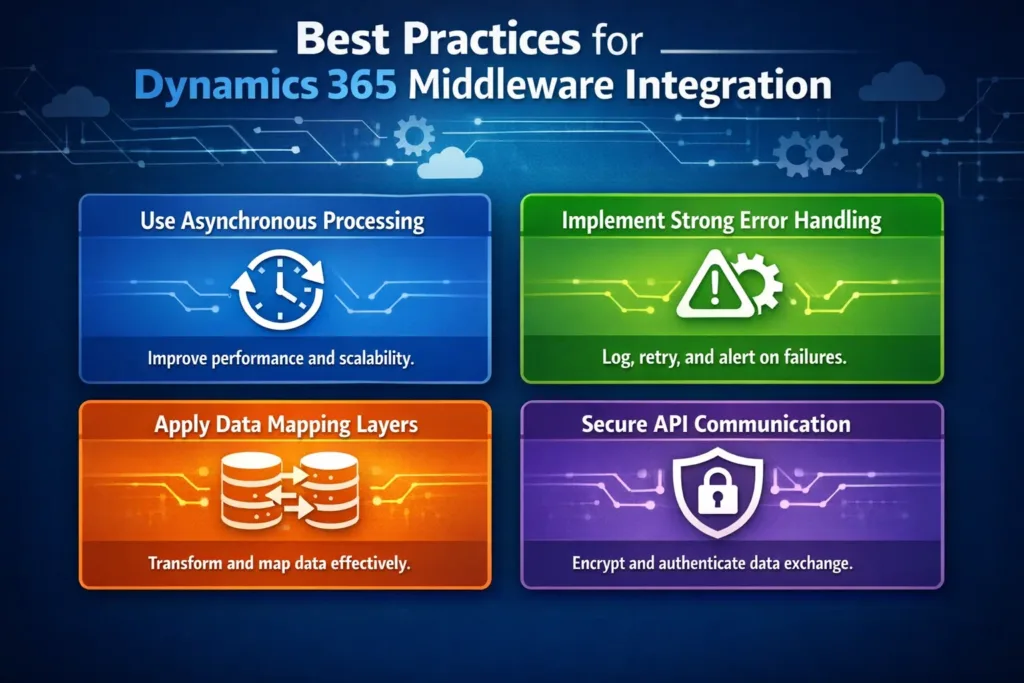
Use Asynchronous Processing
Instead of direct API calls, use queues or event streams. As a result, system performance improves significantly.
Implement Strong Error Handling
Integration systems must log errors clearly.
Important logging practices include:
- Structured logs
- Retry mechanisms
- Failure notifications
- Monitoring dashboards
Apply Data Mapping Layers
Because different systems use different schemas, mapping layers are essential.
Benefits include:
- Flexible transformations
- Version control of schemas
- Easier system updates
Secure API Communication
Security should always be a priority.
Essential measures include:
- OAuth authentication
- API keys
- Encryption using HTTPS
- Role-based access control
Technologies Commonly Used in This Architecture
The following technologies are frequently used in enterprise CRM integrations.
| Technology | Purpose |
|---|---|
| .NET Core | Middleware development |
| Dynamics 365 Web API | CRM integration |
| Azure Service Bus | Messaging system |
| SQL Server | Data storage |
| AutoMapper | Object mapping |
| Swagger | API documentation |
Together, these technologies enable scalable and reliable integration architectures.
How SkySoft Connections Helps Businesses
Implementing enterprise-grade integrations requires strong technical expertise and deep knowledge of CRM ecosystems. This is where SkySoft Connections delivers value.
SkySoft Connections provides custom Microsoft Dynamics solutions and integration services designed for modern enterprise systems.
SkySoft Connections Integration Services
Their services include:
- Custom Dynamics 365 integrations
- .NET Core middleware development
- Legacy ERP integration
- API development and management
- Data migration and synchronization
- Cloud-based enterprise architecture
Moreover, their team follows clean architecture principles, ensuring scalable and maintainable solutions for businesses.
Benefits of Using Custom Middleware for Dynamics 365
Businesses that implement middleware-driven architecture gain significant advantages.
Operational Benefits
- Centralized integration management
- Faster system updates
- Improved data consistency
- Reduced system downtime
Technical Benefits
- Loose coupling between systems
- Scalable architecture
- Easier testing and deployment
- Better monitoring and logging
Therefore, middleware becomes the foundation for digital transformation initiatives.
Future of Enterprise CRM Integrations
The future of integrations is rapidly evolving. Organizations are increasingly adopting:
- Microservices architecture
- Event-driven systems
- Cloud-native middleware
- AI-driven automation
- API-first development strategies
Consequently, businesses that invest in scalable integration architectures today will remain competitive tomorrow.
Conclusion
Integrating Dynamics 365 with custom .NET Core middleware using clean architecture provides a powerful and scalable solution for modern enterprises.
By separating business logic from infrastructure, organizations gain flexibility, reliability, and long-term maintainability. Furthermore, middleware simplifies complex integrations while improving data consistency across systems.
With expert implementation from SkySoft Connections, businesses can build secure, scalable, and future-ready Dynamics 365 integration solutions that support digital growth and operational efficiency.
Read more zero trust security in dynamics crm 2026
FAQ’s
Integrating Dynamics 365 with .NET Core middleware improves scalability, simplifies system communication, and helps manage complex data integrations efficiently.
Clean architecture separates business logic from infrastructure, making the system easier to maintain, test, and scale as business needs evolve.
Yes, custom .NET Core middleware enables seamless integration between Dynamics 365 and legacy ERP systems, databases, and third-party applications.
 is a software solution company that was established in 2016. Our quality services begin with experience and end with dedication. Our directors have more than 15 years of IT experience to handle various projects successfully. Our dedicated teams are available to help our clients streamline their business processes, enhance their customer support, automate their day-to-day tasks, and provide software solutions tailored to their specific needs. We are experts in Dynamics 365 and Power Platform services, whether you need Dynamics 365 implementation, customization, integration, data migration, training, or ongoing support.