Table of Content
Overcoming Word Template limitations to support rich text, version control, and reusable placeholders
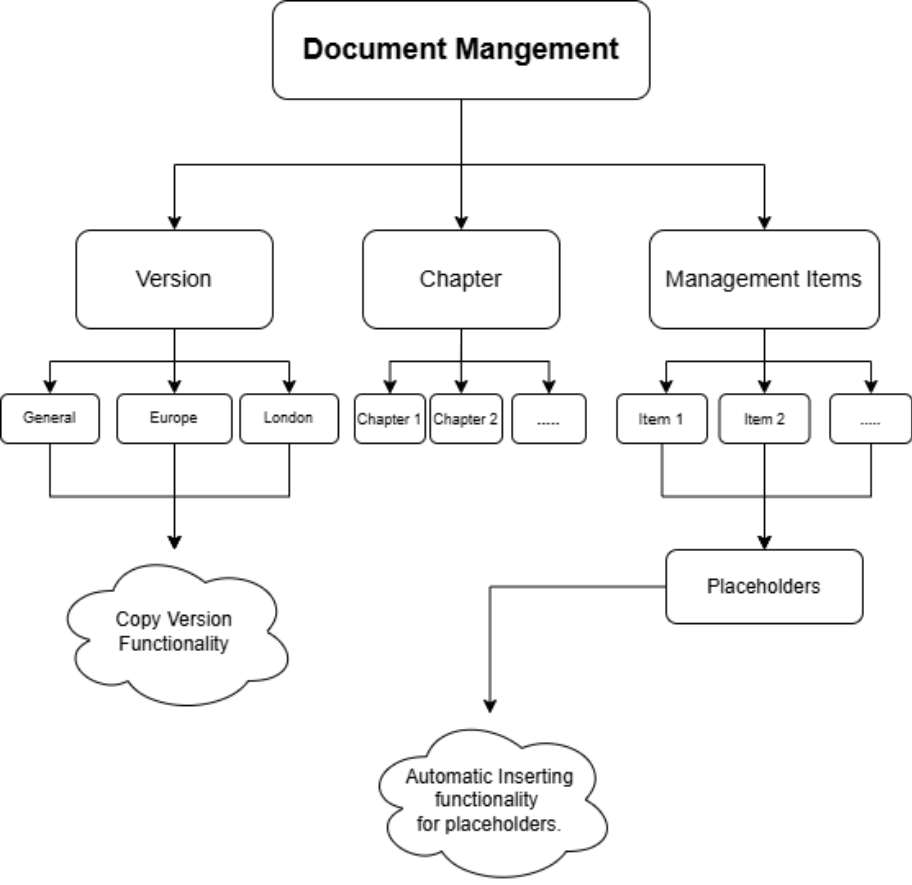
This diagram provides a high-level view of the system components and data flow involved in the custom document generation framework.
Introduction
Microsoft Dynamics 365 provides out-of-the-box (OOB) Word Templates for document generation, but these templates become limiting when businesses require rich text formatting, flexible content structure, and reusable templates. In this case, the client needed to manage document templates within Dynamics 365 while also supporting rich text content, which is not fully possible using OOB Word Templates.
To meet this requirement, a custom Document Library Management solution was introduced. This approach lets users centrally manage templates, supports rich text (HTML/RTF), and enables more flexible document composition while staying fully integrated with Dynamics 365.
Why OOB Word Templates Fall Short
- Limited rich text support: Advanced HTML or RTF formatting is not fully supported.
- Rigid structure: Templates rely on static placeholders, making dynamic or conditional content difficult.
- Reuse and versioning challenges: Managing multiple versions or reusing templates across entities is not straightforward.
Core Components
Document Library Management Entity
Purpose and Role
- The Document Library Management entity acts as the central control point for managing document templates dynamically. It lets users organize templates with document versions, chapters, and management items, enabling flexible and structured document composition beyond standard CRM capabilities.
Support for Multiple Documents and Versions
Each Document Library Management record can contain multiple versions of the same document. Every version supports two template types:
- Preview Template: Used for reviewing and validating the document content before finalization.
- Print Template: We use it to generate the final document, store it in SharePoint, and link it back to the Dynamics 365 record for ongoing access.
Printable vs Non-Printable Document Concept
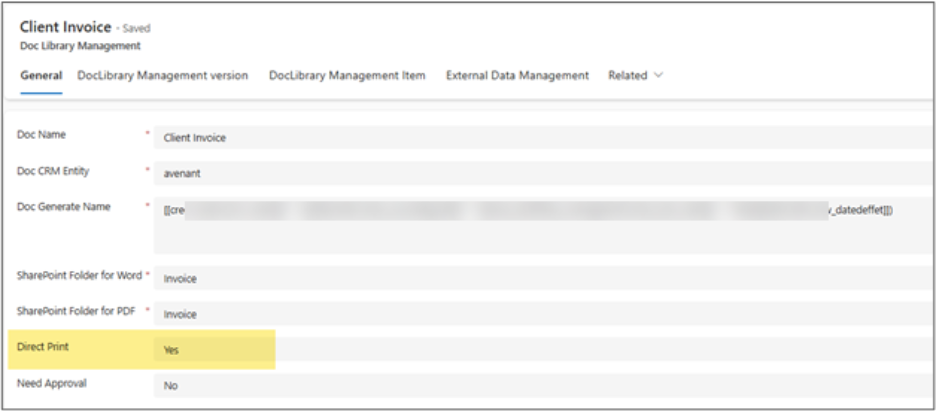
- Printable Templates: Standard CRM OOB Word Templates used for final document generation and printing.
- Non-Printable Templates: Custom templates designed to populate rich text content. These templates rely on a chapter-based structure, where chapters and management items dynamically inject content into the document.
We can differentiate the template type by the highlighted field, whether it is Printable or Non-printable.
Version Control & File Management
Uploading Multiple Versions of the Same Document
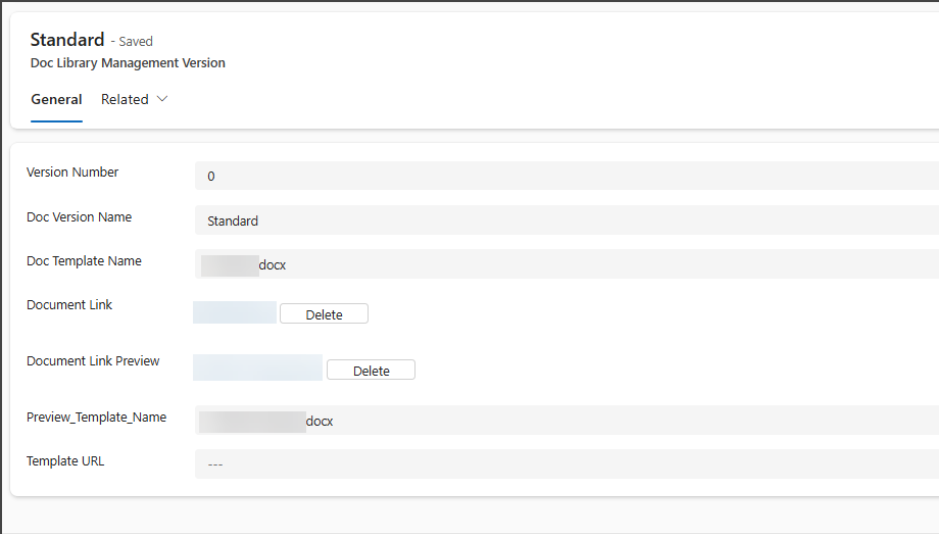
Each document supports multiple versions, and every version can contain two separate templates:
- Preview Template – used for reviewing and validating the document content.
- Print Template – used for final document generation and printing.
Uploading a printable template (Document Link) at the version level automatically triggers a plugin that registers the file as a Dynamics 365 Word Template, making it available for standard CRM document generation.
For non-printable templates (Document Link Preview), we store the files in SharePoint. These templates populate rich text content, which we retrieve from SharePoint and render using a third-party tool.
Copy Version Functionality
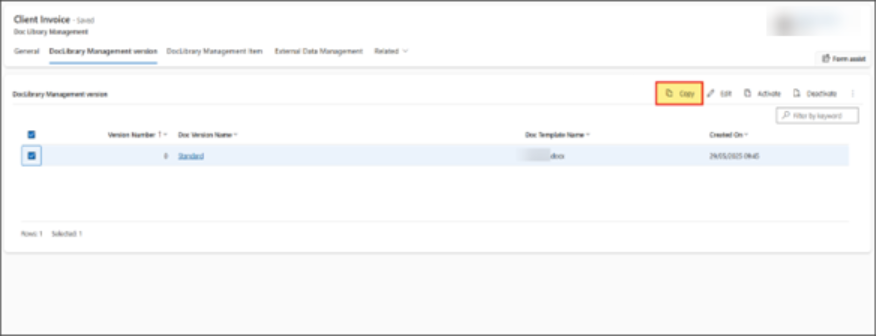
A Copy Version button is available on the version subgrid, allowing users to create a new version by duplicating an existing one. This action copies:
- All version-level field values
- Data + file cloning strategy
This functionality significantly reduces effort when creating new revisions and ensures consistency across document versions.
Chapter & Management Item Structure
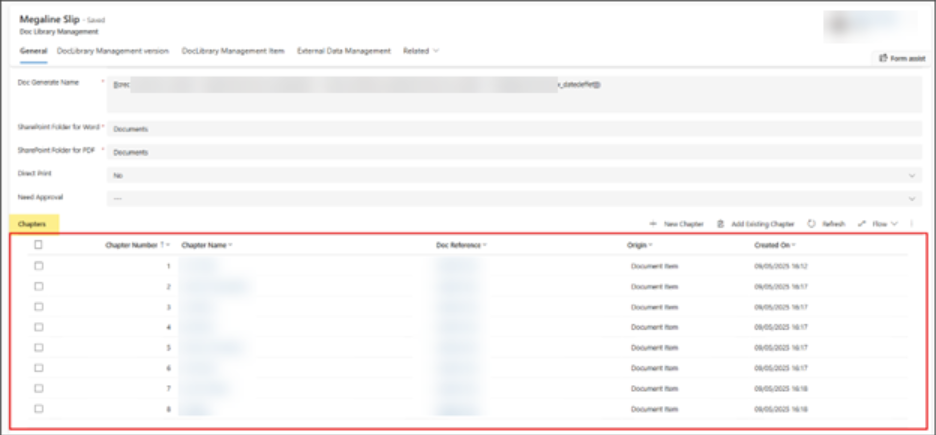
- Chapter-based document segmentation:Users can define multiple chapters for a single document template record to logically structure the document content.
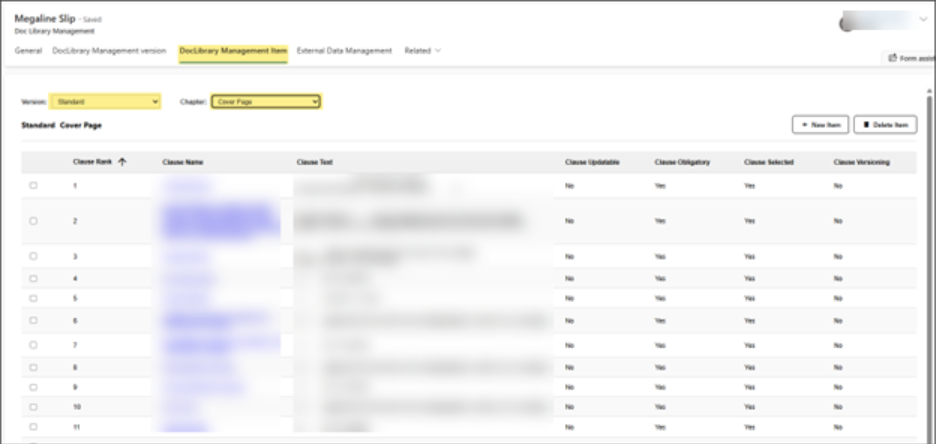
- Management Items: We associate individual management items with a specific document version and chapter, enabling granular control over content placement.
The screenshot below shows the chapters configured against the document template record.
The following screenshot shows how users create and manage management items using a custom HTML web resource, scoped to the selected document version and its related chapters.
Custom Placeholder Insertion Experience
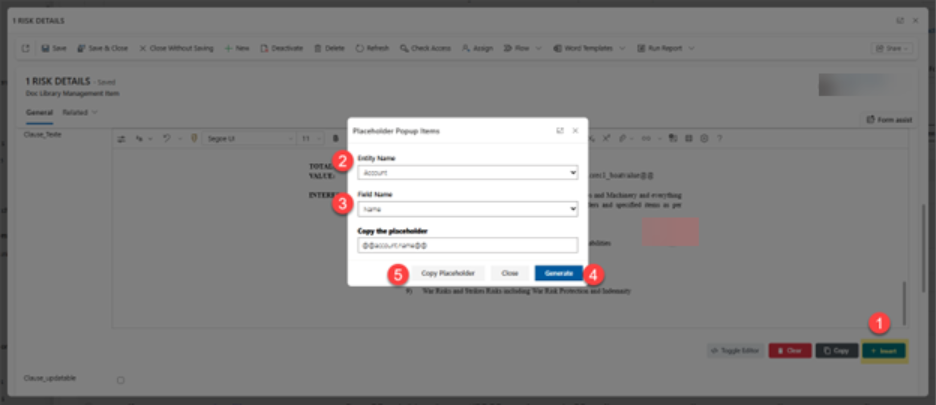
We implemented a custom placeholder insertion experience to help non-technical users avoid manually typing complex placeholders.
A dedicated user interface and logic allow users to select the required data fields easily, ensuring accuracy and consistency.
The solution uses two separate configuration entities:
- One entity stores entity logical names
- Another entity stores field logical names related to those entities
The system automatically generates placeholders in the required format based on the user’s selection.
@@entityname.fieldname@@
Benefits Over Manual Typing
- Reduces user errors caused by incorrect syntax
- Improves usability for business users
- Ensures consistent placeholder usage across templates
- Speeds up template creation and maintenance
Security & Governance Considerations
- Access control: Role-based security ensures only authorized users can create, modify, or publish document templates and versions.
- Data integrity: Controlled placeholder selection prevents invalid or unsupported data references.
- Reusability: Centralized template and placeholder management allows consistent reuse across downstream processes and multiple document types.
Conclusion
The custom Document Library Management framework establishes a strong foundation for scalable and maintainable document generation in Dynamics 365. By introducing structured management of templates, versions, chapters, and placeholders, the solution overcomes the limitations of out-of-the-box Word Templates while enabling rich text support, reuse, and controlled versioning.
This management-driven approach empowers business users with flexible template authoring, ensures data integrity through governed placeholder usage, and supports consistent document generation across multiple processes. Overall, it delivers a future-ready document generation capability that is easier to maintain, extend, and scale as business requirements evolve
What’s Next
In Part 2, We’ll explore how users consume this managed content through a custom Document Library for business entities, including preview, approval, and automated printing.
Read more : bulk file download from sharepoint in dynamics 365
FAQ’s
They’re limited in rich text, flexibility, and version control for complex documents.
It enables rich text templates, reusable placeholders, and controlled document versioning.
Multiple versions are supported, with easy copy, preview, and final print templates.
Yes—custom UI and guided placeholders remove the need for technical knowledge.
 is a software solution company that was established in 2016. Our quality services begin with experience and end with dedication. Our directors have more than 15 years of IT experience to handle various projects successfully. Our dedicated teams are available to help our clients streamline their business processes, enhance their customer support, automate their day-to-day tasks, and provide software solutions tailored to their specific needs. We are experts in Dynamics 365 and Power Platform services, whether you need Dynamics 365 implementation, customization, integration, data migration, training, or ongoing support.