
Moving your business from an on-premise infrastructure to Microsoft Azure is more than just transferring servers. Instead, it is a strategic transformation that affects security, applications, business continuity, compliance, and long-term IT costs.
However, many organizations rush into cloud migration without proper planning. As a result, they experience unexpected downtime, increased expenses, performance issues, and security gaps.
Fortunately, these challenges are avoidable.
This Azure Cloud Migration Checklist walks you through every essential step before moving your business to Azure. Whether you’re migrating a small business environment or a large enterprise infrastructure, following this checklist will help ensure a smooth, secure, and cost-effective transition.
Why Businesses Are Moving to Microsoft Azure
Organizations across industries are rapidly adopting Azure because it offers greater flexibility, enhanced security, and virtually unlimited scalability.
Some of the biggest advantages include:
- Lower infrastructure costs
- Improved disaster recovery
- Better cybersecurity
- Flexible remote work capabilities
- Faster application deployment
- High availability and business continuity
- AI-ready cloud infrastructure
- Built-in compliance tools
More importantly, Azure allows businesses to modernize their IT operations without constantly investing in expensive physical hardware.
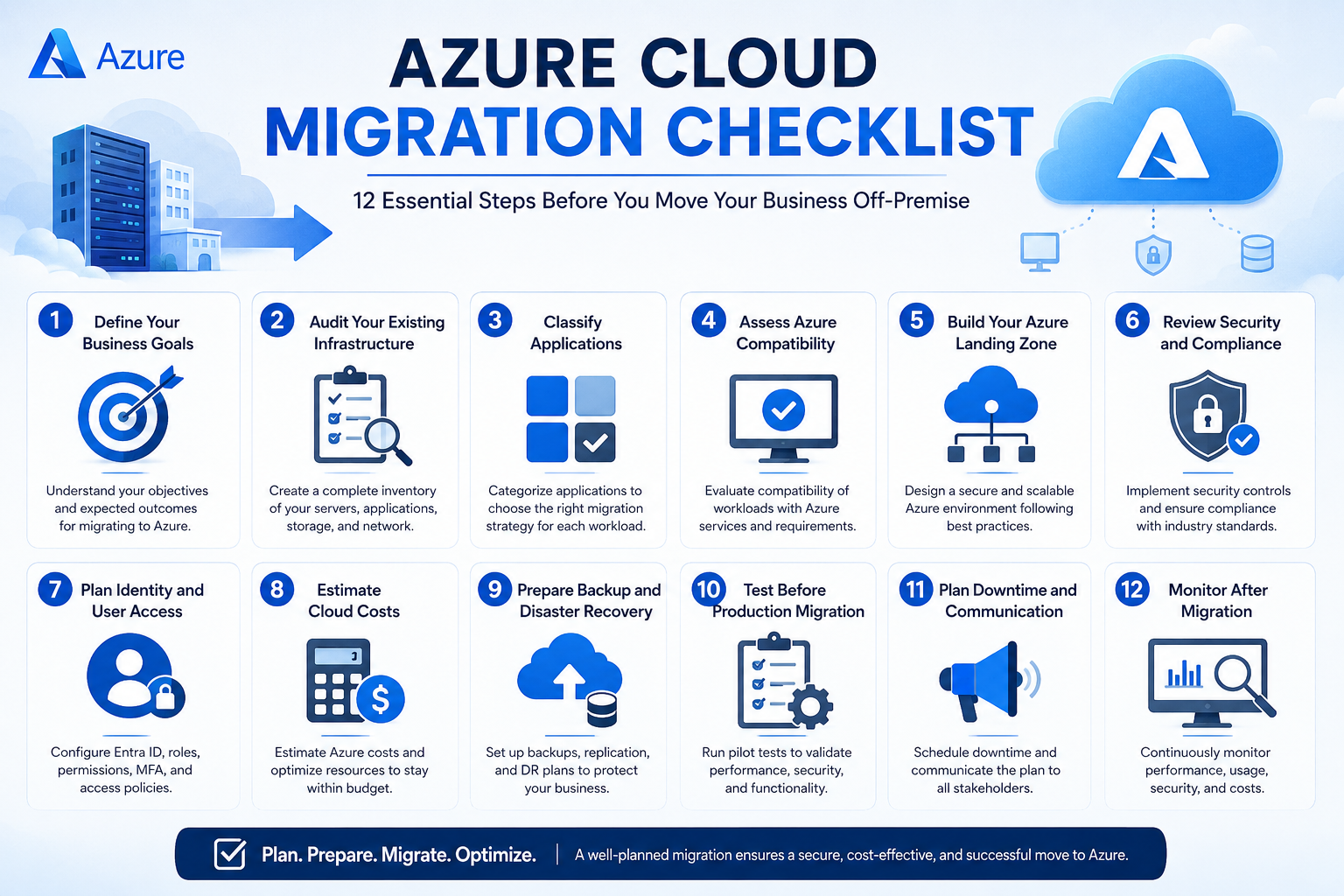
Azure Cloud Migration Checklist
Use this checklist before migrating your workloads to Azure.
| Migration Phase | Primary Goal | Outcome |
|---|---|---|
| Business Assessment | Define objectives | Clear migration roadmap |
| Infrastructure Audit | Identify assets | Complete inventory |
| Application Assessment | Determine compatibility | Migration strategy |
| Security Planning | Protect workloads | Secure cloud environment |
| Cost Planning | Estimate Azure spending | Controlled cloud costs |
| Identity & Access | Secure user authentication | Zero Trust foundation |
| Backup Strategy | Protect business data | Disaster recovery readiness |
| Migration Testing | Validate workloads | Reduced migration risks |
| Production Migration | Move workloads | Successful go-live |
| Post-Migration Optimization | Improve performance | Long-term cloud efficiency |
1. Define Your Business Goals
Every successful migration starts with understanding why you’re moving to the cloud.
Ask questions such as:
- Are you reducing infrastructure costs?
- Do you need better scalability?
- Are aging servers causing problems?
- Is disaster recovery a priority?
- Are you modernizing applications?
- Do you need stronger security compliance?
Clearly defined business objectives will guide every technical decision throughout the migration.
2. Audit Your Existing Infrastructure
Before moving anything, create a complete inventory of your current environment.
Include:
Servers
- Physical servers
- Virtual machines
- Database servers
- File servers
Applications
- ERP systems
- CRM software
- Internal applications
- Third-party applications
- Legacy software
Storage
- File shares
- NAS devices
- SAN storage
- Backup repositories
Network
- Firewalls
- VPNs
- Switches
- DNS
- IP ranges
Without a complete inventory, important systems can easily be overlooked during migration.
3. Classify Applications
Not every application should be migrated in the same way.
Generally, applications fall into four categories.
| Application Type | Recommended Strategy |
|---|---|
| Modern Cloud Ready | Rehost or Replatform |
| Legacy Applications | Refactor or Replace |
| Critical Business Apps | Careful phased migration |
| Obsolete Systems | Retire |
This assessment reduces unnecessary migration costs while improving long-term performance.
4. Assess Azure Compatibility
Next, evaluate whether your workloads are compatible with Azure services.
Consider:
- Operating systems
- Database versions
- Application dependencies
- Licensing requirements
- Virtual machine sizing
- Storage requirements
- Networking architecture
Compatibility testing helps eliminate costly surprises later in the migration.
5. Build Your Azure Landing Zone
A properly designed Azure environment provides the foundation for secure operations.
A typical Azure landing zone includes:
- Resource Groups
- Virtual Networks
- Subnets
- Network Security Groups
- Azure Policies
- Management Groups
- Monitoring
- Logging
- Backup services
Building this foundation first ensures consistency across your cloud environment.
6. Review Security and Compliance
Security should never be an afterthought.
Before migration, review:
Identity Protection
- Multi-Factor Authentication (MFA)
- Conditional Access
- Role-Based Access Control (RBAC)
Data Protection
- Encryption at rest
- Encryption in transit
- Azure Key Vault
Compliance
Depending on your industry, ensure compliance with:
- ISO 27001
- GDPR
- HIPAA
- PCI DSS
- SOC 2
Strong security planning reduces operational risk while protecting sensitive business data.
7. Plan Identity and User Access
Most businesses use Microsoft Entra ID (formerly Azure Active Directory) for identity management.
Before migration:
- Review user accounts
- Remove inactive accounts
- Define administrative roles
- Enable MFA
- Configure Single Sign-On (SSO)
- Plan Hybrid Identity if needed
A well-designed identity strategy simplifies administration while improving security.
8. Estimate Cloud Costs
One of the most common mistakes is underestimating Azure operating costs.
Estimate expenses for:
- Virtual Machines
- Storage
- Backup
- Networking
- Azure SQL
- Azure Kubernetes Service
- Monitoring
- Security services
- Licensing
Cost planning helps prevent unexpected monthly bills after migration.
9. Prepare Backup and Disaster Recovery
Never migrate production systems without reliable backups.
Your backup strategy should include:
- Full system backup
- Database backup
- Application backup
- Recovery testing
- Geo-redundant storage
- Recovery Point Objectives (RPO)
- Recovery Time Objectives (RTO)
Testing recovery procedures before migration significantly reduces business risk.
10. Test Before Production Migration
Rather than migrating everything at once, start with a pilot workload.
Testing should include:
- Performance testing
- Security validation
- User acceptance testing
- Network connectivity
- Application functionality
- Backup verification
Successful pilot migrations provide valuable insights before moving critical systems.
11. Plan Downtime and Communication
Even carefully planned migrations may involve scheduled maintenance.
Create a communication plan that informs:
- Employees
- Customers
- Vendors
- IT teams
- Business leadership
Include:
- Maintenance window
- Expected downtime
- Rollback procedures
- Support contacts
Transparent communication minimizes disruption and builds confidence.
12. Monitor After Migration
Migration does not end after workloads are moved.
Instead, continuously monitor:
- CPU utilization
- Memory usage
- Storage performance
- Security alerts
- Backup success
- Application response time
- Azure costs
- User experience
Continuous optimization ensures your Azure environment remains efficient and cost-effective.
Common Azure Migration Mistakes to Avoid
Many cloud projects fail because organizations overlook critical planning steps.
Avoid these common mistakes:
- Migrating without a strategy
- Ignoring application dependencies
- Skipping security assessments
- Overprovisioning Azure resources
- Underestimating cloud costs
- Neglecting user training
- Failing to test backups
- Moving everything simultaneously
- Not optimizing workloads after migration
By addressing these issues early, businesses can significantly improve migration success rates.
Azure Migration Best Practices
For the best results:
- Create a detailed migration roadmap.
- Migrate in phases instead of all at once.
- Automate deployments wherever possible.
- Follow Microsoft’s Well-Architected Framework.
- Apply Zero Trust security principles.
- Monitor cloud spending continuously.
- Optimize workloads after migration.
- Document every configuration change.
- Train employees before deployment.
Following these best practices improves reliability while reducing long-term operational costs.
Why Choose Sky Soft Connections for Azure Cloud Migration?
Cloud migration requires more than technical expertise—it demands careful planning, business alignment, and ongoing optimization.
At Sky Soft Connections, we help organizations modernize their IT infrastructure with secure, scalable, and business-focused Azure cloud solutions.
Our Azure services include:
- Azure Cloud Migration Planning
- Infrastructure Assessment
- Azure Landing Zone Design
- Hybrid Cloud Solutions
- Microsoft 365 Integration
- Azure Security & Compliance
- Backup & Disaster Recovery
- Identity & Access Management
- Azure Cost Optimization
- Managed Azure Services
- Cloud Performance Monitoring
- Post-Migration Support
Our experienced cloud specialists work closely with your team to minimize downtime, reduce migration risks, and ensure your Azure environment is optimized for long-term success.
Whether you’re moving a single application or an enterprise-wide infrastructure, Sky Soft Connections provides end-to-end Azure migration services tailored to your business goals.
Frequently Asked Questions (FAQs)
An Azure cloud migration checklist is a structured guide that helps businesses assess, prepare, migrate, and optimize their workloads before moving from on-premise infrastructure to Microsoft Azure.
The timeline depends on the size and complexity of your environment. Small migrations may take a few weeks, while enterprise migrations can span several months.
The most common risks include inadequate planning, application compatibility issues, security misconfigurations, unexpected downtime, and poor cost management.
No. Some applications may require modernization, while others may be retired or replaced. A thorough assessment determines the most appropriate migration strategy for each workload.
Downtime can be minimized by performing pilot migrations, testing workloads thoroughly, scheduling maintenance windows, using replication tools, and preparing rollback plans.
Final Thoughts
Migrating to Microsoft Azure is an opportunity to improve scalability, strengthen security, and support long-term business growth. However, success depends on careful preparation rather than simply moving workloads from one environment to another.
By following this Azure Cloud Migration Checklist, businesses can reduce migration risks, improve performance, control costs, and create a strong foundation for future innovation.
If you’re ready to move your infrastructure to Azure, Sky Soft Connections can help you plan, execute, and optimize every stage of your cloud journey with confidence.
Read more : 5 Signs Your Business Has Outgrown Its Current CRM
Read more : 5 Signs Your Business Has Outgrown Its Current CRM