Table of Content
When implementing Dynamics 365 CRM, the Power Platform offers incredible capabilities to extend and customize your solution. However, many organizations stumble into common pitfalls that can derail projects, inflate costs, and frustrate users. Whether you’re a business analyst, developer, or project manager, understanding these mistakes can save you months of rework and thousands of dollars.
In this comprehensive guide, we’ll explore the most frequent Power Platform mistakes in Dynamics 365 CRM projects and how to avoid them.

1. Overcomplicating Solutions with Custom Code
One of the biggest mistakes teams make is reaching for custom code when low-code solutions would suffice. The Power Platform was designed to empower citizen developers and reduce dependency on traditional development, yet many projects immediately jump to plugins, custom APIs, or complex JavaScript.
Why This Happens
Developers often default to what they know best. When faced with a requirement, experienced programmers instinctively think in terms of C# or JavaScript rather than exploring Power Automate flows or business rules.
The Impact
Custom code requires more maintenance, specialized skills, and creates technical debt. It’s harder to troubleshoot, more expensive to modify, and can break during platform updates.
The Solution
Follow the “low-code first” principle. Explore Power Automate cloud flows, business rules, and Power Apps before writing custom code. Reserve plugins and custom development for scenarios where platform limitations genuinely require it, such as complex real-time validations or external system integrations with specific performance requirements.
2. Ignoring Environment Strategy and ALM
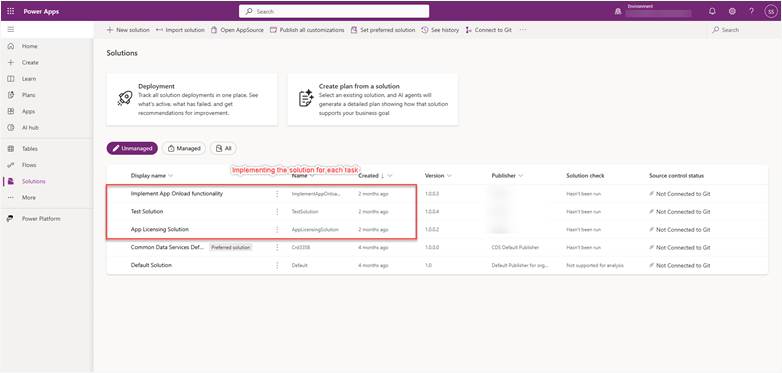
Application Lifecycle Management (ALM) is often an afterthought in Power Platform projects. Teams build directly in production environments or fail to establish proper development, testing, and deployment pipelines.
The Consequences
Without proper ALM practices, you’ll encounter version control nightmares, accidental overwrites of working solutions, difficulty tracking changes, and no rollback capability when things go wrong. One accidental production change can impact hundreds of users.
Best Practices
Establish at least three environments: development, testing, and production. Implement solution-aware development using managed solutions for deployment. Use Azure DevOps or GitHub for version control and automated deployments. Create clear governance around who can access each environment and when changes can be promoted.
3. Creating Performance Bottlenecks with Inefficient Flows
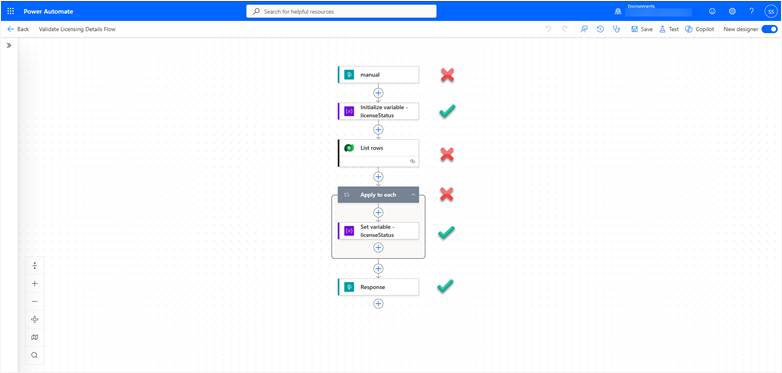
Power Automate is incredibly powerful, but poorly designed flows can cripple system performance. Common mistakes include creating infinite loops, using “Apply to each” actions unnecessarily, and triggering flows on every field update regardless of which field changed.
Common Performance Killers
Flows that trigger on any update to a record without filtering for specific fields create unnecessary processing. Nested loops that query data inside iterations can exponentially increase execution time. Missing error handling causes flows to fail silently, leaving data in inconsistent states.
Optimization Strategies
Use trigger conditions to limit when flows run. Leverage the “Get rows” action with proper filtering instead of retrieving all records and filtering in the flow. Implement concurrency controls and batch processing for high-volume scenarios. Always include error handling and notifications for critical workflows.
4. Poor Data Model Design
Many projects inherit or create problematic data models that cause issues throughout the system. Over-normalized tables, missing relationships, incorrect data types, and poor naming conventions create confusion and limit functionality.
Red Flags to Watch For
Creating separate tables for data that belongs together, using text fields for dates or numbers, inconsistent naming conventions across tables, and missing lookup relationships that would simplify reporting and workflows.
Design Principles
Plan your data model before building. Use Dynamics 365’s standard entities when possible rather than creating custom tables. Establish naming conventions early and stick to them. Consider reporting and analytics requirements during design, not as an afterthought. Document your data model and the relationships between tables.
5. Neglecting Security and Permission Design
Security is often configured hastily or copied from another project without understanding the implications. Teams either make permissions too restrictive, frustrating users, or too permissive, creating compliance risks.
Common Security Mistakes
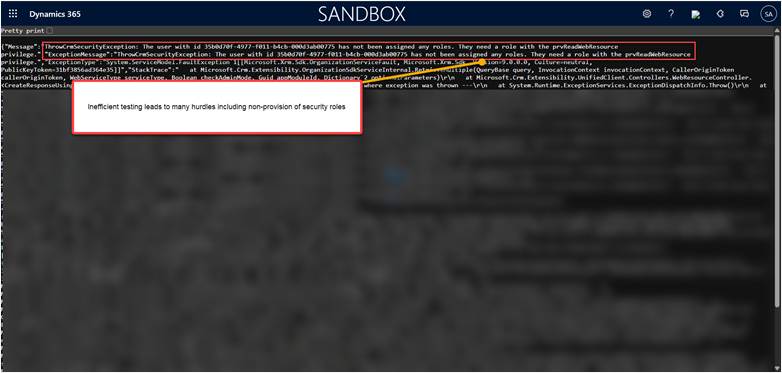
Using the wrong security model (organization-owned versus user-owned records), creating too many security roles instead of using teams effectively, not understanding how security role layers interact, and failing to test permissions from the end-user perspective.
Security Best Practices
Design security roles based on job functions, not individual users. Leverage team ownership and access teams for collaborative scenarios. Use field-level security sparingly as it impacts performance. Document your security model and regularly audit permissions. Always test with actual user accounts before deploying.
6. Building Canvas Apps When Model-Driven Apps Would Suffice
Power Apps offers two primary app types, and choosing the wrong one is a frequent mistake. Canvas apps provide pixel-perfect control but require significantly more development effort, while model-driven apps are faster to build and automatically responsive.
When Teams Choose Incorrectly
The appeal of complete design control leads teams to canvas apps for scenarios where model-driven apps would be more appropriate. Canvas apps require custom coding for features that are built into model-driven apps, such as business process flows, complex forms, and hierarchical data relationships.
Making the Right Choice
Use model-driven apps for data-heavy applications with complex relationships, when you need enterprise-scale security and compliance features, and for internal business applications. Choose canvas apps for external-facing mobile apps, when you need specific UI/UX branding, or for task-specific applications that don’t require deep data manipulation.
7. Insufficient Testing and User Acceptance
Rushing through testing is one of the most expensive mistakes. Teams often test only the “happy path” scenarios, skip user acceptance testing due to time pressures, or test in environments that don’t match production configurations.
The Hidden Costs
Bugs discovered in production are exponentially more expensive to fix than those caught during testing. User adoption suffers when people encounter unexpected behavior. Support tickets multiply when testing was inadequate.
Comprehensive Testing Approach
Create test scenarios covering both positive and negative cases. Test with realistic data volumes to identify performance issues. Include edge cases and error conditions. Conduct user acceptance testing with actual end users, not just power users or IT staff. Test security permissions thoroughly. Document test results and maintain regression test suites.
8. Lack of Documentation and Knowledge Transfer
Documentation is often the first casualty when project timelines tighten. Teams ship solutions without proper documentation, creating long-term maintenance challenges and knowledge silos.
What to Document
Document your solution architecture, data model, customizations, integration points, security configuration, and deployment procedures. Create user guides with screenshots and step-by-step instructions. Maintain a change log for all modifications. Document business logic behind workflows and calculations.
Making Documentation Sustainable
Build documentation into your development process rather than treating it as a final step. Use tools like Power Platform’s built-in description fields for flows and apps. Create video walkthroughs for complex processes. Establish a knowledge base that’s easily accessible to both administrators and end users.
9. Underestimating Integration Complexity
Integrating Dynamics 365 with other systems often proves more complex than anticipated. Teams underestimate data transformation requirements, error handling needs, and the ongoing maintenance burden of integrations.
Integration Challenges
Different systems use different data formats and standards. API rate limits can throttle data synchronization. Network issues and system downtime require robust retry logic. Data conflicts need resolution strategies. Integration monitoring and logging are often insufficient.
Integration Best Practices
Map out data flows before building integrations. Implement comprehensive error handling and logging. Use Dataverse’s built-in integration capabilities when possible. Consider using Azure Logic Apps for complex enterprise integrations. Monitor integration health proactively. Document API endpoints, authentication methods, and data transformations.
10. Ignoring Governance and Change Management
Technical excellence means nothing if users resist the new system or if the solution becomes ungovernable over time. Many projects focus solely on technical implementation while neglecting organizational change management and governance.
Governance Failures
Without governance, you’ll see unauthorized changes in production, inconsistent development practices across teams, duplicate solutions solving the same problem, and no clear ownership of different solution components.
Establishing Governance
Create a Power Platform Center of Excellence within your organization. Define clear roles and responsibilities for development, testing, and deployment. Establish change control processes for production modifications. Implement regular reviews of existing solutions. Provide training and certification paths for your team.

11. Failing to Plan for Scalability
Solutions that work perfectly with 10 users and 1,000 records often fail when scaling to 500 users and a million records. Teams frequently overlook scalability considerations during initial development.
Scalability Considerations
Consider API call limits and throttling thresholds. Design for concurrent users from the beginning. Implement caching strategies where appropriate. Use asynchronous processing for bulk operations. Plan for data archival and retention policies. Monitor system performance metrics regularly.
Building Scalable Solutions
Load test your applications before production deployment. Design database queries with performance in mind. Implement pagination for large data sets. Use Power Platform’s concurrency features appropriately. Plan for both horizontal and vertical scaling needs.
12. Over-Customization and Feature Bloat
The flexibility of Power Platform sometimes leads to over-customization. Teams add features “just in case” or customize standard functionality that was working fine, creating unnecessary complexity.
The Minimalism Principle
Start with the out-of-the-box functionality and customize only when there’s a clear business need. Every customization adds maintenance burden and potential upgrade issues. Sometimes the standard functionality is the way it is for good reasons learned over years of product development.
Keeping Solutions Lean
Challenge every customization request with “Why can’t we use the standard functionality?” Document the business justification for customizations. Regularly review existing customizations to identify obsolete features that can be removed. Resist the temptation to accommodate every individual user preference through customization.
Key Takeaways
Successful Power Platform implementations in Dynamics 365 CRM projects require balancing technical capabilities with practical considerations. By avoiding these common mistakes, you can deliver solutions that are maintainable, performant, secure, and actually used by your organization.
Remember that the Power Platform evolves rapidly, with Microsoft releasing new features and improvements regularly. Stay current with platform updates, engage with the community, and continuously refine your approaches based on lessons learned.
The most successful implementations share common characteristics: they follow low-code principles when appropriate, implement proper governance and ALM practices, prioritize user experience and adoption, plan for scalability from the start, and maintain comprehensive documentation.
By learning from the mistakes of others and implementing these best practices, your Dynamics 365 CRM project can avoid the pitfalls that plague so many implementations and deliver real value to your organization.
Read more : autonomous agents in dynamics 365 o2c automation
FAQ’s
Common mistakes include over-customization, ignoring ALM, inefficient flows, poor data models, and weak governance.
Follow a low-code first approach, plan your data model, optimize flows, implement proper ALM, and maintain clear documentation.
Governance prevents unauthorized changes, ensures consistency, improves user adoption, and reduces long-term maintenance issues.
 is a software solution company that was established in 2016. Our quality services begin with experience and end with dedication. Our directors have more than 15 years of IT experience to handle various projects successfully. Our dedicated teams are available to help our clients streamline their business processes, enhance their customer support, automate their day-to-day tasks, and provide software solutions tailored to their specific needs. We are experts in Dynamics 365 and Power Platform services, whether you need Dynamics 365 implementation, customization, integration, data migration, training, or ongoing support.