Table of Content
In the high-stakes world of customer service, the race is no longer just about adding more agents—it’s about empowering each agent with intelligence that anticipates needs, surfaces insights, and automates the mundane. This is the paradigm shift ushered in by Copilot in Dynamics 365 Customer Service. Moving far beyond a simple chatbot, it is evolving into a context-aware, proactive partner that is fundamentally redefining agent productivity, customer satisfaction, and the strategic value of support operations
What is Copilot in Dynamics 365 Customer Service?
Copilot in Dynamics 365 Customer Service is an AI-powered assistant that helps agents resolve issues faster and deliver exceptional experiences. It uses generative AI, powered by Azure OpenAI models, to provide context-aware suggestions based on case history, customer data in Dataverse, knowledge articles, and now extended sources.
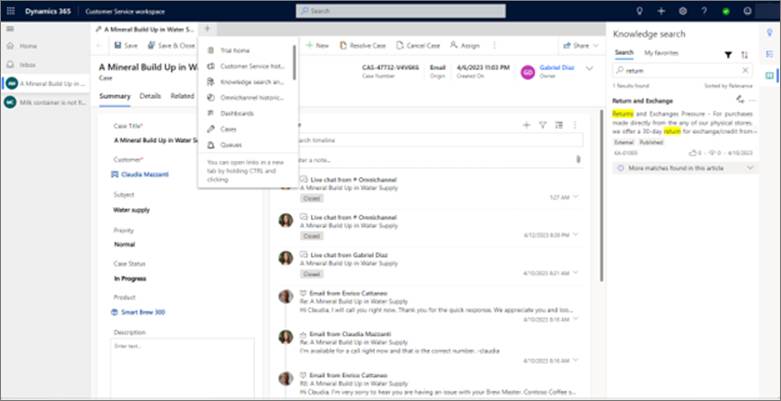
Unlike basic chatbots, Copilot is deeply integrated into the Dynamics 365 environment. It appears as a convenient pane on the right side of the screen, allowing agents to ask questions, draft responses, or get summaries without switching tabs.
Key advantages:
- Contextual understanding — Analyzes ongoing cases and conversations.
- Secure and compliant — Follows Microsoft’s enterprise-grade standards, ideal for sensitive industries like healthcare and finance.
- Included with licensing — Available in standard Dynamics 365 Customer Service enterprise plans, with advanced customizations via Copilot Studio.
Core Features of Copilot
Copilot offers practical tools that reduce repetitive work and help agents focus on complex issues.
1. Ask a Question
Agents can type natural language questions, and Copilot pulls answers from knowledge bases, Dataverse records, or configured sources. This eliminates time spent searching manuals or internal sites.
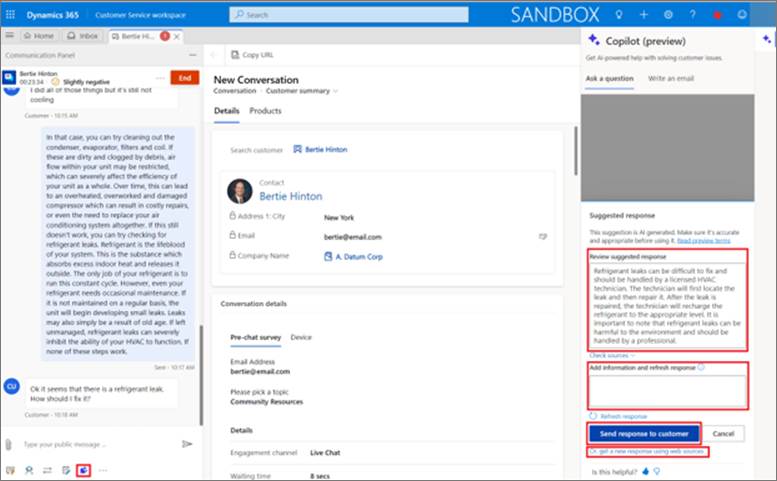
2. Compose Emails and Chat Responses
Copilot drafts professional, personalized emails or chat replies based on case context. It incorporates tone guidelines, previous interactions, and suggested actions like “request more information” or “resolve the issue.”
Recent updates allow partial email content generation and better integration with attachments.
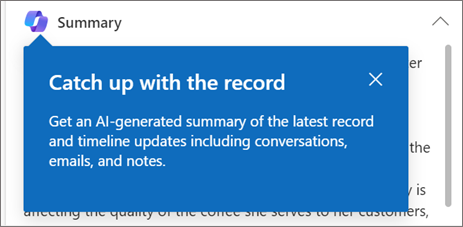
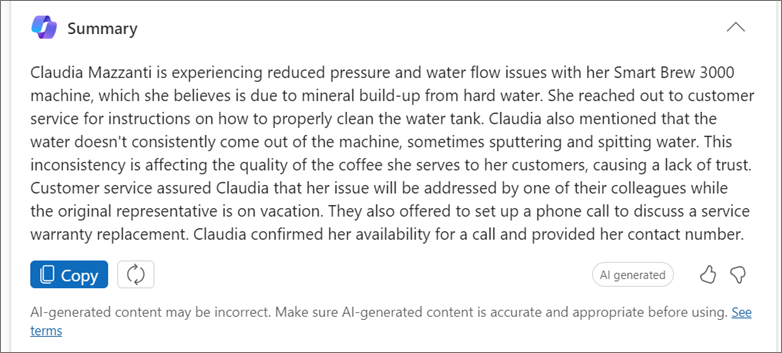
3. Case and Conversation Summarization
Long cases with multiple interactions become easy to understand. With one click, Copilot generates concise summaries highlighting key issues, actions taken, and next steps—perfect for handovers between agents.
4. Knowledge Article Suggestions and Proactive Prompts
Copilot recommends relevant articles and provides proactive suggestions, such as follow-up actions or contextual prompts based on the current case.
Advanced Customizations with Copilot Studio
A major breakthrough is the deep integration with Microsoft Copilot Studio, allowing organizations to extend Copilot beyond standard knowledge articles.
Expanded Knowledge Sources
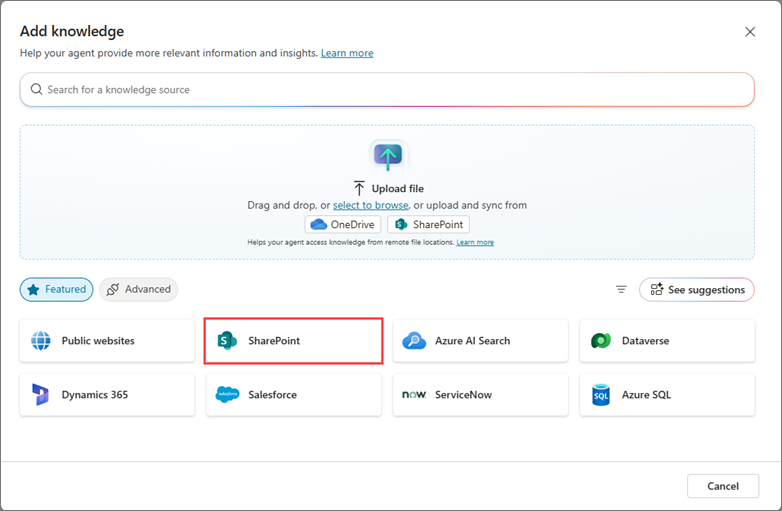
Add custom sources like:
- SharePoint sites
- Public websites
- Uploaded files
- Dataverse tables
This centralizes all company-specific knowledge, so agents get accurate answers without creating duplicate articles.
Custom Actions and Plugins
Create AI-driven actions using prompts or connectors to:
- Retrieve data from external systems
- Summarize text
- List related records (e.g., open opportunities for an account)
Plugins streamline workflows by connecting directly to Dataverse, reducing tab-switching.
Dataverse as a Direct Source
Agents query live data securely, with summaries generated on the fly—while respecting security roles where configured.
Note: While powerful, Dataverse access requires careful setup to align with user permissions.
How Copilot Works: A Look at the Architecture
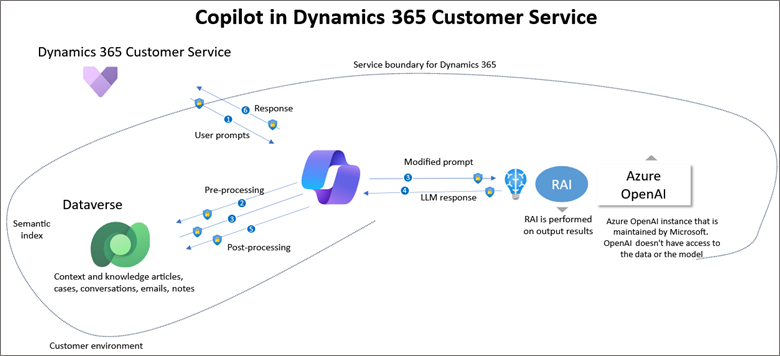
Copilot processes requests securely through encrypted channels:
- Agent submits a prompt.
- Copilot preprocesses using Dataverse and semantic indexes.
- It sends enriched data to the large language model (LLM).
- Response is post-processed and delivered.
This ensures grounded, accurate outputs tailored to your organization’s data.
Benefits and Real-World Impact
Organizations using Copilot report significant improvements:
- 25–40% reduction in average handling time (AHT)
- 30% increase in agent productivity
- Higher first-contact resolution (FCR) rates
- Improved customer satisfaction (CSAT) scores
- Faster onboarding for new agents
- Reduced training and operational costs
In industries like retail, manufacturing, and financial services, these gains translate to stronger customer loyalty and competitive advantage.
The Future: Why Copilot Is Changing Customer Service Forever
With ongoing releases (including 2025 wave 2 enhancements), Copilot moves toward agentic AI—where it anticipates needs, suggests proactive actions, and automates more workflows.
Features like plugin discovery, contextual prompts, and deeper Copilot Studio integrations make service truly intelligent. Agents become orchestrators of exceptional experiences, not just responders.
As AI evolves, Copilot ensures customer service shifts from reactive to predictive, personalized, and seamless—setting a new standard that will define the industry for years to come.
Conclusion
Microsoft Copilot in Dynamics 365 Customer Service is more than a tool—it’s a strategic transformation. By empowering agents with AI that understands context, automates tasks, and scales with custom knowledge, it’s enabling faster resolutions and happier customers.
If you’re ready to elevate your customer service in 2026 and beyond, now is the time to explore Copilot. Contact a Microsoft partner or schedule a demo to see it in action.
Read more : dynamics 365 plugin execution stage rank depth
FAQ’s
It’s an AI-powered assistant that helps agents resolve cases faster by providing contextual insights, automation, and smart recommendations.
Copilot reduces handling time by automating routine tasks, suggesting next best actions, and helping agents find the right information instantly.
Yes. Industries like retail, manufacturing, and financial services use Copilot to improve customer satisfaction, loyalty, and operational efficiency.
 is a software solution company that was established in 2016. Our quality services begin with experience and end with dedication. Our directors have more than 15 years of IT experience to handle various projects successfully. Our dedicated teams are available to help our clients streamline their business processes, enhance their customer support, automate their day-to-day tasks, and provide software solutions tailored to their specific needs. We are experts in Dynamics 365 and Power Platform services, whether you need Dynamics 365 implementation, customization, integration, data migration, training, or ongoing support.