Table of Content
In today’s digitally-driven world, Microsoft Dynamics 365 has become a cornerstone for businesses managing customer relationships, sales pipelines, and operational workflows. However, while it offers unparalleled functionality, maintaining security and controlled access in your Dynamics 365 environment is critical. Mismanaged access can lead to data breaches, compliance issues, and costly disruptions.
This guide explores practical strategies to balance access and protection in Dynamics 365, ensuring your business remains secure without compromising productivity.
Why Security in Dynamics 365 Matters
Dynamics 365 environments contain sensitive business and customer data. Poorly configured security can result in:
- Unauthorized access to confidential information
- Data loss or manipulation
- Regulatory non-compliance (GDPR, HIPAA, etc.)
- Increased risk of cyberattacks targeting critical workflows
Understanding security best practices helps businesses protect their data while providing employees with the access they need to operate efficiently.
Key Principles of Dynamics 365 Security
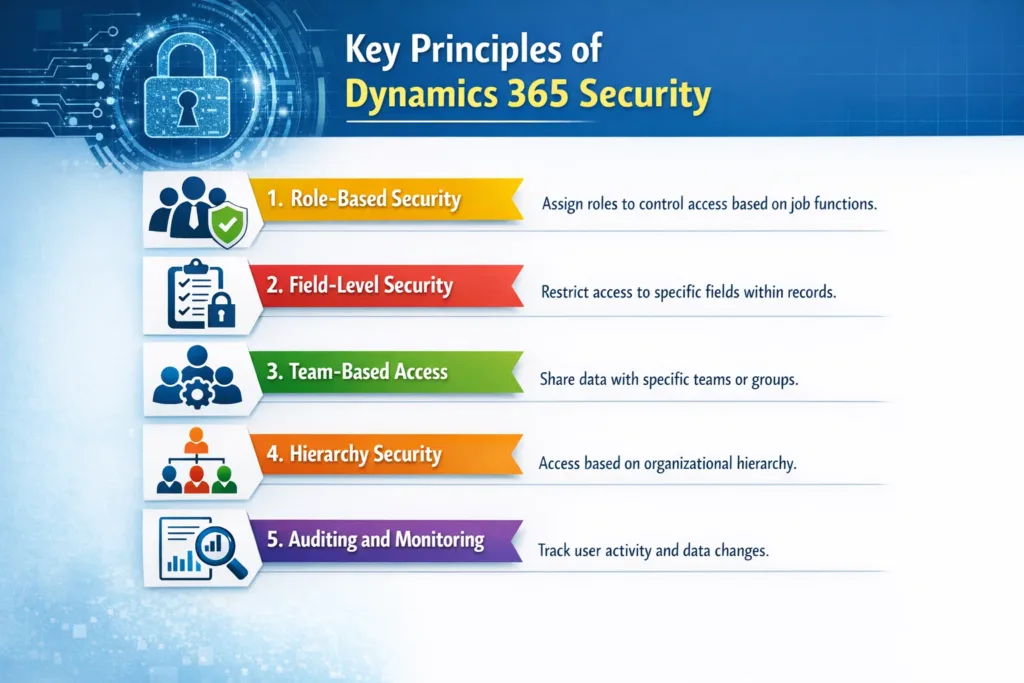
1. Role-Based Security
Dynamics 365 uses role-based security, allowing you to assign permissions according to job responsibilities.
Benefits include:
- Granular control over data access
- Reduced risk of accidental data exposure
- Streamlined administration
| Security Role | Access Level | Recommended Use Case |
|---|---|---|
| System Administrator | Full Access | IT administrators managing the system |
| Sales Manager | Read/Write | Supervising sales activities and pipelines |
| Customer Service Rep | Limited Access | Handling customer queries and cases |
2. Field-Level Security
Not all data is meant for every user. Field-level security ensures sensitive fields, like salary information or payment details, are only visible to authorized users.
Read more : demystifying field service in d365
Best Practices:
- Restrict access to personal identifiers
- Monitor who views or edits sensitive fields
- Regularly audit field-level permissions
3. Team-Based Access
Team-based security provides flexibility for projects requiring collaboration across multiple departments.
- Create teams with shared access privileges
- Assign dynamic roles that reflect project needs
- Reduce administrative burden by grouping users
Read more : access teams manage record security in dynamics 365
4. Hierarchy Security
Hierarchy security allows access based on organizational structure. Managers automatically gain visibility into subordinate data without compromising others’ privacy.
Benefits:
- Maintains control over sensitive information
- Supports leadership oversight
- Simplifies reporting and auditing
5. Auditing and Monitoring
Monitoring user activity and system changes is vital for proactive security. Dynamics 365 includes built-in audit logs, which can:
- Track changes to critical data
- Identify unauthorized access attempts
- Support compliance reporting
Pro Tip: Implement automated alerts for suspicious activities using Power Automate integrations.
Balancing Productivity and Protection
Striking the right balance ensures users have the access they need without jeopardizing security. Consider:
- Least Privilege Principle: Grant only necessary permissions
- Segregation of Duties: Separate critical actions across multiple users
- Regular Security Reviews: Schedule quarterly audits to adjust roles and permissions
How Skysoft Connections Can Help
Managing Dynamics 365 security can be complex. At Skysoft Connections, we specialize in:
- Dynamics 365 Security Audits: Identify vulnerabilities and optimize access controls
- Custom Security Models: Tailored solutions for role-based, field-level, and team-based access
- Ongoing Support: Proactive monitoring and compliance management
Take control of your Dynamics 365 environment today.
Contact Skysoft Connections for a free consultation and secure your CRM environment now!
Read more : power automate performance optimization with expressions
FAQ’s
Role-based security assigns permissions based on user roles, ensuring access aligns with job responsibilities.
Security audits should be conducted at least quarterly to identify gaps and unauthorized access.
Yes, it restricts access to specific fields, preventing unauthorized users from viewing or editing sensitive information.
Hierarchy security ensures managers have oversight over their teams while keeping other data confidential.
 is a software solution company that was established in 2016. Our quality services begin with experience and end with dedication. Our directors have more than 15 years of IT experience to handle various projects successfully. Our dedicated teams are available to help our clients streamline their business processes, enhance their customer support, automate their day-to-day tasks, and provide software solutions tailored to their specific needs. We are experts in Dynamics 365 and Power Platform services, whether you need Dynamics 365 implementation, customization, integration, data migration, training, or ongoing support.