In complex Microsoft Dynamics 365 implementations, certain business processes require creating a primary record along with many related records in a single operation. While this approach improves automation and consistency, it can introduce serious performance challenges when extensive business logic is executed synchronously through plugins.
Overview
This blog highlights a real-world engineering challenge where cascading record creation through plugins resulted in execution timeouts. It explains the root cause, the observed error behavior, and how a controlled plugin bypass strategy helped resolve the issue effectively. All examples are kept generic to avoid exposing any client-specific details.
Business Scenario (High-Level)
In our implementation, a core business record can generate a related child record as part of an automated backend process. During this operation, multiple associated entities are also copied or created automatically.
Each of these related entities has its own business logic, such as calculations, validations, or follow-up processes, implemented through synchronous plugins.
The Problem
When this end-to-end process was executed, the system frequently failed with an unexpected error. From the user’s perspective, record creation failed even though the logic itself was correct.
The platform error observed was similar to:
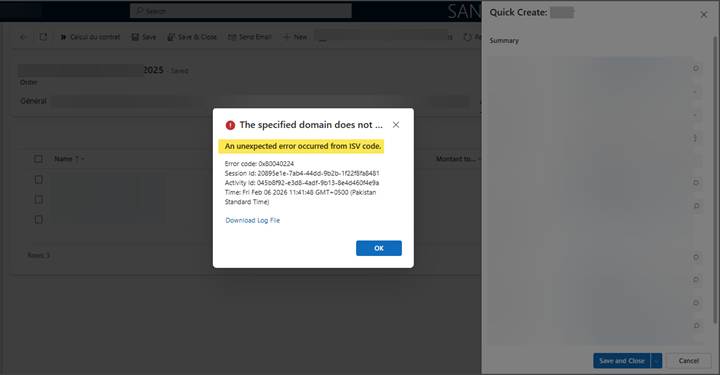
“Couldn’t complete execution of the plug-in within the 2-minute limit.”
This occurs because Dynamics 365 enforces a strict execution time limit on synchronous plugins to ensure overall platform stability.
Reference Screenshot – Plugin Error
Screenshot: Error message displayed during record creation
Why the Timeout Occurred
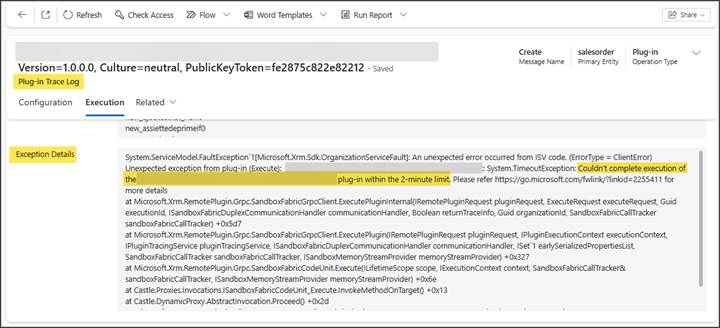
The timeout was not caused by a single inefficient plugin, but rather by a chain reaction. One plugin created multiple related records, which in turn triggered other plugins. Each plugin performed valid business logic, but the cumulative execution time exceeded the platform limit.
This pattern is especially common when complex calculations or validations are repeated unnecessarily during system-driven record creation.
Reference Screenshot – Plugin Trace Log
Screenshot: Plugin trace log highlighting timeout exception
The Solution: Controlled Plugin Bypass
To resolve this issue, we implemented a controlled plugin bypass strategy. The objective was not to disable business logic globally, but to skip redundant plugin execution during system-driven operations where the logic was already handled upstream.
This was achieved by attaching a custom bypass flag to the record creation request.
Plugin Bypass Code Example
Below is a simplified example of how the bypass flag is applied during record creation:
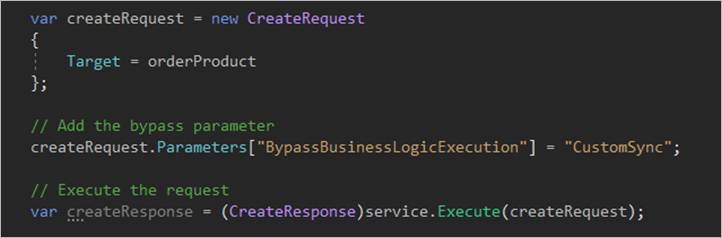
This flag travels with the request and can be detected by downstream plugins.
How Plugins Respect the Bypass
Plugins that are designed to support bypass behavior simply check for the presence of this flag at runtime and exit early if it is detected.
This ensures that only the necessary logic runs, while avoiding duplicate calculations and chained executions.
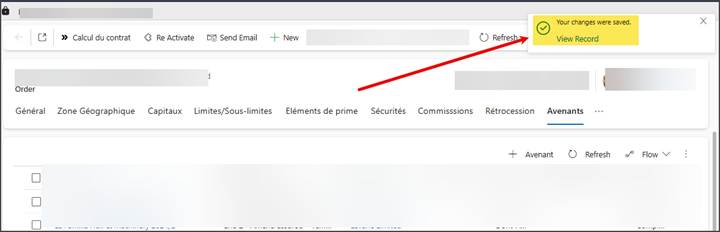
Reference Screenshot – Successful Execution
Screenshot: Record created successfully after applying plugin bypass
Key Benefits Achieved
– Significant reduction in execution time
– Elimination of timeout-related failures
– Improved system reliability during complex operations
– Clear separation between user-driven and system-driven logic
– Better scalability for future enhancements
Important Notes
It is important to note that this bypass mechanism only affects plugins that are explicitly written to respect the bypass flag. Other platform features such as workflows, business rules, and Power Automate flows continue to run normally.
Conclusion
A plugin bypass strategy is a powerful performance optimization technique when used responsibly. By selectively skipping redundant logic during backend processes, teams can meet complex business requirements without compromising platform stability.
At SkySoft Connections, we apply such patterns to build scalable, maintainable, and high-performing Dynamics 365 solutions while adhering to best engineering practices.
Have you faced similar plugin timeout challenges in Dynamics 365 projects? Would love to hear your experience.
Read more : real time data sync dynamics 365 with power automate
FAQ’s
A plugin bypass strategy allows specific plugins to skip execution during system-driven operations by using a custom bypass flag. This prevents redundant logic and improves performance.
Timeouts occur when multiple synchronous plugins execute in sequence, and their combined execution time exceeds the platform’s 2-minute limit.
No. It only skips plugins designed to respect the bypass flag. Other processes like workflows, business rules, and Power Automate flows continue to run normally.
It’s best used during backend or automated record creation where logic has already been applied, helping reduce execution time and prevent unnecessary plugin chaining.
 is a software solution company that was established in 2016. Our quality services begin with experience and end with dedication. Our directors have more than 15 years of IT experience to handle various projects successfully. Our dedicated teams are available to help our clients streamline their business processes, enhance their customer support, automate their day-to-day tasks, and provide software solutions tailored to their specific needs. We are experts in Dynamics 365 and Power Platform services, whether you need Dynamics 365 implementation, customization, integration, data migration, training, or ongoing support.