Table of Content
You’ve invested in Dynamics 365 Copilot, excited about the promise of AI-powered insights that will transform how your team works. But instead of the intelligent assistant you expected, you’re getting vague responses, irrelevant suggestions, and answers that make you question whether the AI understands your business at all.
The problem isn’t the technology, it’s your data.
Copilot is only as good as the information it has access to. If your Dynamics 365 environment is cluttered with duplicate records, incomplete fields, and inconsistent data entry practices, your AI assistant will struggle to provide accurate, actionable insights. The good news? This is entirely fixable.
The Root Cause: Garbage In, Garbage Out
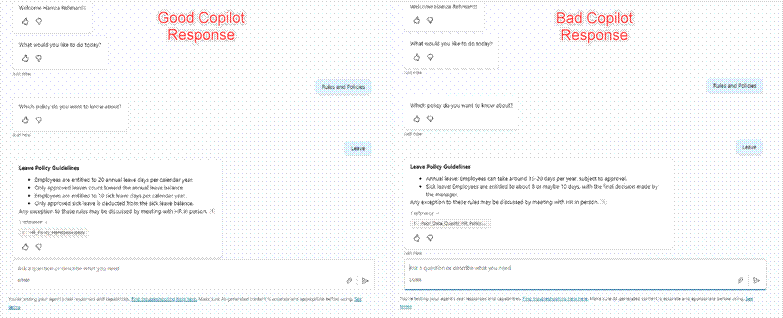
Copilot uses natural language processing to understand your questions and machine learning to analyze your Dynamics 365 data. When you ask it to “show me our top customers” or “what deals are at risk this quarter,” it’s searching through your CRM records, looking for patterns and connections.
But what happens when:
- Customer names are entered differently across records (Microsoft vs. Microsoft Corp vs. MSFT)
- Critical fields like “Last Contact Date” or “Deal Stage” are left blank
- Duplicate accounts exist with conflicting information
- Historical data hasn’t been migrated or cleaned properly
Copilot can’t magically fix bad data. It will either give you incomplete answers or, worse, confident-sounding responses based on flawed information.
The Five Data Quality Issues Breaking Your Copilot
1. Duplicate Records
When the same customer, contact, or opportunity exists multiple times in your system, Copilot doesn’t know which version is correct. You might ask about account history and get information from an outdated duplicate instead of the current, active record.
The fix: Use Dynamics 365’s built-in duplicate detection rules and regularly run deduplication processes. Set up matching criteria based on email addresses, phone numbers, and company names to prevent duplicates from being created in the first place.
2. Incomplete Data Fields
Copilot relies on structured data to understand context. If your sales team consistently leaves fields like “Industry,” “Annual Revenue,” or “Number of Employees” blank, Copilot can’t segment customers, identify trends, or make intelligent recommendations.
The fix: Make critical fields required during data entry. Implement data validation rules and create dropdown menus for standardized entries. Use Power Automate flows to send reminders when important fields are missing.
3. Inconsistent Data Entry
One sales rep enters “Meeting scheduled” in the notes, another uses the activity timeline, and a third updates a custom field. Copilot has to piece together information from multiple sources, often missing critical context because it’s scattered across your system.
The fix: Standardize your data entry processes with clear guidelines. Use choice fields instead of free text where possible. Create custom business process flows that guide users through consistent data capture steps.
4. Outdated or Stale Information
If your last interaction with a customer was recorded six months ago but you’ve had three calls since then that weren’t logged, Copilot will base its recommendations on incomplete history. It might suggest re-engaging with accounts that are already in active discussions.
The fix: Integrate your communication tools (Outlook, Teams) with Dynamics 365 so activities are automatically logged. Set up reminders for your team to update records after customer interactions. Use activity tracking dashboards to identify stale records.
5. Poor Data Relationships
Dynamics 365 is a relational database. When contacts aren’t properly linked to accounts, opportunities aren’t connected to the right decision-makers, or cases aren’t associated with products, Copilot can’t understand the full picture of your customer relationships.
The fix: Audit your data relationships regularly. Use connection records to map complex relationships between entities. Train your team on the importance of linking related records during data entry.
A Step-by-Step Data Cleanup Strategy
Fixing your data doesn’t happen overnight, but with a systematic approach, you can dramatically improve Copilot’s accuracy within weeks.
Phase 1: Assess Your Current State (Week 1)
Run data quality reports to identify the scope of your issues. Dynamics 365 has built-in analytics that can show you:
- Percentage of records with missing critical fields
- Number of duplicate records detected
- Age of the oldest unmodified records
- Data completeness scores by user or team
Create a baseline measurement so you can track improvement over time.
Phase 2: Quick Wins (Weeks 2-3)
Start with the data that Copilot uses most frequently:
- Clean up your active opportunities and high-value accounts first
- Merge obvious duplicates in your customer database
- Fill in missing data for your top 20% of customers (who likely represent 80% of your revenue)
- Standardize naming conventions for your most common entries
These quick wins will immediately improve Copilot’s performance for your most important business queries.
Phase 3: Systematic Cleanup (Weeks 4-8)
Now tackle the broader issues:
- Run bulk deduplication processes with careful review before merging
- Use Power Automate to enrich missing data from external sources
- Archive or delete obsolete records that are cluttering your system
- Establish data governance policies and assign ownership for data quality
Phase 4: Prevention (Ongoing)
The real victory is preventing future data quality issues:
- Implement real-time duplicate detection during data entry
- Set up data validation rules that enforce quality standards
- Create automated alerts when data quality metrics drop
- Schedule regular data quality audits (monthly or quarterly)
- Train new users on data entry best practices before they touch the system
Optimizing for Copilot Specifically
Beyond general data quality, there are specific optimizations that help Copilot perform better:
Use Consistent Terminology
Copilot learns from how your organization uses language. If you call the same thing “proposal,” “quote,” and “bid” interchangeably, you’re confusing the AI. Pick standard terms and stick to them across all fields and records.
Enrich Your Notes and Descriptions
When you log activities or update records, provide context that Copilot can learn from. Instead of “Called customer,” write “Called customer about Q1 renewal they’re interested in adding 50 licenses but need budget approval.” This gives Copilot richer information to work with.
Tag and Categorize Strategically
Use tags, categories, and custom fields to add semantic meaning to your data. This helps Copilot understand not just what happened, but why it matters.
Keep Your Knowledge Base Current
If you’re using Copilot for customer service, ensure your knowledge articles are up-to-date, properly categorized, and linked to relevant products or issues. Outdated documentation will lead to outdated answers.
Measuring Success: Is Your Data Getting Better?
You’ll know your data quality efforts are working when:
- Copilot’s answers become more specific: Instead of “Here are 50 accounts,” you get “Based on recent engagement and deal size, these 5 accounts are most likely to close this quarter.”
- Confidence scores improve: Copilot provides confidence indicators with its responses. Higher scores mean it’s working with better data.
- User adoption increases: When your team trusts Copilot’s answers, they’ll use it more frequently. Track usage metrics to see if engagement is climbing.
- Time-to-insight decreases: Your team should spend less time hunting for information and more time acting on Copilot’s recommendations.
- Business outcomes improve: Ultimately, better data and better AI should lead to higher close rates, faster resolution times, and more satisfied customers.
Common Mistakes to Avoid
As you embark on your data quality journey, watch out for these pitfalls:
Over-cleaning too quickly: Aggressive deduplication can accidentally merge records that shouldn’t be combined. Always review merge operations carefully, especially for high-value accounts.
Ignoring historical context: While old data might seem irrelevant, it provides valuable context for long-term customer relationships. Archive rather than delete when possible.
Setting unrealistic field requirements: Making every field mandatory will frustrate users and lead to garbage data entered just to satisfy the system. Focus on truly critical fields.
Forgetting to train users: New data quality rules mean nothing if your team doesn’t understand or follow them. Invest in training and create easy-to-follow documentation.
Treating it as a one-time project: Data quality is ongoing. Without continuous monitoring and maintenance, you’ll be back to square one within months.
The Business Case for Better Data
Still need to convince leadership to invest in data quality? Here’s the ROI argument:
Studies show that poor data quality costs organizations an average of $12.9 million annually. For Dynamics 365 Copilot specifically, bad data means:
- Sales reps waste time chasing wrong leads or duplicating efforts
- Customer service can’t access complete customer histories, leading to poor experiences
- Marketing campaigns target the wrong segments with irrelevant messages
- Executives make strategic decisions based on incomplete or inaccurate reports
Conversely, organizations with high data quality report 66% better decision-making, 50% faster time-to-market for new initiatives, and 25% higher productivity.
Your Data Quality Roadmap
Here’s a practical 90-day plan to transform your Dynamics 365 data and unlock Copilot’s full potential:
- Days 1-14: Assessment and baseline metrics
- Days 15-30: Quick wins on high-value records
- Days 31-60: Systematic cleanup and deduplication
- Days 61-75: Implementation of prevention measures
- Days 76-90: Training, documentation, and ongoing monitoring setup
- By day 91, you should have noticeably better Copilot responses and a sustainable system for maintaining data quality going forward.
Conclusion: Your AI Is Only as Smart as Your Data
Dynamics 365 Copilot represents a significant leap forward in how we interact with business systems. But like any AI, it’s fundamentally limited by the quality of its training data which, in this case, is your CRM database.
The frustration you feel when Copilot gives you inaccurate answers isn’t a failure of the technology. It’s a signal that your data needs attention. And unlike many technology problems, this one has a clear solution: clean, consistent, complete data.
Start small, measure your progress, and build sustainable processes for maintaining quality. Your investment in data cleanup will pay dividends not just in better Copilot responses, but in better business decisions, higher productivity, and stronger customer relationships.
The AI revolution in business is here. Make sure your data is ready for it.
Read more : voice of the customer in dynamics 365 crm
FAQ’s
Copilot relies on your CRM data. Duplicate records, missing fields, and inconsistent data lead to unclear or incorrect responses.
No. Copilot analyzes existing data but can’t clean or correct poor-quality information automatically.
Start by removing duplicates, standardizing key fields, and keeping records updated—especially for high-value accounts.
 is a software solution company that was established in 2016. Our quality services begin with experience and end with dedication. Our directors have more than 15 years of IT experience to handle various projects successfully. Our dedicated teams are available to help our clients streamline their business processes, enhance their customer support, automate their day-to-day tasks, and provide software solutions tailored to their specific needs. We are experts in Dynamics 365 and Power Platform services, whether you need Dynamics 365 implementation, customization, integration, data migration, training, or ongoing support.