

Modern enterprises often operate across multiple Dynamics 365 environments—whether due to mergers, regional systems, or client-specific tenants. A common challenge arises when records and related documents must move securely between tenants, without duplication, data loss, or manual effort.
At SkySoft, we recently implemented a robust cross-tenant integration solution in Microsoft Dynamics 365 that enables controlled record creation, get related records and secure SharePoint document synchronization—all through a simple user experience.
The Business Challenge
Users needed the ability to:
- Search records from an external Dynamics 365 tenant
- Create or update them in the current tenant
- Automatically sync related CRM documents and SharePoint files
- Avoid duplicates and maintain data integrity
—all without exposing sensitive credentials or complex backend logic.
The Solution Overview
We designed a secure, scalable, and user-friendly architecture using native Dynamics 365 extensibility:
Custom Ribbon Button
- Added to relevant entities, allowing users to initiate the import with one click.
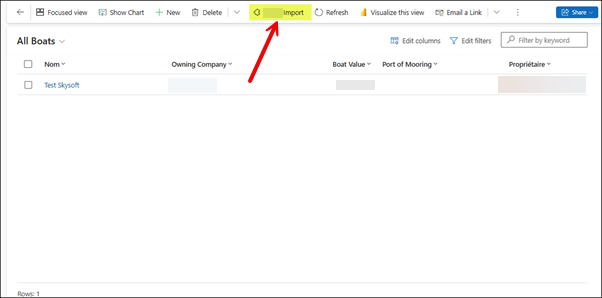
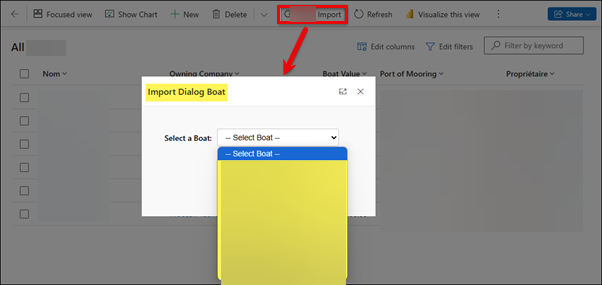
Popup Dialog with Guided Selection
- A lightweight HTML + JavaScript popup opens, enabling users to search and select records from the external tenant
Custom Actions & Plugins
- Business logic is centralized in server-side components, handling:
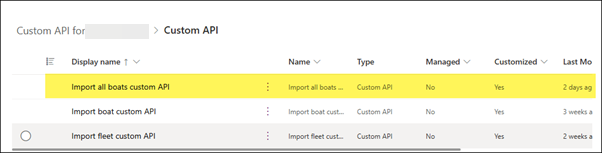
- Custom APIs (Cross-Tenant)
Purpose-built APIs retrieve records and related data from the source tenant in a clean, modular way.
Handling Related CRM Documents and SharePoint Files
As part of the record creation or update process, the Custom API and Custom Action also handle related CRM documents and their associated SharePoint files between the source and target tenants.
Functionality Overview
When a user selects a record from the source tenant lookup in the target tenant form, the system checks whether any related CRM documents exist.
If those documents have files uploaded to the source SharePoint and the Export Flag is set to Yes, the system automatically retrieves those files and uploads them to the target SharePoint.
This ensures document consistency across both environments.
Step-by-Step File Sync Process
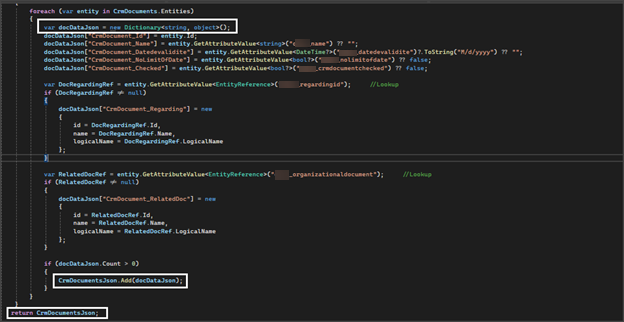
A. Set Related Documents in Source Tenant (Custom API)
In the source environment, related CRM documents are retrieved and stored in JSON format, including all associated document records.
Screenshot: Related CRM documents returned by the Custom API:
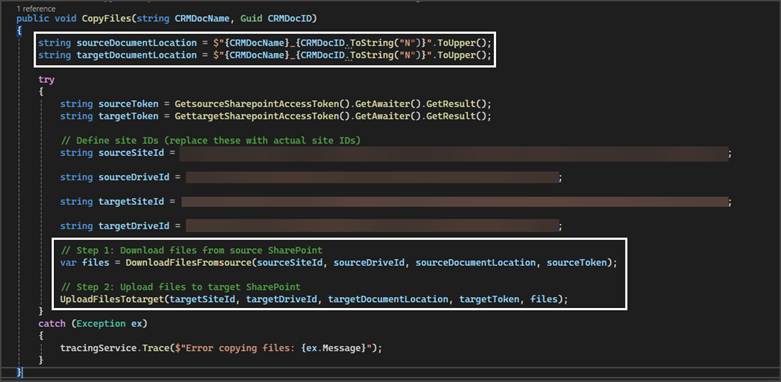
B. Copy Files via Plugin
A plugin handles the file copy process and performs the following steps:
- For each document (based on Name and ID), a document location URL is created in the format:
DocumentName_DocumentId for both source and target SharePoint. - Access tokens for both source and target SharePoint are retrieved.
- Site ID and Drive ID are fetched for both environments.
Screenshot: Plugin logic fetching SharePoint access details
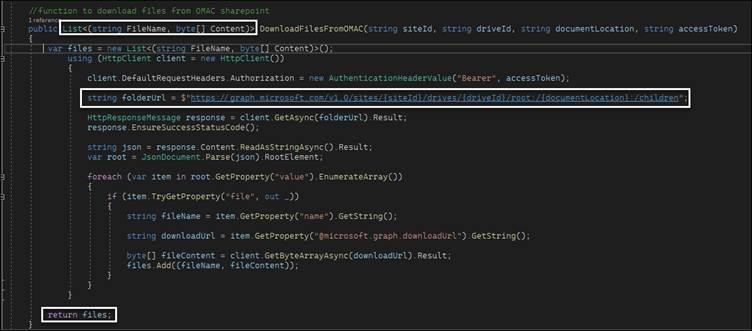
C. Download Files from Source SharePoint
Using the source SharePoint access token, Site ID, Drive ID, and document location, the plugin downloads the files from SharePoint.
The result may contain:
- Multiple files
- A single file
- Or no files, depending on what exists in the source SharePoint.
Screenshot: Files downloaded from source SharePoint
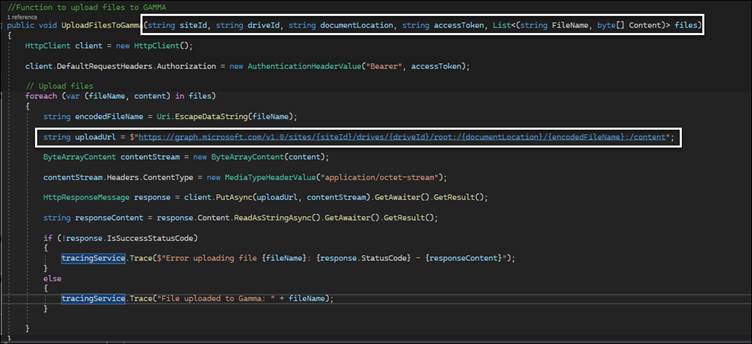
D. Upload Files to Target SharePoint
The downloaded files are stored temporarily and then uploaded to the target SharePoint using:
- Target SharePoint access token
- Target Site ID and Drive ID
- Target document location
This ensures the files are uploaded to the correct location and are immediately accessible in the target environment.
Screenshot: Files uploaded to target SharePoint
📁 Intelligent SharePoint Document Sync
Beyond records, document consistency was critical.Our solution:
- Identifies related CRM documents marked for export
- Securely downloads files from the source tenant’s SharePoint
- Uploads them to the target tenant’s SharePoint
- Preserves structure and accessibility
All of this happens automatically during the record import process—no manual uploads, no missed files.
Built with Security & UX in Mind
- Secure token-based authentication
- No hard-coded credentials exposed to users
- Clear system feedback:
- Record already exists
- Record created successfully
- Record not found
- API or sync failure
- Clean separation between UI, business logic, and integration layers
The Result
- Faster cross-tenant onboarding
- Zero duplicate records
- Reliable document synchronization
- A smooth, one-click experience for end users
- A maintainable and scalable integration architecture
Why This Matters
This approach showcases how Dynamics 365 Custom APIs, Plugins, and SharePoint integrations can be combined to solve real enterprise problems—without compromising security or usability.
At SkySoft, we focus on building solutions that are not just functional, but production-ready, secure, and future-proof.
Read more : business central vs spreadsheets the future of growth
FAQ’s
No. It uses secure, token-based authentication with no hard-coded or user-exposed credentials.
No. The system validates records before creation to prevent duplicates and maintain data integrity.
Related CRM documents marked for export are automatically downloaded from the source tenant and uploaded to the target SharePoint no manual steps needed.