Table of Content
Modular clauses, dynamic placeholders, and advanced document composition
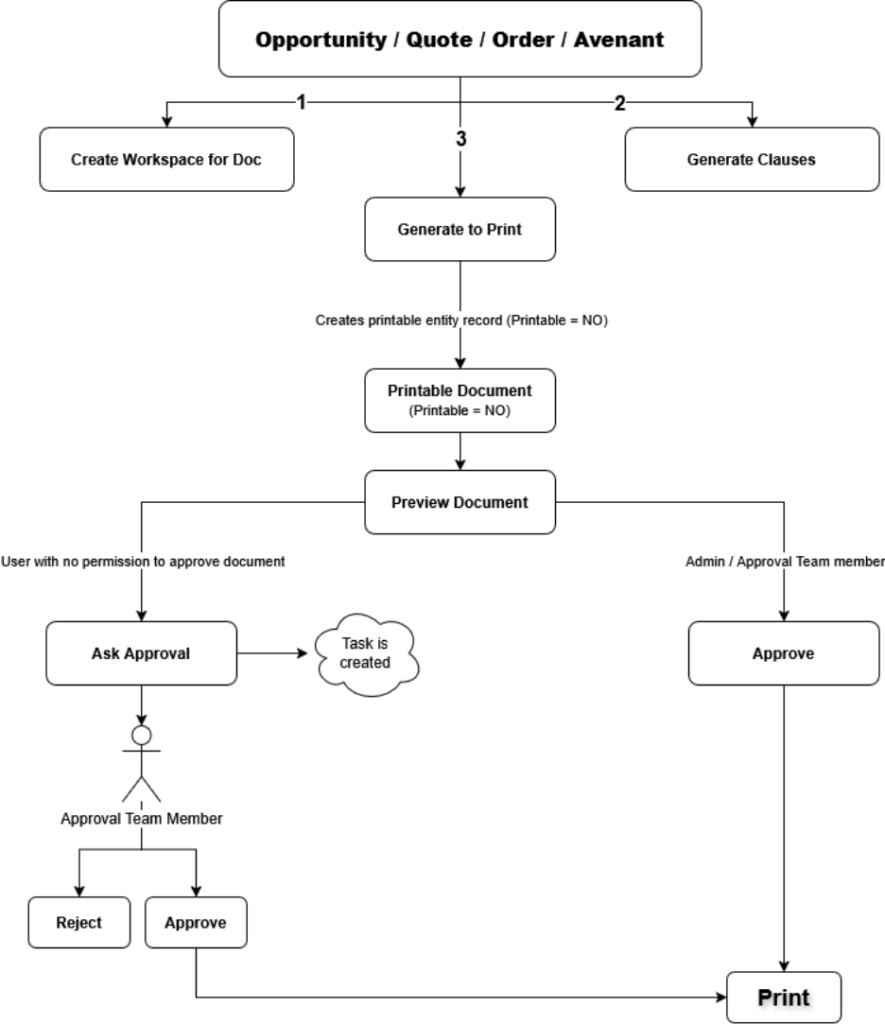
This diagram provides a high-level view of the system components and data flow involved in the custom document generation framework.
Introduction
Recap of Parts 1 & 2
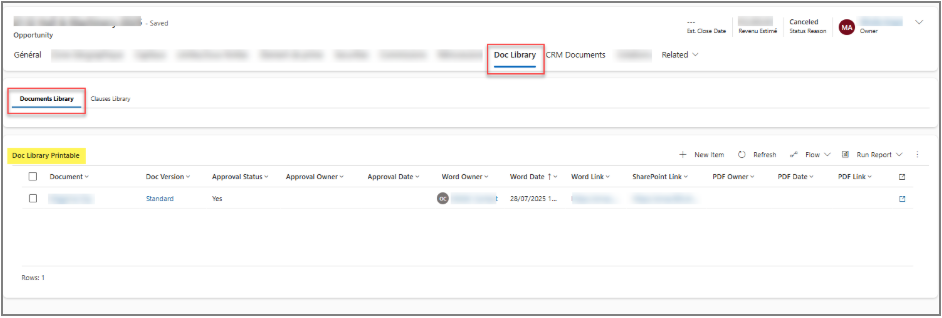
In Part 1, we covered the Document Library Management side, which serves as an administrative layer for maintaining documents. This includes creating and managing documents, defining chapters, maintaining multiple versions, and standardizing placeholders using a controlled structure.
In Part 2, we focused on the Document Library (Printable documents), where records are created in the Printable entity for Printable = Yes documents. These documents follow a governed lifecycle that includes previewing, approval (either direct or via an approval team), and final printing. Upon printing, placeholders are replaced with actual data and the generated document is converted to PDF and uploaded to SharePoint.
Business Need for Clause-Based Document Assembly
Certain documents require a modular and flexible structure, where only specific sections (clauses) should be included based on business rules or user selection. For this purpose, Printable = No documents are used in conjunction with a Clauses Library. Each clause contains rich text content, and placeholders within this content are dynamically replaced with data from the target entity. After clause generation, a Generate to Print action creates a corresponding record in the Printable entity, allowing the document to follow the same Preview, Approve, and Print process as standard printable documents.
Why Rich Text Handling Required a Different Approach
Unlike standard document generation, clause-based documents rely heavily on rich text fields and conditional content selection. Each clause includes a Clause Selected flag, which is automatically set during clause generation based on defined conditions. During preview and printing, only clauses marked as selected are merged into the final document. To correctly populate rich text content while also handling placeholder replacement inside that rich text, a third-party connector (Plumsail) is used. This approach enables accurate rich text rendering in Word templates while maintaining full support for dynamic data binding and document governance.
Clauses Library Overview
Purpose of the Clauses Library
The Clauses Library is designed to support modular document composition, allowing documents to be assembled dynamically from individual clauses. Each clause represents a reusable section of content stored as rich text, enabling flexible inclusion or exclusion based on business rules or user selection.
Relationship with Document Management
The Clauses Library is tightly integrated with the Document Library Management framework. It consumes documents, versions, and chapters defined on the management side, ensuring that clause-based documents follow the same governance model, version control, and placeholder standards as centrally managed documents.
Printable = No Document Concept
Documents used within the Clauses Library are marked as Printable = No, indicating that they are not printed directly. Instead, they act as source templates for clause generation. Selected clauses are later consolidated into a new Printable entity record, after which the document follows the standard Preview, Approve, and Print lifecycle.
Custom Grid Experience
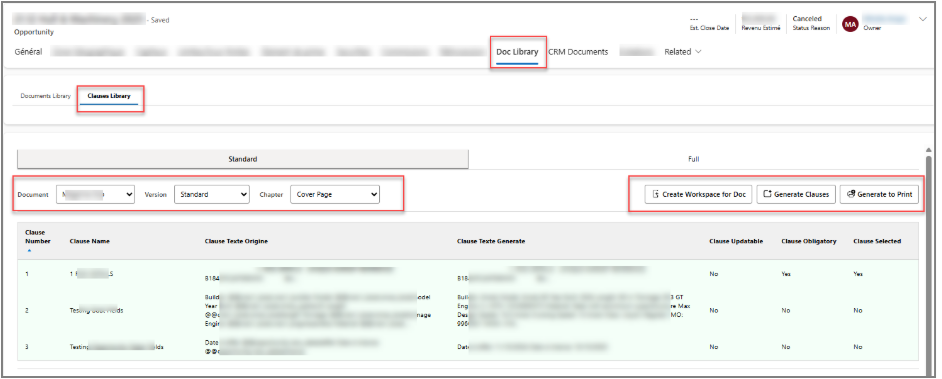
The Clauses Library is implemented using a custom HTML web resource, providing a tailored user experience beyond standard Dynamics 365 grids. This approach enables controlled document assembly while maintaining flexibility and performance.
HTML Web Resource Implementation
The grid is rendered through an HTML web resource embedded within the entity form. This allows custom UI elements, client-side logic, and precise control over user actions such as workspace creation, clause generation, and document printing.
Document, Version, and Chapter Selection
The grid includes three interdependent dropdowns:
- Document – Displays only documents marked as Printable = No
- Version – Filtered dynamically based on the selected document
- Chapter – Filtered based on the selected document version
This cascading selection ensures users can only work with valid and governed document structures defined in the management layer.
Action Buttons and Workflow Control
The grid provides three primary actions:
- Create Workspace for Doc – Copies all relevant data from the Document Library Management side and creates clause records for the selected document, version, and chapter. If existing clause records are found, they are deleted and recreated to maintain consistency.
- Generate Clauses – Processes placeholders (e.g. @@entityname.fieldname@@) within rich text fields by replacing them with actual data from the target entity. The generated output is stored separately, preserving the original clause content.
- Generate to Print – Creates a new record in the Printable entity using only clauses marked as Selected = Yes, allowing the document to follow the standard Preview, Approve, and Print lifecycle.
The system uses a third-party connector (Plumsail) to populate rich text within Word templates, ensuring accurate rendering and placeholder replacement during document generation.
Create Workspace for Document
Purpose of Workspace Creation
The workspace acts as a working copy of the managed document structure, allowing users to interact with and modify clauses without impacting the original configuration maintained in the Document Library Management layer.
Data Cloning from Management Side
When the system creates a workspace, it copies all relevant data—including document structure, chapters, and management items—from the management side into clause records. This ensures the workspace accurately reflects the selected document, version, and chapter while remaining isolated from administrative definitions.
Delete-and-Recreate Strategy for Consistency
Before creating a new workspace, the system checks for existing clause records. If any are found, they are deleted and recreated. This approach guarantees that the workspace always represents the latest managed configuration, prevents data drift, and ensures consistent document generation outcomes.
Clause Records & Selection Logic
Clause Entity Design
Each clause is stored as an individual record, representing a modular section of the document. The clause entity includes structured metadata along with rich text fields for both the original content and the generated output, enabling controlled content management and dynamic data replacement.
Clause Selected Flag
A Boolean Clause Selected flag determines whether a clause is included in the final document. The system automatically sets this flag during clause generation based on predefined conditions and allows users to adjust it for business-specific scenarios.
Business Control Over Final Output
By using the Clause Selected flag, the system ensures that only approved and relevant clauses are merged during document generation. This provides business users with precise control over the final document content while maintaining consistency, compliance, and governance.
Rich Text Placeholder Replacement
Clause Text Origin
- Source rich text content
Clause Text Generated
- Generated output with actual data
- Placeholder detection and replacement logic
Generate Clauses to Printable Document
Creating a New Printable Entity Record
Once clauses are generated and evaluated, a new record is created in the Printable entity. This record represents a print-ready document instance derived from clause-based content rather than directly from a managed template.
Passing Only Selected Clauses
During this process, only clauses marked as Clause Selected = Yes are included. This ensures that the final document contains only relevant, approved sections based on business rules and user selection.
Maintaining Separation of Concerns
By generating a new Printable entity record, the solution clearly separates clause composition from document generation and approval. This design maintains a clean architecture, allows reuse of existing preview and approval workflows, and ensures consistency across all document generation scenarios.
Rich Text Document Generation Using Plumsail
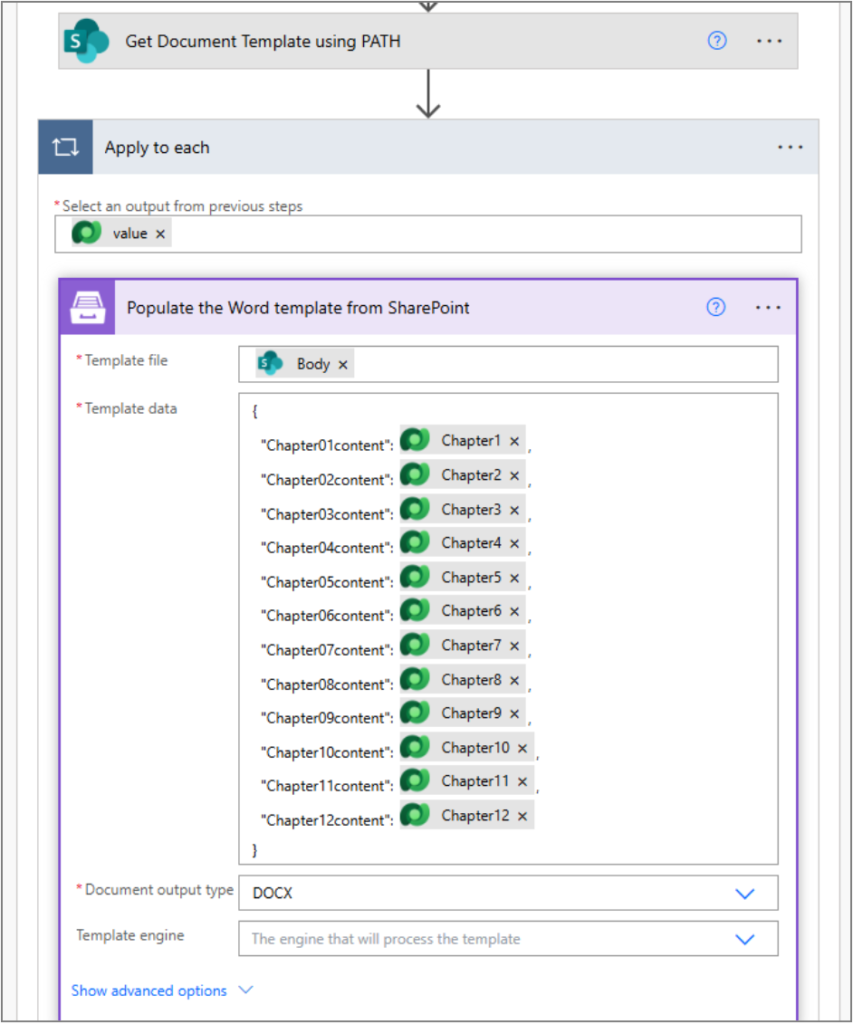
Why Out-of-the-Box Connectors Were Insufficient
Dynamics 365 out-of-the-box document generation and Power Automate connectors have limited support for reliably populating rich text (HTML/RTF) content into Word templates. While simple text replacement is supported, complex formatting, nested elements, and dynamic clause-based content cannot be rendered accurately using standard connectors.
Role of Plumsail in Rich Text Handling
To address these limitations, we introduced Plumsail as a third-party connector within Power Automate. We designed custom flows and actions to pass generated rich text content from clause records into the document generation process, ensuring that the system preserves formatting, structure, and dynamic data replacements accurately.
Word Template Population with HTML/RTF Content
Plumsail directly populates Word templates with HTML/RTF-based rich text, allowing the system to seamlessly merge clause content into the final document. This approach ensures accurate rendering of rich text sections while maintaining full support for placeholder replacement and downstream approval and printing workflows.
Final Approval & Print Flow
Reusing the Same Approval Pipeline
Once the clause-based document is generated into a Printable entity record, it follows the same approval pipeline used for standard printable documents. This includes preview, approval (manual or via an approval team), and final print actions, ensuring no separate approval logic is required.
Consistency Across Document Types
By reusing the existing approval and print framework, the solution maintains consistent behavior across template-based and clause-based documents. This unified approach simplifies maintenance, enforces governance, and delivers a standardized document generation experience regardless of the underlying document structure.
Business Impact & Key Benefits
Fully Modular Document Creation
The solution enables documents to be assembled dynamically from reusable clauses, allowing content to be tailored to specific business scenarios without modifying core templates or code.
Rich Text Support
By leveraging third-party capabilities, the framework fully supports rich text content within Word templates, ensuring accurate formatting, layout, and placeholder replacement across all generated documents.
Reusable Governance Framework
A unified management, approval, and printing pipeline enforces consistent governance, reduces duplication, and simplifies ongoing maintenance across both template-based and clause-based documents.
Scalable Across Entities
The architecture is designed to scale seamlessly across multiple business entities such as Opportunities, Quotes, and Orders, making it a flexible and future-proof document generation solution.
Conclusion
The Clauses Library completes the document generation framework by enabling dynamic, clause-based document assembly with full support for rich text and conditional content. By extending the existing Document Library Management and Printable document workflows, it delivers a cohesive end-to-end solution that supports authoring, governance, approval, and final document generation within Dynamics 365.
This approach not only overcomes out-of-the-box limitations but also establishes a scalable and reusable enterprise document generation ecosystem capable of supporting complex business requirements across multiple entities.
FAQ’s
The Clauses Library enables modular document assembly by letting users dynamically select and merge reusable rich-text clauses into a final document based on business rules.
Printable = No documents act as source templates for clause generation. The system later converts selected clauses into a Printable record for preview, approval, and printing.
During clause generation, the system dynamically replaces placeholders (e.g., @@entity.field@@) using Power Automate and a third-party connector to ensure accurate rich text rendering.
Yes. Once generated into a Printable entity record, the document follows the same Preview, Approve, and Print lifecycle as standard documents in Microsoft Dynamics 365.
 is a software solution company that was established in 2016. Our quality services begin with experience and end with dedication. Our directors have more than 15 years of IT experience to handle various projects successfully. Our dedicated teams are available to help our clients streamline their business processes, enhance their customer support, automate their day-to-day tasks, and provide software solutions tailored to their specific needs. We are experts in Dynamics 365 and Power Platform services, whether you need Dynamics 365 implementation, customization, integration, data migration, training, or ongoing support.