
Automated Document Management for Real Estate CRM

From Manual Document Handling to a Unified, Automated Document Management Workflow

From Manual Document Handling to a Unified, Automated Document Management Workflow How Sky Soft Connections integrated Microsoft Dynamics 365, SharePoint, Microsoft Graph API, and a custom ASP.NET Core Web API to automate compliance document management and centralize property assets across multiple external portals.

A real estate platform managing client onboarding and property sales required a reliable way to handle two critical document management processes.


The first involved collecting identity and compliance documents from clients and brokers while ensuring that every individual’s documents remained securely isolated within their own record.

The second involved managing property images, floor plans, brochures, and gallery content that needed to remain synchronized across multiple external-facing portals

The existing approach relied on disconnected document management processes, creating operational friction and increasing the risk of inconsistent or incorrectly managed information.

Client: Fully anonymized
CRM Platform: Microsoft Dynamics 365
Business Function: Real Estate

Process: CRM record creation → Document provisioning → Document upload → Asset management → Portal distribution

Note: The client’s company name, industry, and employee names have been intentionally omitted.

The Business Problem

Two Document Management Challenges

The platform faced two connected document management challenges.

Challenge One: Compliance Documents

Clients and brokers needed to submit identity and compliance documents. The system needed to:

  • Keep documents securely separated by record
  • Automatically create folders
  • Route uploads correctly
  • Reduce manual filing
  • Support compliance requirements

Previously, these document spaces had to be created manually.

Challenge Two: Property Assets

Property images, floor plans, brochures, and gallery content were managed separately from the CRM. Administrators had to manually update multiple portals, increasing workload and the risk of outdated or inconsistent assets.

Business Impact of the Existing Process

The Sky Soft Connections Solution

SharePoint + Dynamics 365 + Microsoft Graph API

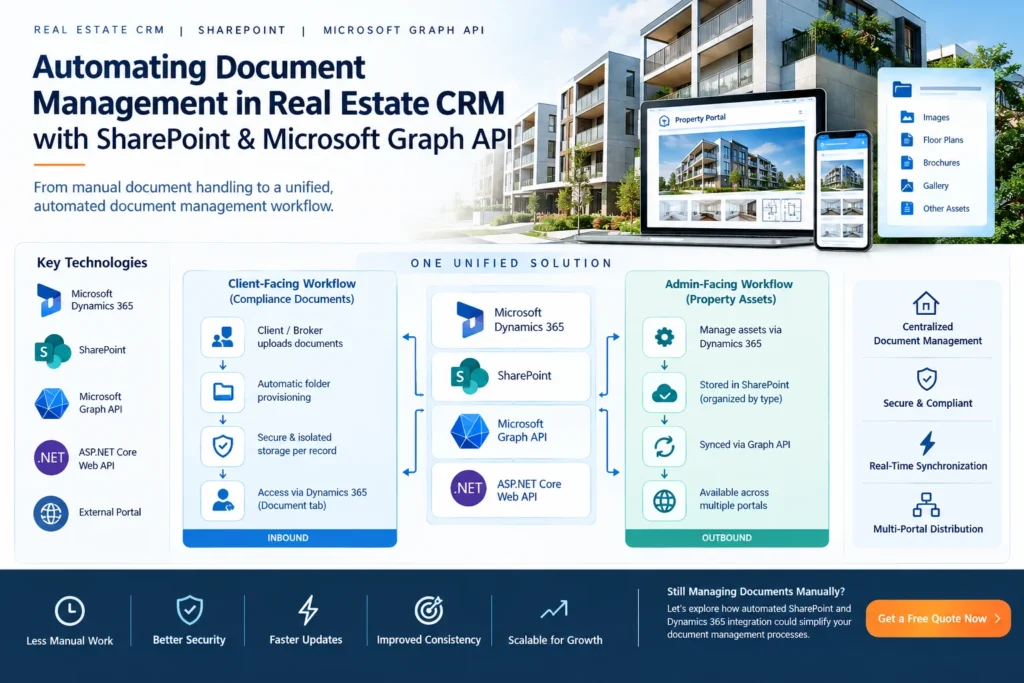
Sky Soft Connections integrated Microsoft SharePoint with the client’s existing Microsoft Dynamics 365 environment and connected the solution to a custom ASP.NET Core Web API backend using Microsoft Graph API.

The architecture supports two directions:

INBOUND: Client users upload compliance documents through the external portal.

OUTBOUND: Internal administrators manage property assets through Dynamics 365 and those updates are automatically delivered to external portals.

The result is a unified document architecture that provides a single source of truth across both workflows.

How the Automation Works

From CRM Record Creation to Synchronized Property Assets

01 : CREATE
A new lead is created in Microsoft Dynamics 365.
02 : PROVISION
The backend receives the CRM event and uses Microsoft Graph API to automatically provision a dedicated SharePoint folder structure for the record.
03 : UPLOAD
The user logs into the external portal and uploads their compliance documents.
04 : ROUTE
The backend identifies the correct record and routes each document into the appropriate SharePoint subfolder.
05 : ACCESS
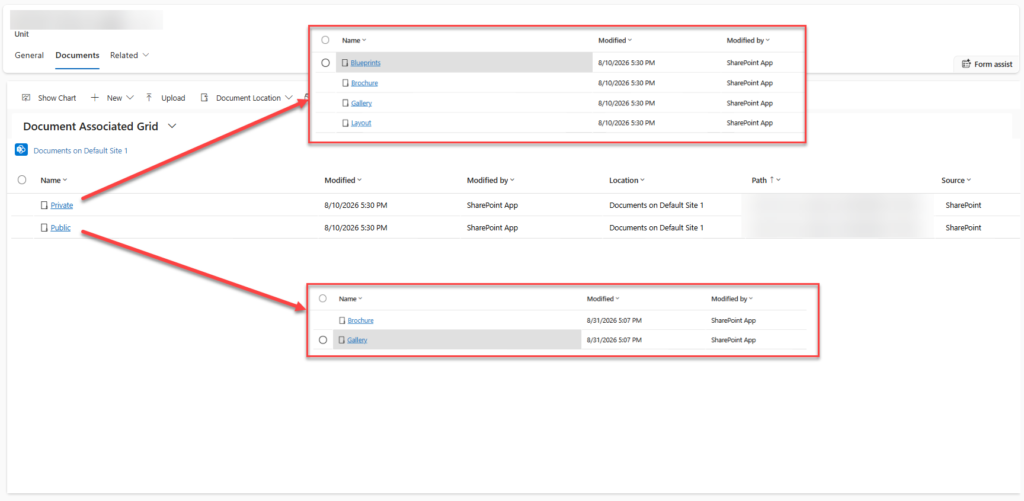
Internal administrators can access the same document repository directly through the Dynamics 365 Document tab.
06 : MANAGE
Administrators manage property assets directly from the Unit record in Dynamics 365.
07 : SYNCHRONIZE
Changes made to property assets are stored in SharePoint and read by the backend through Microsoft Graph API.
08 : DISTRIBUTE
Updated assets are immediately reflected across the connected external portals.
01 : CREATE
A new lead is created in Microsoft Dynamics 365.
02 : PROVISION
The backend receives the CRM event and uses Microsoft Graph API to automatically provision a dedicated SharePoint folder structure for the record.
03 : UPLOAD
The user logs into the external portal and uploads their compliance documents.
04 : ROUTE
The backend identifies the correct record and routes each document into the appropriate SharePoint subfolder.
05 : ACCESS
Internal administrators can access the same document repository directly through the Dynamics 365 Document tab.
06 : MANAGE
Administrators manage property assets directly from the Unit record in Dynamics 365.
07 : SYNCHRONIZE
Changes made to property assets are stored in SharePoint and read by the backend through Microsoft Graph API.
08 : DISTRIBUTE
Updated assets are immediately reflected across the connected external portals.

The solution combines Microsoft technologies and custom development into a single integration architecture.

Technology & Integration Architecture
Microsoft Dynamics 365

Acts as the central business system for leads, client records, units, and document management.

Microsoft SharePoint

Provides structured document storage with dedicated folders for individual records and property units.

Microsoft Graph API

Provides programmatic control over SharePoint folders, files, uploads, and document access.

ASP.NET Core Web API & External Portal

Acts as the custom integration layer connecting Dynamics 365, SharePoint, the external portal, and property asset delivery.

Provides the client-facing interface through which users upload compliance documentation.

Reusability Across Real Estate Workflows

The underlying architecture can support multiple document-heavy processes within a real estate environment.

Client Onboarding

Automatically create secure document spaces when new clients or brokers are added.

Compliance Management

Store identity and verification documents in structured, record-specific locations.

Property Management

Centralize images, floor plans, brochures, and other property assets.

Multi-Portal Content Distribution

Keep property information synchronized across multiple external-facing portals.

Document-Based Workflows

Extend the same architecture to other processes that require structured document storage and controlled access.

Business Outcomes

Reduced Manual Document Handling

Document spaces are created automatically when records are created, eliminating routine manual folder setup.

Stronger Document Isolation

Each record receives its own dedicated document space, reducing the risk of cross-record access and supporting compliance requirements.

Automated Document Filing

User-uploaded compliance documents are automatically routed to the correct location without manual intervention.

Single Source of Truth

Property assets are managed centrally through Dynamics 365 and SharePoint rather than being maintained separately across multiple portals.

Faster Asset Updates

Changes made by administrators are reflected across connected portals without additional publishing or export steps.

Improved Consistency

Users across different portals receive the current version of property assets from the same underlying source.

Scalable Architecture

The event-driven folder provisioning model automatically creates the required document structure for every new record as the platform grows.

Still Managing Documents Manually?

Let’s explore how automated SharePoint and Dynamics 365 integration could simplify your document management processes.