
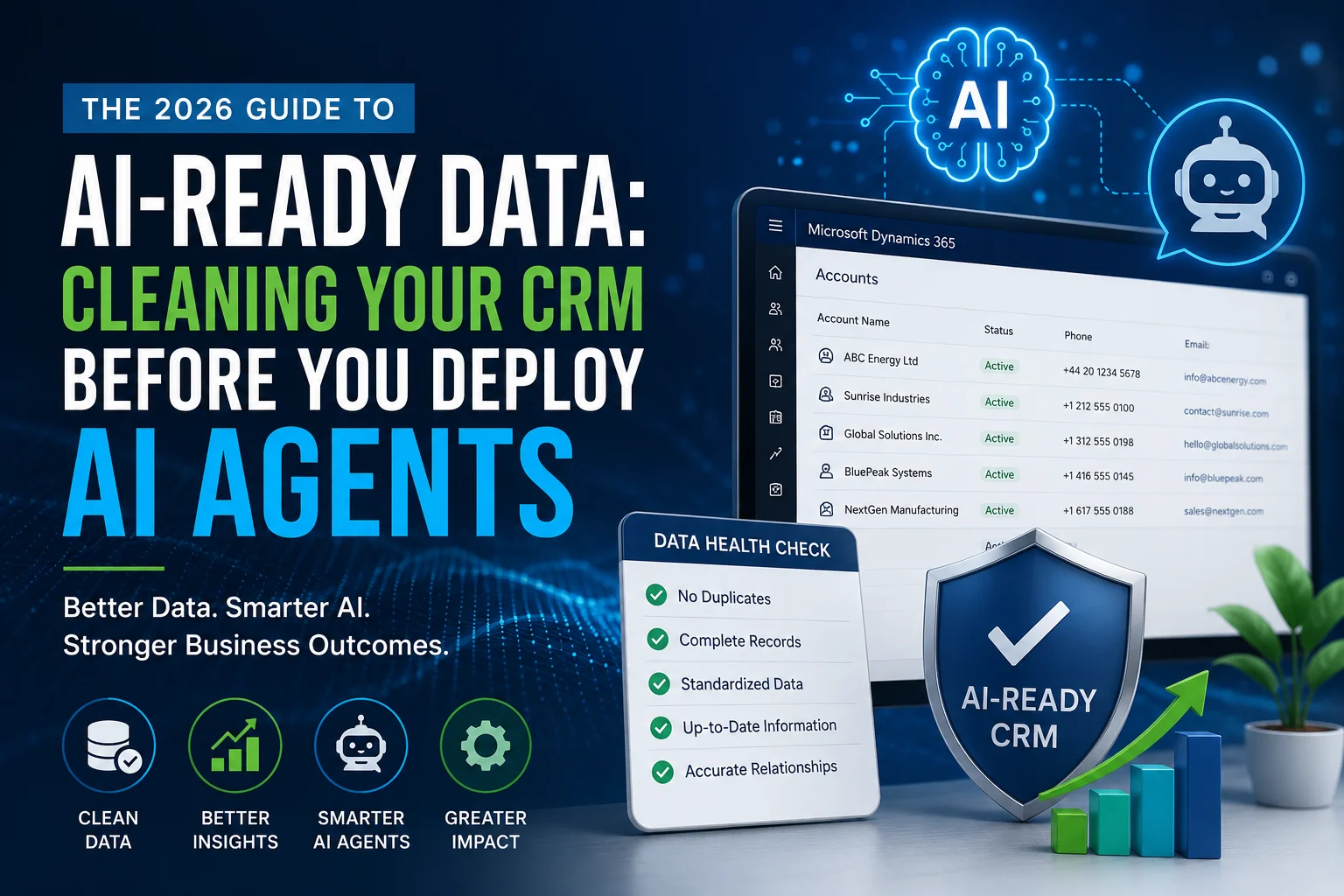
Artificial Intelligence has moved beyond being a future trend. In 2026, organizations across sales, customer service, finance, manufacturing, and field operations are deploying AI agents to automate repetitive work, generate insights, and improve customer experiences.
However, there is one challenge many businesses overlook.
AI is only as intelligent as the data it receives.
If your CRM contains duplicate records, outdated contacts, inconsistent formats, missing information, or inaccurate customer histories, your AI agents will simply automate poor decisions.
Therefore, before deploying Microsoft Copilot, AI Agents, or any enterprise AI solution, you must first make your CRM AI-ready.
This guide explains exactly how to prepare your CRM data for AI, why it matters, and how businesses can build a strong foundation for successful AI adoption.
Why AI-Ready Data Matters More Than Ever
Businesses often believe AI will automatically solve inefficiencies.
In reality, AI amplifies existing data quality.
Good data produces:
- Better recommendations
- Accurate forecasting
- Faster automation
- Reliable customer insights
- Personalized experiences
Poor data produces:
- Incorrect responses
- Duplicate communications
- Failed automations
- Misleading reports
- Poor customer experiences
Think of AI as a Formula 1 car.
Without a quality track, even the fastest car cannot perform well.
Similarly, AI cannot outperform poor CRM data.
What Is AI-Ready CRM Data?
AI-ready CRM data refers to structured, accurate, complete, standardized, and continuously maintained information that AI models can understand and use effectively.
An AI-ready CRM includes:
- Complete customer profiles
- Standardized field formats
- Accurate sales history
- Clean opportunity records
- Consistent product information
- Well-organized relationships
- Proper ownership records
- Current activity history
In short, every record should tell a complete and reliable story.
Signs Your CRM Is Not Ready for AI
Many companies already use Microsoft Dynamics 365 or another CRM. Yet, years of manual updates often leave behind hidden data problems.
Watch for these warning signs.
Duplicate Customer Records
One customer appears multiple times with different spellings or email addresses.
Example:
| Customer | Version 1 | Version 2 |
|---|---|---|
| ABC Energy Ltd | abcenergy@gmail.com | info@abc-energy.com |
AI may treat these as two different companies.
Missing Critical Fields
Common missing information includes:
- Phone numbers
- Industry
- Revenue
- Contact owner
- Customer segment
- Country
- Decision-maker role
Missing values reduce AI accuracy.
Inconsistent Formatting
Examples include:
| Incorrect | Correct |
|---|---|
| UK | United Kingdom |
| U.K. | United Kingdom |
| United K. | United Kingdom |
Although these appear similar to humans, AI treats them differently.
Outdated Information
Customer information changes constantly.
Examples include:
- Employees leave
- Companies relocate
- Phone numbers change
- Products evolve
- Contracts expire
Without updates, AI generates outdated recommendations.
Incomplete Customer History
If emails, meetings, quotations, support tickets, and opportunities exist outside your CRM, AI only sees part of the customer journey.
As a result, recommendations become unreliable.
Why Dirty CRM Data Hurts AI Agents
AI agents perform tasks such as:
- Answering customer questions
- Writing emails
- Generating sales summaries
- Predicting customer behavior
- Creating follow-up tasks
- Recommending products
- Prioritizing leads
However, these outputs depend entirely on data quality.
| Clean CRM | Dirty CRM |
|---|---|
| Accurate AI responses | Incorrect AI recommendations |
| Better lead scoring | Poor prioritization |
| Reliable forecasts | Inaccurate reporting |
| Personalized communication | Generic messaging |
| Faster automation | Automation failures |
Step-by-Step Process to Make Your CRM AI-Ready
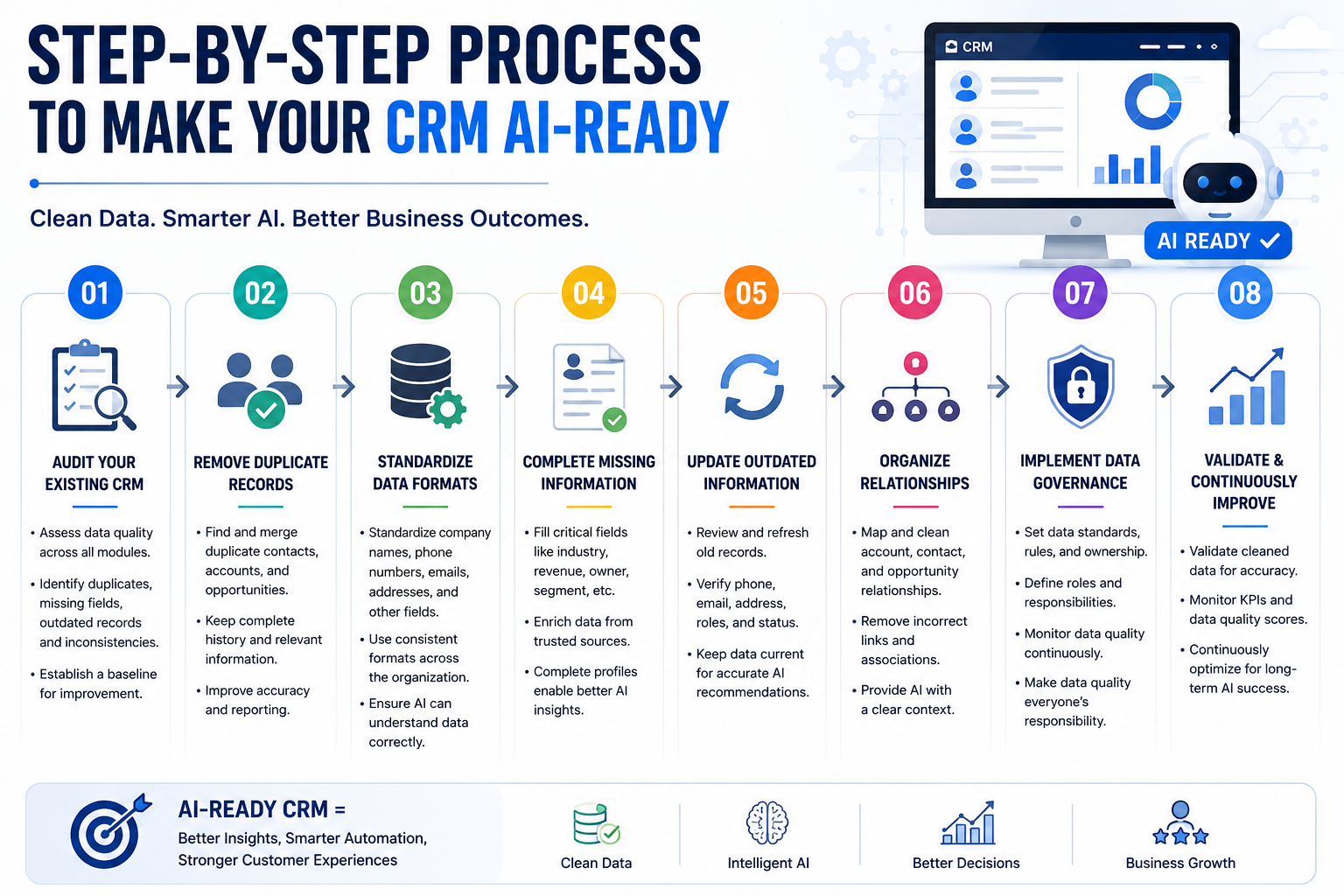
Step 1: Audit Your Existing CRM
Begin with a comprehensive health assessment.
Review:
- Duplicate records
- Missing fields
- Invalid emails
- Inactive customers
- Empty opportunities
- Old activities
- Incorrect relationships
An audit establishes a baseline before AI deployment.
Step 2: Remove Duplicate Records
Duplicate contacts confuse AI models.
Use CRM duplicate detection tools to merge records while preserving valuable history.
Benefits include:
- Better reporting
- Accurate forecasting
- Improved AI suggestions
Step 3: Standardize Data Formats
Create consistent rules for:
Company Names
Choose one naming convention.
Example:
- ABC Manufacturing Ltd
- XYZ Oil Services LLC
Avoid abbreviations unless standardized.
Phone Numbers
Use one international format.
Example:
+44 20 1234 5678
instead of
02012345678
Country Names
Always use standardized values.
Avoid mixing:
- USA
- U.S.
- America
- United States
Step 4: Fill Missing Information
AI performs better with complete records.
Prioritize:
- Industry
- Revenue
- Region
- Customer type
- Lead source
- Product interest
- Sales stage
- Account owner
Step 5: Archive Old Records
Inactive data increases AI noise.
Archive:
- Closed businesses
- Old leads
- Expired opportunities
- Obsolete products
This improves AI relevance.
Step 6: Connect Business Systems
Modern AI works best when data flows across systems.
Integrate:
- ERP
- Accounting
- Marketing automation
- Customer support
- Inspection software
- Finance systems
- Inventory platforms
This creates a unified customer profile.
Step 7: Establish Data Governance
Cleaning data once is not enough.
Instead, define clear governance policies.
Include:
- Data ownership
- Validation rules
- Approval workflows
- Duplicate prevention
- Scheduled audits
- Security controls
Strong governance keeps CRM AI-ready over time.
Essential Data Fields AI Agents Need
| Category | Important Fields |
|---|---|
| Customer | Name, Industry, Country |
| Contacts | Email, Phone, Role |
| Sales | Opportunity Value, Stage |
| Marketing | Campaign Source, Lead Score |
| Support | Case History, SLA |
| Finance | Payment Status |
| Products | Purchase History |
| Activities | Calls, Emails, Meetings |
Microsoft Dynamics 365 Makes AI Readiness Easier
Organizations using Microsoft Dynamics 365 already have an advantage.
With proper configuration, Dynamics 365 supports:
- Microsoft Copilot
- AI Agents
- Predictive insights
- Customer intelligence
- Automated workflows
- Power Automate integrations
- Power BI dashboards
- Real-time reporting
However, these capabilities depend on well-managed CRM data.
Common Mistakes Companies Make Before Deploying AI
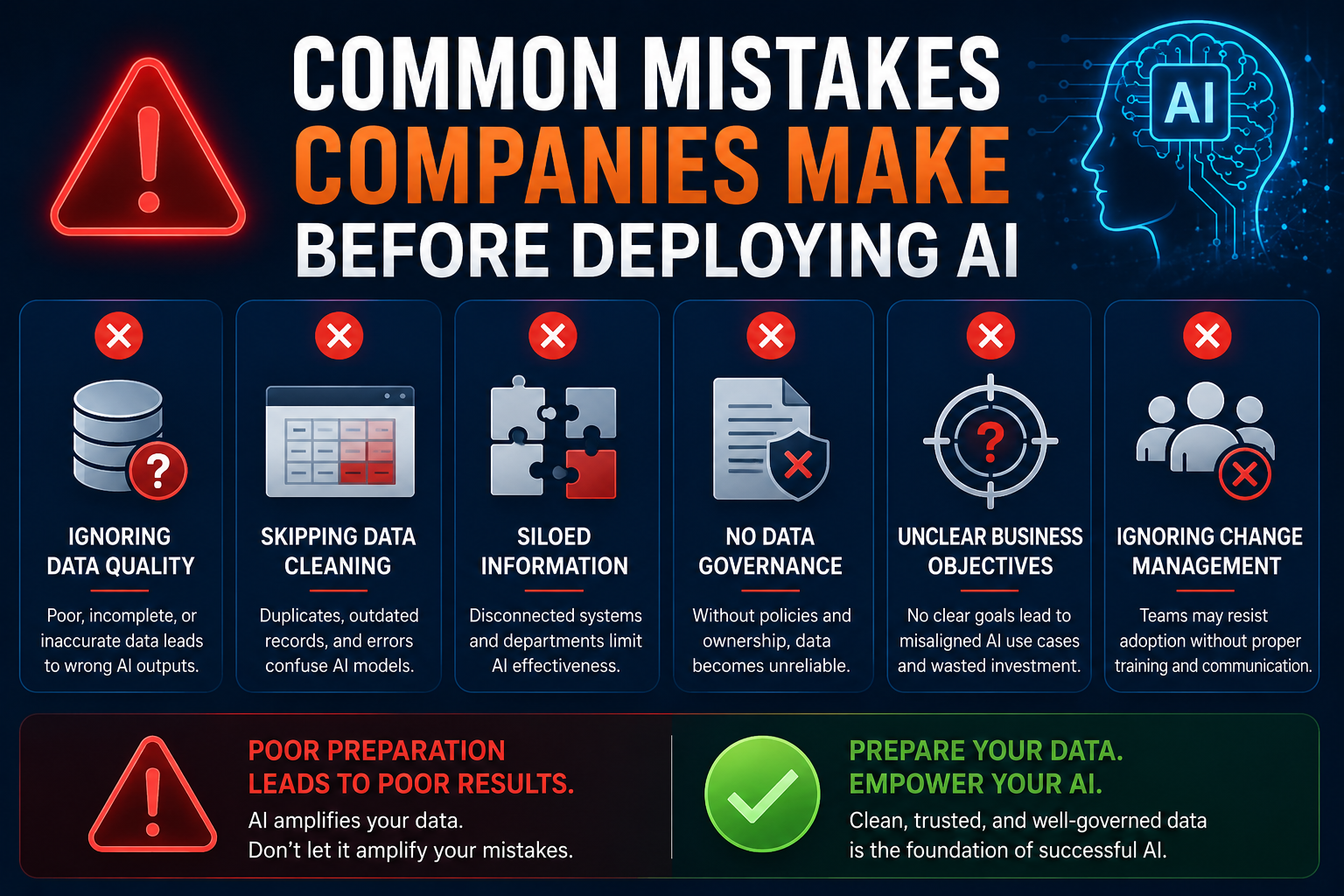
Avoid these costly mistakes.
Deploying AI Before Cleaning CRM
AI cannot fix poor data.
Ignoring Data Governance
Without governance, data quality quickly declines.
Leaving Legacy Records Untouched
Historical duplicates continue confusing AI
Using Multiple Data Standards
Different naming conventions reduce AI accuracy.
Forgetting User Training
Employees should understand why consistent data entry matters.
AI-Ready CRM Checklist
Use this checklist before enabling AI agents.
- Duplicate records removed
- Missing fields completed
- Data standardized
- Old records archived
- Relationships validated
- Business systems integrated
- Security reviewed
- Governance implemented
- Users trained
- Regular audits scheduled
How Sky Soft Connections Helps Businesses Prepare for AI
Preparing CRM data for AI requires technical expertise, strategic planning, and continuous optimization.
At Sky Soft Connections, we help organizations modernize their CRM environments so AI delivers measurable business value instead of amplifying existing data issues.
Our AI readiness services include:
Microsoft Dynamics 365 Consulting
We assess your CRM, identify data quality issues, optimize configurations, and prepare your environment for AI-driven automation.
CRM Data Cleansing and Migration
Our specialists remove duplicate records, standardize data, enrich missing information, and ensure seamless CRM Data migration with minimal disruption.
[fusion_button enable_hover_text_icon=”no” target=”_self” aria_role_button=”0″ color=”default” stretch=”default” icon_position=”right” icon_divider=”no” hover_transition=”none” animation_direction=”left” animation_speed=”0.3″ animation_delay=”0″ hide_on_mobile=”small-visibility,medium-visibility,large-visibility” sticky_display=”normal,sticky” modal=”migration-checklist” icon=”fa-arrow-alt-circle-down fas”]Dynamics 365 CRM: Data Migration Planning Checklist[/fusion_button]
[fusion_modal title=”Dynamics 365 CRM: Data Migration Planning Checklist” size=”large” show_footer=”yes” name=”migration-checklist”]
[fusion_form form_post_id=”7880″ hide_on_mobile=”small-visibility,medium-visibility,large-visibility”][/fusion_form]
[/fusion_modal]
Microsoft Copilot and AI Agent Enablement
We configure Microsoft Copilot, AI-powered workflows, and intelligent agents that align with your business processes and compliance requirements.
Microsoft Power Platform Solutions
Our team develops tailored Power Platform solutions using:
- Power Apps
- Power Automate
- Power BI
- Dataverse
These tools connect your business data and unlock AI-powered insights across departments.
System Integration
We integrate Dynamics 365 with ERP, finance, inspection management, customer support, and third-party applications to create a unified, AI-ready data ecosystem.
Whether you’re beginning your AI journey or scaling enterprise-wide automation, Sky Soft Connections provides the expertise needed to build a reliable foundation for long-term success.
Future Trends in AI-Ready CRM Data
As AI continues to evolve, organizations will increasingly focus on:
- Autonomous AI agents
- Real-time data synchronization
- Predictive customer intelligence
- Zero-touch CRM updates
- Natural language analytics
- Intelligent data governance
- AI-driven compliance monitoring
- Industry-specific AI copilots
Companies that prioritize data quality today will be better positioned to take advantage of these innovations tomorrow.
Read more : Will AI Replace Microsoft Dynamics 365 Consultants? What Copilot and Agents Actually Change in 2026
Frequently Asked Questions
AI-ready CRM data is accurate, complete, standardized, and well-governed information that enables AI systems to generate reliable insights, automate tasks, and improve decision-making.
Cleaning your CRM ensures AI works with trustworthy information, reducing errors, improving automation, and delivering more accurate recommendations.
Most organizations should perform continuous validation with quarterly audits and an annual comprehensive data quality review.
Yes. Microsoft Dynamics 365 integrates with Microsoft Copilot, AI Agents, Power Platform, and predictive analytics. However, these tools perform best when the underlying CRM data is clean and well-structured.
Absolutely. Sky Soft Connections provides CRM health assessments, data cleansing, Dynamics 365 optimization, AI implementation, Microsoft Copilot integration, Power Platform development, and end-to-end digital transformation services tailored to your business needs.
Final Thoughts
Artificial intelligence is transforming how businesses manage customer relationships, automate workflows, and make strategic decisions. Yet, the success of every AI initiative depends on one critical factor: data quality.
Cleaning your CRM before deploying AI agents is no longer optional—it is a strategic investment that improves accuracy, efficiency, and long-term scalability.
By auditing your CRM, eliminating duplicates, standardizing data, establishing governance, and integrating key business systems, you create a trusted foundation for AI to deliver meaningful results.
If your organization is planning to implement Microsoft Copilot, AI Agents, or modern Dynamics 365 capabilities, now is the time to ensure your CRM is truly AI-ready.
With expert guidance from Sky Soft Connections, you can transform fragmented CRM data into a reliable, intelligent asset that powers automation, enhances customer experiences, and drives sustainable business growth in 2026 and beyond.