Table of Content
- Understanding the Fundamentals
- What Is Microsoft Copilot for Customer Service?
- AI Chatbots: Capabilities and Use Cases
- Where Chatbots Excel
- Limitations and Best Practices
- Microsoft Copilot: Transforming Agent Productivity
- Where Copilot Excels
- Direct Comparison: Key Differences
- When to Choose Each
- The Power of Both: Integrated Architecture
- Implementation Roadmap
- Cost Analysis
- Common Pitfalls to Avoid
- Making Your Decision
- Conclusion
- FAQ’s
The landscape of customer service has undergone a remarkable transformation with artificial intelligence at its core. For organizations leveraging Microsoft Dynamics 365 Customer Service, the question isn’t whether to adopt AI, but which AI solution will deliver the greatest impact. Two powerful options stand at the forefront: traditional AI chatbots and Microsoft Copilot for Customer Service.
This comprehensive guide explores both technologies, helping you make an informed decision that aligns with your organization’s unique needs.
Understanding the Fundamentals
What Are AI Chatbots in D365?
AI chatbots in Dynamics 365 Customer Service are sophisticated virtual agents built on Microsoft’s Power Virtual Agents platform (now evolved into Copilot Studio). These digital assistants handle customer inquiries autonomously, providing instant responses without human intervention.

Key characteristics include:
- Autonomous Operation: Chatbots work independently, engaging directly with customers through web chat, Microsoft Teams, SMS, and social media platforms.
- 24/7 Availability: They provide round-the-clock support, ensuring customers receive immediate assistance regardless of time zones or business hours.
- Scalability: A single chatbot can handle thousands of simultaneous conversations, ideal for high-volume support scenarios.
- Structured Conversations: Chatbots excel at guiding customers through predefined workflows like password resets, order tracking, appointment scheduling, or FAQ resolution.
What Is Microsoft Copilot for Customer Service?
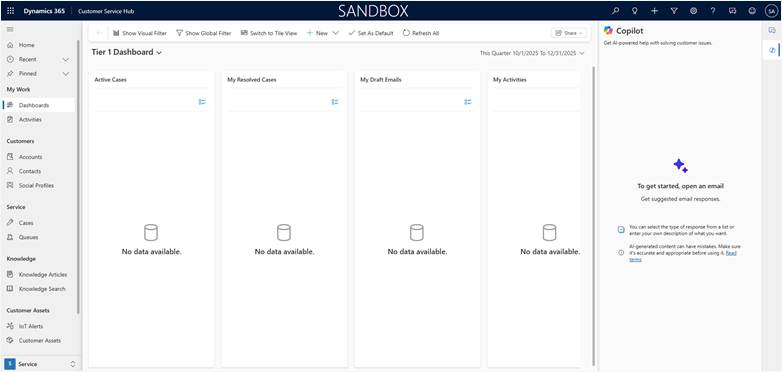
Microsoft Copilot represents a fundamentally different approach. Rather than replacing human agents, Copilot acts as an intelligent assistant that works alongside them, augmenting their capabilities and enhancing productivity.
Core capabilities include:
- Contextual Assistance: Copilot monitors live customer interactions and automatically suggests responses, relevant knowledge articles, and case information based on conversation context.
- Knowledge Synthesis: Rather than simply retrieving documents, Copilot synthesizes information from multiple sources to generate comprehensive, tailored responses.
- Case Summarization: Copilot automatically generates concise case summaries after lengthy interactions, dramatically reducing after-call work.
- Intelligent Drafting: Copilot drafts email responses, chat messages, and case notes, allowing agents to review and send rather than compose from scratch.
AI Chatbots: Capabilities and Use Cases
Architecture and Implementation
Implementing AI chatbots requires careful planning and configuration in Copilot Studio, where you design conversation flows using an intuitive, low-code interface.
The architecture consists of:
- Topic Modeling: Topics represent distinct conversation paths like “Check Order Status” or “Return Request,” each with trigger phrases for recognition.
- Entity Recognition: Entities extract specific information like order numbers, product names, or dates from customer messages.
- Integration Layer: Chatbots connect to D365 through Power Automate flows or APIs, enabling them to retrieve customer information, create cases, and update records.
- Knowledge Base Connection: Linking to D365 knowledge articles ensures chatbots provide accurate, consistent information.
Where Chatbots Excel
High-Volume, Repetitive Inquiries: Chatbots shine when handling predictable patterns. A telecommunications company receiving thousands of daily inquiries about data usage and billing can use chatbots to instantly provide this information.
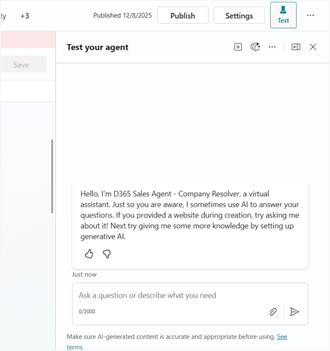
Self-Service Transactions: Modern customers often prefer solving problems independently. Chatbots enable self-service for updating account information, scheduling appointments, processing returns, resetting passwords, and downloading invoices.
After-Hours Support: For organizations that can’t afford 24/7 staffing, chatbots provide critical coverage, handling straightforward inquiries during off-hours and creating cases for human follow-up when necessary.
Multilingual Support: Chatbots can be configured to understand and respond in dozens of languages, making global support operations more feasible.
Limitations and Best Practices
Challenges:
- Struggle with nuanced, emotionally charged, or highly technical scenarios
- Require continuous maintenance and updating
- Can frustrate customers if poorly designed
- Have a complexity ceiling that limits their scope
Best Practices:
- Start with 3-5 high-volume, straightforward use cases
- Design clear escalation paths to human agents with full context transfer
- Implement thoughtful personality aligned with your brand
- Track containment rates, customer satisfaction, and topic coverage gaps
Microsoft Copilot: Transforming Agent Productivity
Key Capabilities
Real-Time Conversation Intelligence: As conversations unfold, Copilot analyzes dialogue continuously, automatically retrieving order details, displaying status, highlighting relevant notes, and suggesting next steps.
Generative Response Drafting: Copilot generates contextually appropriate responses based on the customer’s inquiry, relevant knowledge articles, case history, and organizational tone guidelines. Agents can accept, edit, or use these as starting points.
Knowledge Mining: Copilot eliminates manual searching by automatically identifying relevant knowledge articles, extracting specific information needed, synthesizing insights from multiple sources, and presenting information in ready-to-use formats.
Intelligent Case Summarization: Copilot automates after-call work by generating comprehensive case summaries, extracting action items, identifying sentiment and escalation risks, and suggesting appropriate categorization.
Where Copilot Excels
Complex Problem Resolution: When dealing with intricate technical issues or multi-step troubleshooting, Copilot enhances scenarios by surfacing relevant documentation, highlighting similar past cases, suggesting diagnostic questions, and providing technical specifications.
High-Stakes Customer Interactions: For VIP customers or escalated complaints requiring human empathy and judgment, Copilot supports by providing instant access to complete customer history, flagging important details, and suggesting empathetic language.
Training and Onboarding: Copilot accelerates new agent onboarding by providing real-time guidance, suggesting appropriate responses, correcting misconceptions, and building confidence.
Multichannel Consistency: Copilot ensures consistent service quality across email, chat, phone, and social media by providing uniform intelligent assistance regardless of channel.
Limitations
- Effectiveness depends on data quality and knowledge base completeness
- Requires agent training on how to leverage capabilities effectively
- Needs thoughtful change management to address agent skepticism
- Represents additional per-user licensing costs
Direct Comparison: Key Differences
Primary Function
- Chatbots: Customer-facing automation that reduces inquiry volume reaching human agents
- Copilot: Agent-facing augmentation that enhances human capabilities and efficiency
Implementation and ROI
- Chatbots: Require significant upfront design work but can deliver quick wins for straightforward use cases. ROI becomes apparent within months if you automate substantial inquiry volume.
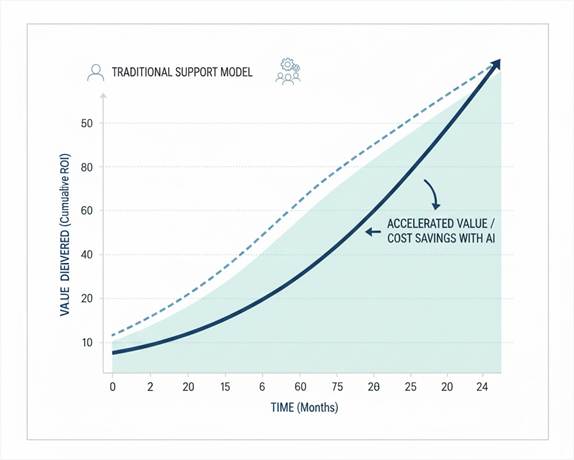
- Copilot: Easier initial implementation but requires content governance and training. ROI accrues gradually through incremental productivity improvements.
Scalability
- Chatbots: Scale linearly with inquiry volume—handle unlimited conversations at consistent cost
- Copilot: Scales with agent headcount—each agent needs a license but can handle more volume and complexity
When to Choose Each
Choose Chatbots When:
- High volumes of simple, repetitive inquiries
- Self-service is culturally accepted by customers
- 24/7 coverage needed but cost-prohibitive with humans
- Inquiry types follow predictable patterns
Choose Copilot When:
- Support scenarios involve complexity and nuance
- Customer relationships and personalization matter deeply
- Agent expertise is a competitive differentiator
- After-call work consumes significant agent time
Read more : top copilot studio terms for dynamics 365 sales pros
The Power of Both: Integrated Architecture
For many organizations, the most effective strategy is implementing both technologies in a complementary tiered support model:
Tier 1 – Chatbot Layer: Automated bots handle high-volume inquiries, providing instant resolution for routine questions and capturing information for complex issues.
Tier 2 – Copilot-Enhanced Agents: When chatbots escalate, Copilot-equipped agents receive complete context and intelligent assistance for mid-complexity issues.
Tier 3 – Specialized Experts: For the most complex situations, specialists leverage deep expertise combined with Copilot assistance.
Real-World Example: E-Commerce Retailer
Challenge: 50,000 monthly inquiries, 60% simple (order status, returns), 40% complex (defective products, special orders).
Solution: Deployed chatbot for simple inquiries plus Copilot for 20 agents handling escalations.
Results:
- Chatbot contained 65% of inquiries without human intervention
- Average handle time decreased 35% for agent-handled interactions
- Customer satisfaction improved from 78% to 86%
- Agent headcount requirements reduced 30% despite 20% volume growth
Implementation Roadmap
Phase 1: Foundation (Months 1-2)
- Analyze inquiry data to identify automation candidates
- Audit and clean up knowledge base content
- Configure systems and security
- Develop training materials
Phase 2: Pilot (Months 3-4)
- Deploy to limited channels/user groups
- Monitor closely and gather feedback
- Measure key performance indicators
- Refine based on learnings
Phase 3: Optimization (Months 5-6)
- Expand to broader deployment
- Implement advanced features
- Establish ongoing maintenance processes
- Document best practices
Phase 4: Scale and Evolve (Ongoing)
- Continuously analyze for improvement opportunities
- Stay current with platform updates
- Build organizational AI literacy
- Integrate with adjacent technologies
Cost Analysis
Chatbot Investment
Initial: $35,000-$170,000 (licensing, implementation, integrations, training) Ongoing: Monthly licensing, maintenance (10-20 hours/month), content management Returns: $30,000-$50,000 annual savings per agent avoided Break-Even: 8-14 months with sufficient inquiry volume
Copilot Investment
Initial: $40,000-$110,000 (licensing setup, knowledge optimization, training, change management) Ongoing: $50/user/month licensing, content maintenance, training support Returns: 20-40% productivity gains, 15-25% quality improvements, 30-50% reduced after-call work Break-Even: 10-18 months with compounding benefits
Common Pitfalls to Avoid
Chatbot Pitfalls
- Over-ambitious scope: Start with 3-5 use cases, not everything at once
- Poor conversation design: Involve UX designers and customer service experts
- Inadequate escalation: Implement clear paths to human agents with context transfer
- Insufficient testing: Test extensively with real customer language variations
Copilot Pitfalls
- Knowledge base neglect: Invest in content governance before deployment
- Inadequate training: Develop comprehensive training beyond basic functionality
- Over-reliance on AI: Emphasize agent responsibility for accuracy verification
- Ignoring feedback: Implement systematic feedback collection and review cycles
Making Your Decision
The choice between AI chatbots and Microsoft Copilot isn’t binary for most organizations. Each serves distinct but complementary purposes.
Assessment Questions:
- What percentage of inquiries fall into clear, repeatable categories?
- Do customers prefer self-service or human interaction?
- How mature is your knowledge management system?
- Are you primarily seeking cost reduction or experience enhancement?
Decision Framework:
- Strong Chatbot Indicators: 50%+ transactional inquiries, high volumes (1000+ daily), need for 24/7 coverage, limited agent expansion resources
- Strong Copilot Indicators: Complex products/services, high-value customers, significant inquiry variance, existing agent team needs productivity boost
- Both Solutions: Mixed inquiry portfolio, large diverse customer base, comprehensive AI investment resources, commitment to best-in-class experience
Conclusion
Success with AI in customer service requires more than technology activation. It demands strategic clarity, organizational commitment, continuous investment in knowledge management, measurement discipline, and unwavering customer-centricity.
The organizations that will lead aren’t necessarily those with the most advanced AI, but those that most thoughtfully integrate these tools into human-centered service experiences. Both chatbots and Copilot are powerful enablers, but your strategy, execution, and commitment to customer experience will ultimately determine your success.
The future of customer service is neither fully automated nor purely human—it’s a sophisticated blend where AI and human intelligence work together to deliver exceptional experiences at scale. Your journey begins with understanding your unique context and choosing the right AI tools to support your vision.
Read more : The Future of CRM
FAQ’s
AI chatbots directly interact with customers and automate simple inquiries, while Copilot assists human agents by suggesting responses, summarizing cases, and improving productivity.
Chatbots are ideal when you receive high volumes of repetitive inquiries that follow predictable patterns and require 24/7 self-service support.
Yes. Many organizations see the best results by using chatbots for Tier 1 automation and Copilot to support agents handling complex or escalated cases.
 is a software solution company that was established in 2016. Our quality services begin with experience and end with dedication. Our directors have more than 15 years of IT experience to handle various projects successfully. Our dedicated teams are available to help our clients streamline their business processes, enhance their customer support, automate their day-to-day tasks, and provide software solutions tailored to their specific needs. We are experts in Dynamics 365 and Power Platform services, whether you need Dynamics 365 implementation, customization, integration, data migration, training, or ongoing support.