Table of Content
Managing large datasets in Power Apps connected to Dynamics 365 can be challenging. As data volumes grow, performance issues often appear, especially when delegation is not handled correctly. Therefore, understanding advanced delegation techniques is essential for building scalable, fast, and user-friendly business apps.
In this guide, you will learn how delegation works, why it matters, and how to apply advanced delegation strategies for large Dynamics 365 datasets. Additionally, you’ll see how Skysoft Connections helps organizations design high-performance Power Apps solutions tailored for enterprise needs.
What Is Delegation in Power Apps?
Delegation in Power Apps refers to offloading data processing tasks to the data source, such as Dynamics 365 Dataverse, instead of handling them locally within the app. As a result, only the relevant records are returned, improving performance and reliability.
However, not all functions and operators are delegable. Consequently, improper delegation can lead to incomplete data, slow load times, and warning messages inside Power Apps.
Why Delegation Matters for Large Dynamics 365 Datasets
When your Dynamics 365 tables contain thousands—or even millions—of records, delegation becomes critical.
Without proper delegation:
- Only the first 500–2,000 records are processed
- App performance degrades significantly
- Business decisions are made using incomplete data
With advanced delegation techniques:
- Full datasets are queried securely
- Performance improves noticeably
- Apps scale smoothly as data grows
Therefore, delegation is not optional—it is a best practice for enterprise Power Apps.
Common Delegation Challenges in Power Apps
Although Power Apps supports delegation, several challenges still exist.
Key Delegation Limitations
- Non-delegable functions like
CountIf,Len, orMid - Complex formulas combining multiple filters
- Unsupported operators for Dataverse
- Improper use of collections for large datasets
Because of these limitations, developers must design formulas carefully from the beginning.
Advanced Delegation Techniques for Power Apps with Dynamics 365
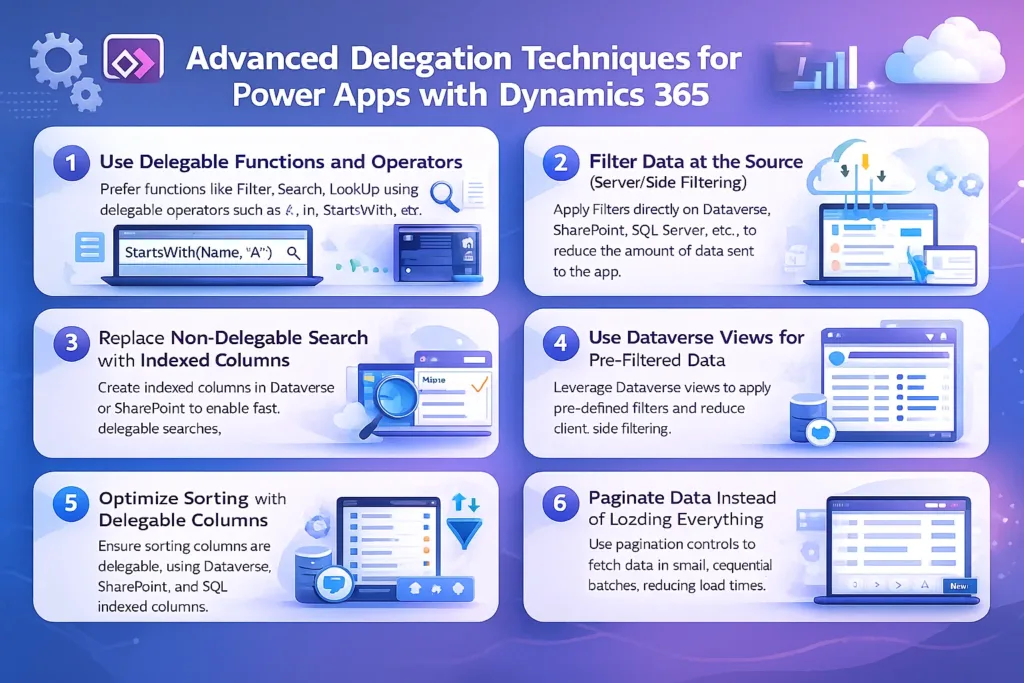
1. Use Delegable Functions and Operators
First and foremost, always use delegable functions supported by Dataverse.
Recommended delegable functions:
FilterSearchLookUpSortStartsWith
Avoid when working with large datasets:
CountRowsForAll(without delegation)- Text manipulation functions on large tables
Tip: Power Apps will show a blue underline warning when delegation is not supported.
2. Filter Data at the Source (Server-Side Filtering)
Instead of retrieving all records, always filter data directly from Dynamics 365.
Example:
Filter(Accounts, Status = "Active")
As a result, only relevant records are fetched, which improves speed and reduces memory usage.
3. Replace Non-Delegable Search with Indexed Columns
Although Search() is delegable, performance improves further when used with indexed columns.
Best practice:
- Use
StartsWith()on indexed text fields - Avoid searching across multiple columns
This approach ensures fast query execution even with very large datasets.
4. Use Dataverse Views for Pre-Filtered Data
Creating custom views in Dynamics 365 allows Power Apps to consume already optimized datasets.
Benefits include:
- Reduced app-side logic
- Better query performance
- Cleaner Power Apps formulas
Therefore, complex filtering should often be handled at the Dataverse level.
Read more : what intermediate users must know about data services dataverse
5. Optimize Sorting with Delegable Columns
Sorting large datasets can be expensive. However, when you sort using delegable columns, performance remains stable.
Delegable sorting example:
SortByColumns(Accounts, "CreatedOn", Descending)
Always ensure the column used for sorting is supported and indexed in Dataverse.
6. Paginate Data Instead of Loading Everything
Rather than loading all records at once, implement pagination or incremental loading.
Why this works:
- Faster initial load
- Better user experience
- Reduced memory consumption
This approach is especially useful for dashboards and list-heavy applications.
Delegable vs Non-Delegable Functions (Quick Comparison)
| Feature | Delegable | Non-Delegable |
|---|---|---|
| Filter | ✅ Yes | ❌ No |
| StartsWith | ✅ Yes | ❌ No |
| CountRows | ❌ No | ✅ Yes |
| Len | ❌ No | ✅ Yes |
| SortByColumns | ✅ Yes | ❌ No |
Understanding this difference helps you design apps that scale effortlessly.
Best Practices for Delegation in Enterprise Power Apps

To summarize, follow these best practices:
- Design delegation-first formulas
- Use Dataverse views wherever possible
- Index frequently filtered columns
- Avoid local collections for large datasets
- Test performance with real production data
As a result, your Power Apps will remain fast, reliable, and future-proof.
How Skysoft Connections Helps with Power Apps Delegation
At Skysoft Connections, we specialize in building enterprise-grade Power Apps integrated with Dynamics 365. Our team understands the complexities of delegation, large datasets, and performance optimization.
Our Power Platform & Dynamics 365 Services
- Power Apps design and optimization
- Advanced delegation and performance tuning
- Dynamics 365 customization
- Dataverse data modeling and indexing
- Power Automate and Power BI integration
Therefore, whether you are facing delegation warnings or scaling issues, Skysoft Connections delivers solutions that work at enterprise scale.
Final Thoughts
Advanced delegation techniques are essential when working with large Dynamics 365 datasets in Power Apps. By using delegable functions, filtering data at the source, and leveraging Dataverse views, you can build high-performance applications that scale with your business.
If you want expert help optimizing Power Apps or Dynamics 365 solutions, Skysoft Connections is ready to assist with proven expertise and real-world results.
Need help with Power Apps performance or delegation?
Contact Skysoft Connections today to build scalable, secure, and high-performing Power Platform solutions.
Read more : power platform copilots in dynamics 365 sales
FAQ’s
Delegation allows Power Apps to process queries directly on Dynamics 365 (Dataverse) instead of locally, ensuring accurate results and better performance for large datasets.
Delegation warnings appear when a formula uses non-delegable functions or operators, meaning Power Apps can only process a limited number of records instead of the full dataset.
You can improve performance by using delegable functions, filtering data at the source, leveraging Dataverse views, and avoiding local collections for large datasets.
Yes, Skysoft Connections provides expert Power Apps and Dynamics 365 optimization services, including advanced delegation strategies and performance tuning for enterprise-scale applications.
 is a software solution company that was established in 2016. Our quality services begin with experience and end with dedication. Our directors have more than 15 years of IT experience to handle various projects successfully. Our dedicated teams are available to help our clients streamline their business processes, enhance their customer support, automate their day-to-day tasks, and provide software solutions tailored to their specific needs. We are experts in Dynamics 365 and Power Platform services, whether you need Dynamics 365 implementation, customization, integration, data migration, training, or ongoing support.